

You are seated at a CoderPad round, editor open and cursor blinking. You feel ready for the questions. What you cannot predict is whether the help you reach for would be flagged.
Yes: CoderPad Screen detects plagiarism, external pastes, IDE exits, IP anomalies, and optional webcam flags. It does not detect AI use, and the employer decides what a flag means.
CoderPad Screen records your in-pad coding activity and logs external pastes and exits. The answer splits by product: these observables apply to async Screen, not to a live Interview. In other words, any help on the same computer crosses a surface CoderPad can record.
InterviewFox's dual-device mode keeps help off the interview computer entirely. No answer surface or process exists on the monitored device, so nothing is captured. Compare options at dual device AI interview assistant.
Screen or Interview, which CoderPad are you in
Most confusion starts here. CoderPad sells two different products under one name. The "does it detect cheating" answer points opposite ways for each.
How to tell from your invite
CoderPad gives no candidate-facing tell for which product you use. The split is format-definitional, not a hidden setting. A recruiter's async link with no interviewer is the Screen product. A scheduled live pad with an interviewer is the Interview product.
Instead, reason from that, not from a vendor promise. A live meeting name means assume Interview. A take-home link, by contrast, means assume Screen.
The one-line difference
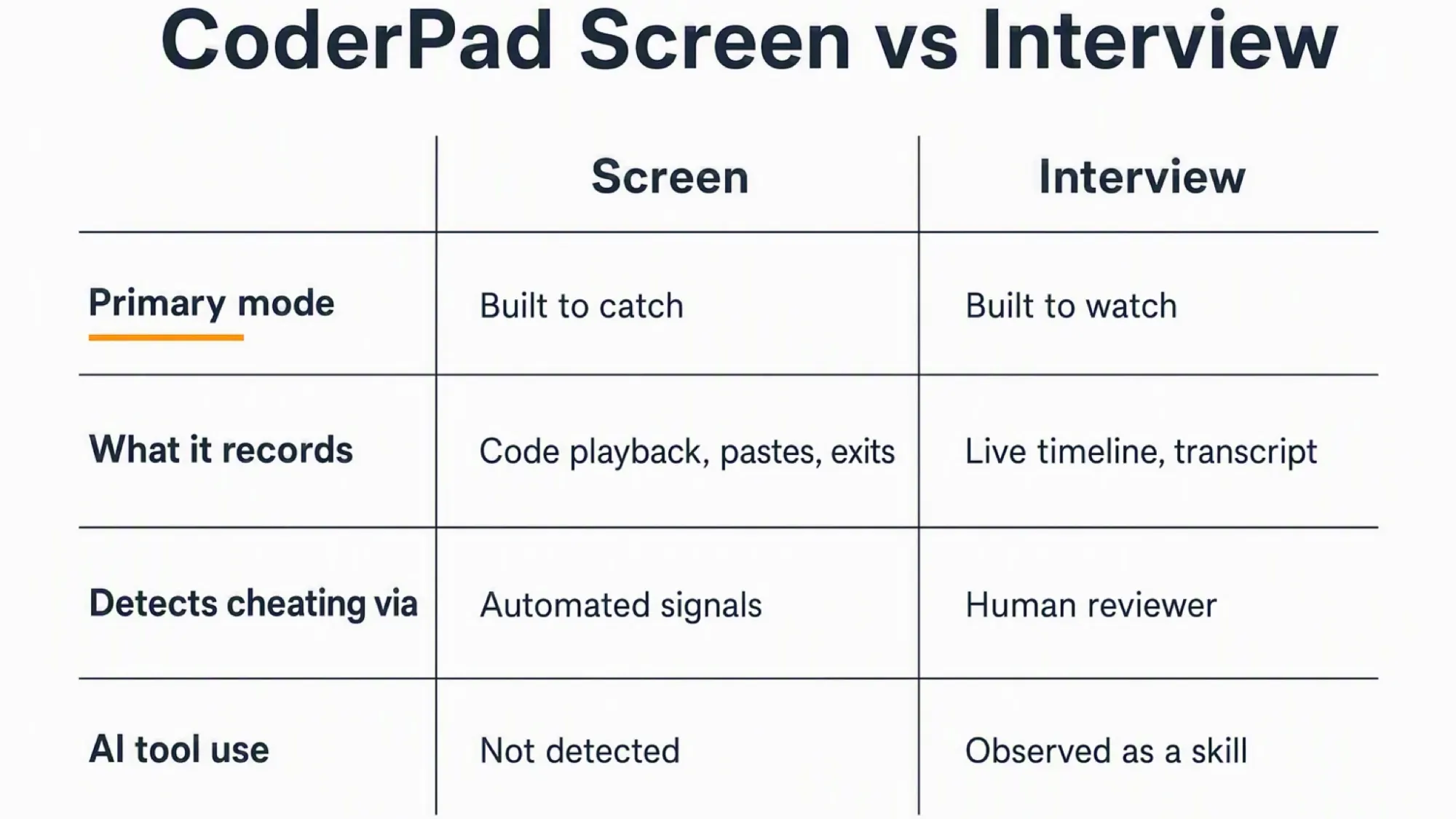
First, Screen catches by design. Meanwhile, Interview watches by design. Screen runs a detection stack: similarity checks, playback, paste and exit tracking, optional webcam flags. Interview records an in-pad activity timeline while a human watches live, based on CoderPad's product documentation.
That asymmetry drives everything below. Consequently, the capabilities are not equal, and the consequences are not either.
What CoderPad Screen detects
CoderPad documents the detection stack below for Screen only. Do not read it across to a live Interview. Moreover, every signal described runs inside the browser tab where the pad is loaded. Nothing in this stack reaches outside that sandbox.
Code playback
CoderPad records every keystroke, cursor move, paste, and code run with a timestamp. The playback timeline marks each event type with a colour. Green signals code runs, orange signals writing, and red signals paste events. Dark grey tracks IDE exits. Light grey tracks time spent outside the test.
A reviewer can scrub to any moment and watch how the code was built. This is not a screen recording of your machine. It is a recording of the pad's internal state.
The shape of the coding process reveals more than any single event. For instance, a solution that arrives fully formed with no false starts or debugging cycles has a recognisable pattern. Incremental building with edits and test runs has a different shape. The reviewer sees the difference.
External pastes
CoderPad tags every paste event as internal or external. External pastes appear as red segments on the playback timeline, based on documentation last updated April 2026. The clipboard API gives a clean binary signal. A paste happened from outside, or it did not. There is no grey zone.
What changes, however, is the interpretation. Pasting your own boilerplate code is a legitimate pattern. Pasting a long function right after a focus loss is a different pattern. The same event type reads differently depending on context.
Leaving the IDE
CoderPad listens for browser focus and blur events on its tab. Each time you click away, the tab loses focus and the event fires with a timestamp. In playback the event shows as a dark grey or orange marker with the duration recorded.
Short sub-two-second focus blips are normal and ignored. A longer absence followed by a rapid typing burst without exploratory edits is the pattern a reviewer looks for. The signal records departure and return, not what you viewed during the gap. That content sits outside the browser sandbox.
Code similarity and plagiarism
CoderPad flags exact code matches against previous submissions on its platform. It says it cannot publicly share how that detection works.
CoderPad also offers an AI follow-up question feature. Its ChatGPT integration generates a question asking the candidate to explain their code and then validates the answer. This tests understanding rather than detecting a tool that produced the code.
IP and location catch identity substitution
IP tracking targets identity substitution: a different person or a different place mid-test. That mismatch is the signal CoderPad watches for. The platform tracks approximate geolocation to spot logins from different locations or devices during one test. CoderPad explicitly notes that a VPN or temporary travel can produce the same signal for non-cheating reasons.
Prevention is not detection
Some controls stop the behaviour instead of recording it. Readers routinely conflate the two, and that mistake changes what they expect. Screen offers prevention measures that employers can toggle. These include question randomisation, time limits, optional paste blocking, and full-screen mode that alerts on monitor switching. None of these are detection. They make cheating harder before it happens. The detection layers above report what happened during the test.
CoderPad Screen records your in-pad activity, logs what you paste from outside, and alerts when you leave the environment. Assistance that lives on the interview computer has to touch one of those surfaces.
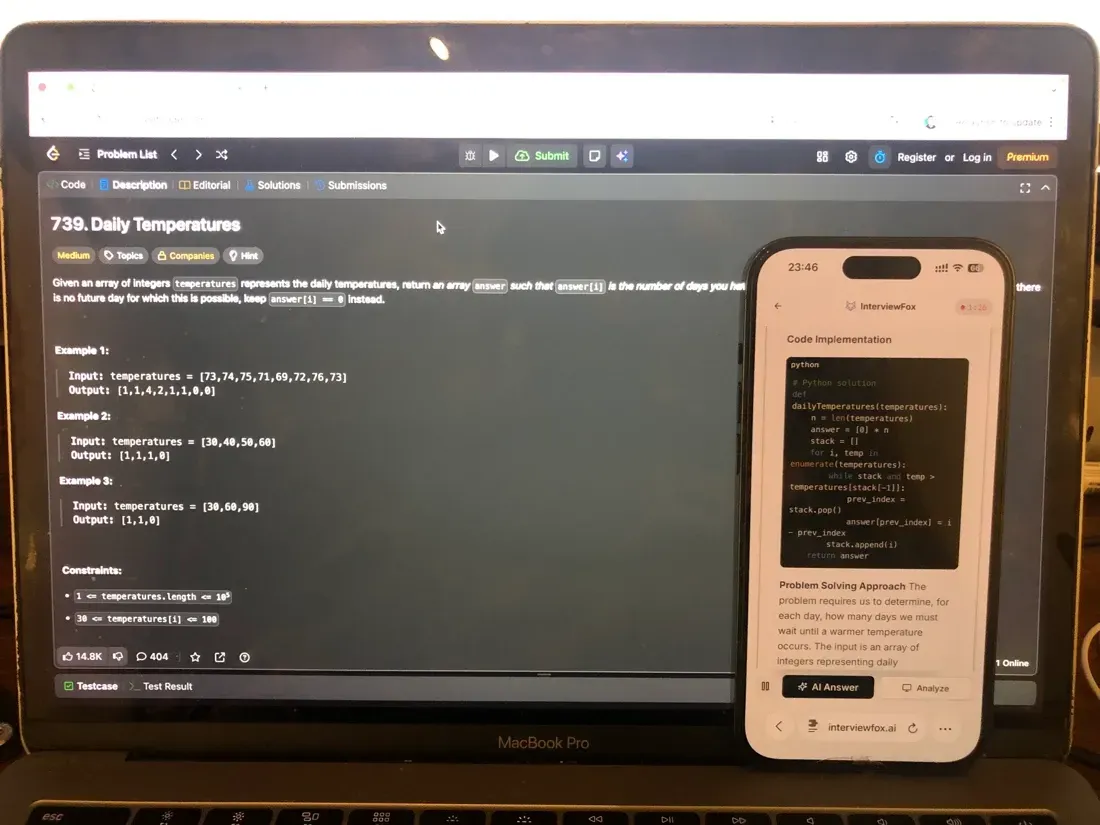
Keep help off the shared screen with our dual device AI interview helper.

Answers On Your Phone, Not Your Shared Screen
Skip the risky invisible-overlay tricks. Our dual-device mode keeps answers on your phone, never on the screen you're sharing or recording. Nothing for a platform or interviewer to catch, because there's nothing on the shared screen to find.
Get started. It's freeLoved by 100,000+ candidates
What a live CoderPad Interview sees
By contrast, a live CoderPad Interview operates differently. The interviewer observes collaboration in real time.
The interviewer is the detector
This product aims for real-time human observation, not automated adjudication. The interviewer watches the collaboration as it happens. CoderPad frames flags as items to investigate, not verdicts.
In-pad AI Assist usage and the auto-generated transcript
CoderPad says its live pad logs AI Assist usage and generates a transcript and notes. These claims rest on CoderPad's own product descriptions, not on an independent interview document. Treat them as described, not as confirmed mechanics.
Paste and tab-switch signals in the live pad
CoderPad reports that the live pad alerts on real-time external paste. It detects tab switches after a short grace period. Avoid relying on a specific grace-period number. This remains reported behaviour, not documented certainty.
Does CoderPad detect AI use in 2026?
This is the exact question readers bring to CoderPad in 2026. The answer is a direct vendor statement, not an inference.
What CoderPad actually says
CoderPad's own FAQ answers the question plainly: it does not detect whether a candidate used AI. It evaluates how candidates use AI within realistic projects, because those are job skills. Read the position on CoderPad's fraud and cheating detection page for the verbatim wording.
What still gets recorded regardless
CoderPad not detecting AI use is not the same as seeing nothing about an outside tool. The Screen observables above record the artifacts regardless of what produced them.
Why the live product treats AI as a skill to observe
CoderPad positions the live pad as a place where candidates use AI tools in the open. The interviewer evaluates how the candidate collaborates with them. That stance can change. This is CoderPad's stated position as of 2026, not a permanent property.
Is any of it switched on for your test?
Platform capability is not your exposure. Your real risk depends on whether the employer turned each control on for your specific test.
Webcam snapshots, not video
As documented on 2025-04-25, webcam proctoring is Enterprise only and needs a request. It opts in twice: the employer enables it per team and per test. When on, it captures periodic image snapshots rather than video, and CoderPad documents no audio capture. The same guide says its AI flags three patterns.
The AI flags a missing face. It flags extra faces. A different face is detected.
If your camera is off you are not blocked
An inactive webcam does not stop the test. CoderPad writes an alert into the report instead.
CoderPad's own advice against proctoring everyone
CoderPad does not recommend proctoring every candidate. It cites bias, a negative candidate experience, and degraded performance. For circumstances such as high-volume hiring, it says video proctoring is available on custom plans.
The test mechanics your employer can toggle
CoderPad publishes which settings employers can configure, but not the defaults. Do not infer a default from a control's existence.
Where CoderPad's observation surface ends
In the end, the reader decides at the boundary, not at the capability list. The honest answer to what CoderPad cannot detect lives here. Every gap below follows from one structural fact: a browser tab runs inside a sandbox. It cannot enumerate other applications, read other windows, or inspect keystrokes outside its own DOM. This is the Web platform security model, not a CoderPad policy choice.
Your desktop and your other tabs
CoderPad documents everything inside the pad, the browser context, or the webcam frame when enabled. It publishes nothing about desktop-wide capture. A browser tab has no API for listing running applications or reading the contents of other tabs. That architecture, not a missing feature, sets the boundary. For the full recording surface, see Does CoderPad Record Your Screen?.
A second monitor or a second machine
CoderPad's candidate-facing material does not describe detection of a second machine. Full-screen Screen tests are documented to alert on monitor switching, which is a different signal from seeing another device. The browser isolates each tab to its own rendering surface. A second monitor showing anything at all is invisible to the pad. The candidate would have to share that monitor via screen sharing.
Typing rhythm, keystrokes, eye movement
People repeat these claims online. No CoderPad source documents any of them. CoderPad does not publish typing-rhythm, keystroke, or eye-tracking detection.
What CoderPad will not publish
CoderPad says outright that it cannot publicly share how its plagiarism detection works. That is an epistemic boundary, not a technical one. CoderPad's silence does not prove the platform sees nothing. It is not evidence that something happens.
From signal to flag to decision
An observation is not a verdict. This section breaks the assumption that "detected" equals "disqualified." It also answers the fear that someone wrongly suspects you.
Real time, or after the fact?
Screen produces automated alerts during the test plus a post-hoc report with searchable playback and pad summaries. Interview relies on the interviewer watching live. The timing differs by product, but the human review does not.
Who decides, and will anyone tell you
Flag-only versus auto-reject is the employer's configuration, not CoderPad's ruling. CoderPad documents nothing about notifying the candidate. That silence is the answer: assume nobody tells you.
When honest behaviour produces a cheating-shaped signal
The two signals readers most often trip are the two most innocent. Pasting reference material looks like plagiarism sourcing. Leaving the tab looks like evasion. CoderPad's own guidance warns that monitoring introduces bias. Beyond those, several legitimate behaviours trigger flags.
Pasting your own boilerplate or setup code shows up as an external paste. CoderPad acknowledges legitimate use cases, including working in a familiar desktop IDE before pasting the result back. The flag is binary, but the reason may be genuine.
Using a VPN can trigger a geolocation mismatch. CoderPad's documentation states explicitly that candidates may have different locations for non-cheating reasons, including temporary travel. The flag fires on the change, not on the cause.
Habitual alt-tabbing during a long session can accumulate IDE exit events. A reviewer seeing ten exit markers without context might read evasion. The candidate was simply checking the problem statement or calming a notification, which the focus-loss tracker cannot distinguish.
Finishing a difficult problem in a fraction of the usual time can trigger an abnormal performance flag. CoderPad's documentation describes identifying when a hard question is completed unusually fast. The candidate may simply know the problem from past practice, but the signal fires on the timing anomaly regardless.
What to actually do in your next round
Work inside the pad so your activity stays coherent. Expect Screen to log external pastes and tab exits. On a live Interview, narrate AI use openly instead of hiding it. CoderPad says it evaluates exactly that.
Working inside the pad keeps your activity coherent and reduces false-positive risk. Prepare with our Prep Agent.
Prepare Once, Walk In Ready
The durable fix isn't a cleverer hiding trick, it's going in prepared. Our Prep Agent reviews your resume, builds a study plan, and runs mock interviews with you over WhatsApp or SMS, so you rehearse the content before it counts.
Get started. It's freeLoved by 100,000+ candidates
FAQ
How long does CoderPad keep webcam snapshots? CoderPad caps webcam snapshot retention at 90 days for GDPR. Its webcam proctoring guide dated 2025-04-25 documents this. The limit applies only when your employer enabled webcam proctoring.
Does CoderPad detect cheating right away? Screen raises automated alerts during the test and also produces a post-hoc report. Interview relies on a live human observer. The experience differs by product, and the employer configures whether a flag triggers automatic action or human review.
Can CoderPad tell if someone else took the test for me? This is the one question that spans both products. IP and location signals flag a different place mid-test. The different-face webcam flag catches a different person, but only when your employer enabled webcam proctoring.
Does CoderPad detect named AI assistants? CoderPad publishes no tool-specific detection claim. Its stated position is that it does not detect AI use at all. Naming a specific tool does not change the documented observables.