

You are minutes from starting a proctored CodeSignal assessment. The camera light is about to come on. The real question is whether a little AI help would show up on that recording.
Yes, CodeSignal records your camera as continuous video whenever the employer enables proctoring. An unproctored assessment does not require your camera.
Your microphone and your whole shared display are recorded in that same session. So any helper window on that computer lands inside the recording. Review happens later, which is not the same as no review.
Dual device mode is undetectable by software running on the monitored interview computer. An AI interview assistant on your phone keeps the answer surface off the machine CodeSignal records.
When the camera is on, and when it isn't
Everything below depends on one setting you do not control. Proctoring is not standard on CodeSignal. Only some assessments include remote proctoring and identity verification. The hiring company turns it on for a specific assessment.
That condition explains why two candidates describe two different experiences. One walks through ID checks and camera setup. The other opens the editor and starts coding. Neither is misremembering.
How you know before you start
CodeSignal documents one clean pre-start check. Your Assessments section shows whether an assessment requires proctoring before you take it. Look there while you can still change your room or your device.
The setup flow is the second signal, and it is unmissable. A proctored assessment asks you to share camera, microphone, and screen for the duration. It also asks for a government-issued photo ID.
Certified GCA versus a company-configured test
The certified General Coding Assessment runs 70 minutes by default. CodeSignal adds one caveat: a company may configure a different duration. Timing on an employer-created assessment can differ from the certified default.
So do not read a friend's certified GCA experience as your own. Check the invitation you actually received.
The unproctored case is not a blind spot
An unproctored assessment does not require your camera. That is not the same as nobody looking.
CodeSignal runs integrity signals that have nothing to do with video. Its Suspicion Score is the clearest example, and a later section lists the rest.
One honest limit belongs here. CodeSignal does not publish which of those signals run when proctoring is off. The accurate statement is that they exist independently of the video layer.
What the camera actually records
Search results disagree on this point, and the most repeated claim is wrong. Several pages say CodeSignal only takes an identity photo. CodeSignal's own material says otherwise.
Continuous video, not a single identity photo
CodeSignal's own account of cheating and fraud is explicit. AI proctoring records video, audio, and screen activity for the entire assessment session.
Read that literally. The camera produces continuous video across the session, not one still and not periodic snapshots. Candidate-facing documentation matches it from the other side. You share camera, microphone, and screen for the duration of the assessment.
The identity photo and the ID photo
Two separate captures happen during setup. Step 6 takes a one-time photo of your face. Step 7 captures a photo of your government-issued ID.
CodeSignal's documentation describes both separately from the session recording. Identity verification then matches your name and your ID photo to the person on camera.
So the "identity photo" answer is not invented. It is incomplete. The photo exists, and so does the video.
When recording starts and stops
Setup comes before the clock. The timer does not begin until every setup step is complete. Browser check, video share, screen share, network test, face photo, and ID capture all precede it.
CodeSignal bounds the other end loosely. Its wording covers the entire assessment session. No document names the exact instant capture stops, so treat the whole session as recorded.
Who reviews the footage, and when
Nobody is documented as watching you live. CodeSignal describes review as something that happens afterwards.
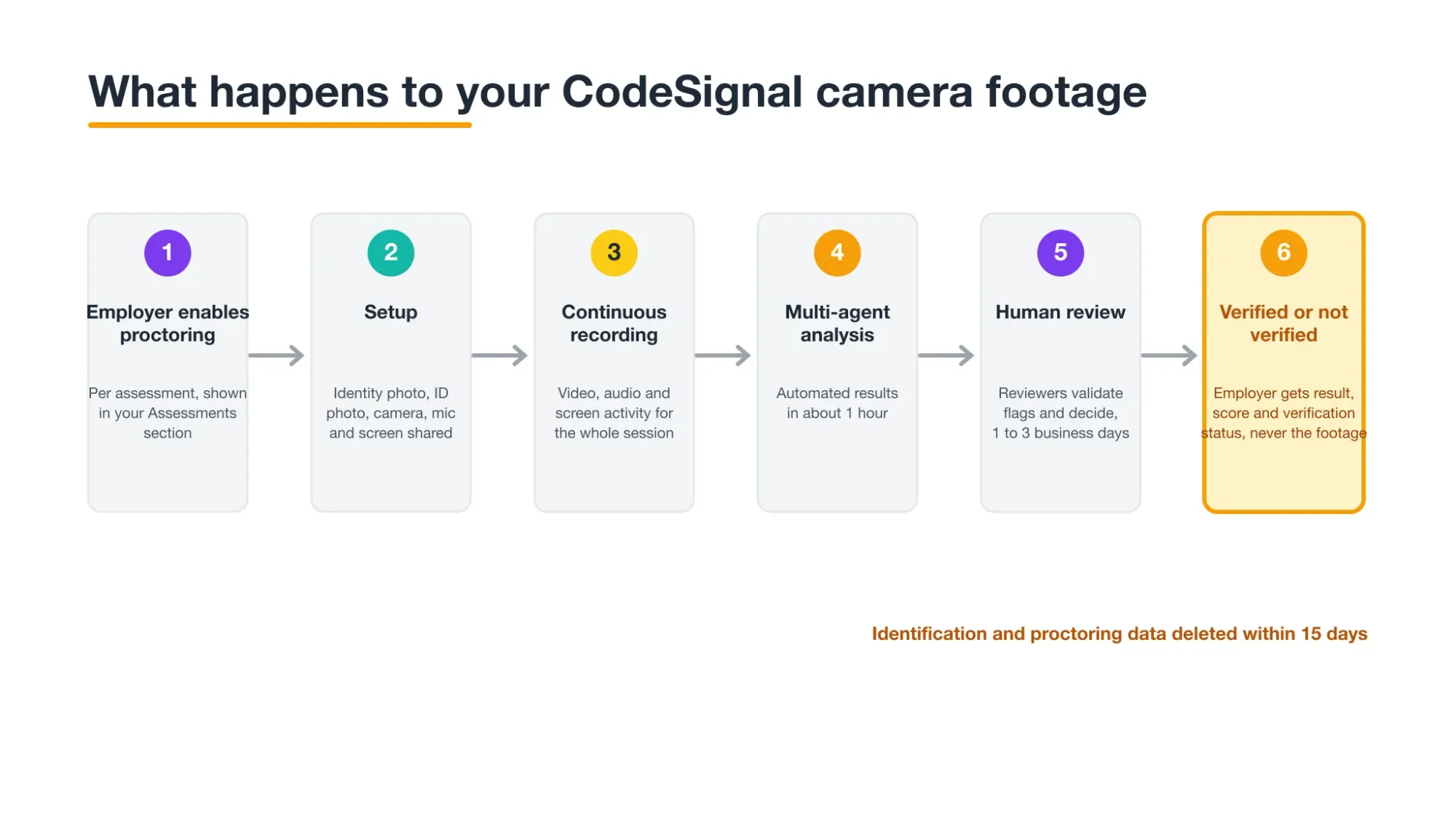
Its explanation of what proctoring is and how it works is clear on timing. Your data is recorded, then reviewed once the evaluation completes. CodeSignal's own proctoring verification team does that review.
The review itself has two layers. Sessions are evaluated using multi-agent analysis. Human reviewers validate flagged activity and make the final decisions.
That order matters for how you read the rest of this page. Software surfaces something. A person decides what it means.
Who gets your footage, and how long it lasts
This is the fear behind most searches for this question, and the answer is documented.
What the company actually receives
CodeSignal states that proctoring data is not shared with the company that requested your coding report. That company receives a copy of your assessment result and your score.
Alongside the result, hiring teams see the verification decision. The decision travels. The footage does not.
The 15-day deletion window
CodeSignal reviews identification and proctoring data internally. It stores that data and deletes it within 15 days.
One boundary deserves precision. That window names identification and proctoring data collectively. CodeSignal publishes no separate window for camera footage specifically. Read it as the collective scope it describes.
What the review checks on the camera track
A reviewer being able to see something is not the same as a system detecting it. CodeSignal documents the first far better than the second.
Three verification criteria are published. Camera, microphone, and screenshare were shared for the full duration. Your ID is valid. You observed the evaluation rules displayed before the session.
Does CodeSignal track eye movement or gaze?
No CodeSignal document says it does. Across candidate support, recruiter support, and product material, no gaze or eye-movement statement appears.
Record that as an absence, not as permission. Undocumented means CodeSignal has not published a mechanism. It does not mean a reviewer cannot watch the video.
Claims that a webcam gaze detector feeds the Suspicion Score come from third-party pages. CodeSignal does not make that claim anywhere.
Other people, an empty frame, other devices
CodeSignal publishes common reasons a result may not verify. Three are camera-frame reasons. Not being alone in the room. Getting up and leaving the camera's view. Using other devices.
Two more are workflow reasons: using an external IDE, and searching online beyond syntax help.
CodeSignal calls this list common, not complete. Treat it as the reliable core, not the full boundary.
Everyday behaviours that put a session at risk
Most of the anxiety here is about ordinary movement, so here is the honest split. Some behaviours appear on CodeSignal's documented list. Several others are not addressed anywhere.
Documented risks come first. Another person in the room is a published not-verified reason. That reason is about presence, not assistance, so someone walking through counts. Getting up and leaving the frame is published too, with no stated duration threshold. Using other devices is published, which covers a phone you pick up and a second laptop you work on.
Now the undocumented set. CodeSignal publishes no rule on background noise, talking to yourself, headphones, or physical scratch paper. Its readable rules text does not address them. Permitted, prohibited, and unaddressed are three different answers, and this is the third.
Room tidiness sits in the same gap, with one qualifier. Sharing the camera for the duration implies your face must stay visible. No lighting, background, or tidiness rule is published beyond that.
Looking away deserves its own line, because it worries people most. CodeSignal documents leaving the camera's view, not glancing away from your screen. Those are different events. Do not upgrade the second into the first, and do not read the gap as clearance.
Why same-computer help is the real risk
The pattern underneath the documented risks is about devices, not attention. A second monitor, a second laptop, and a phone all fall under "other devices". At the same time, the machine in front of you is camera-recorded and screen-recorded together.
That combination is what makes same-computer assistance a poor architecture. An answer window, a browser overlay, or a helper panel renders on the display CodeSignal captures. Automated analysis and a human reviewer both see that display afterwards.
InterviewFox's dual-device mode is undetectable by software running on the monitored interview computer. The questions run in the live workflow and the answers appear on your phone. No InterviewFox window, overlay, or process exists on the machine CodeSignal records.
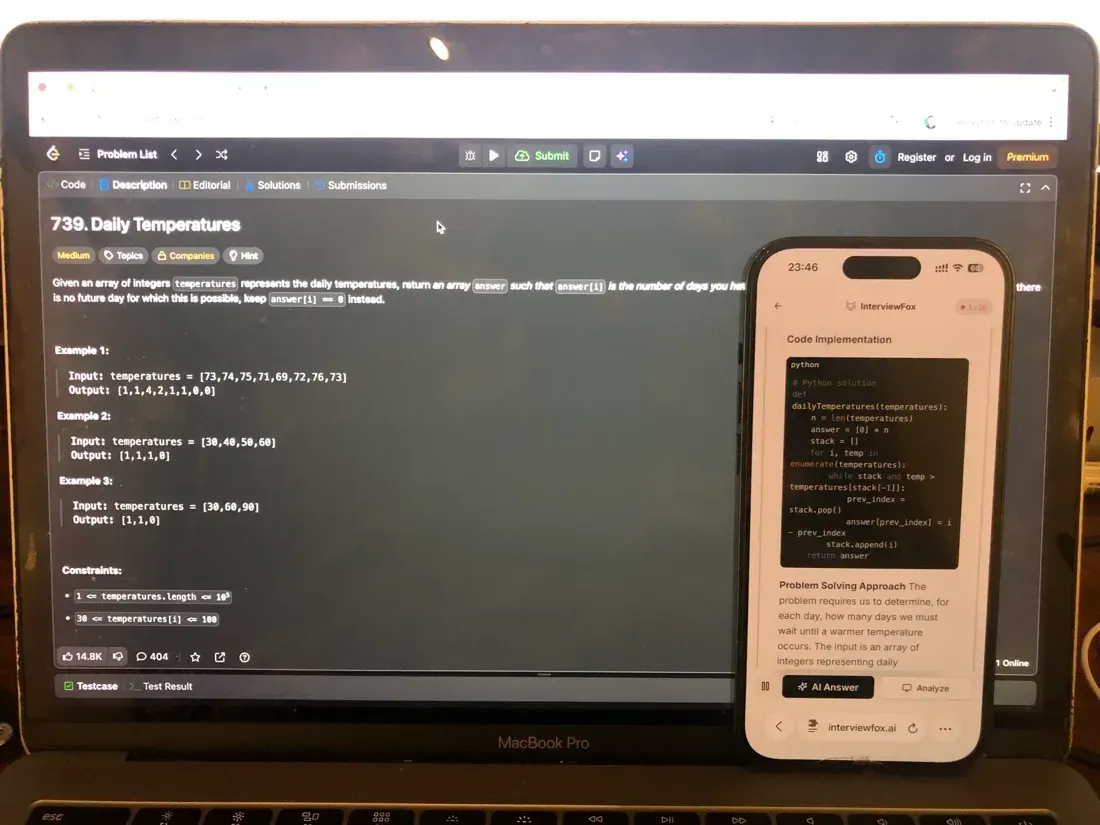
Placement is the part people get wrong. Because the two devices are independent, the phone can sit near the laptop camera or in your natural forward sightline. Keep it there rather than in your lap or off to one side.
As a result, you avoid the conspicuous off-screen glance a badly placed device creates. A dual device AI interview tool only helps if reading it still looks like reading the problem.

Answers On Your Phone, Not Your Shared Screen
Skip the risky invisible-overlay tricks. Our dual-device mode keeps answers on your phone, never on the screen you're sharing or recording. Nothing for a platform or interviewer to catch, because there's nothing on the shared screen to find.
Get started. It's freeLoved by 100,000+ candidates
What happens if your camera is flagged
A flag is the start of a review, not its conclusion. Automated analysis surfaces activity. Human reviewers validate it and make the final call. A session ends either verified or not verified.
Does a flag affect my score?
No. CodeSignal states that proctoring has no impact on the score you receive. All scores are calculated automatically by the system.
The verification decision sits beside your score. It does not change it.
How long until you hear the outcome
Two different numbers circulate, because there are two stages. Automated AI proctoring results arrive within about one hour. Full result verification takes 1 to 3 business days.
Both figures are CodeSignal's own. Do not average them into a single expectation.
If your camera fails, or you decline it
These are two different situations, and only one of them is mechanical.
When the camera drops mid-assessment
Sharing your video is a required setup step. The timer does not start until setup is complete. A camera that will not share therefore blocks the session from beginning.
CodeSignal publishes no camera-specific troubleshooting article. Its closest guidance covers the share flow generally. Use the latest desktop Chrome or Firefox with screenshare enabled. Run the connection test, then refresh the browser to retry.
CodeSignal also does not document what happens when a stream fails partway through. The adjacent documented fact is that review checks full-duration sharing. That tells you what a reviewer looks for, not what the platform does. Contact CodeSignal support instead of relying on a published answer, because there is not one.
Declining the camera, and what it costs
No per-candidate opt-out is documented. Proctored or unproctored is set at the assessment level by the employer, not by a toggle you control.
Declining the camera means the proctored setup cannot complete. Since the timer never starts without setup, declining ends that path. Whether the company offers an alternative sits between you and that company, and CodeSignal does not publish it.
Setting up so a real session verifies cleanly
Every action here traces to a documented rule or a published review criterion. Generic test-taking advice is left out on purpose.
Before setup, get the environment right. Use the latest desktop Chrome or Firefox with screenshare enabled. Keep your government-issued photo ID within reach. Be alone in the room, and settle anything likely to interrupt you.
During setup, follow the order the module gives you. Browser check, video share, screen share, network test, face photo, ID photo. Setup ends with the assessment rules and a checkbox beside each statement. Read them, because "rules observed" is one of the three verification criteria. You can reopen them from the IDE menu bar during the test.
During the session, keep all three shares running. Stay inside the camera frame. Stay alone. Keep other devices out of it, including a second laptop and your phone.
None of that prepares you for the assessment itself. Perhaps your durable problem is being underprepared rather than being watched. In that case the Prep Agent covers resume review, a study plan, and mock interviews over WhatsApp or SMS.
Answers On Your Phone, Not Your Shared Screen
Skip the risky invisible-overlay tricks. Our dual-device mode keeps answers on your phone, never on the screen you're sharing or recording. Nothing for a platform or interviewer to catch, because there's nothing on the shared screen to find.
Get started. It's freeLoved by 100,000+ candidates
What else does CodeSignal monitor?
The camera is one layer of a larger integrity stack. CodeSignal documents several others that run alongside it.
- Suspicion Score. It combines solution similarity, typing and speaking telemetry, copy-paste activity, and AI-assisted pattern detection.
- LeakSweep. CodeSignal scans sites such as Stack Overflow and LeetCode for leaked questions, then issues takedowns.
- Disabled copy and paste. The platform blocks that shortcut inside the assessment environment.
- IP tracking and location signals. These run independently of anything the camera sees.
- Identity verification. Your name and photo ID are matched to the person on camera.
- Dynamic question rotation. Rotating questions reduces the value of a leaked prompt.
- Your shared display. A proctored session records screen activity alongside the camera. That surface has its own answer, and what a recorded display shows a reviewer goes further than this page does.
These seven signals only matter once they reach a verdict. The parent guide shows how CodeSignal reaches a cheating decision, which places your camera footage in the bigger picture.
FAQ
Does it capture my whole room?
CodeSignal publishes no rule about room tidiness, lighting, or background. What its documentation implies is narrower: your face must stay visible for the duration. Treat the tidiness question as unaddressed rather than answered.
Is my microphone recorded too?
Yes. Camera, microphone, and screen are shared and recorded together for the duration of a proctored assessment. Audio is part of that same session recording, not a separate opt-in.
Is my camera footage biometric data?
CodeSignal's own documents call it identification and proctoring data. Setup ends with a consent checkbox acknowledging each rule. No CodeSignal source describes the capture as biometric data, and this page gives no legal advice on the question.
Can I take a proctored test on a phone?
A proctored session needs the latest desktop Chrome or Firefox with screenshare enabled. CodeSignal does not document mobile support for that flow. Plan on a laptop or a desktop.
Is the camera on in a live interview?
This guide covers proctored assessments, which is what the documentation describes. Live technical interviews and AI Interviewer sessions are separate surfaces. CodeSignal does not document identical camera behaviour for them.