

Before you worry about cameras, the real question is simpler. You want to know which actions CodeSignal can actually flag. Using help on a separate device may change your risk.
CodeSignal runs a layered integrity stack, and the most important detector works even when no one is watching. A Suspicion Score analyzes your solution, typing, and paste activity on every assessment.
AI proctoring records your screen, camera, and mic, but only the employer can switch it on. A test without proctoring logs behavior, not video. Your recording risk depends on one setting you do not control.
Dual Device Mode is the safest setup for the recorded-computer path, because CodeSignal cannot see your phone. A dual device AI interview assistant keeps answers on a separate device, off the screen being recorded.
The CodeSignal detection stack
I wanted to know exactly how CodeSignal catches cheating. I read every document CodeSignal publishes on the topic. The answer, in practice, is not one thing. It is five layers.
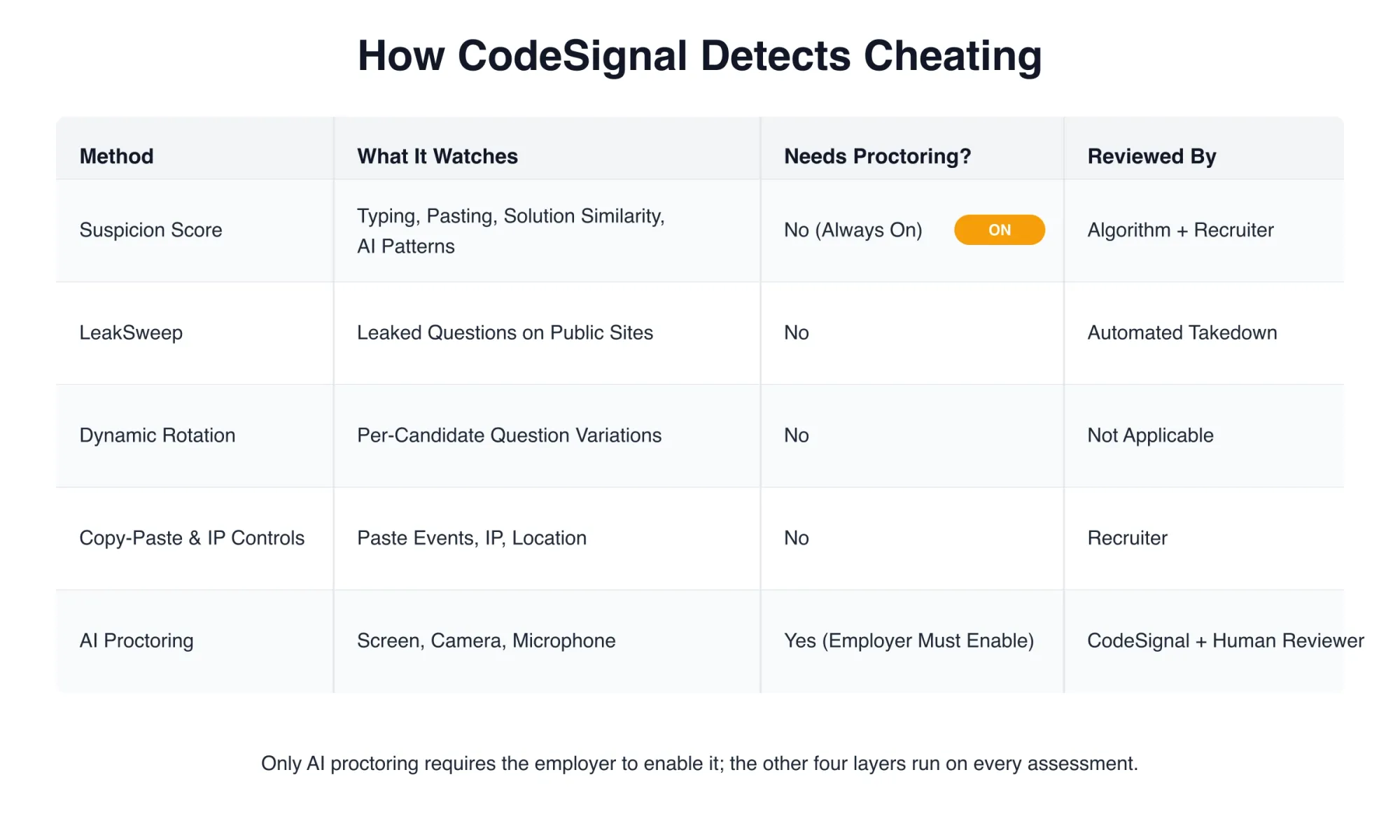
The first four layers run on every test. They do not need proctoring. The fifth layer is AI proctoring. It records your screen, camera, and mic. The hiring company must turn it on, however. You can check whether your test is proctored in the Assessments section before you start.
The five detection layers are:
- Suspicion Score: behavioral analysis of your solution, typing, and paste activity
- LeakSweep: monitors public sites for leaked questions
- Dynamic question rotation: different question variations per candidate on Certified Assessments
- Copy-paste and IP controls: paste events are tracked and flagged; IP/location is logged
- AI proctoring: records screen, camera, and mic for the full session; needs the employer to enable it
Screen recording is only one layer. This guide picks up where that topic stops. It covers the detection signals. It covers what happens after a flag. And it covers the question you really want answered. How safe is a separate device?
The Suspicion Score is the always-on detector
This is the layer that matters most. It runs on every assessment. No camera or screen share is needed. The layer reads the signals you cannot hide.
CodeSignal describes a Suspicion Score in its blog post on how it prevents and detects cheating in recruiting. The score draws on four inputs.
The first input is solution similarity. CodeSignal compares your code to every other submission on the platform. The system, in addition, searches the web for similar solutions.
The second input is pattern detection. GenAI and unauthorized-resource patterns are flagged across millions of sessions. The third input is telemetry. Unusual typing or code navigation patterns get caught as a result. The fourth input is paste events.
Every paste is logged. What you pasted. When you pasted it. Whether you ran it after pasting. All of this lands in the score.
The score appears in the Coding Report. It shows None, Low, Medium, or High per question. The report also has a consolidated value. It is called Integrity Flagged. It shows Yes, No, N/A, or Pending.
Here is the part most pages get wrong. Yes does not mean you cheated. CodeSignal describes it as a review signal. The signal tells the employer to look. It does not tell the employer to reject. Recruiters are told to inspect the similarity diff and the replay before deciding.
CodeSignal can detect AI-assisted work
The cheating-and-fraud page has a FAQ section. One question asks directly. Can CodeSignal detect AI use? The answer is yes.
The Suspicion Score, in particular, flags AI-assisted patterns. These patterns are often missed by basic plagiarism checks. The detection works through behavioral signals. CodeSignal looks at solution structure, how you type, and what you paste.
No specific tool is named. The system does not say "ChatGPT detector." The signals identify AI tool use. They work across assistants.
This matters for two reasons. A tool-specific detector is a narrow claim. It would promise to catch one AI and miss another. CodeSignal's approach is broader. It catches the pattern. Not the product.
The practical takeaway is this. Using an AI assistant on the same computer makes typing patterns look different from a candidate solving alone. The Suspicion Score will see the gap. CodeSignal does not need to know which assistant you used.
LeakSweep watches for leaked questions
LeakSweep is CodeSignal's proprietary monitoring system. It scans public sites like Stack Overflow and LeetCode. Posted CodeSignal questions are what it looks for. When it finds one, two things happen. CodeSignal replaces that question, and consequently issues a DMCA takedown.
This system works outside of your test session. It does not monitor you. It monitors the internet. As a result, if a question gets leaked, LeakSweep catches it fast. Then CodeSignal pulls it from the pool.
A related defense is dynamic question rotation. CodeSignal rotates thousands of question variations across candidates on its Certified Assessments. Your question is not the same as the next candidate's question. Even if someone posted their version online, it would not match yours. The difficulty and scoring stay consistent. Only the question content changes.
Copy-paste and IP location controls round out this layer. Paste events are tracked and flagged. What you pasted is visible to the reviewer. Your IP and location are logged. These are integrity features. They run on every test.
AI proctoring records, but only when enabled
Here is the layer that causes the most confusion. AI proctoring records your screen, camera, and microphone for the entire session. Multi-agent analysis flags concerns. Human reviewers validate those flags.
CodeSignal markets ~one-hour results. Recruiter-facing documentation describes one to three business days. Both numbers describe the same system. They just speak to different audiences.
None of this happens unless the employer flips the switch. CodeSignal's support documentation states it plainly. Only some assessments include proctoring. You can check your own invitation.
Look in the Assessments section before you start. If proctoring is on, a setup flow will appear. It asks for a photo and an ID. The flow also asks you to share your screen, camera, and mic.
The critical detail is on CodeSignal's page about what proctoring is and how it works. CodeSignal reviews the identification and proctoring data. It does not share it with the company that requested your report. The company gets a copy of your result and score. Not the footage.
All of the camera, screen, and flagging details above apply only when proctoring is on. For the exact scope of screen recording, see our guide on whether CodeSignal records your screen. It covers what is captured, how long it is kept, and who reviews it.
Is help on a second device actually safer?

Answers On Your Phone, Not Your Shared Screen
Skip the risky invisible-overlay tricks. Our dual-device mode keeps answers on your phone, never on the screen you're sharing or recording. Nothing for a platform or interviewer to catch, because there's nothing on the shared screen to find.
Get started. It's freeLoved by 100,000+ candidates
This is the question that brings readers here. The answer is yes, with one clear boundary. CodeSignal cannot see your phone. Proctoring records the display you share. The Suspicion Score reads typing and pasting on the test computer. Neither reaches a separate device.
A second monitor or a split-screen setup does not help. Sharing the full display, for example, means CodeSignal records everything on it. A browser window, a helper app, a second screen all land in the same recorded frame. The reviewer sees them.
The difference is device-level separation. An AI interview assistant on your phone works because the phone is not the computer being monitored. The assistant reads the question and gives an answer. You read it and type it yourself. CodeSignal sees a candidate who types normally. No app overlay, no paste event, no second window shows up.
The boundary you must respect is the camera. In a proctored session, your camera records you. If you stare at your lap for every question, the reviewer will notice. Keep the phone just below the camera or slightly to one side. Your glance should look like reading the problem. Not reading a hidden answer.
A flag is a review signal, not a verdict
Let us say your test is proctored. Or let us say the Suspicion Score flagged something. What happens next?
CodeSignal's review process has two paths. For proctored sessions, a multi-agent system analyzes the recording. Human reviewers validate the flags. The outcome is either verified or not verified. Common reasons for not-verified outcomes include these. Not alone in the room. Leaving the camera view. Using other devices. Using an external IDE. Searching online beyond syntax help.
For the Suspicion Score path, the result lands in the Coding Report. The Integrity Flagged field shows Yes, No, N/A, or Pending. Per-question scores show None, Low, Medium, or High. The employer reviews these alongside your solution.
The score does not change your assessment result. CodeSignal states this clearly. All scores are calculated automatically. Proctoring has no impact on the score. A flag sits beside the result. It does not replace it.
The employer receives the result and score. Not the recording footage. Not the raw Suspicion Score data. Just the output and the flag.
What makes a session look suspicious
CodeSignal's Suspicion Score documentation gives specific flag patterns. Each one, however, tells a different story.
A high or medium score with zero paste events. The reviewer looks at the similarity diff. Your code may match another submission or a public solution.
One or more paste events. The reviewer watches the replay. Paste size and position come up first. The reviewer looks for language switches. They also check the sequence: did you paste, run it, see an error, then paste again.
A low score combined with a description copy. You may have copied the problem statement into an external tool. Then you typed back the solution. The reviewer checks the copy size and whether retyping matches the timing.
Telemetry oddities are another signal. Unusual typing speed, for example, stands out. Navigation patterns that do not match the problem get flagged. Code gaps that appear too fast are also caught.
None of these are automatic fails. They are signals. The employer decides what they mean.
What CodeSignal does not claim to detect
Some detection claims appear in forums and blog posts. CodeSignal, however, does not document them. Here is the honest list.
CodeSignal does not document a dedicated tab-switch detector. A second-monitor detector is also not documented. A screen-share detection tool likewise stays out of the documentation. The documented not-verified reasons include using other devices. They include searching online beyond syntax. As a result, no specific mechanism for spotting a second monitor is named in the official documentation.
CodeSignal does not name a specific AI detector. The Suspicion Score flags AI-assisted patterns. It does not say "ChatGPT" or "Claude." As a result, the system catches the behavioral signature across tools.
CodeSignal does not publish a per-assessment signal scope for unproctored tests. The Suspicion Score runs on every assessment. The specific signals in play depend on the assessment type and configuration. If you are not proctored, assume the Suspicion Score runs. Do not assume it runs with fewer signals.
Answers On Your Phone, Not Your Shared Screen
Skip the risky invisible-overlay tricks. Our dual-device mode keeps answers on your phone, never on the screen you're sharing or recording. Nothing for a platform or interviewer to catch, because there's nothing on the shared screen to find.
Get started. It's freeLoved by 100,000+ candidates
How to prepare so a flag never reaches you
Most flags follow predictable patterns. Knowing what the algorithm sees, in turn, helps you avoid triggering it.
The cleanest profile is a candidate who types naturally. Paste events stay at zero. Code blocks do not appear after a thirty-second pause. Language stays on one track, with no shift from Python to JavaScript and back. Description copy does not feed an external tool. A normal typing rhythm builds trust before your solution is even reviewed.
For preparation that teaches you what natural problem-solving looks like, InterviewFox Prep Agent works through WhatsApp or SMS. The agent gives a study plan, drills timed problems, and shows clean coding patterns. Not the solution. The process. As a result, the more naturally you move through a problem, the less the Suspicion Score has to flag.
FAQ
Can CodeSignal catch cheating without proctoring? Yes. The Suspicion Score, LeakSweep, dynamic question rotation, and copy-paste controls all run on every assessment. Proctoring is only needed for the recording layer.
Can CodeSignal tell if I used ChatGPT? The Suspicion Score flags AI-assisted patterns. No specific tool is named. Behavioral signals are read across all AI assistants.
Does a flag mean I failed? No. A flag means "review this." The employer checks the evidence and decides. Your score is not changed by the flag.
How long are CodeSignal recordings kept? CodeSignal keeps them for 15 days and then deletes them. It does not share the footage with the employer.
Can CodeSignal see my second monitor? It records the display you share. A second monitor you do not share stays out of frame. But using other devices is a documented reason for a not-verified outcome.
Does the Suspicion Score change my test score? No. Scores are calculated automatically. Proctoring and the Suspicion Score sit beside your result. They do not change it.
How do I know if my test is proctored? Check the Assessments section before you start. A proctored test will walk you through a setup flow with ID verification and screen sharing.
Does dynamic rotation give everyone a different question? On Certified Assessments, yes. CodeSignal rotates thousands of variations. The difficulty and scoring stay the same. Only the question content changes.