

Before you click Start, the real question isn't only screen capture. It's what stays visible on the display you're asked to share.
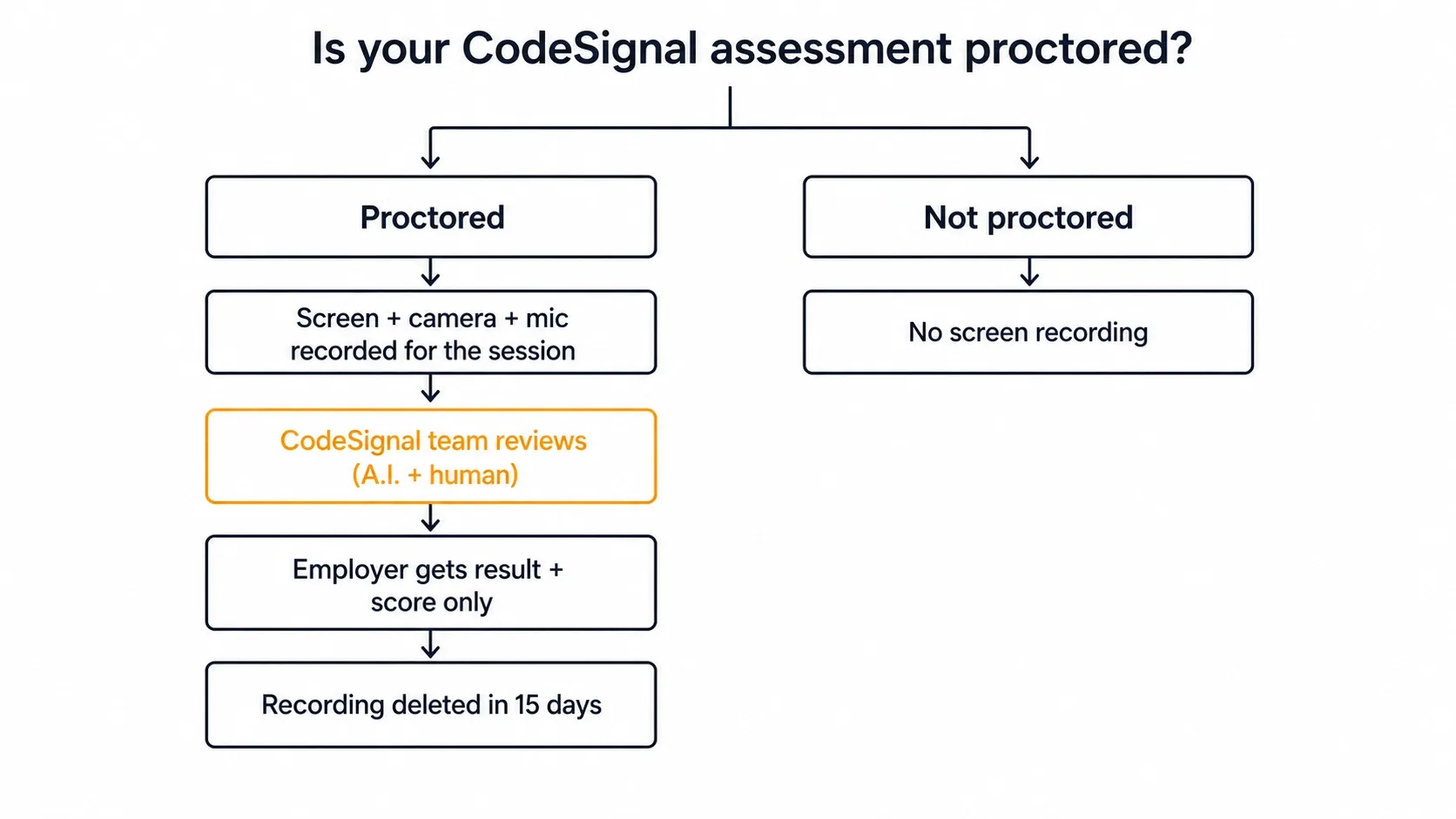
Yes , CodeSignal records your screen, but only when proctoring is enabled. A proctored session captures your camera, microphone, and the full display you select as video and audio.
A second window, a browser overlay, or a helper app all land in the reviewer's view. The recording covers a whole display, so anything else open shares the same frame.
Dual Device Mode is the safest setup for the monitored-computer path, because CodeSignal cannot see your phone. A dual device AI interview assistant keeps answers on a separate device, off the recorded screen.
CodeSignal records your screen only when proctored
CodeSignal describes a proctored evaluation clearly. During the evaluation, CodeSignal records your video, audio, and screen. Its candidate docs say the same from the other side. You share your camera, microphone, and screen for the assessment, and CodeSignal records that data.
The condition on that sentence is the whole answer. Only some CodeSignal assessments include remote proctoring and identity checks. Proctoring on means recording happens. Proctoring off means no documented screen, camera, or mic recording in CodeSignal's own material.
This is why you may have read two opposite answers today. One page says CodeSignal records everything. Another says standard assessments involve no continuous capture. Neither describes a different platform. They describe two branches of one conditional, and neither names the branch. Everything below depends on your branch, so the next two sections help you find it.
Who enables proctoring and why experiences differ
Proctoring does not come standard on CodeSignal, and it is not your choice. It is a per-assessment option the hiring company enables. CodeSignal's recruiter docs state it plainly to the employer. You can choose to enable proctoring for your assessments.
That one setting explains most of the confusion. Two candidates can take the same named assessment from two companies and have different experiences. One walks through camera, mic, screen, and ID checks. The other opens the editor and starts coding. Neither misremembers. Divergent reports show what a per-assessment employer setting produces, not that the platform behaves inconsistently.
A few boundaries deserve precision, because over-reading is easy:
- The gate is proctoring, not the product line. CodeSignal offers proctoring across assessments and interviews, with review of the whole session. No documented rule says a certified assessment always records while an employer-created one never does. Anyone showing you a neat product-line table is filling a gap the docs leave open.
- A non-proctored path exists. CodeSignal's General Coding Assessment setup offers a practice option beside the invited assessment. This confirms that not every path involves proctored capture.
- CodeSignal does not document plan or tier rules. CodeSignal's public docs do not state whether some accounts always keep proctoring on. Treat any claim about that as unverified.
Since the setting belongs to the company, you cannot infer it from the platform. Check your own invitation instead.
How to tell if your assessment is proctored
Two documented places exist to check, and you should check both before you start a session.
- Your Assessments section. CodeSignal says you can check there whether your assessment requires proctoring before you take it. This is the cleanest pre-start check for a candidate. Use it if you want an answer while you can still prepare your environment.
- The setup module itself. A proctored assessment opens with a setup flow you cannot miss. It asks for a photo and a government ID for identity verification. Then it walks you through the camera, microphone, and screen shares.
It also requires Chrome or Firefox with screen-share enabled. That browser rule exists because the module must capture a display. If you reach that flow, you are on the proctored branch.
One honest caveat: CodeSignal documents the Assessments-section indicator, not every invitation email's wording. Some invitations say "proctored" outright, and some do not. No public doc guarantees the email will tell you. Do not read a silent email as proof that nothing will record. Check the Assessments section instead.
Your whole display is captured, not just the tab
This question decides what you must physically close, and most pages answer it badly.
The screen share in a proctored session is a browser-level share. CodeSignal's setup instructions tell you to select "Entire Screen" in the pop-up modal. The capture surface is a whole display, not the CodeSignal tab and not one app window.
Anything visible on the display you select lands inside the recorded frame. A second browser window, a downloads bar, or a code editor you left open enters the recorded frame. The capture covers the full session.
CodeSignal does not document how it handles more than one display. "Entire Screen" in a browser share means one selected display. CodeSignal does not publish what happens to an extra monitor on the same machine.
That is a genuine unknown, not a loophole. Do not fill it with evidence from elsewhere. The documented flag reason "used other devices" refers to devices, not a second monitor. Those two are not the same. The safe assumption is the one the docs support. You share a full display, so treat it as visible to a reviewer.
Your camera and microphone are separate streams from your screen
Screen, camera, and microphone recording are three distinct streams captured in one consent moment. Keep them separate in your head.
CodeSignal's candidate docs describe sharing camera, microphone, and screen for the assessment, with that data recorded. Its blog describes the same session as recording your video, audio, and computer screen. Identity verification, the photo and government ID step, is a fourth separate collection at setup, not a continuous stream.
The practical consequence: closing your apps addresses only the screen stream. Your camera and microphone run for the same duration. That said, a reviewer checks them as part of the same session.
What that means for anything else on that display
Once you accept that the recorded surface is a whole display for the whole session, the question changes. Your assistance architecture becomes the entire question. A tool can render an answer window, an overlay, or a helper panel on the interview computer. That puts it inside the recorded frame. An automated review pass and a human reviewer later watch that frame.
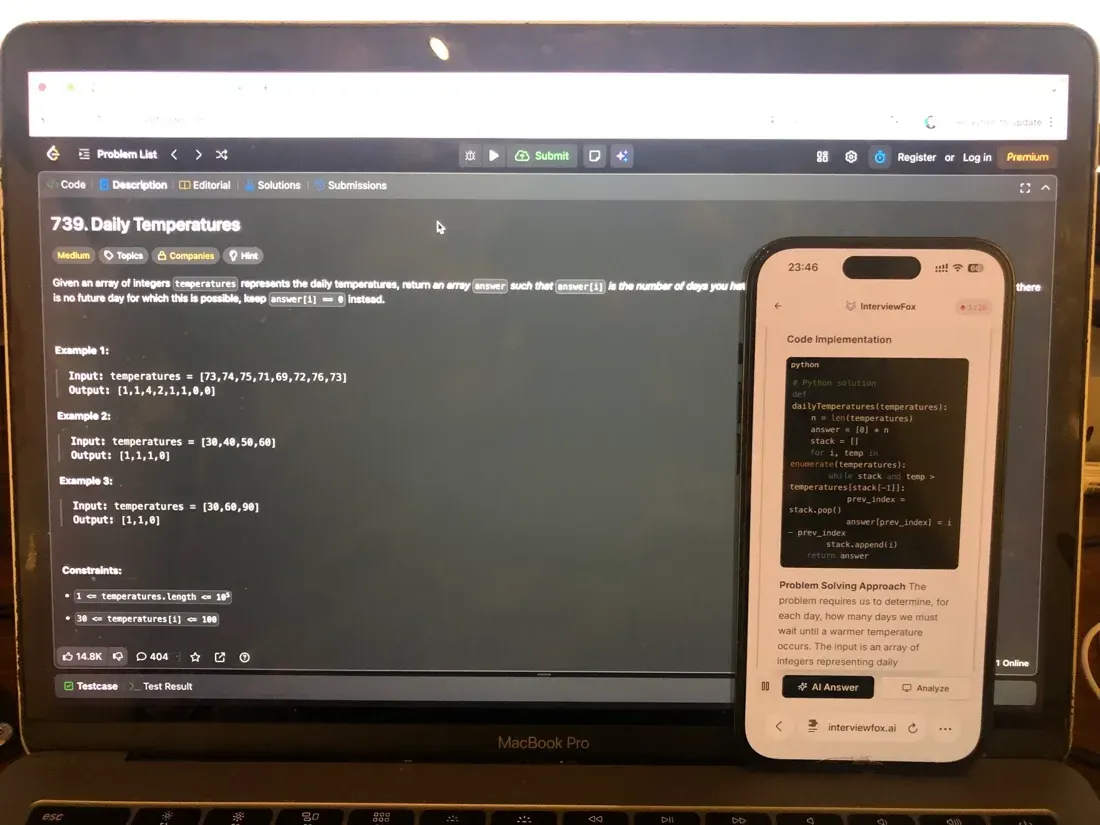
InterviewFox's dual-device mode stays undetectable to software on the monitored interview computer. The reason is structural, not clever. The questions run in the live workflow and the answers show on your phone. There is no InterviewFox window, no overlay, and no InterviewFox process on the machine CodeSignal captures.
The recorded display shows the assessment and nothing else, because nothing else is there.
Where to place the second device
CodeSignal also records and reviews the camera stream. Where you put the second device matters as much as which device it is. The phone and the laptop can sit independently. Place the phone near the laptop camera or within your natural forward sightline. Avoid your lap or far off to one side.
That placement avoids the obvious off-screen glance a badly placed second device creates. An AI interview assistant on a separate screen only helps if reading it looks like reading the problem.

Answers On Your Phone, Not Your Shared Screen
Skip the risky invisible-overlay tricks. Our dual-device mode keeps answers on your phone, never on the screen you're sharing or recording. Nothing for a platform or interviewer to catch, because there's nothing on the shared screen to find.
Get started. It's freeLoved by 100,000+ candidates
If you can't or won't share your screen
These are two different situations with two different answers. Conflating them wastes time at a permission prompt.
If you won't share: you cannot proceed. The screen share is a required step in the proctored setup module. The interface tells you directly that it will record your screen before you approve it. No documented alternative flow exists. CodeSignal documents no accommodation path either. No documented way completes a proctored assessment while you decline the share.
CodeSignal also does not document what happens if you decline the invitation outright instead of starting and stopping. That sits between you and the company that sent it.
If you can't share: this is usually mechanical, not final. CodeSignal's troubleshooting guidance points at the browser. The proctoring module requires Chrome or Firefox with screen-share enabled. The share prompt asks you to select "Entire Screen" in the pop-up modal.
A blocked share is usually an OS screen-recording permission not granted to the browser. It is also a browser not supported for this flow, or a dismissed modal selection.
Work through those before you assume your assessment is broken.
The other signals CodeSignal runs besides recording
If you take one correction from this page, take this one. The screen recording is one mechanism among several. It may not be the one that matters most in your case.
CodeSignal's own account of how it prevents and detects cheating describes a Suspicion Score. It draws on inputs with nothing to do with video.
The score compares code against other platform submissions and against web material. It detects GenAI patterns. Telemetry captures your typing and speaking. The system also logs paste events, recording what you pasted and when, and flags them for human review. Separately, the coding report includes a per-question replay of your keystrokes inside the CodeSignal editor.
CodeSignal logs and analyses these apart from any screen video. They are not products of the recording. They do not vanish when a session skips proctoring.
CodeSignal also runs LeakSweep, its own technology for finding leaked questions. It scans public sites such as Stack Overflow and LeetCode for leaked assessment questions. CodeSignal documents LeakSweep on its cheating and fraud page and uses it to protect question validity.
The full signal inventory
| Signal | What it captures | Requires proctoring? | Who reviews it |
|---|---|---|---|
| Screen recording | The whole display you select, for the session duration | Yes | CodeSignal verification team (AI + human) |
| Camera video | You, for the session duration | Yes | CodeSignal verification team (AI + human) |
| Microphone audio | Room audio, for the session duration | Yes | CodeSignal verification team (AI + human) |
| Paste-event logging | What was pasted and when | Independent of proctoring | Flagged for human review |
| Code-similarity comparison | Your submission vs. platform submissions and web material | Independent of proctoring | Feeds the Suspicion Score |
| GenAI pattern detection | Patterns in the submitted work | Independent of proctoring | Feeds the Suspicion Score |
| Typing / speaking telemetry | Input and speech behaviour | Independent of proctoring | Feeds the Suspicion Score |
| IDE keystroke replay | Per-question replay of editing inside the CodeSignal editor | Independent of proctoring | Included in the coding report |
The "independent" cells are deliberate. CodeSignal describes these as integrity features that run apart from the screen video. It does not publish which ones run when proctoring is off. Treat the independence as designed, not as a guarantee.
For scale, CodeSignal published that in 2025 it flagged 35% of proctored assessments. That is a platform-wide figure for that year, self-published. It says nothing about the odds for your session. But it shows that flagging is routine, not exceptional, which matters for how you read "flagged" below.
Who reviews the recording and what the employer gets
This is the most contradicted point on the search results page, and it deserves precision.
Who reviews it: CodeSignal's own proctoring verification team, after you submit. Not the hiring company, and not a live human watching you in real time.
The review blends several automated AI reviews with human oversight. CodeSignal's recruiter docs put the typical turnaround at one to three business days. The reviewer checks specific things. The reviewer confirms you shared camera, microphone, and screen for the duration. Your ID was valid. The reviewer confirms you followed the evaluation rules.
What the employer gets: not the footage. According to CodeSignal's explanation of what proctoring is and how it works, CodeSignal reviews the identification and proctoring data. CodeSignal will not share it with the company that requested your coding report. That company simply receives a copy of your assessment result and score.
Alongside that, the company learns the verification decision. Where you read that employers receive your webcam and screen recordings, that claim fails against CodeSignal's own documentation.
What the employer sees instead
"No footage" is not "no visibility," and pretending otherwise falls apart at the first real CodeSignal report. Two separate artifacts exist, and only one is proctoring media:
- Proctoring media: the camera, microphone, and screen recording, plus your identity verification. CodeSignal reviews it, does not send it to the company, and deletes it within 15 days.
- The coding report: your result, your score, the verification decision, and a per-question replay of your keystrokes inside the CodeSignal editor. This is the deliverable the company receives.
So the employer cannot watch your desktop or your face. In addition, the employer can watch how the editor code came into existence, question by question. Those are different exposures, and only the first falls under the non-sharing statement.
If you're flagged or your result is not verified
Start with the fact that dissolves most panic: proctoring has no impact on your score. CodeSignal calculates scores automatically. The verification outcome sits beside the score rather than changing it.
A proctored session ends in one of two states: verified, or not verified. A not-verified session shows on the employer's side as "Proctoring rejected." That is CodeSignal's own vocabulary. Those are the words you may see. This flag is the outcome of a review, not an automatic failure and not a score penalty.
What CodeSignal does not document is what any employer does with a not-verified result. Some may ask for a retake, some may not proceed, and some may never look. That decision belongs to the company. CodeSignal publishes it nowhere. Anyone who tells you a not-verified result definitely ends your candidacy, or definitely does not, is guessing.
The documented reasons a session comes back not verified
CodeSignal publishes a list of common reasons a proctored session fails verification:
- not being alone in the room;
- getting up or leaving the camera view;
- using other devices;
- using an external IDE;
- searching online beyond syntax.
On the General Coding Assessment, the rules permit web search for syntax. The rules do not permit AI assistance, even for syntax. Note that CodeSignal documents the list above but does not call it exhaustive. CodeSignal calls it common reasons. Treat it as the reliable core of what triggers a review, not a complete boundary.
The honest mirror image is narrower than reassurance posts suggest, and it is more useful. CodeSignal publishes the behaviours that trigger a review. Only those documented items carry a documented consequence.
What is actually fine, per CodeSignal's own rules. Pausing to think is fine. Re-reading the problem on your screen is fine. On the General Coding Assessment, looking up syntax online is also fine. None of those is on the not-verified list.
What actually triggers. The five documented reasons: not alone, leaving camera view, other devices, external IDE, off-syntax search. Paid AI help is also outside the rules on every assessment.
The trap to avoid. A page that invents a tidy 'safe behaviours' column has made it up. The line that holds is the one CodeSignal drew, not the one a blog wishes were true.
How long recordings are kept and what CodeSignal won't do
CodeSignal makes four statements about proctoring and identification data. Read them as a set:
- CodeSignal reviews it only.
- CodeSignal stores it and deletes it within 15 days.
- CodeSignal does not share it with the company that requested your coding report.
- CodeSignal does not use it for any purpose beyond ensuring a fair evaluation.
CodeSignal also states that it does not sell or disclose personal information collected in its proctoring services.
Two boundaries apply to all of that. First, these are CodeSignal's own stated practices from its documentation. They are what the platform says it does, not an independent audit or a compliance certification. Second, the 15-day window covers proctoring and identification data only. It is not a statement about your account, your submissions, or your coding report, which follow different lifecycles.
What to do before you click Start
Every item here traces back to a mechanism above. Nothing on this list is generic exam advice.
- Check your Assessments section for the proctoring indicator before you open anything. That is the difference between preparing an environment and meeting the setup module cold.
- Use Chrome or Firefox with screen-share enabled, and confirm your OS granted that browser screen-recording permission. This is the single most common reason a share fails at the prompt.
- Assume the whole display is visible. You will select "Entire Screen," so close other tabs and apps first. This is CodeSignal's own setup instruction, not excess caution. Sign out of anything that sends notifications.
- Be alone in the room and stay in camera view. Two of the five documented not-verified reasons concern the room and the frame, and both are within your control.
- Work inside the CodeSignal editor. Using an external IDE is a documented not-verified reason, and the coding report includes a keystroke replay of editor work anyway.
- Know the search rule for your assessment. On the GCA, the rules permit syntax lookups but not AI assistance, even for syntax. Do not assume that rule transfers unchanged to an employer-created assessment. Check the rules screen the assessment shows you.
- Budget the time. The GCA runs 70 minutes unless the company configures it differently. Setup, ID verification, and permission prompts happen before the timer, not inside it.
The part of this list you cannot shortcut is the part before the environment: readiness for the questions themselves. A verified session with a weak score gets you no further than a rejected one. For most candidates, the durable risk is preparation, not a proctoring flag.
That is the gap the InterviewFox Prep Agent closes. It offers resume review, a structured plan, and mock-interview practice over WhatsApp or SMS. It does this in the days before the invitation expires, not the hour before you click Start.
Prepare Once, Walk In Ready
The durable fix isn't a cleverer hiding trick, it's going in prepared. Our Prep Agent reviews your resume, builds a study plan, and runs mock interviews with you over WhatsApp or SMS, so you rehearse the content before it counts.
Get started. It's freeLoved by 100,000+ candidates
A non-proctored assessment isn't an unmonitored one
A not-proctored assessment records no screen, camera, or mic. It is still analyzed. The Suspicion Score signals and the coding-report keystroke replay run on their own, apart from any video. Proctoring changes what CodeSignal records, not whether anyone reviews your work.
FAQ
Does CodeSignal record your screen unproctored?
CodeSignal documents no screen recording outside proctored assessments. CodeSignal scopes all its recording statements to proctored evaluations, and only some assessments include proctoring. That is not the same as being unmonitored. The Suspicion Score signals and the coding report's keystroke replay are separate mechanisms that do not depend on video.
Does CodeSignal record your camera and face?
Yes, in a proctored assessment. Camera video, microphone audio, and your screen are three separate streams shared and recorded for the duration. Identity verification separately collects a photo and a government-issued ID during setup.
Can you use a second monitor on CodeSignal?
The documented capture surface is one chosen display. CodeSignal instructs you to select "Entire Screen" in the share modal. It documents no capture of extra monitors. CodeSignal publishes no rule permitting or prohibiting multi-monitor setups.
The "used other devices" flag reason refers to devices, not a second monitor. Do not read it as an answer to this question.
Does CodeSignal know if you switch tabs?
CodeSignal's own material does not separately document tab or window focus detection. Do not assert it as a named mechanism.
CodeSignal documents that a proctored session records your entire selected display. Paste-event logging, code-similarity comparison, GenAI pattern detection, and typing telemetry run as integrity signals. On a proctored assessment, a tab you switch to on the shared display is in the recording. This holds with or without a dedicated detector.
What if the recording stops mid-assessment?
CodeSignal does not document how it handles interrupted streams. The only adjacent documented fact is that post-submission review confirms you shared camera, microphone, and screen for the duration. That tells you what the reviewer checks, not what happens when a stream fails.
If this happens to you, contact CodeSignal support rather than relying on any published answer, because there isn't one.
Do VMs or remote tools change what's captured?
Not documented. CodeSignal publishes flag reasons covering external IDEs and other devices. It says nothing specific to virtual machines, remote-desktop software, or page-injecting browser extensions.
No public CodeSignal source establishes whether it detects these. You should not stretch the external-IDE trigger to cover them.
Can you retake if proctoring is rejected?
CodeSignal does not document a formal appeal path or a retake cooldown for a not-verified result. That outcome is employer-dependent.
The 14-day figure you may see is the window for an invited candidate. That candidate must take or share the assessment before it moves to EXPIRED status. It is an invitation window, not a retake cooldown, and people often confuse the two.
How long does CodeSignal keep proctoring recordings?
Specifically, CodeSignal states that it stores proctoring and identification data and deletes it within 15 days. CodeSignal reviews it only, and does not share it with the requesting company.