

The fear underneath is whether a paste leaves a mark the recruiter can see. You have a Codility invite open and a hard task in front of you. You are weighing a little AI help or code from your own editor.
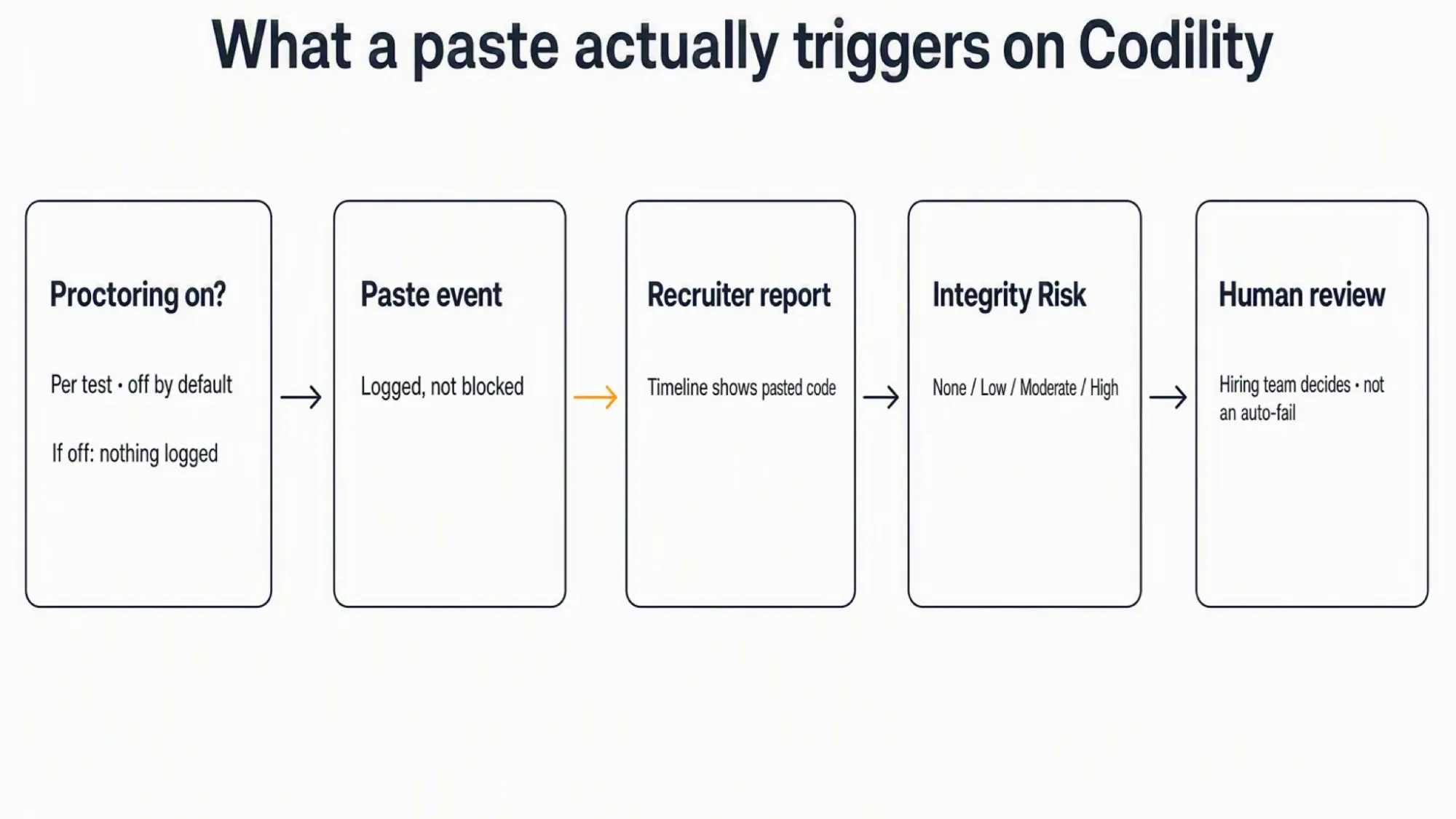
Yes, Codility can detect copy and paste when the employer enables Proctoring for your test. It logs code pasted into the solution area and detects attempts to copy the task description.
But a detected paste is not proof of cheating, and tracking is not always on. Whether anything is logged depends on the test's settings. A flag goes to a human reviewer, not an automatic fail.
The safest device-level choice keeps any assistance on a separate phone, not on the monitored computer. A real time AI interview assistant displays answers on the phone. No answer surface or InterviewFox process exists on that computer.
How Codility detects copy and paste
Codility runs proctoring as a behavioral-event system. When it is on, the platform watches for specific actions during your session. Copy and paste is one tracked behavior. The platform records the event and the content you pasted.
Codility's official Proctoring behavioral-events documentation explains this in full.
The platform treats paste as a logged signal, not a verdict. The recruiter sees the raw behavior and decides what it means. That distinction runs through everything below.
Task-description copy attempts versus solution pastes
These are two separate signals, even though they share the same enablement. A paste into the solution area records the code you added. An attempt to copy the task description is a different event.
Codility can detect the copy attempt even though the IDE does not let you copy the prompt. That attempt can also trigger a webcam snapshot when video proctoring is on. It appears as its own Timeline entry, not as pasted code content.
What counts as a "paste"
The counted surface is the solution area of the IDE. A paste elsewhere in the interface is not described as a tracked event.
The platform does not document whether a right-click paste differs from a keyboard shortcut. It does not state whether drag-and-drop counts the same way. Treat that method detail as unknown, not as a safe option.
When copy/paste tracking is on (and when it's off)
Codility does not track paste on every test. Proctoring ships disabled by default. The employer enables it per test before the first candidate is invited. Once candidates are invited, the setting cannot change without duplicating the test.
An optional account-level Governance setting can enforce proctoring for newly created tests. That applies to new tests only, not to tests that already have invited candidates.
When Proctoring is off for your invite, no paste behavioral event exists for that run. A disabled signal is not recorded at all.
Screen tasks versus Interviews versus VS Code
Codility Screen assessments and Codility Interviews share the same gating. The basic IDE detects copy of external code during Interviews. That changes in VS Code.
In VS Code environments, Codility shows all supported signals except copy-paste code detection. That exclusion is documented for Interviews. Whether a Screen task in VS Code also excludes paste is not clearly stated, so treat it as unknown.
How you know it's on before you start
The session intro page tells you which behaviors the employer enabled. It names the specific signals that will be visible. If the test uses video, you will see a consent prompt before it begins.
Read that disclosure before you start. It reflects the live setting for your invite, not a general marketing description.
What the hiring team actually sees after a paste
A paste does not vanish into the platform. It lands in the candidate report for review.
The report Timeline gives a play-by-play of the session. It lists the paste event and lets the recruiter inspect the pasted code. The code-evolution overlay shows a visual history of the solution with paste events marked.
The report also includes an Integrity widget. It summarizes the signals the employer enabled. It does not, on its own, decide anything.
Pasted content visibility
The recruiter can inspect the pasted code in the Timeline. The platform does not disclose the exact length of the pasted excerpt shown. Treat the content as inspectable without assuming a full, verbatim block.
How long paste and snapshot data is kept
Webcam snapshots are kept for 30 days. That period is documented for snapshots. The retention window for a pasted Timeline entry is not disclosed with a precise number.
Codility retains candidate data under its privacy policy and anonymizes reports on an employer-configured schedule. For deletion or anonymization, contact support or the DPO.
Does Codility block paste or just log it?
Codility logs in-test paste; it does not block it. The editor does not enforce a technical clipboard block during the main assessment. That distinction matters for how you interpret a paste.
Because the monitored computer can log and show content, any assistance on that same computer enters the recorded surface. A same-device answer window or overlay sits at risk. Keeping the answer surface on a separate device removes that desktop exposure.
InterviewFox's dual-device mode keeps the answer on a separate phone. No answer surface, overlay, or InterviewFox process exists on the monitored computer. Software on that computer cannot detect the mode. Place the phone near the laptop camera or in your forward sightline to avoid a visible glance.
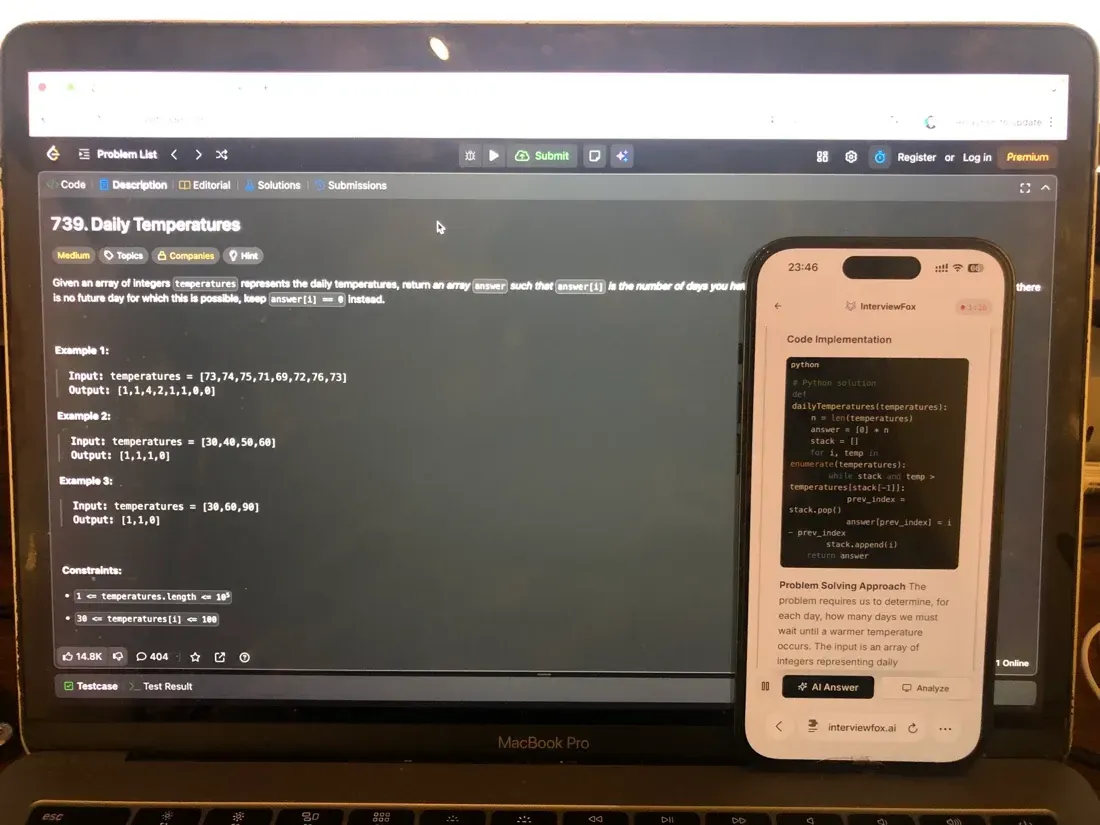
A dual device AI interview assistant uses this separate-device architecture.

Answers On Your Phone, Not Your Shared Screen
Skip the risky invisible-overlay tricks. Our dual-device mode keeps answers on your phone, never on the screen you're sharing or recording. Nothing for a platform or interviewer to catch, because there's nothing on the shared screen to find.
Get started. It's freeLoved by 100,000+ candidates
The follow-up prevention box
There is one place where paste actually gets blocked. After a take-home submission, Codility asks three follow-up questions. Each one is time-boxed to two minutes.
During those answers, pasting is prevented and keystrokes are monitored. The transcript with timings appears in the report. That is a prevention layer, not a logged behavioral event. It applies only to the follow-up answers, not to the main assessment.
What happens after a paste flag (why it is not auto-fail)
A paste flag does not reject you automatically. Codility reports the signal, and the hiring team decides. Not all behavioral signals, on their own, indicate cheating.
Codility's Integrity Risk documentation explains the scoring model.
Integrity Risk runs from None to Low, Moderate, or High. Because the formula is proprietary, it uses no AI. It draws only on the signals the employer enabled. If a behavioral signal is disabled, it is excluded from the score.
How Integrity Risk weights a paste among other signals
A single paste is one input among several. Identity, network, plagiarism, and behavioral signals all feed the same score. Codility notes that several flags together raise more suspicion than one alone.
That is why one paste is not proof. It is a signal for a human reviewer to weigh, not a standing verdict.
Everyday behaviors that do not get you flagged on their own
Codility documents several behaviors that do not, by themselves, mean a flag. Each has a specific mechanism behind it.
- Pasting in a VS Code Interview: Codility excludes copy-paste detection in VS Code environments. The paste signal is absent there by design, even though other signals remain.
- When Proctoring is off: no paste behavioral event exists for that invite. A disabled signal is not recorded.
- Viewing the task description: only an attempt to copy it is the flagged event. Reading or selecting the prompt is not described as a copy attempt.
- Retyping instead of pasting: this is not a paste event. Typing pattern is a separate post-submission check with exclusions and preview bounds.
- A similarity warning alone: it is not proof. It is threshold-gated and flagged for review, not auto-rejection.
- Device Integrity: it does not record the screen or monitor keystrokes. It checks known tools only.
None of these changes what an individual employer decides. They describe what the platform's documented signals do and do not capture.
How to handle paste signals without evading monitoring
You can manage a paste without trying to hide it. The goal is to avoid an ambiguous signal, not to bypass the system.
First, type substantially in the Codility editor where you can. If you use a permitted local draft, expect the paste to appear in the Timeline. Be ready to explain your workflow if the recruiter asks.
Respect the follow-up box rules. Do not attempt to paste during the timed answers, because paste is prevented there. Read the intro disclosure so you know the live settings for your test.
Recognize that paste logging, plagiarism, and typing-pattern checks are different layers. Do not assume a paste alone looks like proof of copying. No safe paste amount exists, so do not rely on a threshold.
The Prep Agent can help you rehearse the format and timing through WhatsApp or SMS. It builds the context you carry into the live session.
Answers On Your Phone, Not Your Shared Screen
Skip the risky invisible-overlay tricks. Our dual-device mode keeps answers on your phone, never on the screen you're sharing or recording. Nothing for a platform or interviewer to catch, because there's nothing on the shared screen to find.
Get started. It's freeLoved by 100,000+ candidates
What else does Codility monitor?
Copy and paste is one piece of Codility's integrity system. To understand the whole picture, Codility's overall cheating detection model ties these signals together.
- Tab switching: Codility logs when you leave the assessment tab. It is a recorded event, not an auto-block, when Proctoring is enabled.
- Time spent on a task: unusually fast completion is a separate signal. It is not a paste verdict.
- Screen content capture and session recording: when enabled, Codility can capture a chosen tab, window, or full screen. A single monitor is required. If you need the full detail, how Codility screen recording works walks through the permission and surface.
- Webcam images and video: Codility can take webcam snapshots at intervals and after proctoring events, kept for 30 days. How does that capture work? Whether Codility uses your camera explains snapshot and recording modes.
- Typing pattern and keystroke sequence: this is a post-submission statistical check, not live keylogging. It excludes several task types and skips short solutions.
- Device and network consistency: Codility checks that you stayed on a consistent device and location. A legitimate connection switch can trigger a false positive.
- Code similarity and plagiarism: this runs post-submission against a large database. It applies only at or above the passing score.
- AI-generated solution pattern match: Codility compares your code against known AI solutions. It is comparison-based, not AI-adjudicated.
- Pre-test identity verification: some tests use a photo ID and selfie as a premium, standalone gate. Public test links do not include it.
- Known cheating-tool presence: Device Integrity checks for known tools through the Codility app. It does not record the screen or monitor keystrokes.
- Take-home follow-up authorship: after submission, three timed questions test authorship. Pasting is prevented and keystrokes are monitored during those answers.
FAQ
Does Codility catch every paste method?
The platform documents "any attempts to paste code into solution area" without separating methods. No source describes a difference between a shortcut and a context-menu paste. Treat method equivalence as unknown.
Can Codility see my clipboard outside the test?
No source documents an outside-tab clipboard logger. The documented scope is pasted code into the solution area. An outside logger is not confirmed, so do not assume one exists or that it cannot.
Does in-editor paste count as external paste?
The platform says "paste code into solution area" without distinguishing internal from external movement. No primary source makes that distinction. Treat it as unknown.
Does Codility know my pasted code's source?
The paste event records the pasted content for inspection. No source states an automatic provenance tag. Plagiarism and AI-match checks run separately after submission. The reviewer makes the determination.
Is a small paste safer than a large one?
No safe paste threshold exists in Codility's documentation. Every paste attempt with Proctoring enabled is an event with content. Avoid assuming any amount is safe.
Does copy-paste detection work in Screen VS Code?
The VS Code exclusion is documented for Interviews. Screen VS Code paste is not addressed explicitly. Treat the Screen case as unknown rather than guaranteed.
How long is pasted code kept, can I delete it?
Webcam snapshots are kept for 30 days. The retention window for a pasted Timeline entry is not disclosed precisely. Codility anonymizes reports on an employer-configured schedule. Contact support or the DPO to request deletion.
Does retyping AI code avoid the paste signal?
Retyping is not a paste event, so it does not create a paste signal. It can still trigger the separate typing-pattern or plagiarism checks after submission. Keep those layers distinct.