

You have a Codility invite open and the timer ready. You can solve the tasks alone. What you are deciding is whether a little AI help would leave a mark the recruiter can see.
Codility detects cheating with employer-enabled in-test proctoring and post-submission similarity, typing-pattern, and AI checks. Proctoring, however, defaults to off; flags go to human reviewers, not auto-rejection.
But knowing detection exists does not tell you whether your setup is safe. If proctoring or the 2026 desktop check is on, anything on the same computer enters the recorded surface.
The safest architecture keeps any assistance on a separate phone, not on the monitored computer. A dual device AI interview assistant evades software running on the interview computer entirely. No answer surface or process exists there.
Whether proctoring is on is your employer's choice
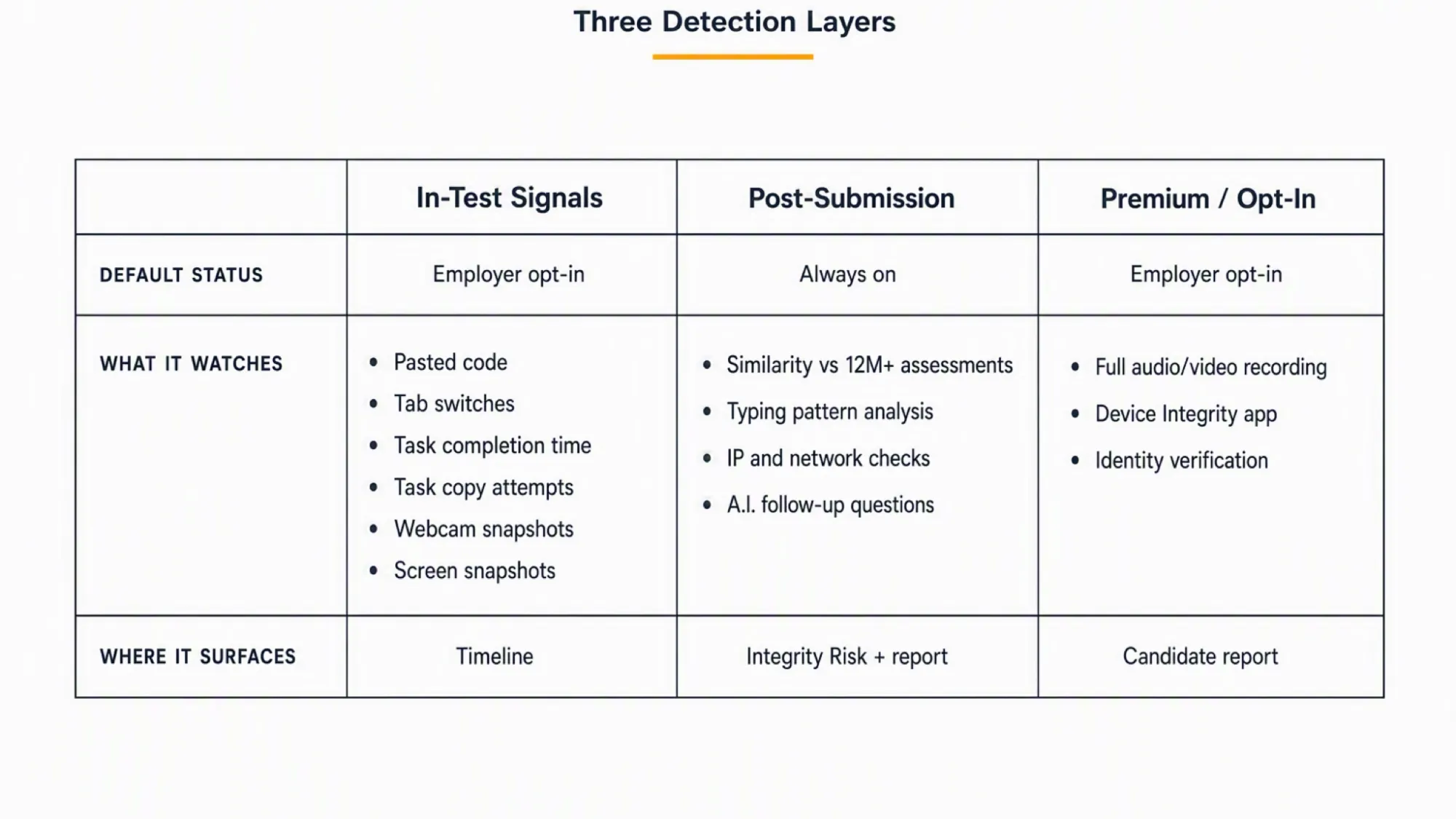
Codility does not monitor every test the same way. Proctoring ships disabled by default. The employer switches it on per test, choosing all signals or a subset. Once the employer invites candidates, the setting cannot change. Account-level governance can enforce a standard.
The session intro page tells you which signals the employer enabled before you start. You will see which behaviours the platform tracks. You will see whether the test requires recording or an app installation. This disclosure, therefore, serves as your self-service answer.
What the gate does not cover matters just as much. Plagiarism and IP detection run post-submission and apply to all customers. Post-submission analysis, therefore, still runs on an unproctored test. The employer's switch governs the in-test layer only.
How to tell what is switched on for your test
Read the session intro page carefully. It names the behaviours the hiring team enabled. If full audio-video recording is on, for instance, you will see a consent prompt. If the employer enables Device Integrity, the test asks you to install the Codility App. Each appears before the test begins.
Does Codility check that it is really you?
Identity Verification serves as a premium, standalone feature. It requires a photo ID, front and back, plus a selfie. Facial recognition validates the match. It functions as a pre-test gate. Public test links, notably, do not include it. The result appears in the candidate report. The source page carries no update date. We confirmed currency only through re-verification on 2026-08-03.
What Codility logs while you take the test
When the employer enables proctoring, Codility logs five behavioural events during the test. Each, consequently, becomes a timestamped entry in the session Timeline, not a verdict.
The platform logs five events. Pasting into the IDE. Tab switching. Abnormally fast completion. Task-description copy attempts. Typing-pattern analysis, which remains in Preview. Copying the task description, for example, can itself trigger a webcam or screen snapshot.
Capture, in fact, differs from detection. A paste in the Timeline represents a recorded event, not a finding of cheating. The recruiter sees the raw behaviour and interprets it.
Webcam snapshots fire at intervals and on triggered events. Screen capture consists of periodic snapshots or a full recording. Full session recording covers screen, webcam, and microphone. It, therefore, requires your opt-in. A candidate who declines can return later. Screen proctoring requires a current browser and a single active monitor, per 2024 documentation. The platform retains snapshots for 30 days.
Are you allowed to Google or open documentation?
Codility documents that the platform logs tab switches when proctoring is on. It does not, however, publish a permitted-resources policy. The employer's instructions govern whether you may open documentation. The platform records the behaviour; the employer sets the rule.
Can you refuse the recording?
Full audio-video session recording requires your opt-in. If you decline, the platform blocks the session but keeps the invitation open. You can, therefore, return and start later, at which point the consent prompt appears again. Screen proctoring does not require separate consent but does need a current browser and one monitor.
For any concern about equipment or recording, Codility's candidate FAQ advises discussing it with the hiring team before you start.
Device Integrity and the Codility desktop app
Since 23 June 2026, Codility offers Device Integrity for Screen, currently in Preview. When an employer enables it, specifically, the candidate must install the Codility App on macOS or Windows. The app does not support Linux. A standard browser will not work for that test.
The app checks for known cheating tools on the candidate's computer. It does not record the screen. No keystroke logging occurs. The app, furthermore, collects no extra personal data, per Codility's Device Integrity documentation.
This mechanism exists because hidden desktop AI tools, in particular, remain invisible to browser-level tab-switch detection. The app closes that gap by checking the device itself, not by surveilling activity.
That same-device exposure, consequently, makes dual-device architecture relevant here. When the monitored computer undergoes inspection for cheating tools, anything running on that computer faces exposure. Keeping the answer surface on a separate phone sidesteps that exposure entirely.
No answer window, overlay, or process exists on the interview computer. The device-level check, therefore, has nothing to find. The phone can sit near the laptop camera or within your natural forward sightline. This avoids the conspicuous downward glance that a phone in your lap would create.
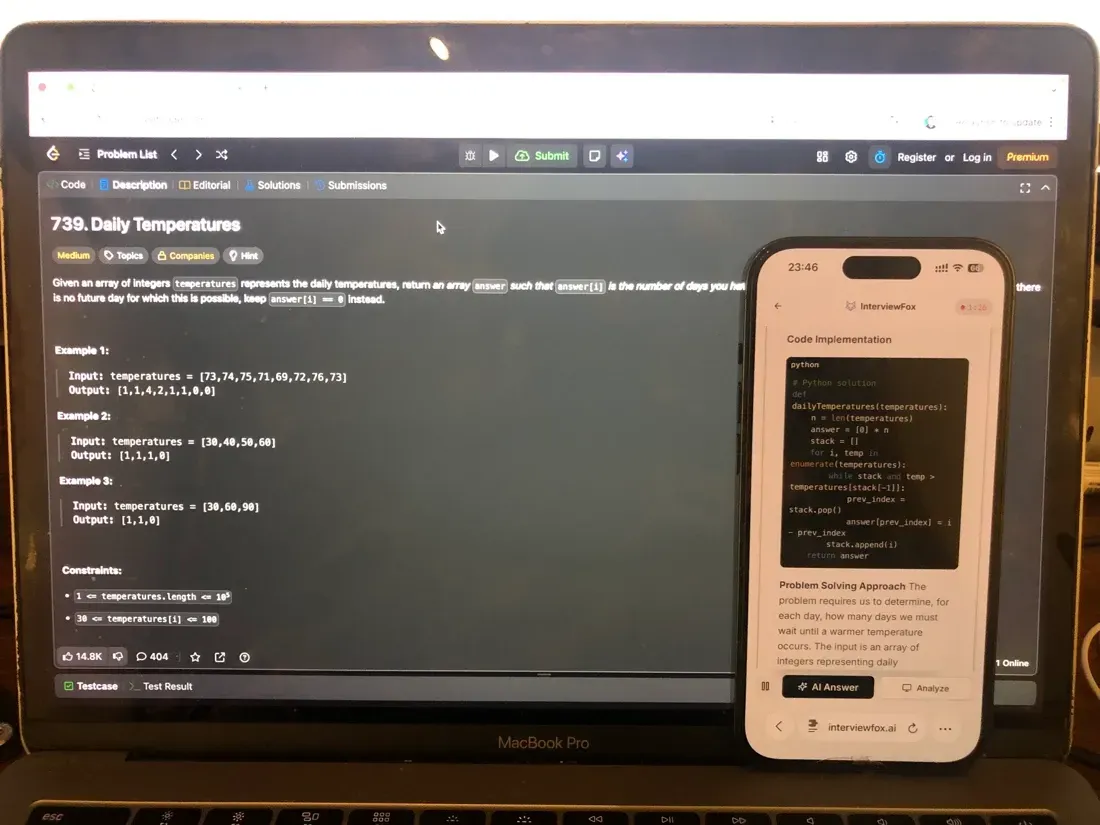

Answers On Your Phone, Not Your Shared Screen
Skip the risky invisible-overlay tricks. Our dual-device mode keeps answers on your phone, never on the screen you're sharing or recording. Nothing for a platform or interviewer to catch, because there's nothing on the shared screen to find.
Get started. It's freeLoved by 100,000+ candidates
In contrast, a dual device AI interview helper keeps the answer and assistant process on a separate phone. No answer surface or process exists there, so the device-level check has nothing to find.
What Codility does not see
The app's documented scope, notably, remains narrow. Checks extend only to known cheating tools. The app does not scan personal files. No screen recording occurs. No keystroke logging takes place.
When the employer does not enable recording, no screen, webcam, or audio capture occurs at all. Linux, additionally, does not qualify for this feature. Screen proctoring requires a single monitor.
Codility does not publish a full list of what it cannot observe beyond these documented negatives. Thirteen candidate actions, therefore, remain unasserted in either direction because no evidence exists.
What runs automatically after you submit
Post-submission analysis, in fact, does not depend on the proctoring switch. It runs on every submission that meets the score threshold.
Similarity Check, specifically, compares your code against a database of over 12 million assessments plus scraped web leaks. It tolerates modifications, so renamed identifiers and reformatted code still match. The check runs only for submissions at or above the passing score. If the employer sets no passing score, the default threshold equals 40 percent. Submissions below the threshold escape the check.
Network and IP detection, additionally, confirms the candidate stayed on a consistent device and location. A mid-test connection switch, such as wifi dropping to mobile data, can trigger a flag. This feature also serves all customers, not only those who enable proctoring.
Both layers produce results in the candidate report. They serve, instead, as signals for a recruiter to read, not automatic judgements.
Can Codility tell you used ChatGPT?
No single detector identifies AI-assisted code live during the test. Three separate post-submission mechanisms, by contrast, address it, each with documented limits.
Typing Pattern Detection analyses the keystroke sequence of your solution after submission. This feature, moreover, remains in Preview. It does not work for multiple-choice, Debugging, Essay, File-upload, or VS Code tasks. The analysis skips solutions under 10 lines to reduce false positives. It looks for patterns consistent with retyping AI-generated code.
The AI-misuse comparison, furthermore, runs inside Similarity Check. It compares your solution against known AI-generated model solutions and surfaces unusual overlap for human review. Codility states it does not use AI to decide whether to flag a solution.
AI Follow-Up Questions apply to take-home assessments only. After submission, meanwhile, the candidate receives three AI-generated personalised questions, each with a two-minute limit. The platform monitors keystrokes and prevents pasting. The full transcript with timings appears in the report.
The follow-up questions after a take-home
If your assessment involves a take-home, for instance, expect three follow-up questions after you submit. You have two minutes per question. Pasting remains disabled. The platform records your keystrokes. This serves as an authorship check, not a coding test.
Does an AI decide whether you cheated?
No. Codility states it does not use AI to decide whether to flag a solution. Integrity Risk, the composite score on the report, also uses no AI. Unusual overlap, by contrast, surfaces for human review, not auto-judgement. A recruiter reads the signals and makes the determination.
What the recruiter actually sees and for how long
Every signal from every layer, ultimately, converges into one artefact: the candidate report. This represents where the recruiter's judgement happens.
The report, for example, includes a Timeline tab with a play-by-play of the session. External imports show up here too. An Assessment Integrity widget displays the Integrity Risk band and which signals the employer enabled.
Integrity Risk, notably, has four bands: None, Low, Moderate, and High. It remains in Beta. It uses only enabled signals, and its formula stays proprietary. No AI participates in the calculation.
A similarity result, typing-pattern flag, identity result, and follow-up transcript each appear in their respective report tabs. Mission Control, the recruiter dashboard, additionally, shows an Integrity Risk column for triage across candidates.
How long any of this exists
Webcam and screen snapshots, for instance, remain for 30 days. The platform anonymizes candidate reports on an employer-configured schedule. 180 days serves as a documented example. Platform access to candidate data, in addition, runs up to six months. Codility acts as a GDPR data processor, per a privacy policy from June 2026.
Being flagged is not being rejected
Five separate Codility documents, notably, state that integrity signals serve as indicators for human review, not automatic rejections. The platform reports; the hiring team, instead, decides.
Recruitment teams review the report and make the determination. Codility's own words on a typing-pattern flag remain clear. The flag should not be used alone as grounds for automatic rejection. A similarity warning does not necessarily suggest cheating. A flag does not guarantee anything. The recommended response involves contacting the candidate or interviewing them in report mode.
Codility notes, however, that several flags together raise suspicion more than one alone. In doubt, consequently, the guidance is to contact the candidate.
This describes platform guidance only. What an individual employer does, however, falls outside Codility's documentation, and we could not verify it. Codility does not publish an appeal path. The platform provides signals; the employer makes the decision.
Honest work that can still look suspicious
Codility documents four false-positive classes. A legitimate connection switch, for example, can trip IP detection. Tasks too simple to distinguish cheating from coincidence can produce a similarity match. One candidate testing for several employers may submit similar code across tests. Short solutions prove harder to analyse, which explains why the analysis skips anything under 10 lines.
On drafting in your own IDE: Codility documents that pastes into the IDE appear in the Timeline. We found no Codility statement on whether the platform permits using your own IDE. The employer's instructions govern that question.
If you already received a similarity warning
Codility, specifically, recommends the hiring team contact the candidate or run an interview in report mode. No documentation describes a candidate-initiated appeal path. If you received a warning, the platform's guidance treats it as a conversation opener, not a verdict.
What to check before you start
Before you accept the invitation, for instance, read the session intro page. It names every behaviour the hiring team enabled for that test. If you see a consent prompt for audio-video recording, you can decline and return later.
Before you start coding, confirm your browser is current and only one monitor is active if screen proctoring is on. If the employer enables Device Integrity, install the Codility App on macOS or Windows. Linux users, additionally, cannot take this test.
While you work, therefore, assume the platform logs pastes, tab switches, and task-description copy attempts when proctoring is on. Each appears in the Timeline. Treat them as visible, not as violations.
After you submit, additionally, expect post-submission analysis regardless of proctoring. If your assessment involves a take-home, expect three follow-up questions. Pasting remains disabled. You have two minutes per question. The Prep Agent can help you rehearse the format and timing so the session does not catch you off guard.
Prepare Once, Walk In Ready
The durable fix isn't a cleverer hiding trick, it's going in prepared. Our Prep Agent reviews your resume, builds a study plan, and runs mock interviews with you over WhatsApp or SMS, so you rehearse the content before it counts.
Get started. It's freeLoved by 100,000+ candidates
FAQ
Is a Codility test proctored?
Only if the employer switched proctoring on for that test. It defaults to disabled, and the employer configures it per test before inviting candidates. The session intro page, meanwhile, tells you what the employer switched on.
Does Codility record your screen?
Screen capture, for instance, happens only when the employer enables proctoring, as periodic snapshots or a full recording. Full audio-video session recording requires your opt-in. For a deeper treatment, see our guide on whether Codility records your screen.
Does Codility use your camera or record audio?
The platform takes webcam snapshots at intervals and on events when proctoring is on. Audio capture occurs only with opt-in full session recording, not by default.
Can Codility detect copy and paste?
Yes, when the employer enables proctoring. Pasted code, specifically, appears as a Timeline event in the candidate report. It represents a logged behaviour, not a finding of cheating.
Can Codility detect ChatGPT?
Three post-submission mechanisms, ultimately, address it. Typing Pattern Detection (Preview). An AI-misuse comparison. AI Follow-Up Questions on take-homes. None runs live during the test. See the section above for each mechanism's exclusions.
Does Codility track your eyes or gaze?
No Codility document, notably, describes eye or gaze tracking. Webcam capture consists of interval and event-triggered snapshots, and full video only with opt-in session recording. This represents a bounded negative based on available documentation, not proven absence.
How long does Codility keep recordings?
Webcam and screen snapshots, for example, remain for 30 days. The platform anonymizes reports on an employer-configured schedule, with 180 days as a documented example. Platform access runs up to six months.
What if you get a similarity warning?
Codility, therefore, recommends the hiring team contact the candidate or interview them in report mode. A similarity warning does not necessarily suggest cheating. No documentation describes a candidate-initiated appeal path.