

You are about to start a proctored HackerRank test. The camera light is on. You are weighing whether to keep a phone or notes nearby. If your eyes move off the screen, will the webcam catch you?
No, HackerRank does not run continuous eye tracking. Its optional Gaze detection add-on reads eye and head movement from periodic webcam photos. It spots repeated look-away patterns.
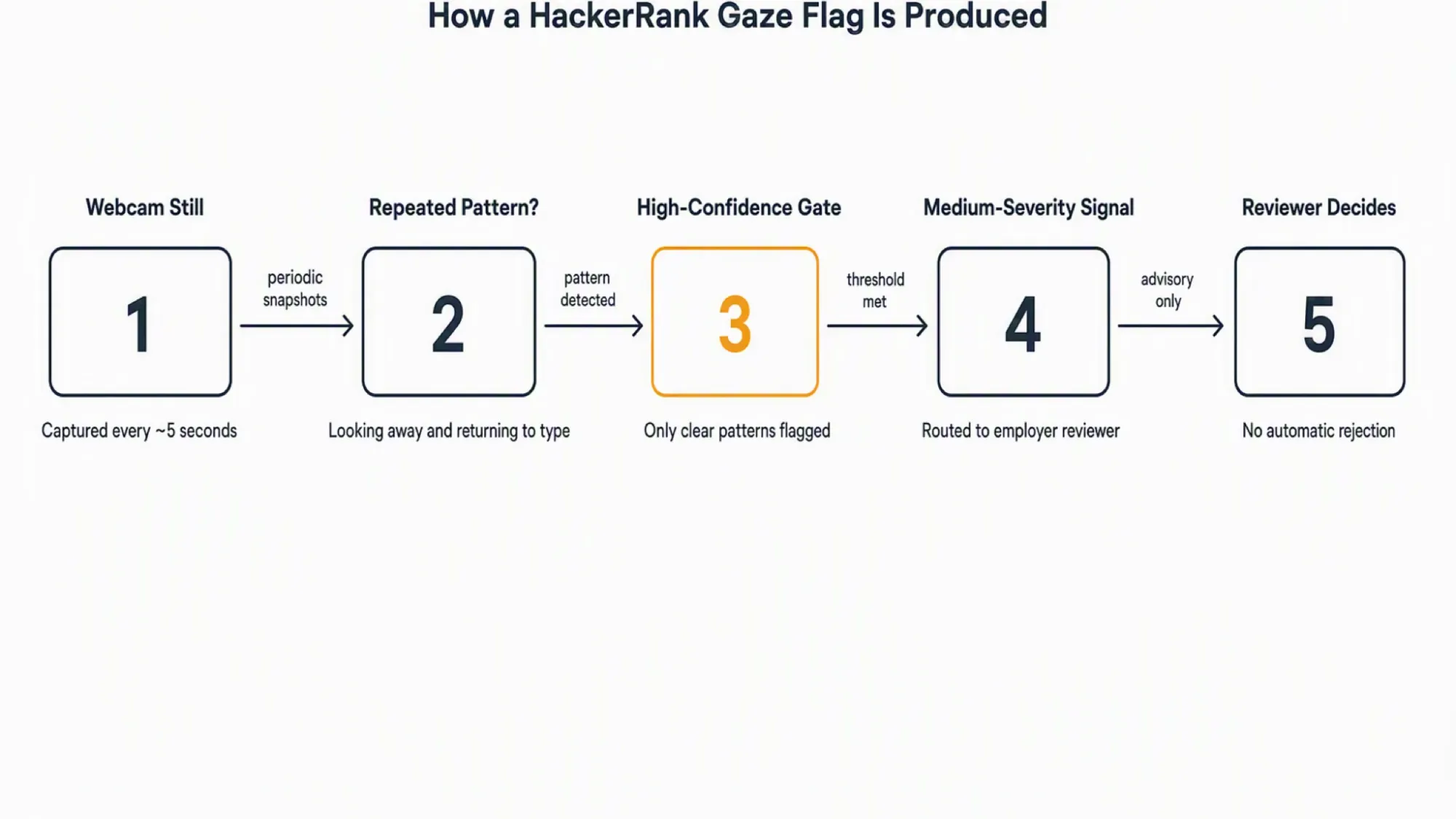
Your eyes are still being watched. Gaze detection reads still photographs taken roughly every five seconds. It looks for a repeated rhythm of looking away and returning to type. A single glance is not the unit of measurement.
A dual device AI interview assistant keeps answers and the assistant process off the monitored machine. That is why software on the test computer cannot see it.
What HackerRank's "Gaze detection" actually measures
HackerRank's Proctor Mode documentation names this feature. You can verify the exact wording in the Proctor Mode article. It appears below in full. HackerRank flags only high-confidence patterns for review.
The official definition reads: Gaze detection analyzes the candidate's eye and head movements captured by the webcam to identify repeated patterns of looking away from the screen and returning to type. Only high-confident behavioral patterns are flagged as suspicious activity for review.
That definition carries three words worth noticing: eye, head, and repeated patterns. The system reads eye orientation and head position from periodic webcam photos. It does not follow a pupil across a continuous video feed. It asks a coarser question instead. Did this person turn away from the screen and then return to type?
What the documentation actually says
The same language appears in HackerRank's Desktop App Mode documentation. Both sources call it an AI Add-on released in July 2026. HackerRank reports it as a medium-severity integrity signal.
Why this is not eye tracking
Eye tracking needs a continuous observation stream as a technical category. A pupil-tracking system requires frame-rate video. That video lets software compute a gaze vector and a trajectory. HackerRank's webcam does not provide that.
It captures a still photograph roughly every five seconds on tests that collect personal information. A still photograph can show orientation and a pattern over time, but it cannot produce a gaze trajectory.
The distinction is mechanical rather than semantic. The capture hardware and cadence decide what the analysis can derive. A five-second still supports a coarse pattern question. Did the candidate turn away and turn back? It cannot answer a fine-grained question about where the candidate looked at any moment.
Why some sources say HackerRank tracks your eyes, and why older ones said it does not
The confusion is honest. HackerRank itself named the feature "Gaze detection". Its own marketing used the phrase "unusual eye movements". A feature with those words naturally makes search results say it tracks your eyes.
The second reason is timing. Gaze detection shipped in July 2026 as a Limited-Availability AI Add-on. The July 2026 release notes list it at medium severity.
Any article written before that date was correct when it said HackerRank had no eye-related detection. The feature did not exist then. Reading an older answer today gives you outdated information, not a wrong answer.
What the assessment webcam actually captures, and how often
The webcam does not record video. Instead, it captures periodic still photographs. To understand Gaze detection, you need to know what those photos are. You also need their capture rate.
Photographs, not video
HackerRank's Proctor Mode documentation states the webcam captures images every five seconds. That applies to tests that collect candidate personal information. A session replay assembles those stills for the reviewer. Screen screenshots join the replay as well. The replay is a sequence of snapshots, not a recorded video stream.
This matters for the eye question. Still frames every five seconds cannot support continuous gaze tracking. The system sees a face at t=0, another at t=5, another at t=10. It can ask whether the face orientation changed between frames. It cannot ask where the pupil pointed at every moment in between.
Two different cadences
The webcam captures at roughly five seconds. Screen screenshots run at roughly fifteen seconds by default. Their frequency increases around a detected violation. The two numbers cover two different signals, so they do not conflict. One tracks the candidate. The other watches the test interface. Each runs on its own timer.
Why a five-second photograph cannot follow your eyes
This is the mechanical bridge that earns the verdict. Continuous eye tracking needs a frame rate high enough to compute where a pupil points. It also needs to track how that point moves over time.
A photograph every five seconds provides static orientations instead. The system can see the candidate facing the screen at frame one. It can see a look to the left at frame two. It can see a return to the screen at frame three. What it cannot see is where the eyes went during the five seconds between frames.
That limitation is not a policy choice. It comes from the capture hardware. A still camera at a five-second cadence gives the engine isolated snapshots. Isolated snapshots support pattern detection over time. They do not support gaze-vector tracking. The two are different tasks, and the hardware decides which one is possible.
Whether gaze detection is running on your test at all
Knowing the capability exists is one thing. Knowing whether it applies to your test is another. For most 2026 candidates, however, the honest answer is that it does not.
The three modes, and which ones can see you at all
HackerRank assessments run in one of three modes. Only two of them involve a webcam.
| Mode | Webcam? | AI image analysis? | Gaze detection possible? | Who enables it? | What would a candidate notice? |
|---|---|---|---|---|---|
| Secure Mode | No | No | No | Employer enables Secure Mode at the test level | No camera permission prompt; no consent screen |
| Proctor Mode | Yes | Yes, enabled by default | Yes, but only if the employer requests the Gaze detection add-on separately | Employer enables Proctor Mode and optionally requests the add-on through their account manager | Camera permission prompt; a pre-test consent screen that covers image capture |
| Desktop App Mode | Yes | Yes | Yes, same add-on requirement as Proctor Mode | Same as Proctor Mode, but the candidate must also download and install the HackerRank desktop application | Desktop app download requirement; camera permission; consent screen |
Live CodePair and Chakra interviews are a separate product surface. They record true audio and video. The Gaze detection feature in this article applies to automated assessments only. The FAQ covers this boundary.
What "limited availability" means, and what it does not tell you
HackerRank's documentation says the feature is "currently available in limited availability." It instructs employers to contact their account manager. That is the documented access route.
What the documentation does not publish is who qualifies. There is no public list of eligible plans, regions, customer sizes, or rollout waves. The designation means the feature is not generally available, so it requires a manual request. It does not tell a candidate whether their employer has made that request.
How to tell which mode your test is using, and the part you cannot tell
You can infer the mode from several visible signals. A desktop app download requirement points to Desktop App Mode. A camera permission prompt points to Proctor Mode or Desktop App Mode. So does a consent screen covering image capture. The absence of any camera prompt points to Secure Mode.
What you cannot infer is whether the employer enabled the Gaze detection add-on. HackerRank does not publish a candidate-facing indicator for that setting. Mode is inferable, while the add-on status is not visible to you. That gap is more useful than a confident guess. It tells you what you can and cannot control before the test starts.
What trips a gaze flag, and what does not
This is the question the reader arrived with. The documentation answers it in mechanism terms. It offers no per-behavior tolerance list.
Thinking with your eyes off the screen, reading scratch paper, glancing at the keyboard, looking at a second display
The documented trigger is a repeated pattern of looking away and returning to type. The system measures a rhythm, not an isolated glance. One moment of looking away to think does not match the pattern. Neither does one glance at scratch paper on the desk.
A single look at the keyboard to find a key does not match it either. The feature only fires above a high-confidence gate. HackerRank publishes no per-behavior tolerance list.
A second monitor within the candidate's normal field of view is not the documented trigger pattern. It does not require a repeated head turn. Looking repeatedly at a display far to one side could create the look-away-and-return rhythm. That rhythm is what the feature detects, but a separate analysis covers how HackerRank handles multiple monitors.
One glance, or a pattern?
HackerRank's exact wording is "repeated patterns" and "high-confidence behavioral patterns". HackerRank publishes no numeric threshold, so the documentation does not say "three glances in sixty seconds". It does not say "five seconds of sustained looking away".
It says repeated and high-confidence. The system looks for a rhythm sustained over time. The confidence gate leaves ambiguous cases out.
Gaze detection is not the same as "no face detected"
HackerRank's Image Proctoring includes a separate family of face-presence signals. These check whether a face is present. They check whether multiple faces appear. They check whether the face changed or stayed static.
Object detection looks for phones and other devices in the frame. These are different signals with different enablement rules, so a face-presence flag is not gaze evidence. Conflating the two would misread the report.
If a gaze flag fires, what the employer sees and decides
Capability without consequence leaves the post-submission reader without an answer. Here is what the documentation describes.
What a medium-severity signal looks like on the reviewer's side
When Gaze detection identifies a high-confidence pattern, it generates a medium-severity integrity signal. That signal appears in the structured integrity export, which the employer's reviewer sees. A session replay accompanies the signal. It assembles the periodic webcam stills and screen screenshots.
HackerRank does not publish the exact field list or report format for a gaze signal. The documentation confirms the signal exists. It carries a medium-severity label and a visual replay.
Does a flag automatically disqualify you?
No. HackerRank's documentation describes an advisory model. The integrity signals surface "for review." The reviewer has documented options. They may reject the candidate or request clarification. The documentation lists no automatic rejection for Gaze detection. The human reviewer decides.
That said, "not automatic" is not the same as "not consequential". A reviewer who sees a repeated look-away pattern may draw their own conclusion. The documentation tells you what the system does. It does not tell you what the reviewer will think.
Your webcam images, consent, control, and who holds them
This section matters for every candidate. It matters most for someone who has already submitted. They cannot change their behavior. The question becomes about rights, not about detection.
Is a webcam photograph biometric data?
HackerRank's Privacy Policy refers to webcam captures as a "Facial Image" under Section 3.2. HackerRank last updated the policy on March 6, 2025. That date predates the July 2026 Gaze detection release. The words "biometric," "BIPA," and "Illinois" do not appear in the policy.
Whether a periodic webcam still counts as biometric data is a legal question. The policy does not answer it. The classification depends in part on the employer's configuration. It also depends on the governing law. HackerRank does not document the classification. Do not treat the missing word "biometric" as a settled conclusion.
Who actually holds your images, and for how long
HackerRank's Privacy Policy designates the employer as the data Controller. HackerRank is the Processor. That allocation matters. It determines where candidate rights are exercised. Under Section 8.3, access, correction, and deletion requests run through the employer. They do not run through HackerRank directly. The CCPA framework reinforces this structure. HackerRank acts as a service provider to the employer-business.
Retention of webcam images is contractual. The employer sets the period, so HackerRank publishes no single retention period. The policy does not state a default number of days or years. To learn how long your images are kept, ask the employer who controls them.
What to do before and after a proctored HackerRank test
The evidence supplies real, documented levers. This section uses only those.
Before you start
Ask the employer or recruiter which proctoring configuration your test uses. They enable the mode and request any add-ons through their account manager. They are the only party who holds the answer.
Treat the camera consent step as a real decision point. Read what it covers. If you plan to use permitted scratch materials, state that in advance. The same applies to a particular physical setup. Both Proctor Mode and Desktop App Mode documents describe a reviewer who may request clarification. Advanced notice is more credible than an after-the-fact explanation.

Answers On Your Phone, Not Your Shared Screen
Skip the risky invisible-overlay tricks. Our dual-device mode keeps answers on your phone, never on the screen you're sharing or recording. Nothing for a platform or interviewer to catch, because there's nothing on the shared screen to find.
Get started. It's freeLoved by 100,000+ candidates
Software on the test computer monitors the screen, the browser, and the applications running on that machine. An AI interview helper on a separate phone places no answer surface on the monitored computer. It places no overlay there either. It runs no process on that machine. HackerRank screen monitoring cannot see it.
The webcam still sees your face, so positioning matters. Place the phone near your laptop camera. Keep it within your natural forward sightline. That avoids the conspicuous downward or sideways glance. A phone in your lap or far to one side creates that glance. A near-camera phone keeps your gaze consistent with someone reading the screen.
If you have already submitted
The route for any question about your data or a flag runs through the employer. They are the Controller. Access requests and questions about a specific integrity signal go to them. A gaze flag is advisory. A reviewer may request clarification. No outcome is promised. The path is documented.
How to prepare for your next assessment
Prepare Once, Walk In Ready
The durable fix isn't a cleverer hiding trick, it's going in prepared. Our Prep Agent reviews your resume, builds a study plan, and runs mock interviews with you over WhatsApp or SMS, so you rehearse the content before it counts.
Get started. It's freeLoved by 100,000+ candidates
Before the next assessment, a structured preparation workflow can reduce the anxiety that makes last-minute help feel necessary. Knowing what to expect means fewer surprises on test day.
Practicing the format helps as well. A Prep Agent can build a plan around your resume and target role. That gives you something more reliable than searching for answers during the test.
What else does HackerRank monitor?
Gaze detection is one integrity signal among several that HackerRank's proctoring system can observe. The same webcam and screen capture infrastructure powers other checks, each with its own enablement rules and severity.
- Screen recording and screenshot capture. HackerRank captures periodic screenshots of the test interface alongside webcam images. The default screenshot cadence is roughly every 15 seconds, increasing toward five seconds near a detected violation. Session replay assembles these screenshots together with webcam stills for the employer reviewer.
- Webcam access and capture. Whether the camera is on at all depends on the test mode and employer configuration. Some modes use no webcam. When the camera is active, HackerRank captures periodic still photographs rather than continuous video. The camera permission prompt and pre-test notice are the candidate's main visibility into whether webcam capture is running.
- Face presence and image analysis. A separate Image Analysis signal family checks whether a face is present in the frame, whether multiple faces appear, whether the face changed, and whether it stays static. These signals are distinct from gaze detection and have their own enablement and default-off rules.
- Object detection. The webcam feed also powers object detection that looks for phones, tablets, and other devices held or visible near the candidate. Like Image Analysis, it operates as a separate signal family rather than part of gaze detection.
Each of these signals is configured separately by the employer. None of them is the same as gaze detection, and a flag from one family does not count as evidence of gaze behavior. The full capability map, including which signals are default-on versus add-on, lives in the platform's broader proctoring overview.
FAQ
Does gaze detection apply to a live CodePair or Chakra interview? No. Live interviews record true audio and video through a separate product surface. The Gaze detection feature described in this article reads periodic stills from automated assessments. The two are different products with different capture mechanisms.
Did HackerRank proctoring change in 2026? Yes, materially. Gaze Detection shipped in the July 2026 release as a Limited-Availability AI Add-on. HackerRank reports it at medium severity. That is why answers written before mid-2026 said there was no eye-related detection. This article is current as of 2026-08-04.
Can I ask my employer what proctoring is enabled, or ask them to turn it off? You can ask. The employer requests add-ons through their account manager, and they enable them at company and test level. The employer is also the data Controller.
Only that party can change the configuration. The documentation does not promise they will disclose or comply.
Is there an accommodation route if a condition affects my eye or head movement? HackerRank documents no accommodation process for Gaze detection. The documented route for candidate requests runs through the employer as Controller. Do not assume a process exists where none is published.