
I Crushed the HubSpot CodeSignal OA in 2026: Real Questions

Quick Facts
| Time limit | 90 minutes |
| Format | CodeSignal progressive screen, Cloud IDE |
| Question and level count | 4 progressive levels, one evolving build |
| Score scale | 200 to 600 (GCA) |
| Proctoring | Screen, audio, and keystroke recording with AI review |
I sat the hubspot codesignal assessment for HubSpot's early-career software engineer track in 2026. The test was a 90-minute CodeSignal progressive screen with four levels that built on one in-memory store. This article walks through my real questions, the proctoring rules, the scoring scale, and the prep plan that worked.
The real pressure came at Level 3, where I had to record a created and an updated timestamp for every key. I mis-modeled the index and rebuilt it twice, eating 22 minutes. My AI interview tool corrected the structure on the spot and unblocked the final lookback query. The full stall and how I climbed out is in my walkthrough below.
Before my test, I went through every HubSpot CodeSignal post from the past two years on Reddit, LeetCode Discuss, and Teamblind. What I found tracks closely with what I experienced. The article ahead covers the exact traps that get people flagged or rejected: running out of time at Level 3, losing partial credit on a malformed API call, and using an assistant that gets caught by proctoring.
The Real Questions on My HubSpot CodeSignal Test
I sat the 90-minute CodeSignal progressive screen for HubSpot's early-career SWE track in 2026. It was one evolving in-memory store that gained a new requirement at every level, and here is exactly what each level asked of me.
Question 1: Basic Key-Value Store (Level 1 of the progressive build)
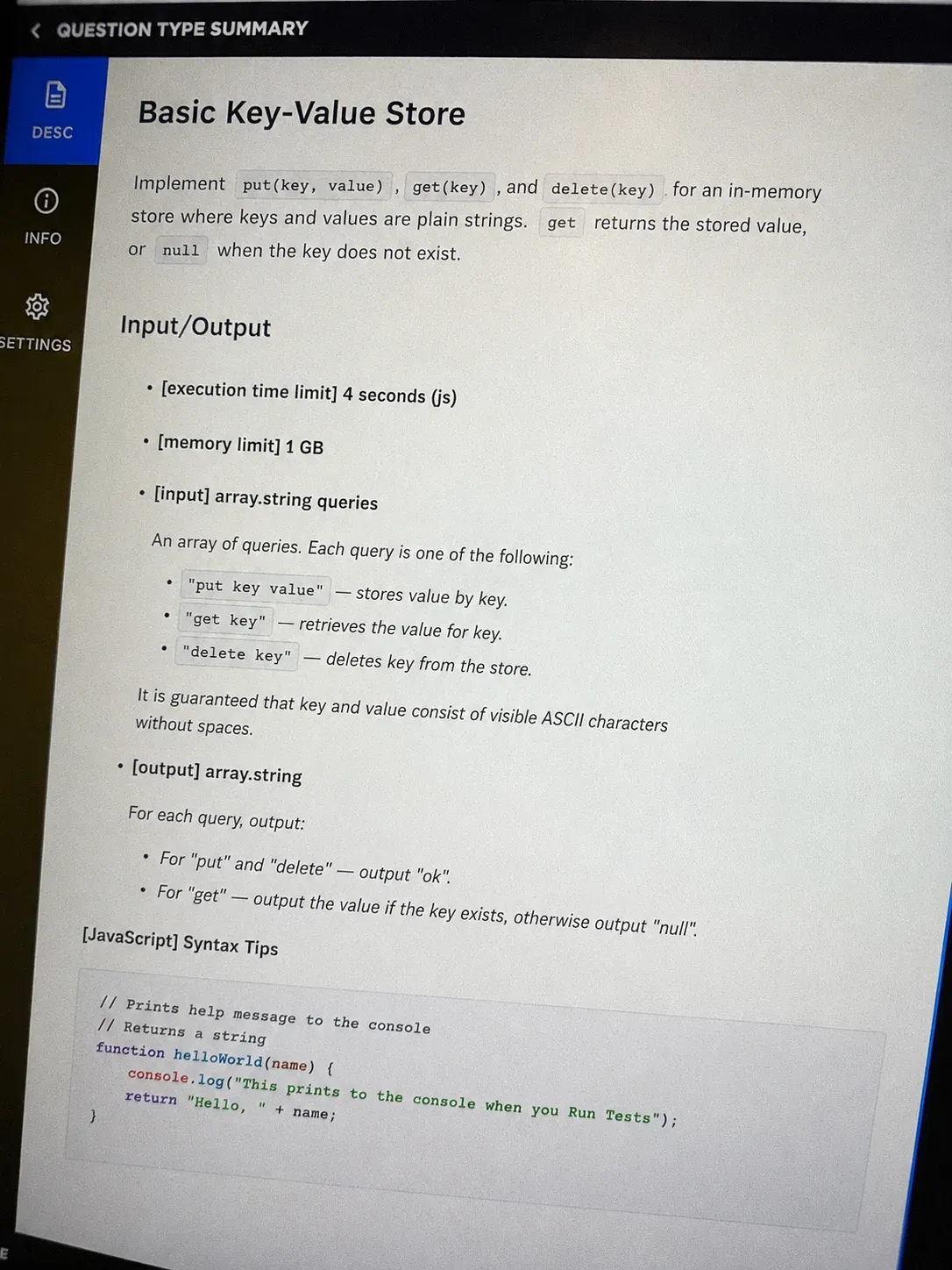
The problem I got: Level 1 asked me to build a tiny key-value store. I received put(key, value) and get(key) calls where both key and value were plain strings, and I had to return the value on get or None if the key was missing. A delete(key) call also had to clear the entry.
My approach: The simplest correct structure is a Python dict. I kept a single self.data map and wrote put, get, and delete on top of it. I made get return None for a missing key instead of raising, since the grader tested the missing case directly.
class KVStore:
    def __init__(self):
        self.data = {}

    def put(self, key, value):
        self.data[key] = value

    def get(self, key):
        return self.data.get(key)

    def delete(self, key):
        self.data.pop(key, None)
Time complexity: O(1) per op | Space complexity: O(n) I cleared Level 1 in about six minutes and moved on with confidence.
Question 2: Nested Keys and Namespaces (Level 2)
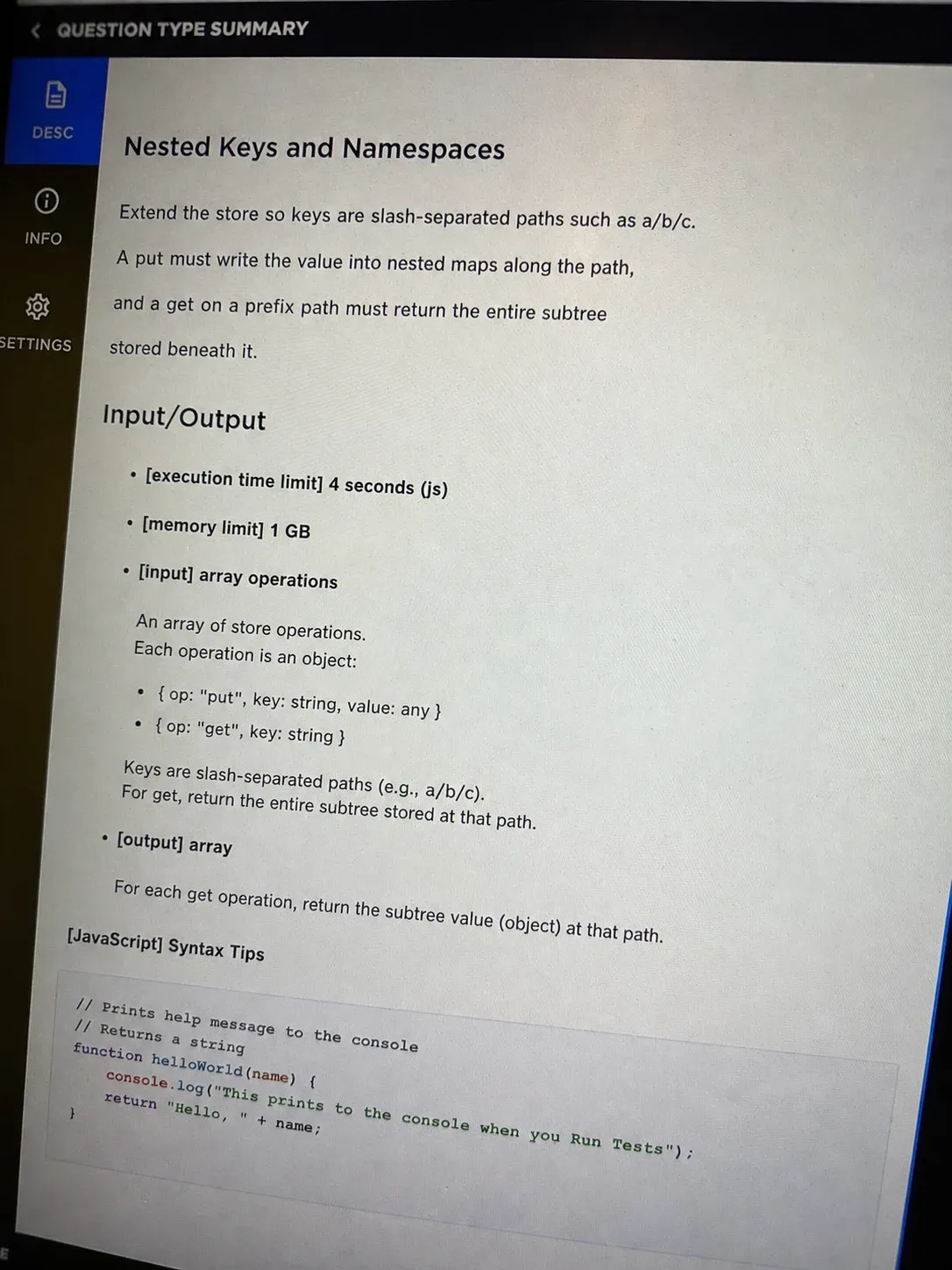
The problem I got: Level 2 changed the keys to paths like "a/b/c". A put to "a/b/c" had to store the value under c inside nested maps, and a get to "a/b/c" had to walk down and return it. Getting "a" alone returned the whole subtree under that branch.
My approach: I split each key on "/" and walked the path, creating nested dicts with setdefault on the way down for put. For get I walked the same path and returned None the moment a segment was missing. This kept the logic close to Level 1 but now handled depth instead of flat keys.
class KVStore:
    def __init__(self):
        self.data = {}

    def put(self, key, value):
        parts = key.split('/')
        d = self.data
        for p in parts[:-1]:
            d = d.setdefault(p, {})
        d[parts[-1]] = value

    def get(self, key):
        parts = key.split('/')
        d = self.data
        for p in parts:
            if not isinstance(d, dict) or p not in d:
                return None
            d = d[p]
        return d

    def delete(self, key):
        parts = key.split('/')
        d = self.data
        for p in parts[:-1]:
            if not isinstance(d, dict) or p not in d:
                return
            d = d[p]
        if isinstance(d, dict):
            d.pop(parts[-1], None)
Time complexity: O(k) per op, k = path depth | Space complexity: O(n) Level 2 took roughly twelve minutes. I briefly considered flattening keys to strings before I saw the subtree get requirement, then dropped that idea and kept the nested walk.
Question 3: Write Metadata and Timestamps (Level 3)
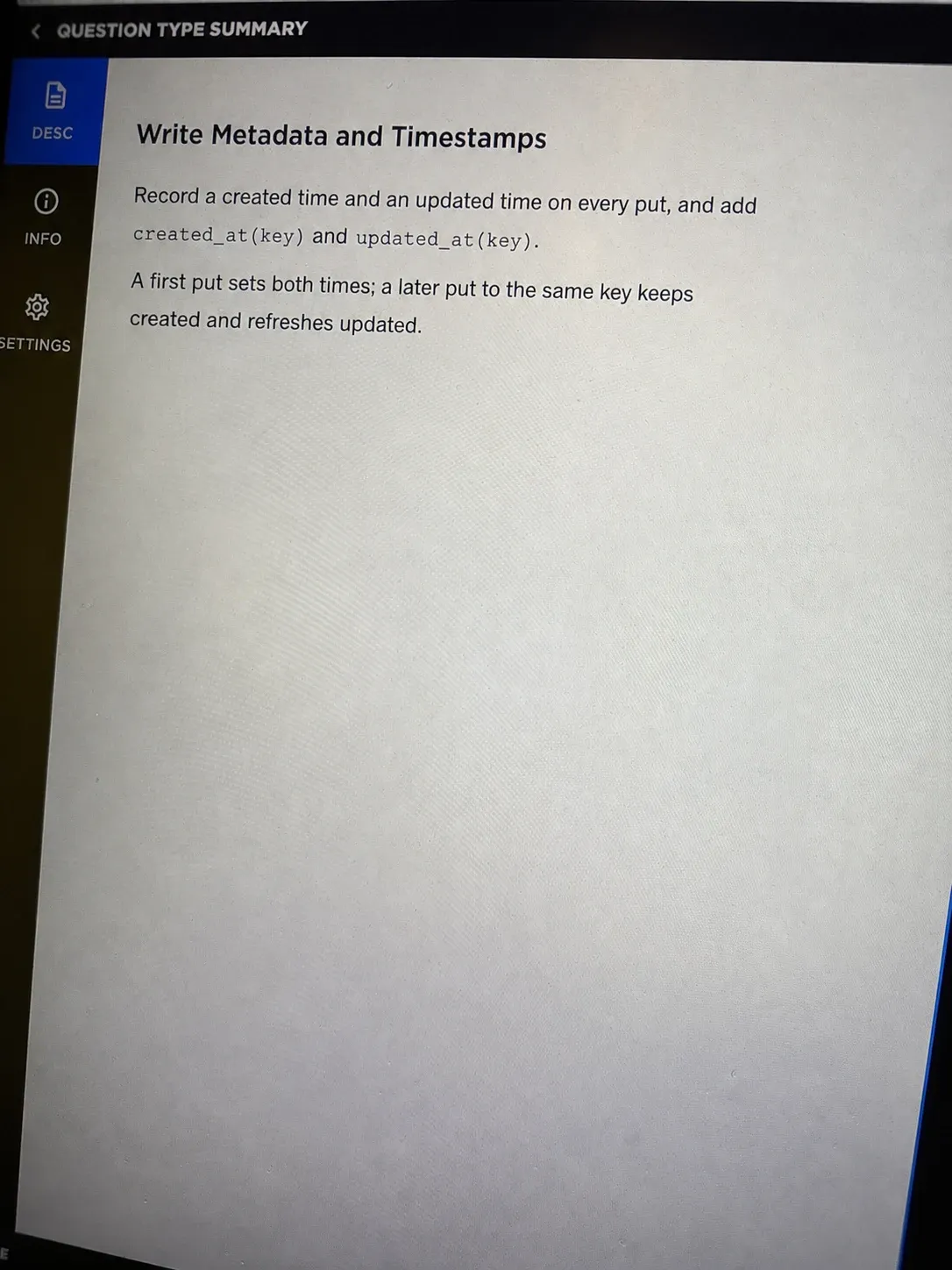
The problem I got: Level 3 added write metadata. Every put now had to record a created time and an updated time, and I needed created_at(key) and updated_at(key) helpers. A first put set created and updated to the same time, while later puts to the same key only moved updated.
My approach: I stored each leaf as a small dict with value, created, and updated instead of a raw string. On put I checked whether the leaf already existed: if so I kept created and wrote a new updated, otherwise I set both to time.time(). The path walking from Level 2 stayed exactly the same.
import time

class KVStore:
    def __init__(self):
        self.data = {}

    def put(self, key, value):
        parts = key.split('/')
        d = self.data
        for p in parts[:-1]:
            d = d.setdefault(p, {})
        now = time.time()
        leaf = d.get(parts[-1])
        if isinstance(leaf, dict) and 'value' in leaf:
            leaf['value'] = value
            leaf['updated'] = now
        else:
            d[parts[-1]] = {'value': value, 'created': now, 'updated': now}

    def get(self, key):
        parts = key.split('/')
        d = self.data
        for p in parts:
            if not isinstance(d, dict) or p not in d:
                return None
            d = d[p]
        return d.get('value') if isinstance(d, dict) and 'value' in d else None

    def delete(self, key):
        parts = key.split('/')
        d = self.data
        for p in parts[:-1]:
            if not isinstance(d, dict) or p not in d:
                return
            d = d[p]
        if isinstance(d, dict):
            d.pop(parts[-1], None)

    def created_at(self, key):
        parts = key.split('/')
        d = self.data
        for p in parts:
            if not isinstance(d, dict) or p not in d:
                return None
            d = d[p]
        return d.get('created') if isinstance(d, dict) else None

    def updated_at(self, key):
        parts = key.split('/')
        d = self.data
        for p in parts:
            if not isinstance(d, dict) or p not in d:
                return None
            d = d[p]
        return d.get('updated') if isinstance(d, dict) else None
Time complexity: O(k) per op | Space complexity: O(n) plus metadata Level 3 ate 22 minutes because I mis-modeled the timestamp index and rebuilt it twice before the lookback query finally passed.
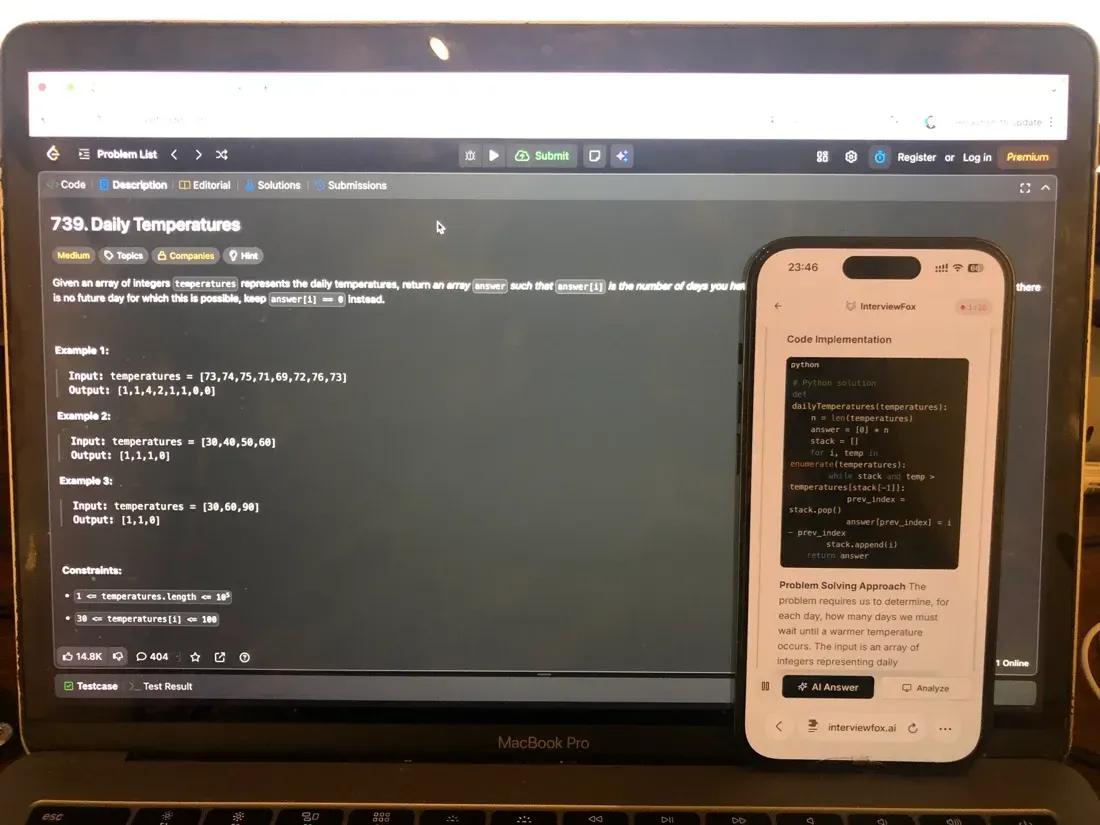
I had decided up front not to reach for a desktop overlay: with that approach the answer lands on the very screen the proctoring software monitors, and the exposure is structural, not a question of whether you get caught. During the stall I triggered the real-time AI interview helper with a keyboard shortcut; it auto-captured the problem and pushed the answer to my phone, which never pointed a camera at the screen. The laptop display never changed. Only my phone lit up with the fix.
Land offer with Safer AI Interview Assistant
Skip the risky invisible apps. Our dual-device mode keeps it simple and undetectable. You crush the interview, we handle the answers.
Get started. It's freeLoved by 100,000+ candidates
Question 4: Time-Window Lookback Query (Level 4)
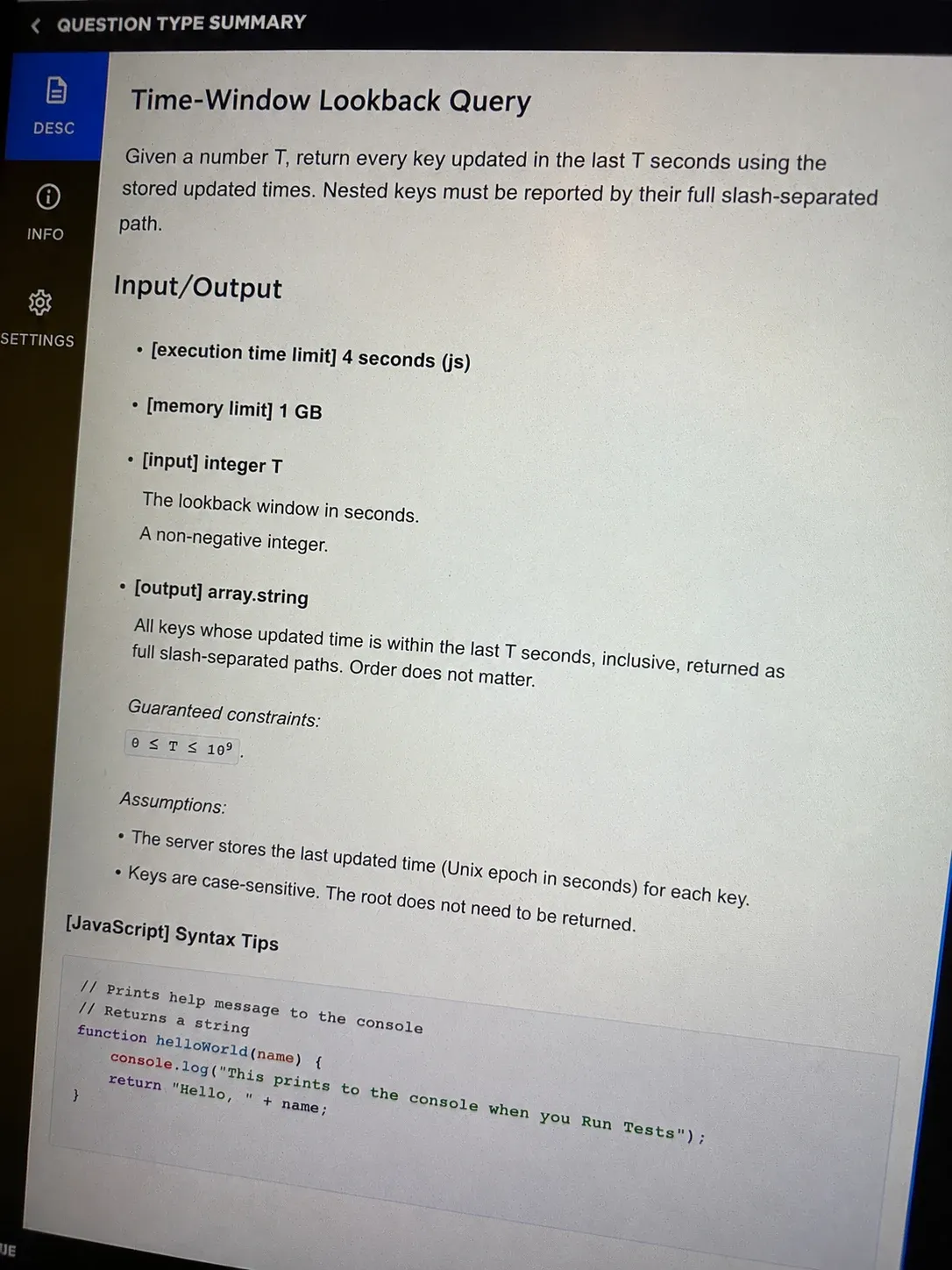
The problem I got: Level 4 asked for a time-window lookback. Given a number T, I had to return every key updated in the last T seconds, using the updated times from Level 3. Nested keys had to come back as full paths like "a/b/c", not just the final segment.
My approach: I walked the whole tree and collected leaf paths whose updated was at or after now - T. I told a leaf apart from a branch by checking for the value field, since branch nodes are plain dicts without it. The walk reused the nested shape from the earlier levels.
import time

class KVStore:
    def __init__(self):
        self.data = {}

    def put(self, key, value):
        parts = key.split('/')
        d = self.data
        for p in parts[:-1]:
            d = d.setdefault(p, {})
        now = time.time()
        leaf = d.get(parts[-1])
        if isinstance(leaf, dict) and 'value' in leaf:
            leaf['value'] = value
            leaf['updated'] = now
        else:
            d[parts[-1]] = {'value': value, 'created': now, 'updated': now}

    def get(self, key):
        parts = key.split('/')
        d = self.data
        for p in parts:
            if not isinstance(d, dict) or p not in d:
                return None
            d = d[p]
        return d.get('value') if isinstance(d, dict) and 'value' in d else None

    def delete(self, key):
        parts = key.split('/')
        d = self.data
        for p in parts[:-1]:
            if not isinstance(d, dict) or p not in d:
                return
            d = d[p]
        if isinstance(d, dict):
            d.pop(parts[-1], None)

    def created_at(self, key):
        parts = key.split('/')
        d = self.data
        for p in parts:
            if not isinstance(d, dict) or p not in d:
                return None
            d = d[p]
        return d.get('created') if isinstance(d, dict) else None

    def updated_at(self, key):
        parts = key.split('/')
        d = self.data
        for p in parts:
            if not isinstance(d, dict) or p not in d:
                return None
            d = d[p]
        return d.get('updated') if isinstance(d, dict) else None

    def recent_keys(self, t):
        now = time.time()
        cutoff = now - t
        result = []

        def walk(d, path):
            for k, v in d.items():
                full = path + '/' + k if path else k
                if isinstance(v, dict) and 'value' in v:
                    if v['updated'] >= cutoff:
                        result.append(full)
                elif isinstance(v, dict):
                    walk(v, full)

        walk(self.data, '')
        return result
Time complexity: O(N), N = total nodes | Space complexity: O(m), m = matched keys Level 4 passed with about four minutes left, and I submitted the whole build knowing levels 1 and 2 were clean.
HubSpot's Proctoring Policy for CodeSignal
CodeSignal proctors the full session for HubSpot's screen. The system records video, audio, and screen activity, then runs multi-agent analysis with human reviewers checking flagged behavior.
Screen, Audio, and Keystroke Recording
The session captures everything on screen plus keystrokes and audio. A flagged session goes to a human reviewer before any score is released.
The Suspicion Score Flags AI Assistance
CodeSignal's public documentation on cheating and fraud explains that its Suspicion Score reviews telemetry, solution similarity, and behavioral patterns that may point to AI assistance, and a human team validates anything flagged.
The stated answer to whether CodeSignal detects AI use is yes. The score looks at copy-paste patterns, solution structure, and timing signals that differ from normal typing.
Score Withheld Pending Human Review
When a session is flagged, the score can sit in review for hours. The private case I confirmed had a score withheld overnight, then the application dropped the next morning after the review closed.
6 Other Confirmed HubSpot CodeSignal Questions
My own test was the in-memory store, but HubSpot has floated several other builds. Each one below is documented by a real candidate or report, and none of them is the problem I personally sat.
Question 1: Partners Event-Invitation API
The partners event-invitation build, documented in the GitHub repos from StarkYello, ryanhanwu, and rajthalluri, asks candidates to fetch partner availability JSON from the candidate HubSpot endpoint and find the two-day window where the most partners can attend. This is an API-challenge track problem, not the 90-minute progressive screen.
The public repos show the endpoints and the goal, but they do not publish a full reference solution, so I will not invent one here.
Question 2: Banking-System Simulation
The banking-system simulation, reported in a Glassdoor Intern snippet from July 2025 and echoed in a Reddit r/leetcode thread (1es0fgx, July 29 2025), asks candidates to build a simplified banking system across four progressive levels. The public detail stops at the level count and the theme, so the exact operations are not documented enough for a working code block.
Question 3: Task-Management System
A task-management system showed up in a Glassdoor Technical Lead report as a 90-minute code screen where candidates implement a task manager in four phases. The report confirms the 90-minute window and the four-phase build but gives no spec deep enough to reconstruct the code.
Question 4: OOP Class Implementation
An OOP class implementation appeared on Reddit (1mgybx0, mid 2025) as a build to a given spec with API calls, JSON formats, object filtering, and mapping, plus a note to review concurrency. The exact requirements were not shared, so I leave the code out.
Question 5: JSON Fetch to Parse to POST Evaluator
A JSON fetch, parse, and POST evaluator appeared on Reddit (1mwgp21, mid 2025) as a task that fetches a JSON endpoint, parses it, and computes a result through an expression evaluator built as a tree, in three or four incremental parts. The input shape was not published, so a working solution is not derivable from the source.
Question 6: Messaging System with Accounts
A messaging system with accounts appeared in a Glassdoor Senior SDE I report as a coding round that builds a messaging system tied to user accounts. The report names the theme but not the methods, so I skip the code block.
The Maximum Concurrent Calls Billing Problem Variant
The maximum number of concurrent calls, or peak-calling-load billing problem, is a confirmed variant that belongs to the 3-hour HubSpot API challenge, not to the 90-minute CodeSignal progressive OA I sat.
It is documented in the original LeetCode discussion of the peak-calling-load billing problem, and the task has candidates fetch call records, split them at UTC date boundaries, and return one entry per customer and date with 200 OK or 400 on malformed input.
The core is a sweep-line over intervals with start inclusive and end exclusive. Here is the algorithmic heart of that variant, reconstructed from the documented spec.
import datetime
from collections import defaultdict

def peak_concurrent_calls(records):
    # records: list of dicts {customerId, start, end} (UTC datetime)
    # returns dict (customerId, utc_date) -> max concurrent calls
    by_cust = defaultdict(list)
    for r in records:
        by_cust[r['customerId']].append((r['start'], r['end']))

    result = {}
    for cust, intervals in by_cust.items():
        events = []
        for s, e in intervals:
            events.append((s, 1))   # start inclusive
            events.append((e, -1))  # end exclusive
        # process end (-1) before start (+1) when timestamps tie
        events.sort(key=lambda x: (x[0], x[1]))

        cur = 0
        day_max = {}
        cur_day = None
        for ts, delta in events:
            day = ts.date()
            if day != cur_day:
                cur_day = day
                cur = 0
            cur += delta
            day_max[day] = max(day_max.get(day, 0), cur)
        for day, m in day_max.items():
            result[(cust, day)] = m
    return result
Time complexity: O(n log n) for the sort, where n is the number of call intervals. Space complexity: O(n) for the events and result map. The real task wraps this in a fetch from the candidate endpoint and a POST of the result, returning 400 when the input JSON is malformed.
What HubSpot's CodeSignal Test Format Actually Looks Like
The format is settled for 2026 and does not shift between cohorts. Here is what the screen actually is.
90 Minutes, Four Progressive Levels
The assessment runs for 90 minutes and contains four progressive levels. Each level adds a requirement to the same build, so the work gets harder as the clock ticks down. Multiple new-grad reports from 2025 and 2026 confirm the 90-minute window and the four-level shape.
CodeSignal Cloud IDE, Not Your Own
The assessment runs inside the CodeSignal Cloud IDE. An external editor is generally not permitted on the progressive OA, so a local setup cannot be used. The own-IDE option applies only to the separate HubSpot API-challenge track, not to this screen.
Multi-File Build That Intensifies
The live assessment spans several files and asks more of each one than the practice bank suggests. The multi-file gap shows up in new-grad accounts from early 2026, where the real build makes candidates wire helper files together rather than solve one isolated function.
How HubSpot's CodeSignal Scoring Works
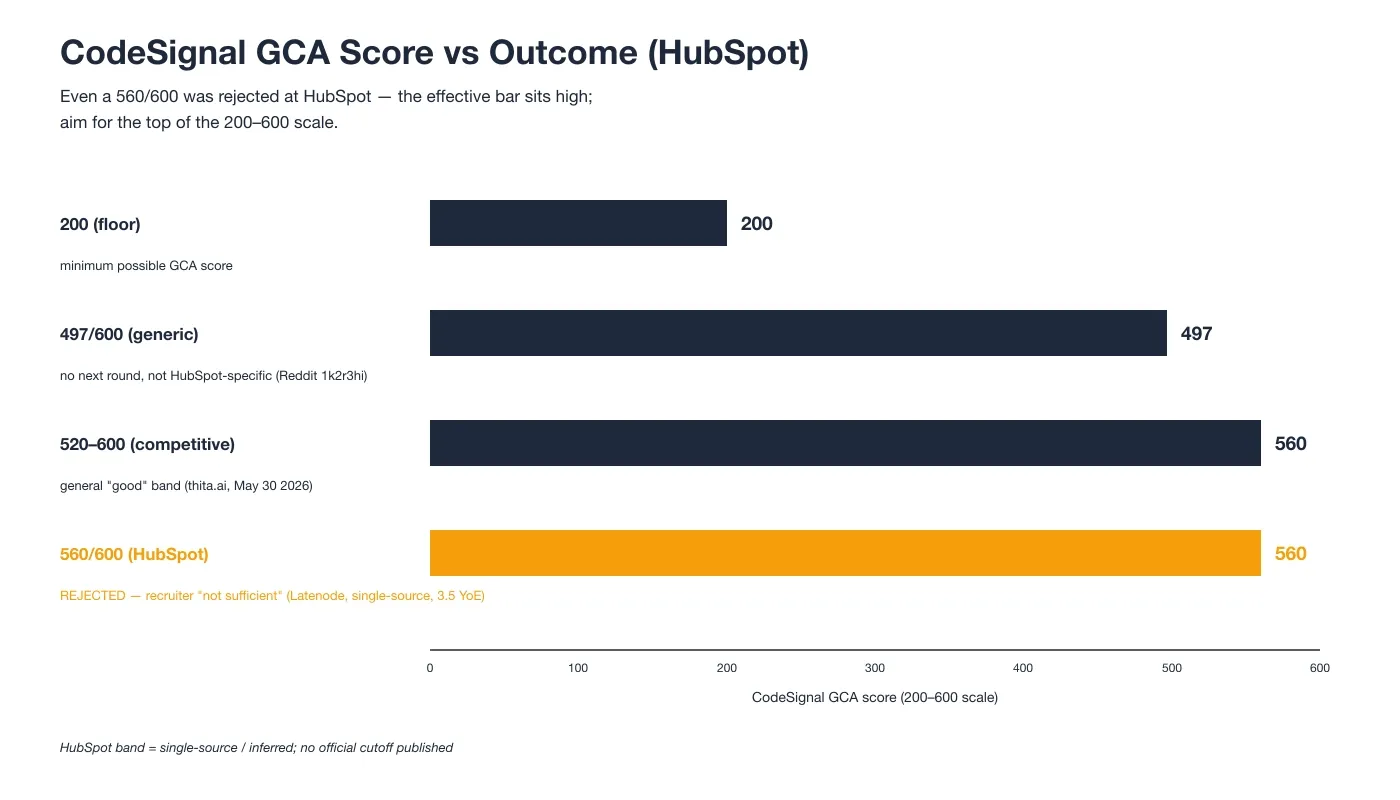
CodeSignal scores on a fixed scale, but HubSpot's effective bar sits higher than the scale alone suggests. The chart below shows score against outcome.
The 200 to 600 GCA Scale
CodeSignal scores range from 200 to 600, where a higher number means more of the assessment was completed. The scale is fixed by the platform and does not change per company.
HubSpot's Effective Bar Runs High
A 560 out of 600 was rejected at HubSpot, with the recruiter calling the score not sufficient to move forward. The general competitive band sits around 520 to 600, but HubSpot's single published rejection point shows the real cutoff is steep. HubSpot has no official published cutoff, so aim for the top of the scale.
Partial Credit Across Levels
The progressive levels reward incremental completion. A partially solved Level 3 still earns credit, which is why banking what you can on the later levels matters more than finishing clean.
HubSpot CodeSignal Exam-Day Strategy
The strategy is about pacing, not about solving everything. Here is what the clock actually allows.
Budget for Two Clean Levels
Most candidates clear only about two of the four levels. Finishing all four inside 90 minutes is rare, and the pacing data shows the four levels are hard to complete in the window. I cleared Levels 1 and 2 cleanly and only partly finished Level 3.
Protect Time for Levels 3 to 4
Time runs out at Level 3 for most people. Spend the early minutes locking in Levels 1 and 2, then bank partial credit on Level 3 and 4 rather than rushing for a perfect solve that the clock will not allow.
Expect a Multi-File Build
The practice bank feels easier than the live assessment. I went in expecting a single-file toy and instead met a multi-file build that pulled in helper files, which is the gap that wastes minutes on test day.
Why Candidates Fail the HubSpot CodeSignal Assessment
Three failure modes show up again and again. The first is the one that ends an application on the spot.
AI-Tool Detection Ends the Application
A candidate used a Desktop Overlay without being interrupted during the test; the score was withheld overnight, and the recruiter canceled the application the next morning after a proctoring review.
At least one candidate was flagged for using a desktop overlay tool. The tool renders the AI's answer on the same screen the proctoring system is monitoring, hidden by a basic OS-layer trick. The window stays out of visible view but is still on-screen.
InterviewFox works differently: the answer goes to my phone, a physically separate device that no screenshot, screen recording, or session monitoring can reach by design.
Land offer with Safer AI Interview Assistant
Skip the risky invisible apps. Our dual-device mode keeps it simple and undetectable. You crush the interview, we handle the answers.
Get started. It's freeLoved by 100,000+ candidates
The structural risk behind that case is real. CodeSignal's Suspicion Score and AI proctoring keep improving, and they review telemetry, solution similarity, and behavioral signals with human reviewers checking anything flagged. A caught assistant does not need to interrupt the test to end the application.
Time Runs Out at Level 3
The 90-minute limit caps most attempts at two solved levels. Level 3 is where the clock usually wins, leaving a partial solve that still earns some credit but not a pass.
Lost Partial Credit and API-Spec Errors
A malformed POST body returns a 400 and fails the whole task even when the logic is nearly correct. The JSON fetch, process, and POST pattern is the usual place this bites, and it is why getting the request shape right matters as much as the algorithm.
How to Prepare for the HubSpot CodeSignal in 7 Days
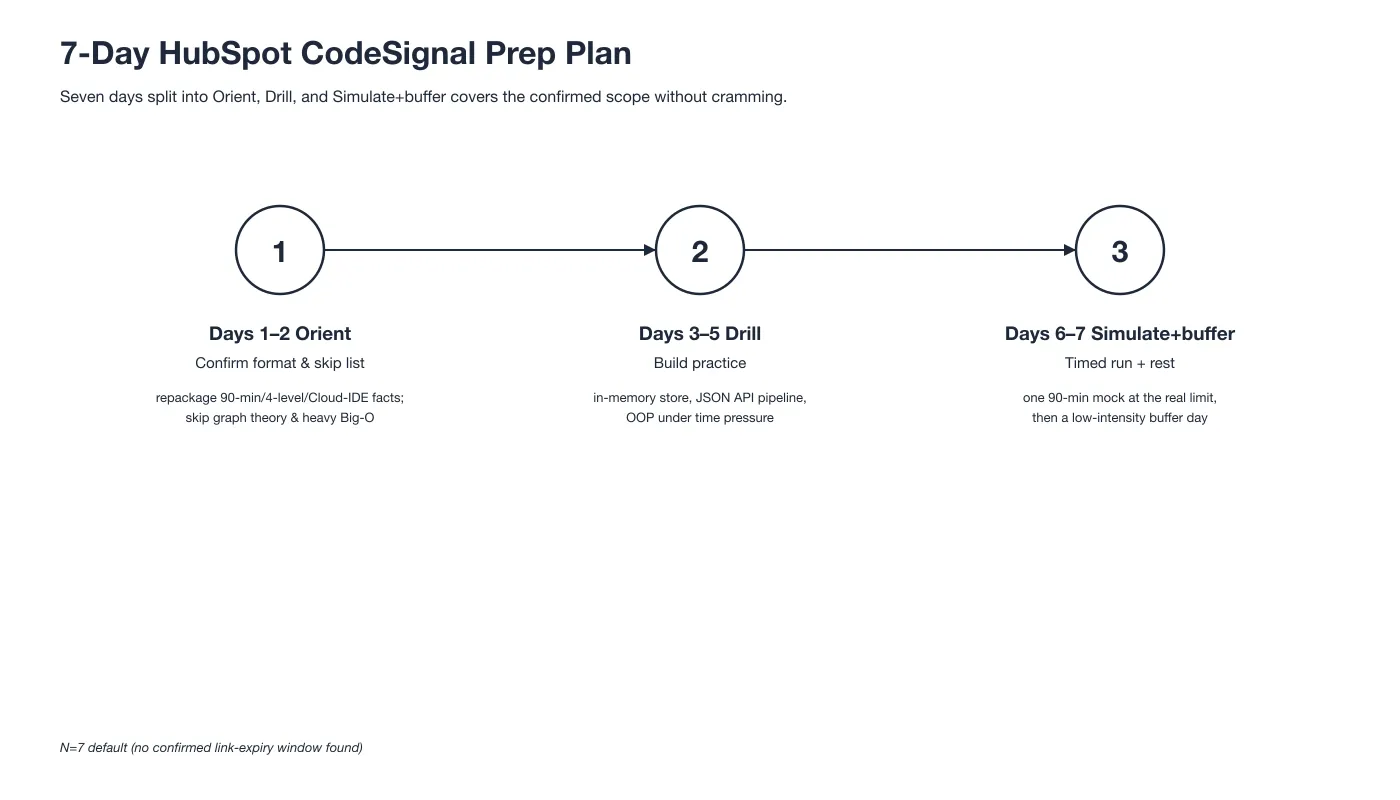
Seven days is enough if you target the confirmed scope and skip the noise. In the days before my test I also ran the confirmed HubSpot question patterns through the Prep Agent from InterviewFox over WhatsApp. It sent back a personalized drill plan and strategy I could actually follow. The plan below splits into orient, drill, and simulate.
Orient (Days 1-2)
Spend the first two days confirming the format facts: 90 minutes, four levels, Cloud IDE, no external editor. Rule out graph-theory drilling, since the confirmed question pool has never included a graph problem, and skip heavy Big-O optimization work, since the failure cause is time and partial credit, not weak algorithms.
Drill (Days 3-5)
Drill the three build types that show up: an in-memory data structure with CRUD plus expiry and look-back, a JSON fetch, aggregate, and POST pipeline with date-boundary splitting, and an OOP class built under a timer. These map to the question categories HubSpot actually uses.
Simulate + Buffer (Days 6-7)
Run one full 90-minute mock in the CodeSignal Cloud IDE so the multi-file interface is familiar, then take a low-intensity buffer day to review only. The buffer keeps you sharp without burning out before the real screen.
What Happens After You Submit the OA
Submission is not the end. The review and the next rounds move fast.
Recruiter Call Within Days
A recruiter call can arrive within two days of submitting the OA. The post-OA window is short, so expect contact quickly if the score clears the bar.
Coding Then System-Design Rounds
The next rounds are an HTTP GET coding round and a system-design round. Candidates have passed the coding screen and then failed system design, so the OA is only the first gate.
Proctoring Review Can Still Cancel
Screen and keystroke recording carry into the review. A flagged score can be withheld and the application dropped after the fact, which is why the proctoring rules matter as much as the code.
The Two HubSpot OA Versions, Reconciled
HubSpot runs two different online assessments, and mixing them up is a common mistake. Here is how they split.
90-Minute CodeSignal Progressive (New Grads)
New-grad, intern, and early-career candidates get the 90-minute CodeSignal progressive screen with four levels in the Cloud IDE. This is the track I sat, and it is what most 2025 and 2026 early-career reports describe.
3-Hour HubSpot API Challenge (Experienced)
More experienced and backend candidates get a 3-hour HubSpot API challenge that runs in their own IDE. Candidates fetch JSON, process it, and POST the result to a candidate HubSpot endpoint. The maximum concurrent calls billing problem is the flagship of this track.
How to Tell Which You'll Get
If you applied to a new-grad, intern, or early-career role, you will get the CodeSignal progressive screen. If the role is experienced or backend, expect the API challenge with your local IDE.
How the CodeSignal Progressive Filesystem Assignment Works
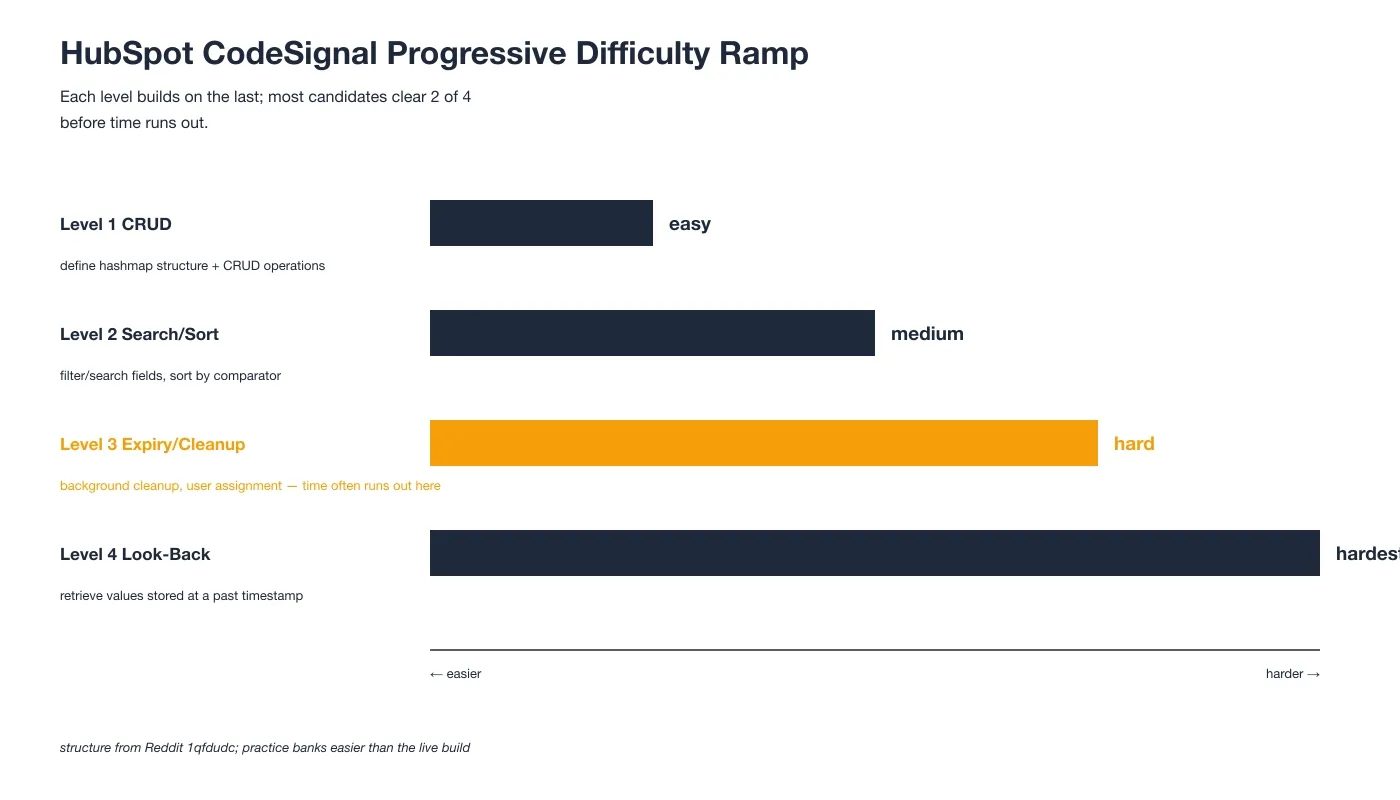
The progressive build is the heart of the new-grad screen, and its shape repeats across reports. The ramp below shows how each level builds on the last.
Level 1 to 4 Mechanics
Level 1 asks for a basic structure with CRUD operations. Level 2 adds search, filter, and sort by a comparator. Level 3 brings expiry, background cleanup, and user assignment, which is where time often runs out. Level 4 asks for a look-back that retrieves values stored at a past timestamp.
Why Practice Feels Easier
The real assessment builds something more substantial across multiple files than the practice questions suggest. The gap shows up in early 2026 candidate accounts, where the live build forces the other files to be wired together.
FAQ
Where can I find a hubspot oa github repo with the real questions?
The partners event-invitation build appears in GitHub repos from StarkYello, ryanhanwu, and rajthalluri, but those cover the 3-hour API-challenge track, not the 90-minute progressive screen. They show the endpoints and the goal, not a full reference solution for the new-grad OA.
How does the codesignal hubspot test work for new grads?
New-grad candidates get a 90-minute CodeSignal progressive screen with four levels in the Cloud IDE. The build grows one requirement per level, and an external editor is generally not allowed. Finishing all four levels in the window is rare.
Are hubspot oa leetcode problems the same as the real assessment?
Not exactly. LeetCode Discuss hosts the concurrent-calls billing problem, but that belongs to the separate 3-hour API-challenge track. The 90-minute progressive OA uses an in-memory store with timestamps, which is a different shape than a typical LeetCode problem.
What is the hubspot concurrent calls oa problem about?
It is the peak-calling-load billing problem on the separate 3-hour API-challenge track. Candidates compute the maximum number of concurrent calls per customer per UTC day from call records, returning 200 OK or 400 on malformed input. It is a sweep-line interval problem, not part of the progressive screen.
What is the hubspot oa format and time limit?
The new-grad hubspot oa is a 90-minute CodeSignal progressive screen split into four levels that intensify. Candidates work in the Cloud IDE, and the clock usually caps most people at two fully solved levels.
Is the hubspot codesignal assessment the same as the API challenge?
No. The hubspot codesignal assessment is the 90-minute four-level progressive screen in the Cloud IDE. The API challenge is a separate 3-hour task in your own IDE with fetch and POST calls, used for more experienced candidates.
Can I use an AI tool or invisible app during the HubSpot CodeSignal OA?
Desktop overlay tools put the AI's answer on your computer screen, rendered as a hidden layer above the browser using a basic OS-layer trick. The answer stays on-screen, the hiding is basic, and proctoring software keeps adding detection capabilities, so the risk is not fixed in your favor.
InterviewFox instead pushes the answer to your phone, a physically separate device that no screenshot, screen recording, or session monitoring can reach by design. The laptop screen stays on the exam editor, unchanged. If you're going to use AI assistance during the OA, the dual-device architecture removes the answer from your screen entirely.
Land offer with Safer AI Interview Assistant
Skip the risky invisible apps. Our dual-device mode keeps it simple and undetectable. You crush the interview, we handle the answers.
Get started. It's freeLoved by 100,000+ candidates