
How I Took the Stripe OA in 2026: The Actual Questions and a Prep Strategy

Quick Facts
| Assessment | The stripe oa runs on HackerRank in 2026 for new-grad, SWE, and intern tracks |
| Format | One coding problem, 60 minutes, split into 3 to 5 incremental parts |
| Scoring | No 0 to 100 score; graded by test cases passed per part |
| IDE | Web IDE only, print-debug, no breakpoints |
| Proctoring | HackerRank anti-cheat logs window and tab activity; webcam is rare |
| AI policy | OA forbids AI helpers; the onsite AI Programming Exercise allows built-in AI |
| Timeline | Apply to invite about 4 to 5 days; reapply cooldown is 12 months |
I took the stripe oa for Stripe's 2026 new-grad SWE track on HackerRank and finished one five-part problem at 22 of 25 test cases inside the 60-minute limit. The result earned an interview invite. What follows is the complete process and how I prepared for it.
With three reversal cases still failing and twelve minutes left, I used an AI interview assistant to inspect the dispute logic. It isolated the remaining fault to reversal bookkeeping and gave me a clear next check, which I break down later in the exam walkthrough.
Before my test, I read every stripe oa post from the past two years on Reddit, LeetCode Discuss, and Teamblind. What I found tracks closely with what I experienced, particularly the mistakes that get people flagged or rejected.
The Real Questions on My Stripe HackerRank Test
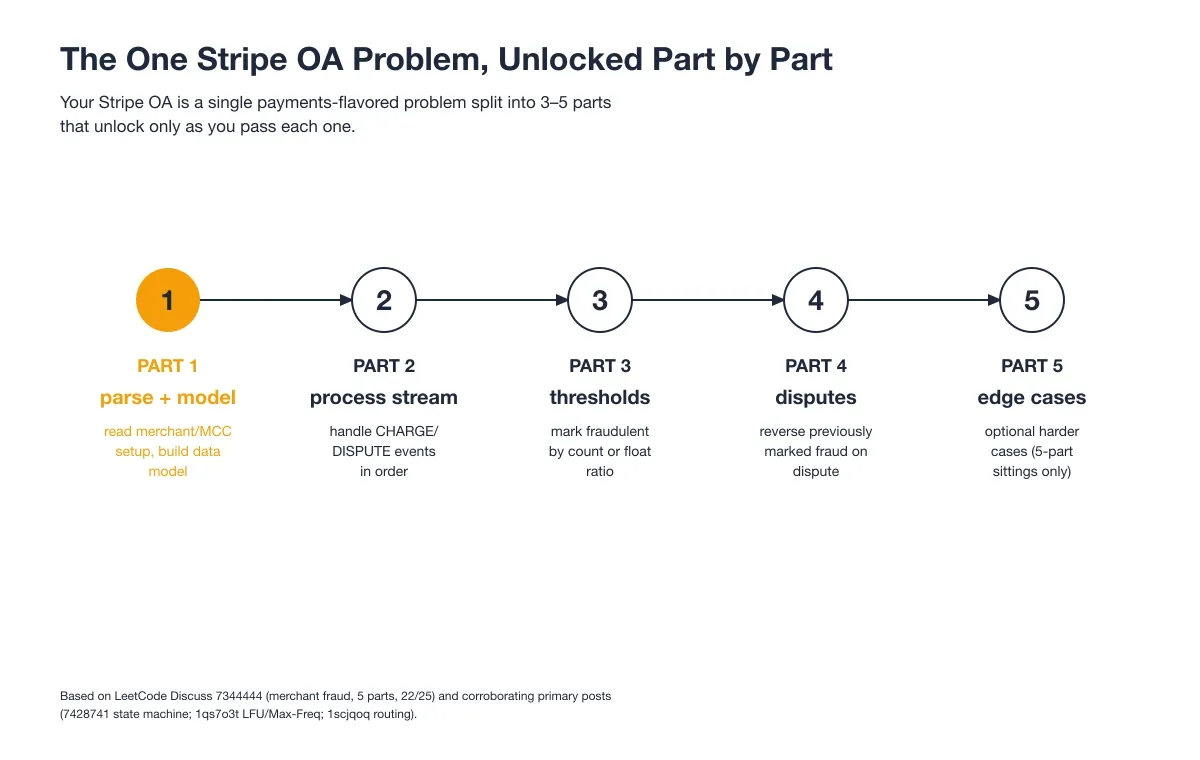
The Stripe OA is one payments-style problem split into parts that unlock only as you pass each one, as the chart below shows.
Question 1: Merchant Fraud Detection
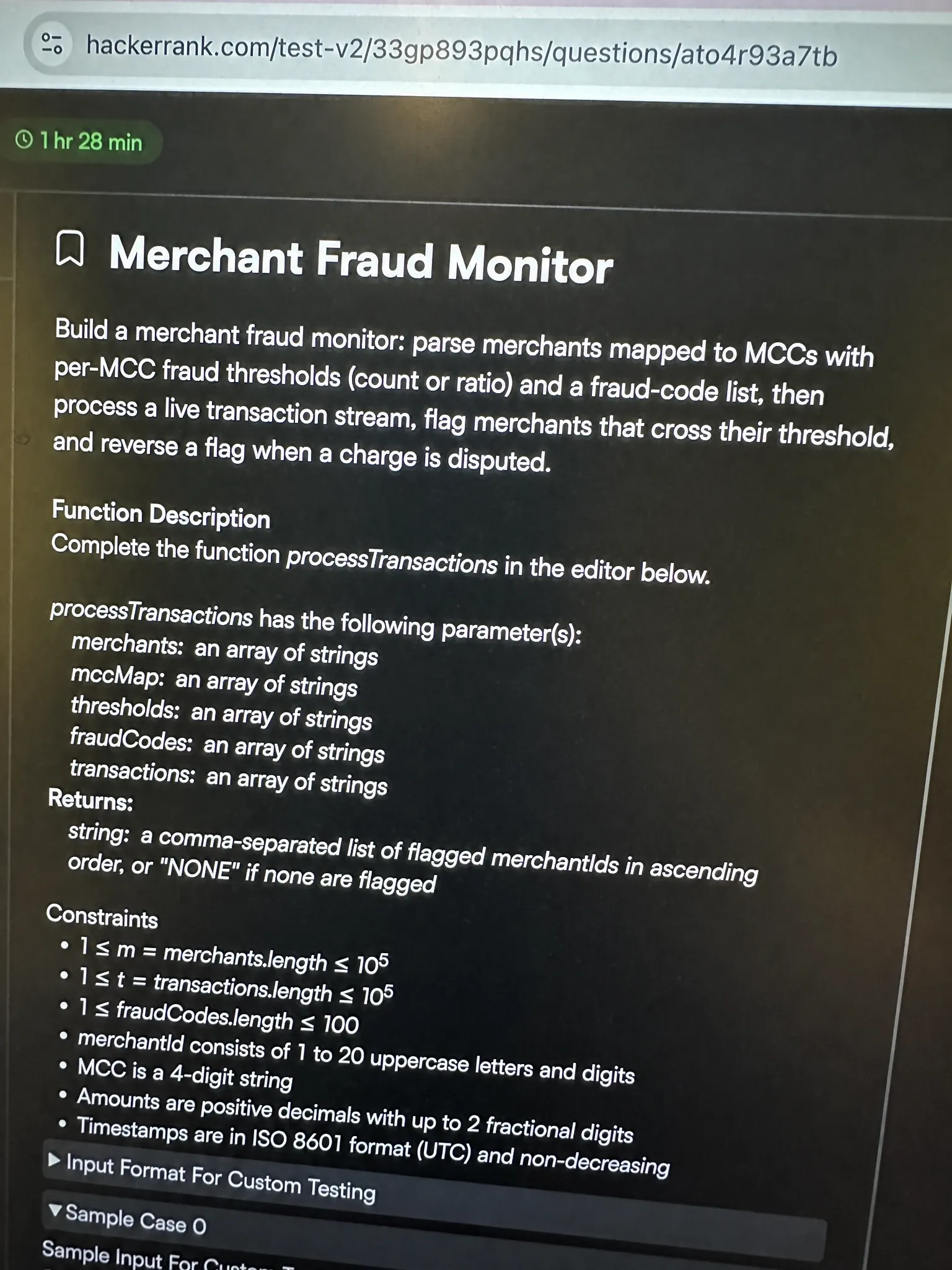
I was sitting the SWE new-grad track, and the confirmed format was one problem in 60 minutes, broken into parts that only unlock after you pass the one before.
The problem I got: Build a merchant fraud monitor. Stripe gave me a setup describing merchants tied to merchant category codes (MCCs), each MCC carrying its own fraud threshold, plus a list of fraud result codes. Then I had to process a live stream of transactions, flag merchants as fraudulent once they crossed their threshold, and correctly reverse a flag when a transaction got disputed. The whole thing was presented as one growing spec, part by part.
- Part 1: Parse the setup. Read each merchant to its MCC, the per MCC fraud threshold (either a hard integer count or a float ratio), and the separate list of fraud codes. Build the data model. I cleared this at 3 out of 3.
- Part 2: Process the event stream in order. Each
CHARGErecords a transaction for a merchant with a result code, eachDISPUTEreferences a prior transaction by id. Keep a running fraud count and total count per merchant. This added 5 cases and I was at 8 out of 8. - Part 3: After the stream, mark each merchant fraudulent. With a count threshold the merchant is flagged once its fraud charges reach the integer. With a ratio threshold it is flagged when fraud charges divided by total charges meets the float. This added 5 more, 13 out of 13.
- Part 4: Handle dispute reversal. A successful dispute reverses the original charge, so a fraud charge that was already counted must be subtracted and the merchant re-evaluated. This added 5, and I hit 18 out of 18.
- Part 5: Edge cases. Disputing a transaction twice, disputing a charge that was never fraud, and ratio merchants with zero volume should not flip to fraud. This part held 7 cases and I only cleared 4 of them.
My approach: The trap here is treating each part as a fresh problem. I read the full spec first, so I built one monitor object up front instead of rewriting it at Part 3. The core insight is that fraud state is just two counters per merchant, and a dispute is a subtraction, not a special case. For a count threshold the check is fraud_count >= value. For a ratio threshold it is fraud_count / total_count >= value, but only when total_count > 0, otherwise a merchant with no charges would wrongly trip the ratio. I stored transactions by id so a dispute could find and reverse the exact charge, flipping its reversed flag so a second dispute on the same id is a no-op. Keeping the merchant map insertion ordered also meant the final report matched the expected output order without a sort.
from collections import defaultdict, OrderedDict


class FraudMonitor:
    def __init__(self):
        self.merchants = OrderedDict()       # mid -> mcc
        self.thresholds = {}                 # mcc -> ('count', int) | ('ratio', float)
        self.fraud_codes = set()             # result codes that count as fraud
        self.txn = {}                        # txn_id -> {'mid', 'fraud', 'reversed'}
        self.fraud_count = defaultdict(int)  # mid -> active fraud charges
        self.total_count = defaultdict(int)  # mid -> active total charges

    def add_merchant(self, mid, mcc):
        self.merchants[mid] = mcc

    def add_threshold(self, mcc, kind, value):
        self.thresholds[mcc] = (kind, value)

    def add_fraud_codes(self, codes):
        self.fraud_codes.update(codes)

    def charge(self, mid, txn_id, code):
        is_fraud = code in self.fraud_codes
        self.txn[txn_id] = {'mid': mid, 'fraud': is_fraud, 'reversed': False}
        self.total_count[mid] += 1
        if is_fraud:
            self.fraud_count[mid] += 1

    def dispute(self, mid, txn_id):
        t = self.txn.get(txn_id)
        if t is None or t['reversed']:
            return
        # a dispute reverses the original charge completely
        self.total_count[mid] -= 1
        if t['fraud']:
            self.fraud_count[mid] -= 1
        t['reversed'] = True

    def is_fraudulent(self, mid):
        mcc = self.merchants.get(mid)
        if mcc is None:
            return False
        kind, value = self.thresholds[mcc]
        fc = self.fraud_count[mid]
        tc = self.total_count[mid]
        if kind == 'count':
            return fc >= value
        if tc == 0:
            return False
        return (fc / tc) >= value

    def report(self):
        lines = []
        for mid in self.merchants:
            status = 'FRAUD' if self.is_fraudulent(mid) else 'OK'
            lines.append(f"{mid} {status}")
        return "\n".join(lines)


if __name__ == "__main__":
    m = FraudMonitor()
    m.add_merchant("M1", "5734")
    m.add_merchant("M2", "5812")
    m.add_threshold("5734", "count", 2)
    m.add_threshold("5812", "ratio", 0.5)
    m.add_fraud_codes({"F01", "F02"})

    m.charge("M1", "T1", "F01")
    m.charge("M1", "T2", "OK1")
    m.charge("M1", "T3", "F02")     # M1: 2 fraud / 3 total -> flagged by count
    m.charge("M2", "T4", "F01")     # M2: 1 fraud / 1 total -> 1.0 ratio -> flagged
    m.dispute("M1", "T3")           # reverses T3, M1 back to 1 fraud -> not flagged

    print(m.report())
Time complexity: O(N + M) where N is the number of stream events and M is the number of merchants | Space complexity: O(N + M) for the transaction map and per merchant counters
I cleared Part 4 at 18 out of 18, but Part 5's edge cases ate the last twelve minutes and I finished the hour at 22 out of 25, with three hard reversal cases on zero volume and double disputed merchants still failing when time ran out.
I'd already decided not to reach for an invisible app or a desktop overlay: the answer would have landed on the same screen the proctoring system monitors, hidden by a basic OS-layer trick, and I didn't want that uncertainty in the background.
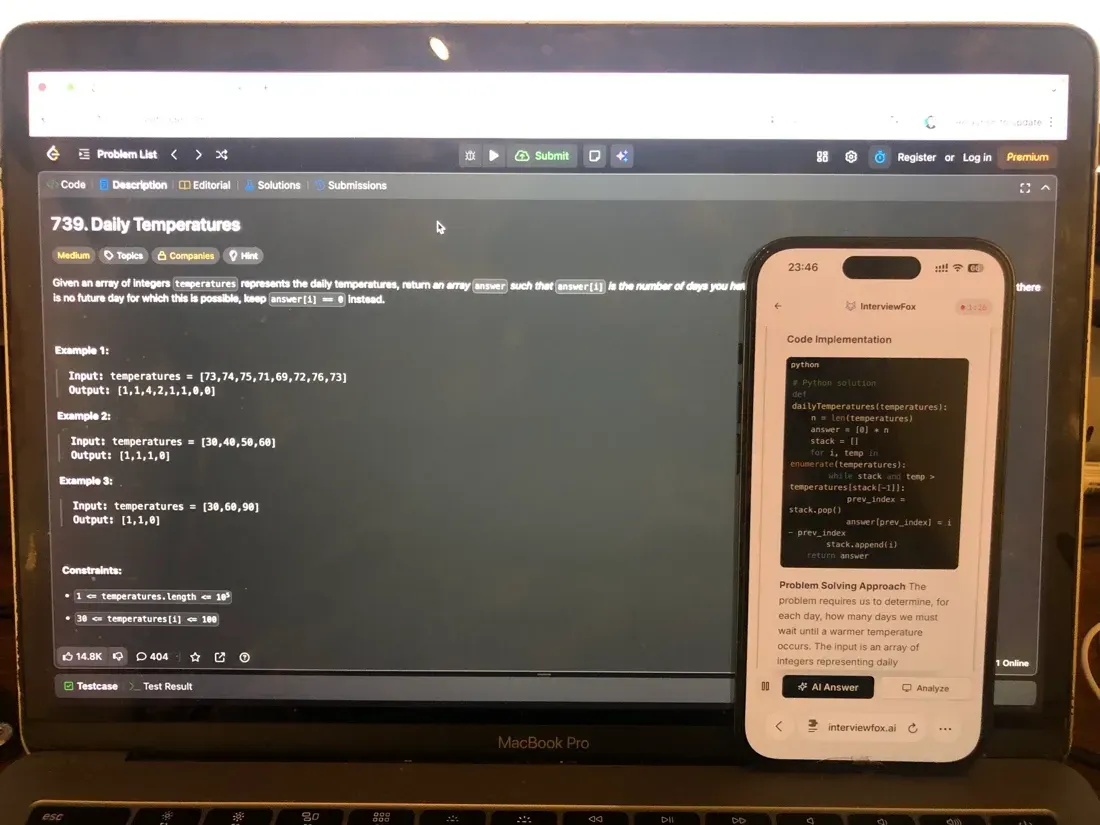
With twelve minutes left and three reversal cases still red, I used the keyboard shortcut for a dual-device AI interview assistant, which auto-captured the problem and pushed the answer to my phone, a separate device outside the platform's screenshot monitoring. It isolated the remaining fault to reversal bookkeeping and gave me a clear next check while my laptop screen stayed exactly on the exam editor, unchanged.
Land offer with Safer AI Interview Assistant
Skip the risky invisible apps. Our dual-device mode keeps it simple and undetectable. You crush the interview, we handle the answers.
Get started. It's free Loved by 100,000+ candidates
Stripe's Proctoring Policy for HackerRank
No Webcam by Default, But Logging Is Always On
Most candidates see no webcam on the Stripe OA. HackerRank still logs activity the whole time. The moment the test window loses focus, because you clicked outside it or opened another window, the action is flagged. A human proctor is not required for that logging to happen.
Overlay and Invisible-App Tools Get Flagged
An automated overlay in a second window stays hidden only if you never touch it. The instant you click or type into it, HackerRank flags the interaction. Proctor Mode adds full-screen enforcement and tab monitoring, so a switch is logged in real time. This is the structural reason outside helper tools fail here.
What Stripe's HackerRank Test Format Actually Looks Like
One Problem, 60 Minutes, 3–5 Parts
The Stripe OA gives you one main coding problem and 60 minutes to solve it. The problem splits into 3 to 5 incremental parts. After setup and a short end question, you have roughly 45 minutes of real coding time. Languages are your choice, and Stripe values readable, modular code.
Parts Unlock Only After You Pass
Each part unlocks only after the prior part's test cases pass. Because later parts build on earlier ones, a bug in part 1 carries forward and compounds. You cannot jump ahead to an easier section when one part stalls.
Web IDE, Print-Debug Only
The test runs in a web IDE with no breakpoints. The only way to debug is print statements. Stripe scores readability and good coding practice, so clear structure matters as much as a correct answer.
How Stripe's HackerRank Scoring Works
The chart below lays out real per-part counts and the outcome each one produced.
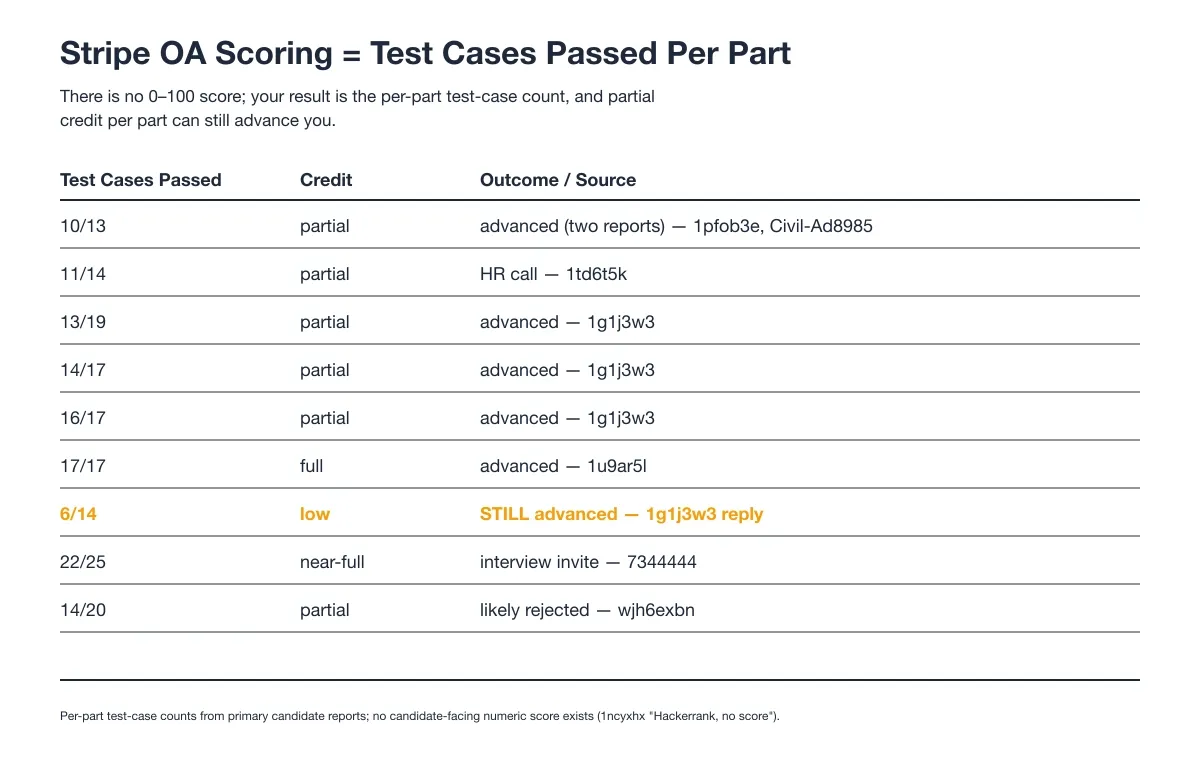
No 0–100 Score, Only Test Cases Passed
HackerRank shows candidates no numeric score. Your result is the count of test cases you passed in each part, such as 10 of 13 or 22 of 25. There is no 0 to 100 total to chase.
Partial Credit Per Part Can Still Advance You
Partial credit per part often still moves you forward. Advancement has happened at 6 of 14, 11 of 14, 13 of 19, and 16 of 17. A low count is not an automatic rejection.
Passing Everything Isn't a Guarantee
Passing every test case does not guarantee progression. Full test-case clears have still ended in rejection. Later rounds judge communication and problem fit, so a clean OA score is necessary but not sufficient.
Stripe HackerRank Exam-Day Strategy
Read the Whole Problem Before Coding
My biggest mistake on a practice run was starting part 1 before I read the full spec. I panicked at the length and refactored later when part 3 changed the shape. I now read the entire problem before writing a line.
Lock Part 1 Before Moving On
I treat each part as a checkpoint. I get part 1 fully working with edge cases before moving on, because later parts build on it and bugs compound. One sitting forced a full rewrite from a heap to a hash map of heaps after I got stuck.
Bank Passing Cases Early, Don't Debug Last
I bank passing cases as early as I can. I saw how a solution finished with ten minutes left could still close with zero passing cases after all ten minutes went to debugging. I spend the first ten minutes reading, then lock cases before the clock gets tight.
Why Candidates Fail the Stripe HackerRank Assessment
Invisible-App Use Gets the OA Terminated
A confirmed private case ended with the OA terminated on the spot and the application closed after Invisible App use. It shows why the OA forbids any outside helper.
The mechanism is structural. HackerRank logs window activity and flags you the moment the test window loses focus. An Invisible App only helps if you click or type into it, and that interaction is exactly what triggers the flag.
Proctor Mode adds full-screen enforcement and tab monitoring, so the switch is logged in real time. The OA explicitly forbids LLM assistance, so the terminated session is the expected outcome.
The AI interview tool from InterviewFox works differently: the answer goes to my phone, a physically separate device that no screenshot, screen recording, or session monitoring can reach by design. That separation keeps the answer off the monitored laptop instead of relying on a hidden on-screen layer.
Land offer with Safer AI Interview Assistant
Skip the risky invisible apps. Our dual-device mode keeps it simple and undetectable. You crush the interview, we handle the answers.
Get started. It's free Loved by 100,000+ candidates
Late Debugging Wastes the Clock
Late debugging is the most common way to lose the clock. Finishing only two of five parts and closing with zero passing cases after a final ten-minute debug sprint are both documented outcomes. I budget debugging time inside each part, not at the end.
Refactor Thrash From Skipping the Spec
Skipping the full spec causes refactor thrash. I started part 1 without reading later parts on a mock and rewrote the whole structure mid-problem. Reading first keeps the data model stable across all parts.
How to Prepare for the Stripe HackerRank in 7 Days
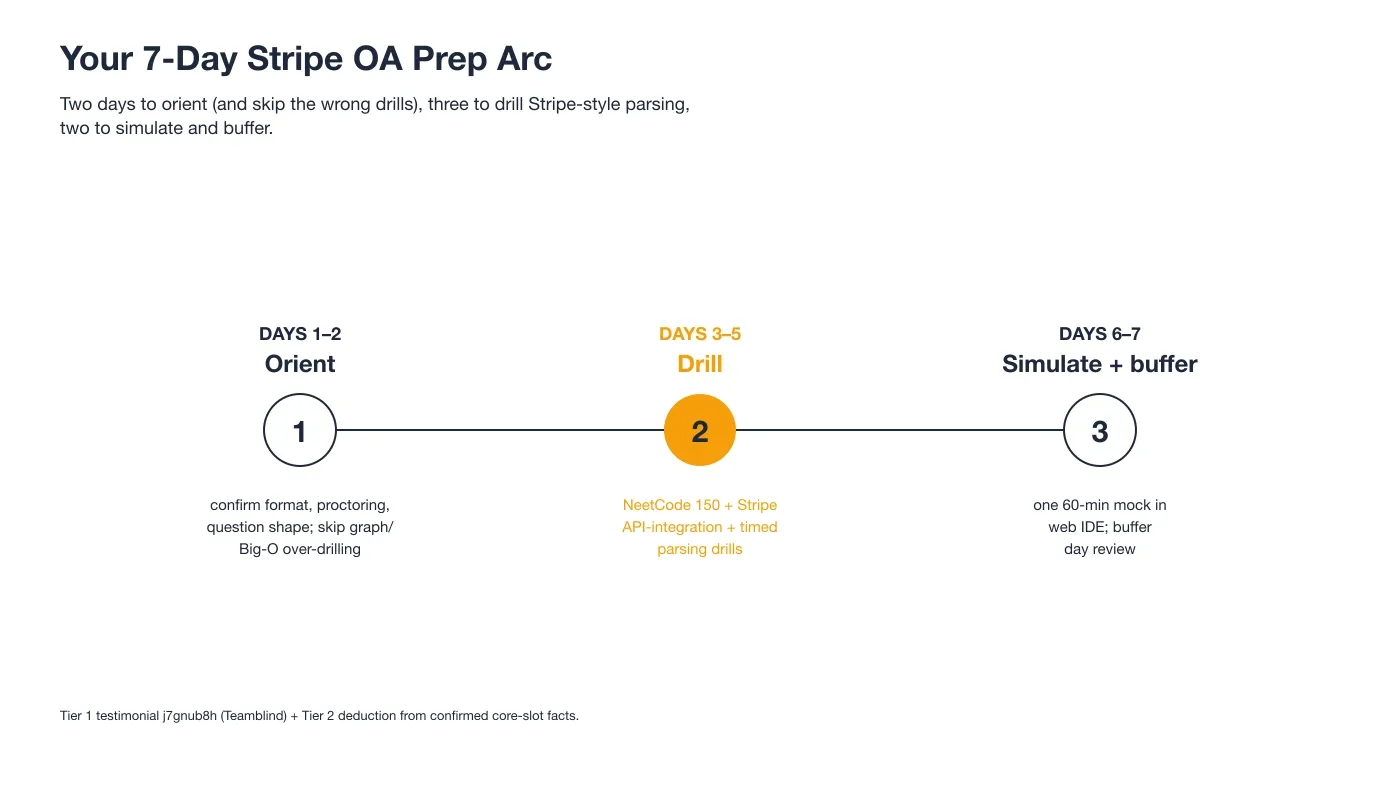
The timeline below shows how I split the week.
Before the OA, I also ran the Prep Agent from InterviewFox as an AI interview preparation tool over WhatsApp. I sent it the confirmed Stripe question patterns and got back a personalized drill plan and strategy for the week.
It was one tool among several, not a shortcut, but it kept my prep focused on the payments-style parsing that actually shows up.
Days 1–2 Focus on Format
I spent the first two days confirming the real format instead of grinding random LeetCode tags. The confirmed pool is string parsing, hash maps, and state machines, not graph or DP problems, so I skipped those. I also skipped deep Big-O drilling, because the failure mode here is proctoring violation and refactor thrash, not weak algorithms.
Days 3–5 Drill Payments-Style Parsing
I drilled Stripe-style parsing with NeetCode 150 and Grind 75 as the base, on a timed clock of 30 minutes per medium and 45 to 60 per hard. I also built API integrations with vanilla request libraries and learned my debugger cold, since Stripe values readable code and real integration skill.
Days 6–7 Run a Full Mock and Buffer
I ran one full 60-minute mock in a bare web IDE with print-debug only, then used the last day to review. I added no new material on buffer day. The mock taught me to manage the clock without breakpoints.
What Happens After You Submit the OA
Recruiter Screen, Then Technical Team Screen
A pass leads to a recruiter screen, a 30-minute call, then a technical team screen. The team screen can be a multi-part live-coding problem where explaining the thought process aloud matters.
Apply-to-Invite Is ~4–5 Days, Screen ~1 Week
The invite lands about 4 to 5 days after you apply. The technical screen follows roughly a week later, though holidays can stretch it to three weeks. I planned my prep window around that cadence.
Fail and You Wait 12 Months
A failed OA starts a 12-month reapply cooldown. The wait is fixed, so I treated the first attempt as the one that had to count.
Stripe's OA and Onsite Split on AI
Stripe splits its HackerRank rounds into an AI-forbidden OA and an AI-allowed onsite exercise. Knowing the split keeps you from bringing helpers into the wrong room.
The OA Forbids Any AI Helper
The OA forbids LLM use outright. Using an Invisible App can end the session and close the application, as the private case above demonstrates. Walk in with no AI helper on the OA.
The Onsite AI Programming Exercise Welcomes It
The onsite AI Programming Exercise is different. It uses HackerRank's built-in AI and scores how you use it on architecture, testing, and optimization. Bring AI judgment to that round, not to the OA.
FAQ
The Stripe Test Uses One Multi-Part Question
The stripe hackerrank test is one coding problem split into 3 to 5 parts. Each part unlocks after you pass the one before. You get 60 minutes total.
Reddit Confirms One Problem and a 60-Minute Limit
The recurring pattern across stripe oa reddit threads is one problem, 60 minutes, and parts that unlock on pass. HackerRank also logs window activity even without a webcam.
New-Grad and Intern Tracks Share the Same Structure
The stripe new grad oa uses the same one-problem, multi-part format as the intern track. The difficulty is the stateful, payments-style spec, not standard LeetCode patterns. Both tracks share the 60-minute limit.
The Online Assessment Is a 60-Minute Web IDE Session
The stripe online assessment is a web IDE coding session with print-debug only. You solve one growing problem across parts and get no 0 to 100 score. Proctoring logs your window activity throughout.
The Intern and New-Grad Formats Match
The stripe intern oa follows the same single-problem, multi-part structure on HackerRank. The time limit is 60 minutes and scoring is test cases passed per part. Only the problem flavor changes between tracks.
AI and Invisible Apps Violate the Stripe OA Rules
Desktop overlay tools put the AI's answer on your computer screen, rendered as a hidden layer above the browser using a basic OS-layer trick. InterviewFox instead works as an on-phone AI interview helper, pushing the answer to a physically separate device that no screenshot, screen recording, or session monitoring can reach by design, so your laptop screen stays on the exam editor, unchanged.
If you're going to use AI assistance during the OA, the dual-device architecture removes the answer from your screen entirely.
Land offer with Safer AI Interview Assistant
Skip the risky invisible apps. Our dual-device mode keeps it simple and undetectable. You crush the interview, we handle the answers.
Get started. It's free Loved by 100,000+ candidates