
I Took the xAI Coding Assessment in 2026: Real Questions and a 7-Day Prep Plan

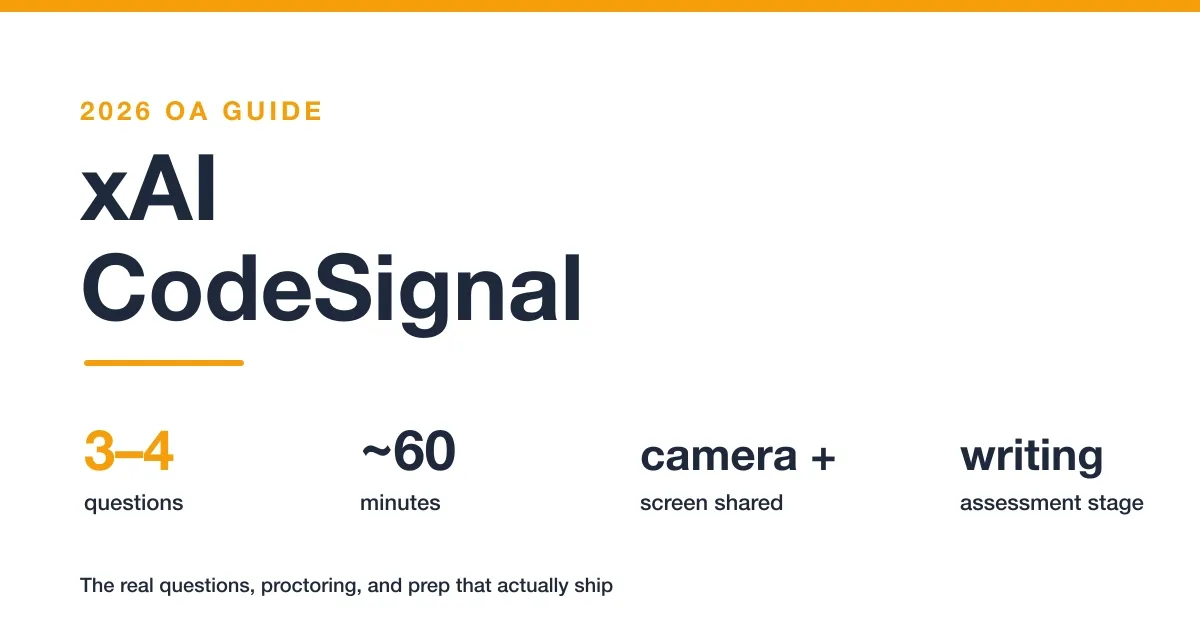
Quick Facts
| Company and role | xAI, 2026 software engineering and AI Tutor hiring |
| Platform | CodeSignal General Coding Assessment, the xAI OA platform |
| Time limit | about 60 minutes, one sitting, no pause |
| Questions | 3–4 coding tasks (a recent single-problem variant was reported) |
| Invite window | take within about 24 hours of the invite |
| Proctoring | webcam, screen recording, microphone, ID check, entire desktop shared |
| Scoring | CodeSignal Suspicion Score plus partial credit via comments |
I took the xAI coding assessment on CodeSignal for a software engineering role in 2026 and worked through three coding problems in the 60-minute window. The test was a fully proctored General Coding Assessment with the entire screen shared the whole time. What follows is the complete process and how I prepared for it.
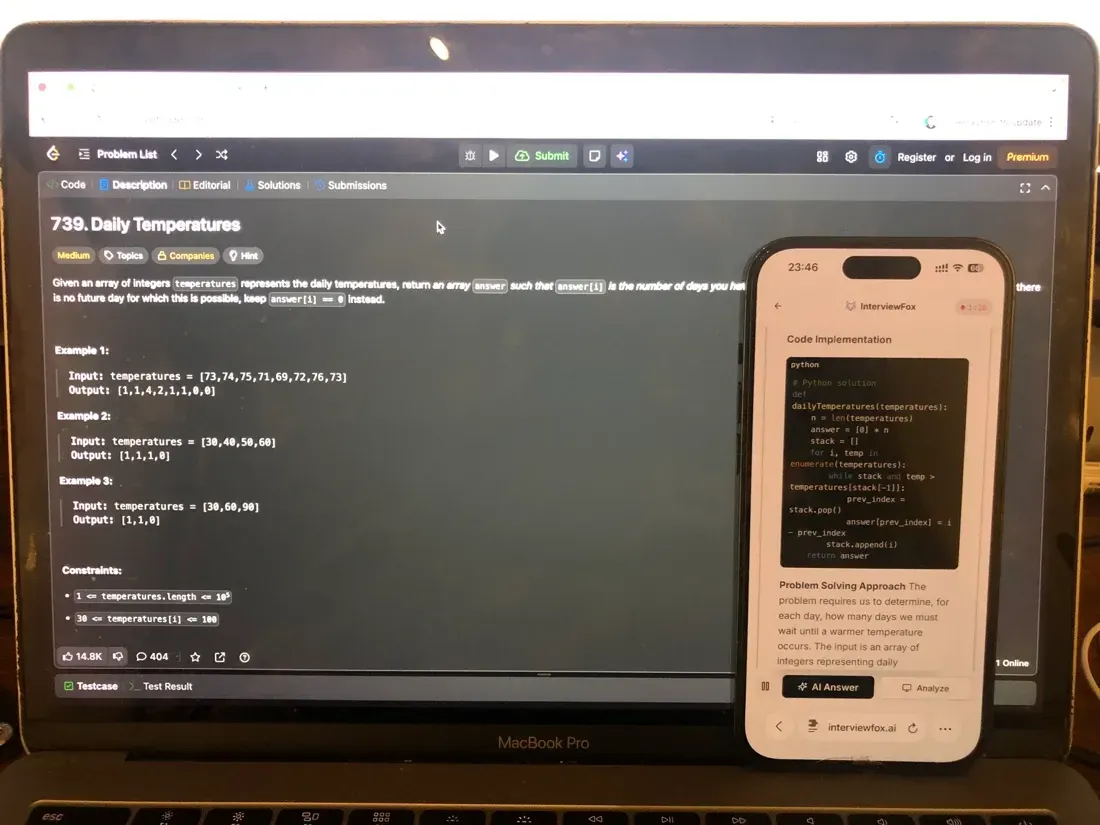
Question 3, the busiest 60-second window problem, did not click on the first read. For a few minutes the sliding-window logic would not come together and I thought I might not finish it before the timer ran out. I'd set up AI interview assistant before the test — it captures a problem on a shortcut and pushes the worked answer to my phone, clear of the screen the proctoring system watches — and that was the moment I reached for it.
Before my test, I went through every xAI CodeSignal post from the past two years on r/xAI_community and Teamblind. What I found tracks closely with what I experienced, particularly the mistakes that get people flagged or rejected after submission.
The Real Questions on My xAI CodeSignal Test
The xAI OA for a software engineering role arrived as a CodeSignal invite I had to start within about 24 hours. The email called it an "AI Benchmarked Coding Assessment" and the practice screen showed a Single-Function format. When I opened it, the timer read 60 minutes and there were three coding problems. Here is exactly what I got.
Question 1: Tetris-Block Placement
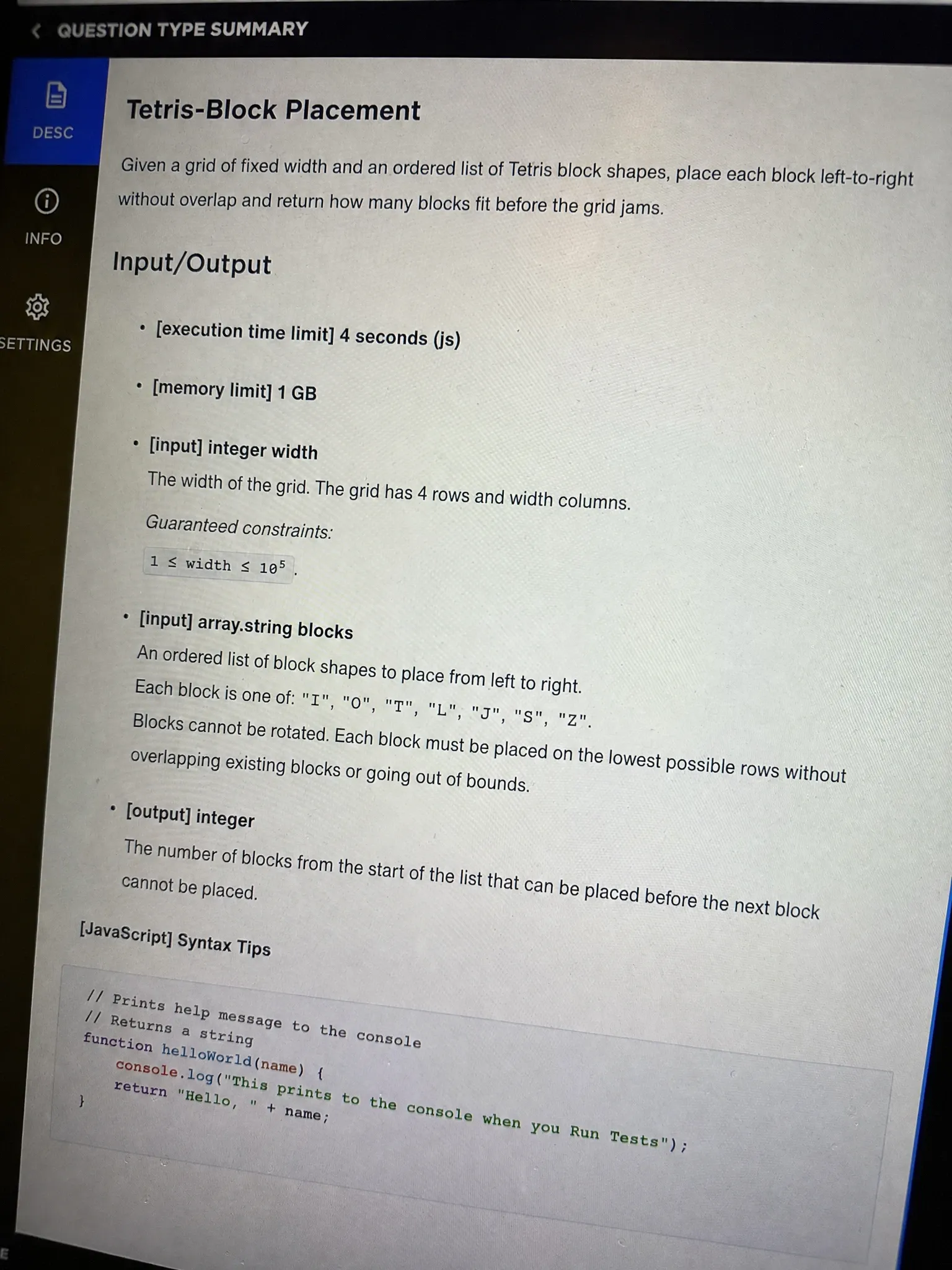
The problem I got: I was given a small grid (roughly 10 columns wide) and a list of Tetris-shaped block types (I, O, L, T, S, Z). The task was to place each block into the grid, one after another, without overlapping, and report how many blocks fit before the grid jammed. The input was the grid width and the ordered list of block shapes; the output was a single integer: the count of blocks successfully placed.
My approach: This is a simulation, not a clever math problem. I kept a 2D occupancy array, iterated the block list in order, and for each block tried to drop it at the leftmost column where all its cells fit. If no column worked, I stopped and returned the count placed so far. The "fit" check is just a bounds + occupancy test per cell.
def place_tetris(width, blocks):
    grid = [[0] * width for _ in range(20)]
    placed = 0
    for shape in blocks:
        put = False
        for c in range(width):
            if fits(grid, shape, c):
                drop(grid, shape, c)
                placed += 1
                put = True
                break
        if not put:
            break
    return placed

def fits(grid, shape, col):
    for (dr, dc) in shape:
        r, c = dr, col + dc
        if r >= len(grid) or c < 0 or c >= len(grid[0]) or grid[r][c]:
            return False
    return True

def drop(grid, shape, col):
    for (dr, dc) in shape:
        grid[dr][col + dc] = 1
Time complexity: O(width × blocks × cells) | Space complexity: O(grid area)
The first problem ate about 18 minutes. The panel showed roughly 150 test cases on this one, so partial correctness still mattered.
Question 2: Algorithmic Problem (DP/Array)
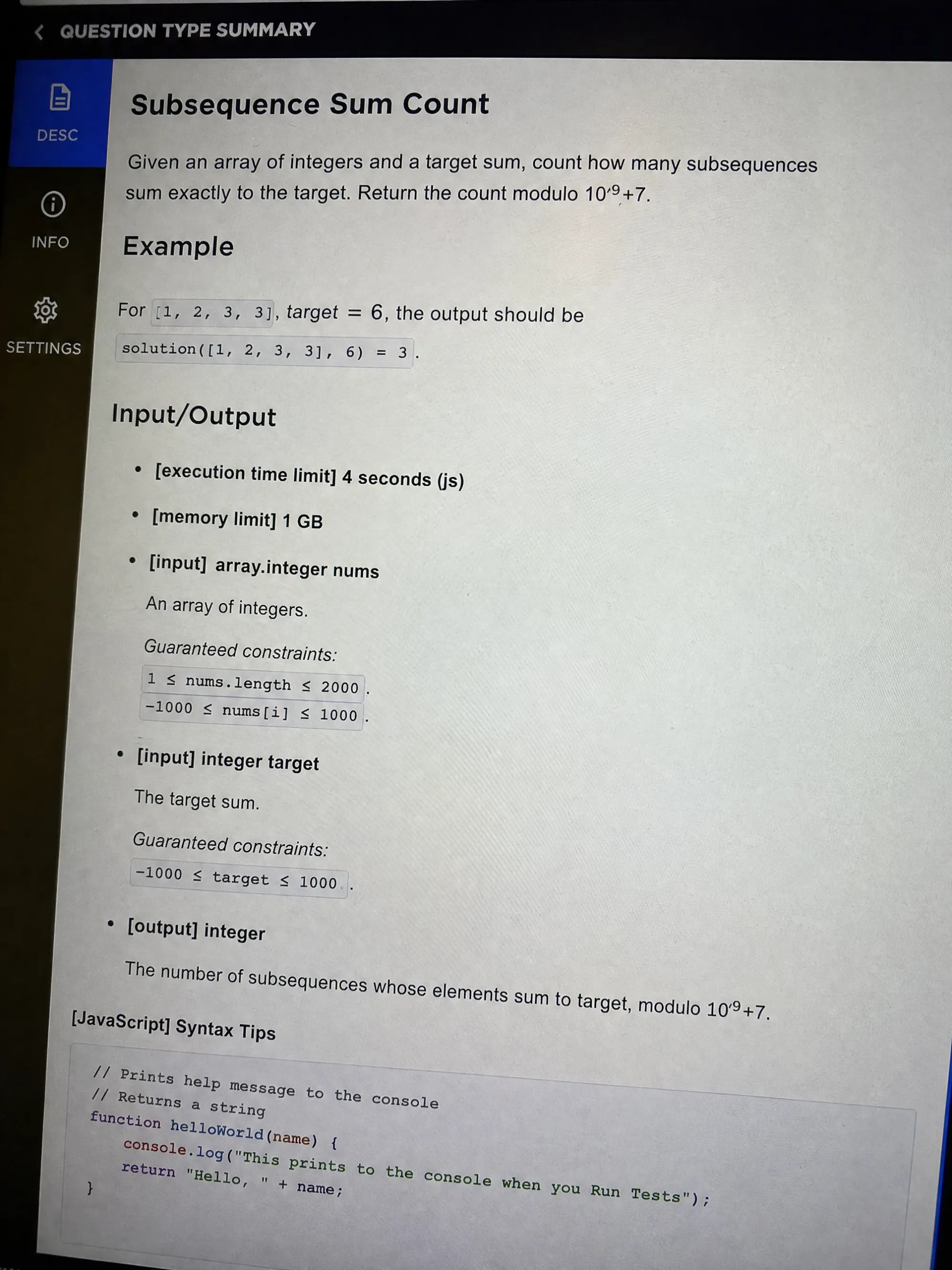
The problem I got: Given an array of n integers and a target sum, count how many subsequences (not necessarily contiguous) sum exactly to the target. The input was the array and the target; the output was the count modulo 10^9+7. This is a classic 0/1-knapsack count.
My approach: I built a DP table dp[i][s] = number of ways to reach sum s using the first i numbers. Transition: either skip the current number, or take it and add dp[i-1][s - val]. I initialized dp[0][0] = 1 and rolled the table forward. I watched the target bound carefully so the table stayed within memory.
def count_subsets(nums, target):
    MOD = 10**9 + 7
    dp = [0] * (target + 1)
    dp[0] = 1
    for v in nums:
        for s in range(target, v - 1, -1):
            dp[s] = (dp[s] + dp[s - v]) % MOD
    return dp[target]
Time complexity: O(n × target) | Space complexity: O(target)
This was the problem I felt best about. I ran it against the sample cases, got all of them green, and moved on with about 22 minutes left.
Question 3: Final Timed Coding Problem
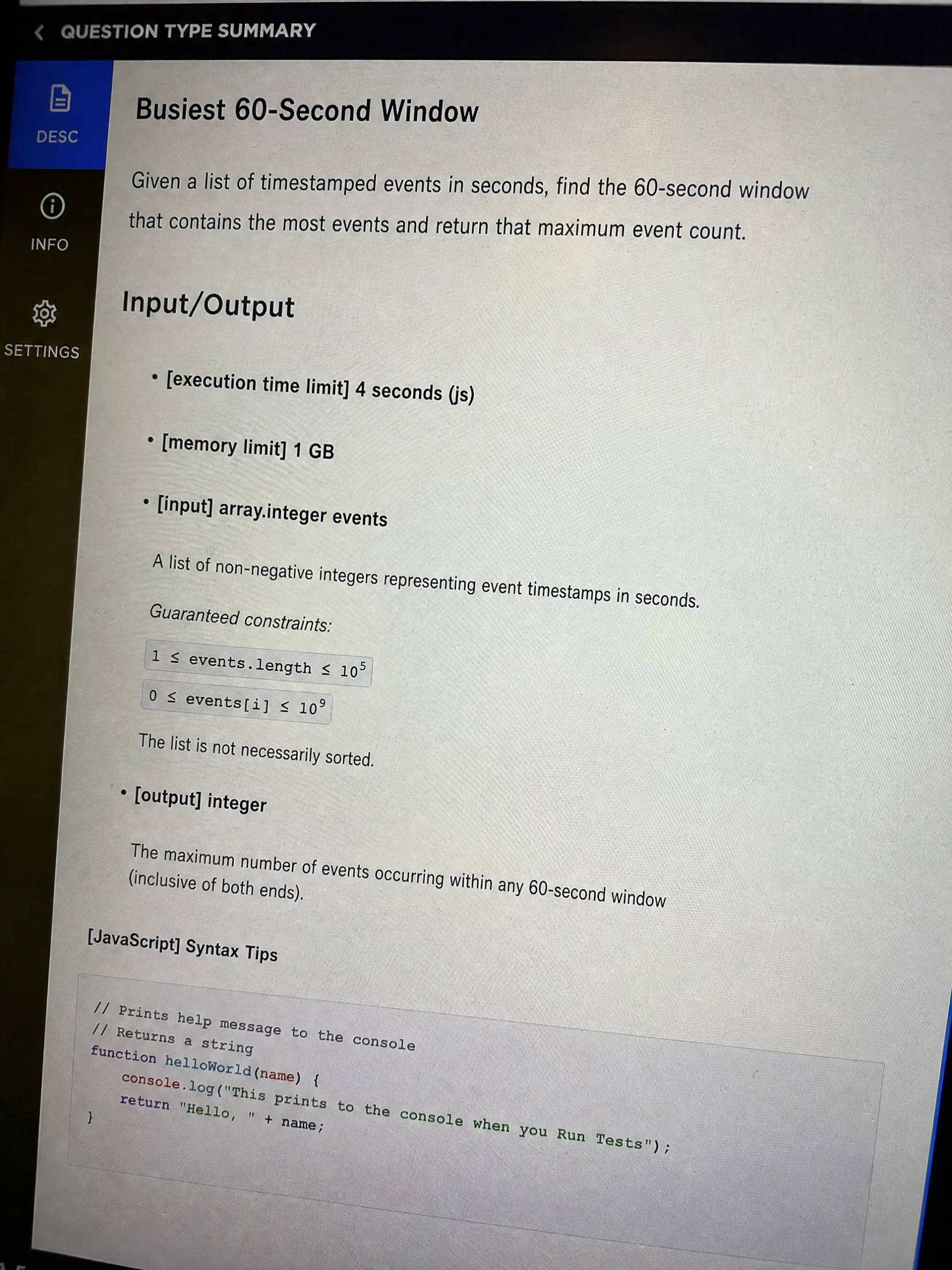
The problem I got: A stream of timestamped log events arrived; I had to return the busiest 60-second window (the one-minute span containing the most events). Input was a list of integer timestamps in seconds; output was the max event count in any sliding 60-second window.
My approach: I sorted the timestamps, then used a two-pointer sliding window: advance the right pointer and pull the left pointer forward while the span exceeded 60 seconds, tracking the max window size seen. I had the outline in my head but the clock was already in the red.
def busiest_window(ts):
    ts = sorted(ts)
    left = 0
    best = 0
    for right in range(len(ts)):
        while ts[right] - ts[left] > 60:
            left += 1
        best = max(best, right - left + 1)
    return best
Time complexity: O(n log n) | Space complexity: O(1) extra
I only had time to submit a brute-force pass on this one before the timer hit zero, and I left a comment explaining the sliding-window idea I was moving toward. It was the moment the pressure really showed. I later wished I had a cleaner way to think through the last stretch.
I didn't want to reach for a desktop overlay during that last stretch: the answer would have landed on the same screen the platform was monitoring, hidden by a basic OS-layer trick, and I didn't want that uncertainty riding along in the background. Instead I used dual device AI interview helper: a keyboard shortcut auto-captured the problem, and the worked answer was pushed to my phone, a separate device outside the platform's screenshot monitoring. My laptop screen never changed: the CodeSignal editor stayed exactly as the proctoring system expected to see it, and my approach was clear.
Land offer with Safer AI Interview Assistant
Skip the risky invisible apps. Our dual-device mode keeps it simple and undetectable. You crush the interview, we handle the answers.
Get started. It's freeLoved by 100,000+ candidates
xAI's Proctoring Policy for CodeSignal
xAI runs the CodeSignal OA as a fully proctored session. The proctoring is the part most candidates underestimate, and it is stricter than a typical take-home.
Camera, Screen Recording, and ID Verification
The webcam stays on for the whole test, the microphone is active, and you upload an ID before you start.
CodeSignal's own guidance on preventing and detecting cheating frames this as part of how it prevents and detects cheating: the Suspicion Score combines proctoring signals with your code behavior. Plan for a quiet room and a charged laptop, because the session does not pause.
The Entire Screen Is Shared
This is the detail that surprises people. Several xAI candidates described the proctoring as sharing the entire screen, not just a browser tab. Anything visible on your desktop during the test is part of what gets recorded. Close every unrelated window and notification before you click start.
Set Up a Quiet, Single-Screen Workspace
Because the desktop is shared, a single clean screen is the safest setup. Turn off message pop-ups, hide anything personal, and keep one monitor if you can. A calm, uncluttered workspace removes the small frictions that turn into integrity flags.
3 Other Confirmed xAI CodeSignal Questions
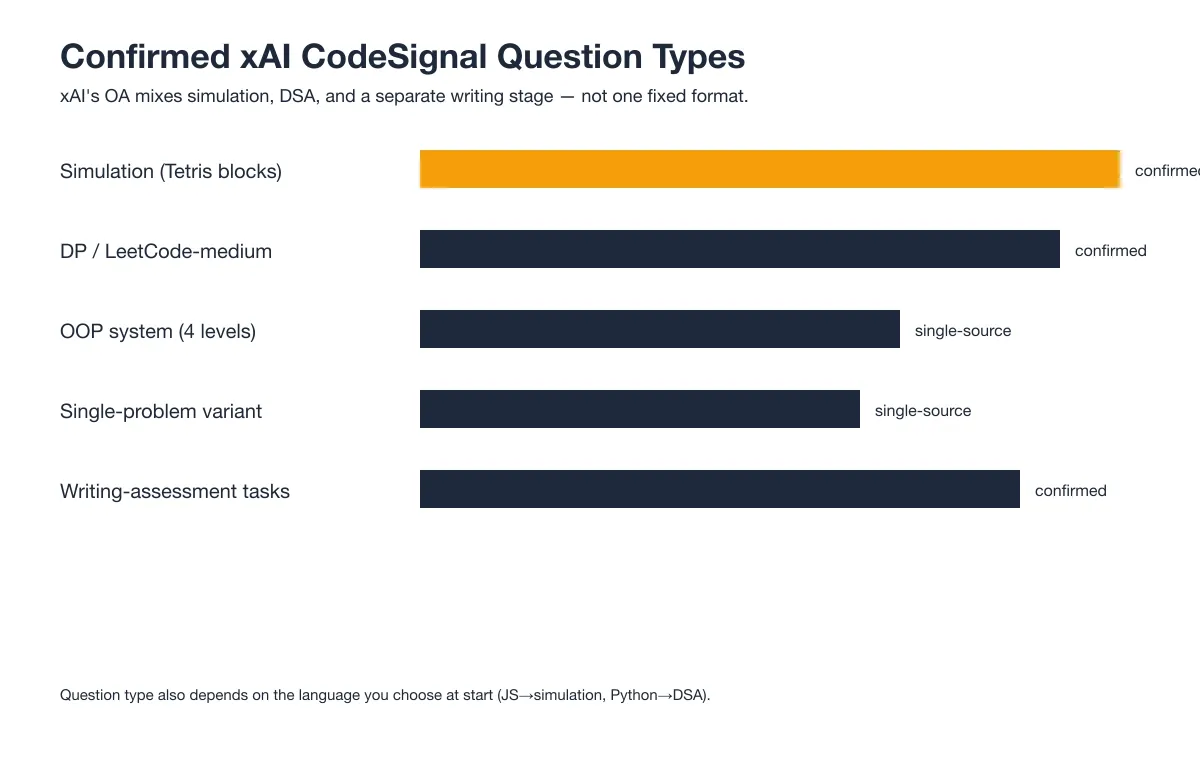
My three-question SWE set is not the only shape this OA takes. Candidates across Reddit and Teamblind reported several other confirmed variants, and the mix is wider than a single fixed format.
OOP System Design (4 Levels)
A r/csMajors candidate described an OOP question with four difficulty levels built on the same system, where each level extended the previous design. The pattern rewards clean modeling more than a clever trick, and it shows up when xAI wants to test design depth rather than pure algorithms.
Single-Problem Recent Variant
Another r/csMajors report described a recent variant that was a single, longer problem instead of three or four shorter ones. If you get this version, the time pressure lands on one sustained effort rather than spreading across multiple tasks.
The Proctored Writing Assessment (4 Tasks)
For some roles, xAI adds a separate proctored Writing Assessment on CodeSignal with roughly four writing tasks. Candidates in r/xAI_community described it as open-ended writing and citation work that is graded strictly. Several said they failed it twice before passing. Treat it as a real second stage, not a formality.
Initial Screening, 15-Minute Rapid-Fire
A Teamblind candidate described an initial screening before the main coding test: about 12 rapid-fire questions in roughly 10 minutes, plus a 30-second project intro. It is a speed and communication filter, not a deep coding round.
AI Tutor, Data Quality and Safety Standards
For AI Tutor roles, candidates reported that the General Assessment tests "data quality and safety standards" specifically. The content leans toward judgment calls about data and safety rather than standard LeetCode patterns.
Known Variants
The variants above (OOP 4-level, single-problem, and the separate Writing Assessment) are the ones confirmed outside my own exam. My SWE OA was the three-question coding General Assessment; if your invite names a Writing Assessment or a different track, expect the shape to shift toward those reported formats.
What xAI's CodeSignal Test Format Actually Looks Like
The format is a standard CodeSignal Single-Function setup, but the specifics xAI uses are worth knowing before you start.
60 Minutes and 3–4 Questions
The SWE coding OA runs about 60 minutes for 3–4 questions. A recent single-problem variant compresses that into one longer task, but the time budget stays tight either way. Pace for the whole set, not just the first problem.
~150 Test Cases and Partial Credit
The first problem on my test exposed roughly 150 test cases. CodeSignal grades on how many cases you pass, and one Teamblind candidate noted that explanatory comments can preserve partial credit when a solution is incomplete. Comment your reasoning even on code you are not sure about.
Language Choice Drives Question Type
What you pick at the start changes the question flavor. Candidates reported that JavaScript or React tends to pull simulation and algorithmic tasks, while Python leans toward DSA and DP problems at a LeetCode-medium level. Choose the language you can implement fastest, because speed is the real constraint.
The 24-Hour Invite Window
The invite asks you to start within about 24 hours. That is a fast-track window, not a suggestion, so block time as soon as the email lands. You do not get the luxury of a relaxed weekend to prep if the window is already open.
How xAI's CodeSignal Scoring Works
xAI's scoring rides on CodeSignal's platform mechanics. The bar is not a single published number you can aim at, but the mechanism is consistent across CodeSignal OAs.
The Suspicion Score
CodeSignal assigns a Suspicion Score from proctoring signals and code-analysis behavior. A high score can throw out an otherwise strong submission, which is why the desktop-sharing and comment-discipline rules matter as much as the algorithms. The score is the platform's integrity layer, not a style preference.
Partial Credit Through Comments
Beyond the pass-rate on test cases, clearly commented reasoning can preserve partial credit when a solution is incomplete. This is a direct, repeatable advantage: spend the last minutes writing out your approach even if the code does not compile cleanly. It is the cheapest insurance you have against a blank score.
xAI CodeSignal Exam-Day Strategy
The strategy that actually helped came from a real account, not generic advice. A Teamblind candidate finished three questions in 60 minutes, ran out of time on the last one, and still protected partial credit by commenting through the unfinished logic.
Start With the Question You Can Finish
Open with the problem you are most confident about. Early points build momentum and lock in a floor before the clock gets scary. My Tetris simulation was the one I could finish fastest, so it went first and bought me room for the harder two.
Use Comments to Lock Partial Credit
On every problem, write the approach in comments even when the code is not done. The 150-test-case panel means partial passes count, and a commented idea is recoverable credit if the timer beats you. This single habit is what saved the candidate who ran out of time.
Pace for All Questions, Not Just One
Do not sink the whole hour into one clever problem. The OA grades the set, so a clean three-of-four beats a perfect one-of-four with two blanks. Check the clock after each question and move on if you are stuck.
Why Candidates Fail the xAI CodeSignal Assessment
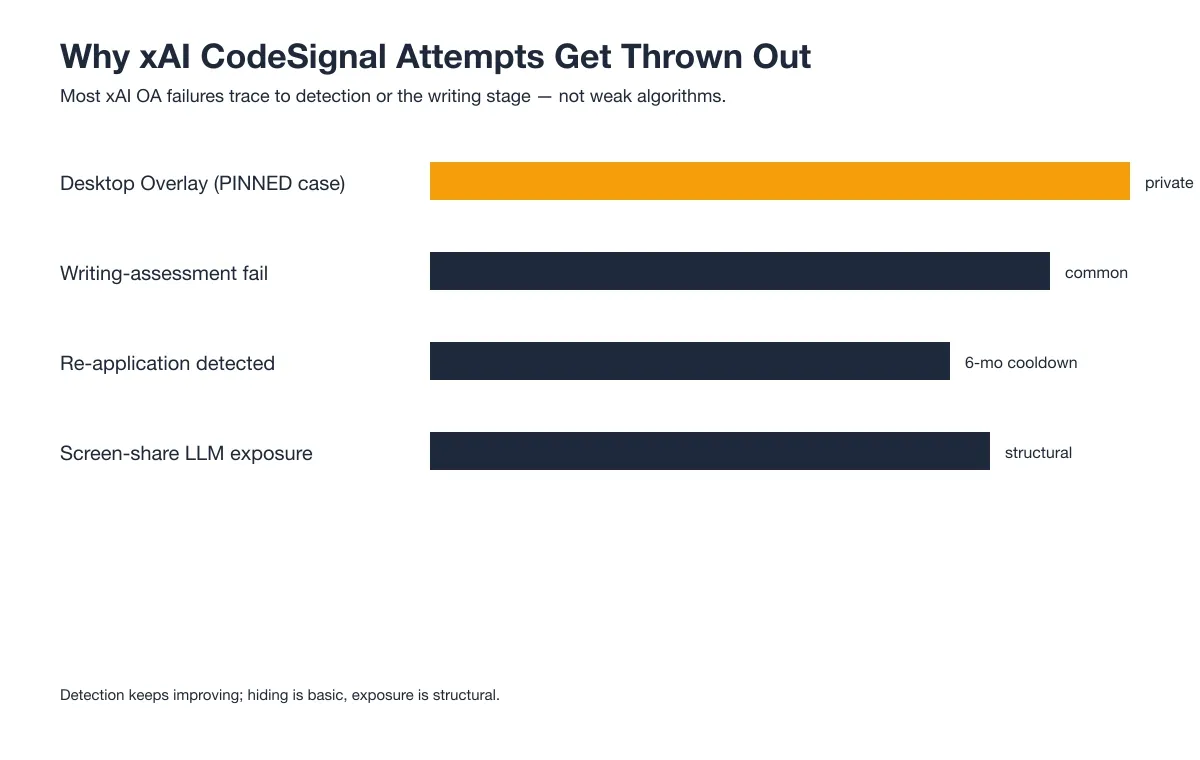
Most xAI OA failures trace to detection or the writing stage, not weak algorithms. The patterns below are the ones candidates report most often.
The Desktop Overlay That Got the Score Thrown Out
One candidate I know completed the OA with a desktop overlay and was later notified that the score would not be accepted. The submission passed the coding round but failed a post-submission integrity review. A basic OS-layer trick does not survive that review, and the lost time is the whole attempt.
The assistant works differently: the answer goes to my phone, a physically separate device that no screenshot, screen recording, or session monitoring can reach by design.
Land offer with Safer AI Interview Assistant
Skip the risky invisible apps. Our dual-device mode keeps it simple and undetectable. You crush the interview, we handle the answers.
Get started. It's freeLoved by 100,000+ candidates
Writing-Assessment Failures Are Common
Several candidates in r/xAI_community failed the proctored Writing Assessment twice before passing. The open-ended writing and citation tasks are graded strictly, and people who treat it as a light second stage get caught out. If your role includes the Writing Assessment, budget real practice for it.
Re-Application Gets Detected
A candidate in r/xAI_community reapplied from a different email and was rejected again within a day or two. xAI appears to detect re-applications with a cooldown of around six months, so a fresh address does not reset the clock. Space any retry out instead of relaunching immediately.
Screen-Share Exposes Obvious AI Use
Because the entire screen is shared, obvious LLM use is structural exposure, not a subtle tell. Anything that looks like pasted model output during the session becomes part of the recording. The detection here is the screen itself, which is why hiding is fragile and exposure is permanent.
How to Prepare for the xAI CodeSignal in 7 Days
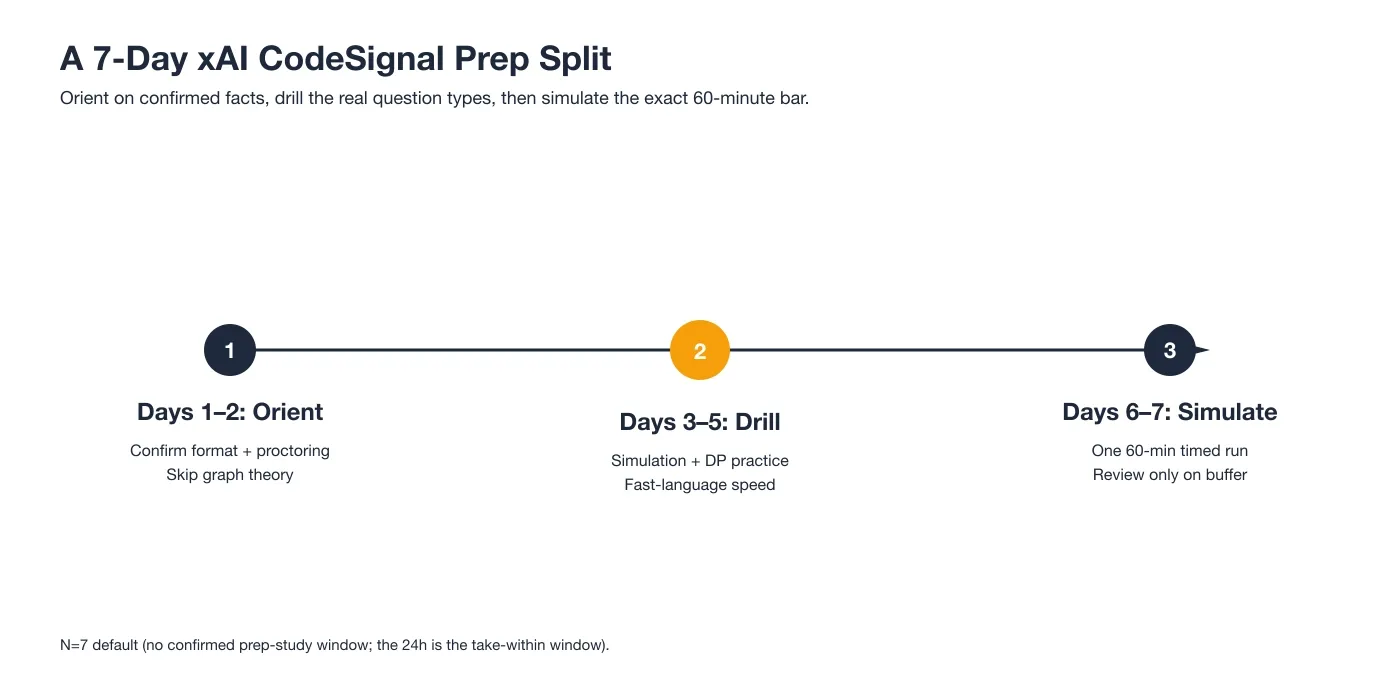
With no confirmed prep-study window published, a 7-day split is a reasonable default built from the confirmed question categories and failure causes. The 24-hour invite window means you may get less, so front-load the drilling.
Days 1–2 Orient
Confirm the format and proctoring facts first: 60 minutes, 3–4 questions, Single-Function, full desktop share, about 24-hour invite window. Skip graph-theory deep dives. No confirmed xAI question needs them. Repackage the real question types (simulation, DP, OOP) so your practice targets what candidates actually report.
Days 3–5 Drill
Drill the confirmed question types at implementation speed. The Tetris-style simulation and the 0/1-knapsack subsequence count are the two I can point to directly; practice them in the language you will choose, because language choice drives the question flavor. Speed matters more than novelty here.
Before the test, I also ran the Prep Agent from InterviewFox over WhatsApp: I sent it the confirmed question patterns for this company and got back a personalized drill plan and strategy. It was one practical tool among several in my prep workflow, not the whole plan.
Days 6–7 Simulate and Buffer
Run one full 60-minute timed set end to end, then spend the buffer day only on review. Do not learn new patterns in the final 24 hours before your invite closes. The simulation is the closest thing to the real bar, and the buffer day is for calm, not cramming.
What Happens After You Submit the OA
Submission is not the end of the line, but the wait varies a lot.
From OA to Interview
Candidates reported a path from the OA into a short interview loop, sometimes a three-step sequence, with the coding screen followed by a system-design or behavioral round. For AI Tutor roles, the Writing Assessment feeds directly into that loop. A clean OA is the gate, not the offer.
Ghosting Happens
Several candidates, including a Teamblind poster, heard nothing back after submitting. Silence is common enough that you should keep applying elsewhere rather than wait on one OA. Treat no-response as the default and let an invite surprise you.
xAI's Two-Stage Assessment Is the Real Differentiator
What sets xAI apart from a standard CodeSignal OA is the two-stage structure some roles carry. Most guides treat xAI like any other coding screen; the writing layer is the part they miss.
General Assessment vs Writing Assessment
The General Assessment is the coding OA: the three-to-four question set I took. For some roles, xAI then adds a proctored Writing Assessment with several open-ended tasks. They are separate CodeSignal sessions, and the writing stage is graded on its own strict rubric.
Why the Writing Stage Trips People Up
Candidates expect a coding screen and get caught by writing and citation work instead. The Writing Assessment rewards clear, sourced reasoning more than algorithmic speed, and people who skip practicing it fail repeatedly. Recognizing the two-stage shape early is the edge most guides do not give you.
FAQ
Does xAI use CodeSignal for its coding assessment?
Yes. xAI uses CodeSignal for its software engineering and AI Tutor OAs. Candidates on Reddit and Teamblind consistently report a CodeSignal General Coding Assessment, and the invite arrives as a CodeSignal session you start within about 24 hours.
How long is the xAI CodeSignal assessment?
About 60 minutes for the SWE coding OA, with 3–4 questions. A recent single-problem variant compresses the time into one longer task. The separate Writing Assessment for some roles runs on its own schedule.
How many questions are on the xAI CodeSignal OA?
Three to four coding questions in the standard SWE set, though a recent single-problem variant reports just one longer task. My own test was three questions: a Tetris simulation, a DP subsequence count, and a sliding-window problem.
What is the xAI CodeSignal General Assessment like?
It is a proctored CodeSignal General Coding Assessment with a Single-Function format, about 60 minutes, and the entire desktop shared. Some roles add a second proctored Writing Assessment with open-ended writing and citation tasks graded strictly.
What do Reddit threads say about the xAI CodeSignal assessment?
Reddit threads in r/xAI_community and r/csMajors describe a 60-minute SWE OA with simulation and DP questions, a strict writing stage for some roles, and frequent silence after submission. The shared-screen proctoring and re-application detection come up often as the traps that catch people.
What happens after you submit the xAI CodeSignal OA?
You may move into a short interview loop, or you may hear nothing. Candidates report both outcomes, so keep other applications open while you wait. A clean OA is the gate to the next round, not a guaranteed offer.
Can I use an AI tool or invisible app during the xAI CodeSignal OA?
Desktop overlay tools put the AI's answer on your computer screen, rendered as a hidden layer above the browser using a basic OS-layer trick. The answer is on-screen, the hiding is basic, and proctoring software keeps adding detection capabilities as AI tools become more common, so the risk exposure isn't fixed.
dual device AI interview assistant pushes the answer to your phone, a physically separate device that no screenshot, screen recording, or session monitoring can reach by design, so the laptop screen stays on the exam editor, unchanged. If you're going to use AI assistance during the OA, the dual-device architecture removes the answer from your screen entirely.
Land offer with Safer AI Interview Assistant
Skip the risky invisible apps. Our dual-device mode keeps it simple and undetectable. You crush the interview, we handle the answers.
Get started. It's freeLoved by 100,000+ candidates