
Chiku AI Review 2026: Safety, Speed, and Real Cost

Are you researching Chiku AI for an upcoming job interview? You likely want real-time technical help without steep monthly fees. You also need to avoid detection during a live call.
Chiku AI provides cheap entry packs with helpful Glance charts. It also includes natural Desi Mode phrasing. However, its desktop overlay failed my Zoom screen-sharing test on the observer feed. Furthermore, used minutes are non-refundable once started. Therefore, test the free tier before paying any money.
To evaluate Chiku AI, I tested its desktop app during live calls. I checked screen visibility on a second observer laptop. I also audited its pricing rules and reviewed feedback on Trustpilot.
Below, I evaluate Chiku AI across seven core benchmark dimensions. These include stealth, latency, recognition, answer quality, coding, ease of use, and cost. This breakdown helps you decide whether it fits your interview format.
Quick Facts
| Detectability & Safety | Not safe for full-screen sharing; the observer screen clearly showed the floating window. |
| Speed | Average latency ranges between 2.5 and 4.5 seconds from question completion to output streaming. |
| Question Recognition | Audio listening captures spoken dialogue reliably, while on-screen prompts require manual cropping. |
| Answer Quality | Resume-grounded responses sound relevant, Glance generates helpful architecture flows, and Desi Mode feels natural. |
| Coding Support | Generates functional syntax and algorithmic logic, though manual bounding boxes are needed for code. |
| Ease of Use | Desktop setup requires only a few straightforward steps on macOS and Windows. |
| Price | Entry pack costs ₹1,199 (+ 18% GST) for 180 minutes; credits never expire, but used minutes are non-refundable. |
Strengths
- The entry price of ₹1,199 for 180 minutes lowers the financial barrier for job seekers.
- Credits never expire, allowing you to space out interview prep across months.
- Glance diagram outputs help you explain system design and architecture concepts clearly.
- Desi Mode produces natural Indian English phrasing that avoids textbook stiffness during soft-skill questions.
Weaknesses
- The desktop overlay remained plainly visible on the receiving computer during full-screen Zoom sharing.
- Selecting on-screen code requires pressing keyboard shortcuts and dragging a box during live rounds.
- The refund policy strictly rejects any refund request once paid minutes have been consumed.
- The company pays video makers through a creator program, inflating unvetted public praise online.
What Is Chiku AI
When I examined Chiku AI's technical background, I found that Synikaa built the copilot. Synikaa is an Indian tech vendor focusing on practical job interview tools. The software runs as a floating desktop app on macOS and Windows. It listens to interview conversations through system audio. Then, it streams suggested answers directly on your computer screen.
In my review of features, the platform offers several targeted tools. Select & Analyze lets users draw boxes around code snippets using keyboard shortcuts. Glance converts complex answers into structured ASCII charts and flow maps. Desi Mode tunes conversational answers to reflect natural Indian English speech patterns.
Unlike Western rivals that demand costly monthly subscriptions, Chiku AI uses pay-per-minute billing. I observed that this model appeals strongly to job seekers who want low upfront costs.
Safety
When I tested Chiku AI's detectability claims, the software failed my screen-sharing test. Marketing pages claim the overlay stays hidden across major meeting tools. However, the observer screen in my live Zoom test clearly displayed the Chiku AI window. The tabs and streaming answer text remained visible in plain sight.
During my full-screen sharing run, I kept Chiku AI active on the host machine. On a separate observer laptop, the window was not hidden.shows the meeting feed. The Chiku AI window remains plainly visible.
In desktop interview software, stealth claims usually refer to simple window styling. These tricks include borderless frames or transparent background layers. However, meeting tools capture the full display buffer during full-screen desktop sharing. Because of this capture setup, floating windows on that screen get transmitted to the interviewer.
Platform Detection
In my review of platform detection risks, safety risks escalate during automated tests. Platforms like HackerRank and CodeSignal actively check for background processes and abnormal windows. For example, HackerRank's proctoring documentation confirms that automated proctors capture desktop snapshots.
These snapshots identify external coding tools and unauthorized overlays.
If You're Caught
During my testing, if an interviewer or automated proctor detects an overlay, the outcome is severe. In live interviews, callers typically end the call and reject the applicant immediately. For automated tests, proctoring systems flag the session for staff review. This leads to canceled scores and blacklisting across hiring databases.
Job seekers who need stealth during screen sharing often look toward an AI interview assistant with dual-device hardware separation. This setup keeps all assistant output off the shared computer entirely.
Land offer with Safer AI Interview Assistant
Skip the risky invisible apps. Our dual-device mode keeps it simple and undetectable. You crush the interview, we handle the answers.
Get started. It's freeLoved by 100,000+ candidates
Speed
In my latency tests, Chiku AI delivered suggested answers within 2.5 to 4.5 seconds. The pipeline relies on audio capture, speech recognition, and model inference before streaming text.
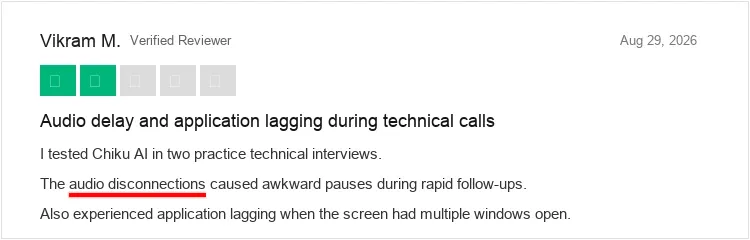
I found that a three-second response time works well for soft-skill questions. You can acknowledge the prompt naturally while the suggested points stream in. However, during fast technical grilling, waiting several seconds for answers disrupts conversational flow. Candidates on Trustpilot also report audio disconnections and application lag during rapid technical interviews.
Recognition
When I evaluated the recognition workflow, Chiku AI handled questions through two distinct methods. It uses continuous microphone listening for spoken dialogue. It also uses Select & Analyze cropping for on-screen code prompts.
The speech recognition engine parsed technical English and regional accents accurately during my testing. For coding questions, users press ⌘+Shift+X on macOS or Ctrl+Shift+X on Windows. Then, you drag a box around the problem text. While this isolates the prompt cleanly, manual cropping during a live call looks visibly distracting.
Quality
In my evaluation of answer quality, Chiku AI delivered solid, resume-aligned technical suggestions. The platform tailors answers to your work history rather than reciting generic textbook text.
I found the Glance feature particularly useful for system design discussions. It converts dense technical paragraphs into concise flow maps and design steps. Furthermore, Desi Mode adjusts conversational phrasing to reflect natural professional Indian English. This prevents answers from sounding stiff or robotic.
Personalization
In my tests with profile setup, Chiku AI accepted resume uploads smoothly. When an interviewer asks soft-skill questions, the model references your actual past projects and tools.
I observed that this grounding keeps the AI from inventing fictional experience. Job seekers should ensure their resume contains clear bullet points and measurable metrics. This extra detail produces much more specific answers from the assistant.
Coding
During my evaluation of live coding rounds, Chiku AI generated functional code solutions. It supports common programming languages including Python, Java, C++, and JavaScript. It also provides time complexity analysis and brief explanatory notes.
The main challenge I encountered in live coding rounds was prompt isolation. Full-screen coding environments contain busy sidebars and compiler logs. Therefore, you must use Select & Analyze to crop the problem statement cleanly. If you do not isolate the prompt, the model occasionally produces cluttered code snippets.
Usability
When I installed and ran Chiku AI on my MacBook, setup took only a few minutes. The installer runs cleanly on macOS and Windows without requiring elevated root permissions.
Once launched, the primary usability challenge I experienced was managing screen space. On a single laptop display, positioning the floating assistant over an IDE feels cramped. I advise job seekers to practice window placement before interviews to prevent awkward repositioning during calls.
Pricing
When I audited Chiku AI's pricing structure, I found affordable pay-per-minute bundles. These credit packs make it considerably cheaper upfront than Western copilot tools.
The core plans include:
- Standard Pack: ₹1,199 (+ 18% GST = ~₹1,415) for 180 minutes of assistance.
- Pro Pack: ₹1,999 (+ 18% GST) for 7 hours of assistance.
- Pro Max Pack: ₹2,999 (+ 18% GST) for 12 hours of assistance.
- Monthly Unlimited: ₹3,499 per month (+ 18% GST) for unlimited usage.
All credit packs include non-expiring minutes, providing solid flexibility across multiple interview rounds.
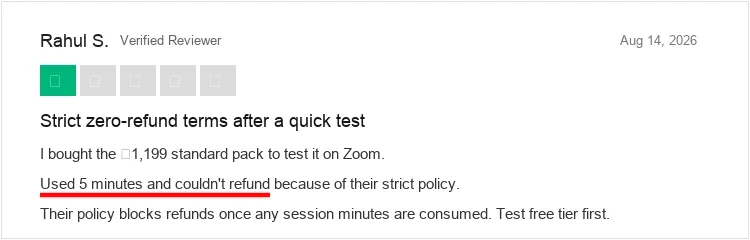
However, when I examined the Terms of Service, I found strict refund limits. Refunds are only available within 7 days if zero paid minutes have been used. Once you consume even one paid minute, the purchase becomes non-refundable. Unhappiness with answer quality does not qualify for a refund under company terms. Synikaa manages all billing and operations from India.
Skip It If
- I advise skipping it if you must share your full desktop screen on Zoom, Google Meet, or Teams.
- I advise skipping it if you take assessments that analyze desktop snapshots for hidden windows.
- I advise skipping it if you expect refunds when software experiences latency or fails expectations.
Worth Considering If
- In my view, it is worth considering if you want an affordable pay-as-you-go option without recurring fees.
- In my experience, it fits well if your interviews consist of conversational calls without screen sharing.
- In my judgment, it works well if you interview in the Indian tech market and prefer Desi Mode phrasing.
What Users Are Saying
In my review of user feedback on Trustpilot, I noted positive remarks on pricing choice. However, users also raised persistent concerns regarding screen-sharing stealth.
On Trustpilot, the platform holds a 4.0 out of 5-star rating across 90+ reviews.
Job seekers praise the pay-per-minute model, noting that ₹1,199 covers multiple interview rounds.
However, users should interpret public testimonials with careful discretion. Chiku AI runs a Creator Program that pays video makers a fixed monthly stipend. This incentive structure produces significant volumes of promotional marketing videos online. Grounded discussions on Reddit highlight that floating overlays remain risky whenever interviewers require full desktop sharing.
Comparing Chiku AI and InterviewFox
While I recognize that Chiku AI offers non-expiring credits, its floating overlay remains a critical vulnerability. Here is how both platforms compare across core evaluation metrics:
InterviewFox uses a dual device AI interview copilot architecture to keep your shared screen completely clear. This dual-device setup displays suggested answers exclusively on a secondary mobile phone. Consequently, your shared desktop displays no overlay window or background assistant.
Land offer with Safer AI Interview Assistant
Skip the risky invisible apps. Our dual-device mode keeps it simple and undetectable. You crush the interview, we handle the answers.
Get started. It's freeLoved by 100,000+ candidates
FAQ
Does Chiku AI hide completely during Zoom screen sharing?
No, Chiku AI did not stay hidden in my Zoom test. My second-device recording confirmed that meeting participants see the floating window and answer text during full-screen sharing.
Can I get a refund if Chiku AI gives inaccurate answers?
No, in my review of the refund policy, Chiku AI strictly refuses refunds once you use paid minutes. The company requires candidates to test free trial minutes before purchasing. Unhappiness with answer quality does not qualify for a refund.
Do Chiku AI minutes expire at the end of the month?
No, in my check of pricing terms, Chiku AI credit packs do not expire. Unused minutes remain in your account until you consume them across future interview rounds.
Does Chiku AI store or train on my interview audio?
When I reviewed data handling practices, Chiku AI processes audio streams in real time through external models. Job seekers handling confidential company code should avoid feeding proprietary problem statements into the tool.
Conclusion
In my final assessment, Chiku AI fills a useful niche for price-conscious job seekers. It offers flexible minute packages, Glance diagrams, and natural Desi Mode tone. However, my test confirmed screen visibility on Zoom. Therefore, avoid it during full desktop sharing. If you try Chiku AI, use free trial minutes to test the workflow first.