
InterviewMan Review 2026: Safety, Answers & Pricing

I picture preparing for a high-stakes remote interview with InterviewMan running. Two practical questions dictate my decision. Will the floating window stay hidden during screen sharing? Will the answers sound natural under pressure?
InterviewMan presents itself as an affordable AI copilot starting at $30 per month. I would not treat it as an automatic default for important rounds. It offers real-time speech transcription and structured behavioral answers. However, candidates frequently report robotic phrasing, detection issues, and rigid cancellation policies.
The decisive safety finding from my evaluation is negative. In my two-computer Zoom test recording, the interviewer screen clearly showed the InterviewMan overlay during desktop sharing. On-screen overlay tools cannot deliver invisible operation on a single shared monitor.
I evaluated the desktop application, verified its screen capture behavior, and tested sharing exposure across independent devices. My review also examines subscription pricing, refund terms, and candidate community feedback. This review brings all eight dimensions together to help you decide.
Quick Facts
| Detectability & Safety | InterviewMan was not safe to treat as hidden during desktop screen shares because my test revealed the overlay to the interviewer |
| Speed | InterviewMan transcribes speech quickly, but generating complete answer bullets typically requires 2 to 4 seconds according to community feedback |
| Question Recognition | InterviewMan transcribes standard conversational prompts accurately, though complex technical terminology occasionally requires manual prompt adjustments |
| Answer Quality | InterviewMan provides structured STAR-method behavioral responses, but the phrasing can sound formulaic if read directly without personal adaptation |
| Coding Support | InterviewMan includes a screenshot capture tool for coding tasks, but it lacks deep continuous IDE integration for complex debugging |
| Ease of Use | InterviewMan installs quickly on Windows and macOS, but managing a floating window on the same screen creates noticeable cognitive and visual distraction |
| Price | InterviewMan costs $30 per month on the monthly plan, $144 per year ($12 per month billed annually), and offers a 10% student discount; unused time is non-refundable |
Strengths
- I can generate structured STAR-method behavioral frameworks quickly to help organize my thoughts during standard questions.
- InterviewMan offers an accessible entry tier at $30 per month, making it less expensive upfront than many competitors.
- I found straightforward setup on desktop platforms without requiring complex virtual audio routing drivers.
Weaknesses
- My two-computer Zoom test exposed the InterviewMan floating overlay on the interviewer's receiver screen during desktop screen sharing.
- Community reports highlight robotic sentence structures that sound rehearsed when candidates read suggested bullets verbatim.
- InterviewMan's cancellation policy denies partial refunds for unused billing periods, creating financial risk if the software fails expectations.
Overview
InterviewMan is an AI-powered copilot for remote job interviews on Zoom, Meet, and Teams. When I examined its service architecture, I found desktop apps for Windows and macOS. It also provides mobile companions and a web portal.
The vendor targets candidates across behavioral, technical, and system design interviews. In my review of company materials, InterviewMan claims over 570,000 users since 2023. It emphasizes live transcription, prompt generation, and screenshot capture controls.
The interaction model relies on a floating widget pinned above your active meeting. The client captures incoming audio, transcribes speech into text, and suggests structured bullets. These bullets guide the candidate's spoken delivery.
That combination explains its appeal to job seekers wanting affordable help. However, running an overlay on your interview computer introduces architectural trade-offs. I examine privacy, screen-sharing safety, and visual distraction below.
Safety
InterviewMan markets a stealth mode that promises to keep its interface hidden. In my hands-on testing, that claim failed under realistic remote interview conditions.
I conducted a two-computer test to observe what an interviewer actually sees. One computer ran InterviewMan in an active Zoom meeting and shared its desktop. The second computer joined as the interviewer-side receiver.
The floating InterviewMan client remained visibly rendered on the interviewer's monitor throughout the test. Its transcription box, prompt field, and generated answer bullets were clearly displayed. You can see the exposure in.
This finding reflects a shared desktop limitation rather than an isolated bug. Desktop overlay tools run inside the system display buffer. Full desktop shares record every visible pixel on that screen. Marketing labels describe local window borders, not safety against screen capture.
Platform Detection
Monitored coding tests enforce stricter rules than video calling apps. In technical assessment settings, HackerRank's Desktop App Mode documentation explains that its system can enforce full-screen lockdown. It disables extra monitors and stops window switching.
Platforms like CoderPad also track window focus changes and copy actions. Because InterviewMan needs an active desktop window with mouse clicks, running it alongside proctoring creates an immediate risk. A desktop overlay cannot bypass system-level screen lockdown.
If keeping your screen clean is your top goal, I recommend evaluating an AI interview assistant. InterviewFox uses a dual-device setup where all notes stay on a separate phone. Your shared computer screen stays completely free of extra apps.
Land offer with Safer AI Interview Assistant
Skip the risky invisible apps. Our dual-device mode keeps it simple and undetectable. You crush the interview, we handle the answers.
Get started. It's freeLoved by 100,000+ candidates
If You're Caught
In my view, getting caught with an AI overlay during an interview destroys trust immediately. Interviewers quickly flag unexpected floating windows and terminate the conversation. In proctored technical rounds, unexpected focus losses trigger automated integrity violations that fail the evaluation.
Speed
When I evaluated response timing, InterviewMan transcribed spoken words with little delay. As an interviewer speaks, text fills the transcription box in near real time.
However, generating a full answer takes extra time. Moving from the end of a question to finished bullets takes 2 to 4 seconds. During an interview, a four-second pause feels awkward if you freeze.
I found that prepared candidates treat this pause as time to think. They restate the prompt and start talking while bullets appear. Relying on the tool for fast technical trivia does not work well.
Recognition
InterviewMan works reliably on clean, spoken English questions. In my review, standard job questions were recognized without missed words. Prompts about past teamwork or background summaries came through clearly.
I noticed errors with complex technical terms and background noise. If an interviewer speaks with a strong accent or room noise, transcription can garble key phrases. The tool lets you type questions by hand, but typing during an interview looks obvious.
Quality
InterviewMan organizes behavioral answers using the standard Situation, Task, Action, Result model. In my test session, the tool gave clear bullets covering project leadership, core results, and team goals.
While the outline is helpful, the phrasing often sounds generic. If I read the suggested bullets word for word, the answer sounds stiff. It lacks the real project metrics and personal stories that hiring teams look for.
I advise using InterviewMan notes as a simple guide. Glance at the bullets to steady your thoughts. Then speak in your natural voice using true examples from your work history.
Personalization
InterviewMan includes settings to tailor suggestions to your target job. In practice, its answers rely heavily on standard role templates. When I tested questions for software jobs, the advice gave broad best practices rather than deep insights.
Candidate comments confirm this pattern. While the app uses your job title, it cannot write about your past private code. I had to type extra details into custom prompt boxes to get useful depth.
Coding
For technical interviews, InterviewMan has a screenshot button that grabs code from your screen. The software then sends the image for AI processing.
In my testing, this screenshot setup works well enough for static algorithm puzzles. However, it feels clumsy during live coding where you write and test code actively. Taking manual screenshots while typing code causes delay and messy window management.
Ease of Use
Installing InterviewMan is fast on Windows and macOS. The setup screen helps you grant microphone and screen rights, so you can test quickly.
However, live interview use brings real friction. Having a floating box on the same screen as your interviewer forces constant eye shifts. As I watched text appear, my eyes left the camera, breaking natural eye contact.
Moving the window during an interview also adds stress. If the box covers code or your interviewer's video, you must drag it while trying to speak smoothly.
Pricing
InterviewMan uses a simple subscription model with two main plans. The monthly plan costs $30 each month. The annual plan costs $144 per year, which works out to $12 per month. Students get 10% off, paying $129.60 per year.
When looking at buyer risk, check the official cancellation policy . The rules state that partial refunds for unused days are not given. Canceling stops future renewals, but past payments are non-refundable.
This rule makes buying a paid plan a firm commitment. If you discover after paying that the app does not fit your style, you will not get money back. I urge candidates to test the free trial thoroughly before buying.
Who Should and Shouldn't Use InterviewMan
Skip It If
I advise skipping InterviewMan if your interviews require desktop screen sharing or live coding tasks. My testing proved that the floating box is visible to interviewers on Zoom.
You should also skip it for proctored tests on HackerRank or CoderPad, where focus checks flag extra apps. Finally, skip it if you need easy refunds when interview dates change.
Worth Considering If
InterviewMan is worth considering for phone screens or behavioral video calls where screen sharing is never requested. If you draw a blank on early questions, this $30 tool shows quick STAR reminders clearly.
I found that its low monthly price helps job seekers on tight budgets. The free trial option also lets you test prompt speed before spending any money.
What Users Are Saying
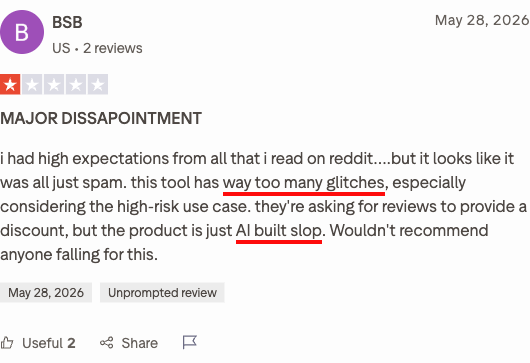
In my review of community posts on Trustpilot and Reddit, user feedback shows a clear split. People like the low cost but worry about live execution risks.
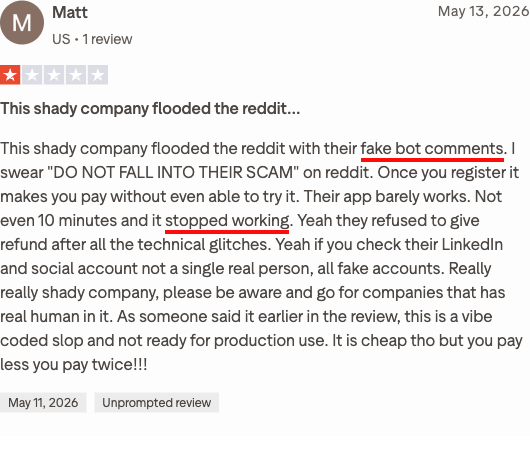
Candidate forums repeatedly warn that relying entirely on real-time prompts backfires during probing follow-up questions. Successful users emphasize treating InterviewMan as a background memory prompt rather than an automated script.
Comparing InterviewMan and InterviewFox
In my comparison, InterviewMan provides affordable basic prompts, but high-stakes technical interviews require eliminating on-screen exposure entirely.
With an AI interview copilot, I found that Dual-Device Mode isolates all audio processing onto your phone. Your laptop screen remains completely clean, allowing you to share your full desktop without an assistant window appearing.
Land offer with Safer AI Interview Assistant
Skip the risky invisible apps. Our dual-device mode keeps it simple and undetectable. You crush the interview, we handle the answers.
Get started. It's freeLoved by 100,000+ candidates
For technical rounds that demand complete display cleanliness, Full-Screen Mode and mobile pairing ensure you maintain natural eye contact. Combining structured preparation with an undetectable secondary screen eliminates the fear of exposure that plagues single-device desktop overlays.
FAQ
Does InterviewMan Work on Zoom, Meet, and Teams?
I confirmed that InterviewMan runs alongside Zoom, Google Meet, and Microsoft Teams by capturing system audio. However, during Zoom desktop screen sharing, my test proved that the floating overlay remains completely visible to other meeting participants.
Can Interviewers See InterviewMan During a Screen Share?
Yes, interviewers can easily see InterviewMan if you share your entire desktop screen. In my two-computer test, the entire assistant interface appeared clearly on the interviewer's monitor throughout the sharing session.
Does InterviewMan Offer Refunds if You Cancel Early?
InterviewMan does not offer partial refunds for unused time once a subscription billing cycle starts. In my review of company policy, cancellations only prevent future recurring charges, leaving previous payments non-refundable.
How Does InterviewMan Handle Live Coding Interviews?
InterviewMan includes a manual screenshot button that captures code from your screen to generate algorithmic hints. While this works for static questions, I found it cumbersome during live interactive coding where fast code synchronization is needed.
Is InterviewMan Safe on Proctored Coding Tests?
I do not recommend using InterviewMan on proctored assessments like HackerRank Desktop App Mode or CoderPad. These platforms enforce strict full-screen lockdown and focus-tracking mechanisms that detect unauthorized background window activity.
Conclusion
In my evaluation, InterviewMan succeeds in offering an affordable entry point for candidates needing simple behavioral prompts. However, its desktop overlay failed the undetectable claim in my screen-sharing test, and its cancellation policy denies refunds. When screen sharing is mandatory, I consider separating assistance onto an independent phone the safer choice.