

You are about to paste a block of code into the HackerRank editor. Or you already did, and now you are wondering if anyone will notice. The question is not whether help exists. It is whether the paste itself leaves a trace.
Yes. HackerRank tracks copy-paste on every test by default. It records how often you paste and the lines you paste. A flag goes to a human reviewer, not an automatic fail.
Pasting from an external source is the riskiest move. A few lines from your own notes are captured but rarely flagged on their own. The danger is not the paste. It is what you pasted and where it came from.
That is why a growing number of candidates keep the answer surface off the monitored computer. They use a dual device AI interview assistant that shows answers on a phone, not on the test screen.
How HackerRank Detects Copy-Paste
Copy-paste tracking is the one signal HackerRank turns on for every test. It is not an opt-in extra. It is the baseline. It is also only one part of how HackerRank detects cheating — other monitoring features only run if your employer enables them.
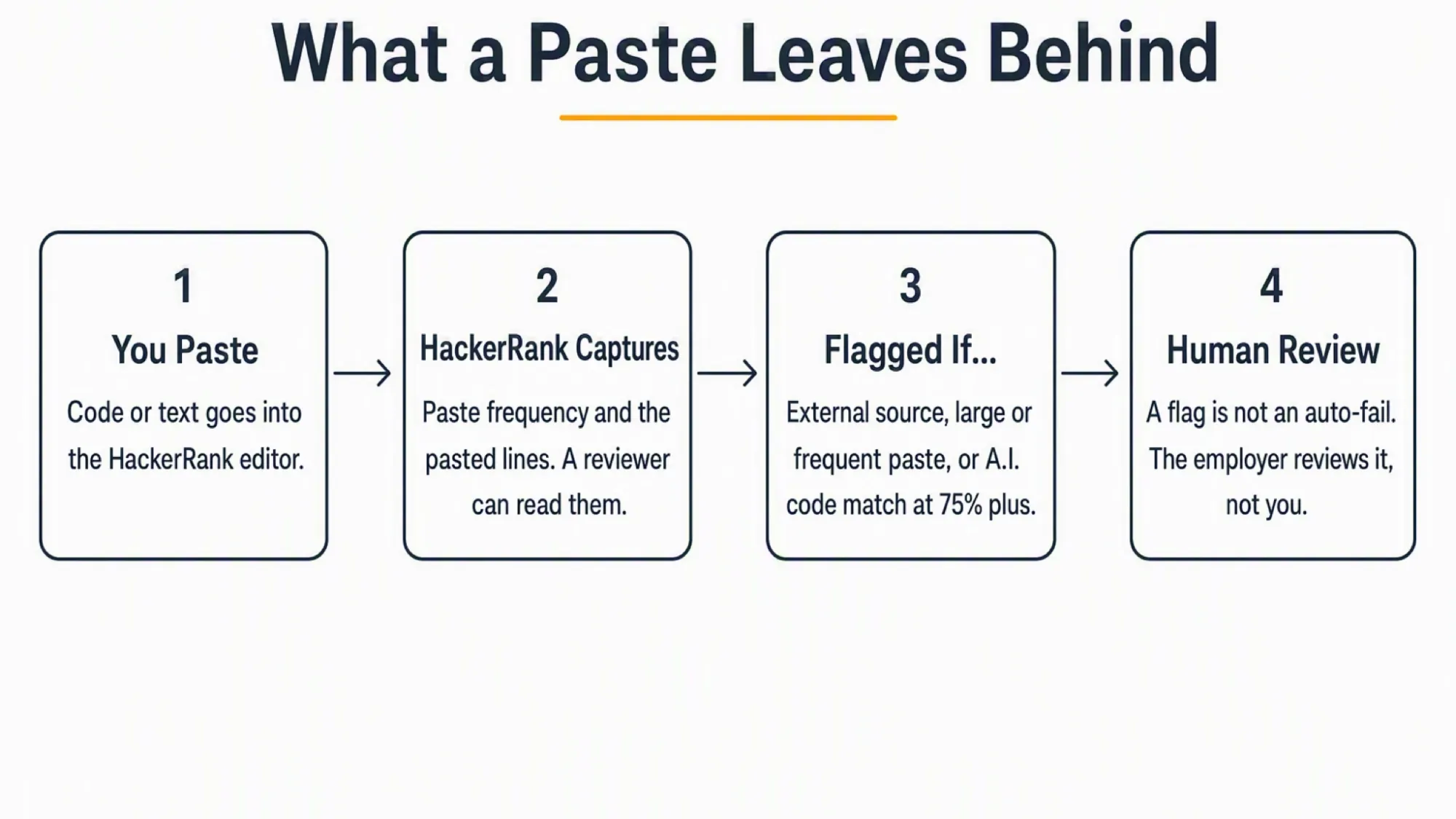
When you paste into the editor, HackerRank records two things. It counts how many times you paste. It also captures the lines you pasted.
The reviewer can open your candidate report and read those pasted lines. They are not hidden. They are not anonymous.
HackerRank's Plagiarism Best Practices Guide states that copy-paste tracking is on by default for all customer tests. It also says reviewers can view the lines a candidate pasted.
The AI plagiarism model also weighs copy-paste activity as one of its signals. External copy-paste is an explicit sub-pattern the model looks for.
What Actually Triggers a Flag
Not every paste becomes a flag. Three patterns push a paste from captured to flagged.
External Copy-Paste (Internet, AI, IDE)
Pasting code you wrote in an external IDE is likely to be flagged as suspicious. The same is also true for code pulled from the internet or generated by an AI tool.
HackerRank's AI Plagiarism Detection guide names external copy-paste as a specific sub-pattern it looks for. If you solve a question in an external IDE, the system may notice. Pasting that code into HackerRank is likely to be flagged.
Large or Frequent Paste Events
A single small paste is captured but usually not flagged on its own. Bulk pastes or a high paste frequency are different.
Proctor Mode lists "large copy-paste events" as a specific suspicion reason. The more you paste, the stronger the malpractice signal becomes.
Code Similarity (MOSS Thresholds)
HackerRank also checks how similar your code is to other submissions. The threshold is a 75 percent match when you have written at least ten lines.
Below ten lines, the bar rises to a 90 percent match. This is separate from copy-paste, but it is part of what can flag you.
What Happens After a Flag
A flag is an indicator, not a verdict. HackerRank does not automatically fail or disqualify you.
Human Review, Not Auto-Fail
The system flags potential issues and leaves the decision to the hiring team. A human reviews the evidence, including your pasted lines and code playback.
HackerRank describes its role this way. It identifies potential plagiarism and empowers hiring teams to decide.
Reported to the Employer, Not You
The flag goes to the employer or recruiter, yet you do not receive the plagiarism result yourself.
If you are worried about a flag, your only real channel is to contact the recruiter or hiring manager directly.
Everyday Behaviors That Do Not Get You Flagged
Some fears are overblown. Here is what the evidence actually supports.
Typing your own code is not the signal HackerRank watches. Paste frequency is. HackerRank even recommends leaving the paste alert off so candidates do not switch to typing as a workaround.
A single small paste is not an instant disqualification. It is captured and visible, but a flag requires more, such as an external source or a large volume.
None of this is a guarantee of safety. Pasting external or AI-generated code is still captured and can still be flagged.
The Safest Setup If You Need Outside Help
If you need help during the assessment, the risk is the shared screen. Anything you paste into the HackerRank editor leaves a footprint on that computer.
The escape is architectural, because you keep the answer surface off the monitored machine entirely.
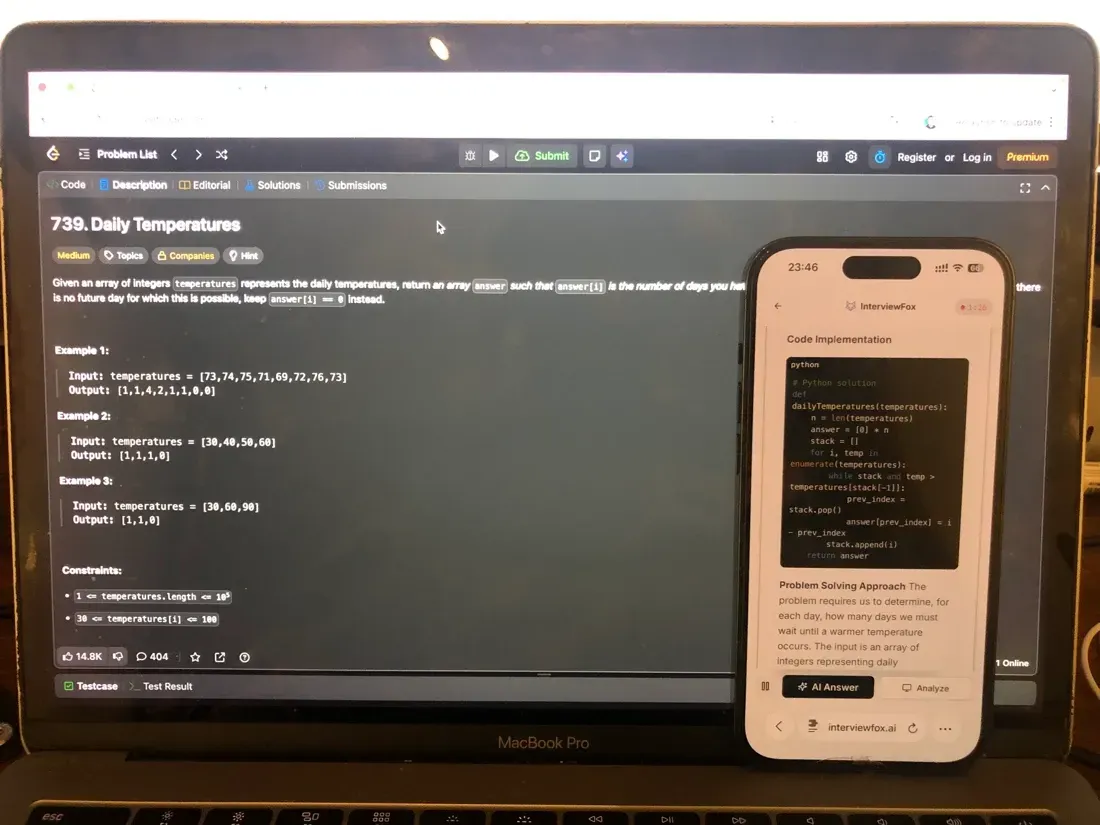
InterviewFox's dual-device mode shows answers on your phone. No answer window and no InterviewFox process ever runs on the interview computer.
That removes the paste event and the visible answer from the test screen at once. It therefore closes the exposure path that copy-paste tracking watches.

Answers On Your Phone, Not Your Shared Screen
Skip the risky invisible-overlay tricks. Our dual-device mode keeps answers on your phone, never on the screen you're sharing or recording. Nothing for a platform or interviewer to catch, because there's nothing on the shared screen to find.
Get started. It's freeLoved by 100,000+ candidates
A dual device AI interview tool is built around that separation from the start. It is the practical answer when the test screen itself cannot be trusted for help.
How to Prepare for the Assessment
The best defense is not tricks. It is preparation.
Practice in the HackerRank IDE before the real test. Get comfortable with the editor so the real session feels familiar.
Learn which integrity settings your test uses, if the employer shares them. Then decide deliberately how you will take it.
Prepare Once, Walk In Ready
The durable fix isn't a cleverer hiding trick, it's going in prepared. Our Prep Agent reviews your resume, builds a study plan, and runs mock interviews with you over WhatsApp or SMS, so you rehearse the content before it counts.
Get started. It's freeLoved by 100,000+ candidates
InterviewFox's Prep Agent can help you build a study plan and run mock sessions over WhatsApp or text. It is a practical next step, not a way to change what the test records.
What else does HackerRank monitor?
Copy-paste tracking is only one of several integrity signals HackerRank can use during a proctored assessment. Depending on the mode your employer enables, the platform may also observe your screen, your webcam, and your behavior through the camera.
- Screen recording and screenshot capture. When proctoring is enabled, HackerRank takes periodic screenshots of your test screen rather than continuous video. The default capture interval is roughly every 15 seconds, and it tightens when you switch windows or exit full screen. These screenshots feed into AI models that look for outside tools or leaked solutions, and they assemble into a session replay for the employer reviewer.
- Webcam access and image capture. Whether your camera turns on at all depends on the test mode. Secure Mode uses no webcam. Proctor Mode and Desktop App Mode capture periodic still photographs — not video — through your camera. You must grant permission before any capture begins, and the permission prompt is your clearest signal that webcam monitoring is active.
- Eye movement detection. HackerRank's Gaze detection add-on reads eye orientation and head position from periodic webcam stills to flag repeated patterns of looking away from the screen and returning to type. It operates on still photographs roughly every five seconds, not continuous video. The feature is a limited-availability add-on that employers must request separately; it is not enabled by default on standard tests.
Each of these signals is configured independently by the employer. None of them replaces copy-paste tracking, and a flag from any one signal goes to human review rather than triggering an automatic fail.
FAQ
Is copy paste tracked on every HackerRank test?
Yes. HackerRank turns it on by default for all customer tests. It is the baseline signal, not an opt-in extra.
Can HackerRank see the code I pasted?
Yes. Reviewers can open your report and read the lines you pasted. The paste is not anonymous.
Does a flag mean I automatically failed?
No. A flag goes to human review. The hiring team decides, and the result is not shared with you.
Does pasting from my own notes get flagged?
A small personal paste is captured but rarely flagged on its own. A flag needs more, such as an external source or a large volume.
What about paste on the HackerRank mobile app?
The mobile IDE still captures paste activity. Avoid assuming the phone app hides what you paste.
Is pasting in a live CodePair interview tracked?
Live sessions record audio, video, and screen share. Paste is visible in that stream, though HackerRank's docs state it less explicitly.