

You've got a HackerRank assessment open, or about to start one. The question that matters isn't really "does HackerRank detect cheating" — it's "if I lean on a little help, will it actually show up on my screen?"
HackerRank runs three additive detection layers, but only one is on by default. Copy/Paste Tracking runs on every test. Everything else — tab-switch logging, webcam and screenshot AI analysis, OS-level lockdown — only activates if your employer turned it on for that specific assessment.
Any flag goes to human review, not automatic rejection. You can't tell which layers are active from the test screen itself.
That doesn't mean your screen is safe to use for help. The layer that changes everything is Proctor Mode's Screenshot Analysis. When an employer enables it, HackerRank doesn't just log that you left the window — it captures and reads what's actually on your screen.
That's why InterviewFox's dual-device mode is undetectable by software running on the monitored interview computer. No answer surface and no InterviewFox process ever exist on that computer — only on your phone.
It's why a growing number of candidates now route live assistance through a Dual device AI interview assistant. That tool is built around that separation from the start.
Which HackerRank Integrity Mode Is Running on Your Test
Any specific fear — "does it see my screen," "does it know I switched tabs" — is worth answering. But first, you need to know which layer is even active. HackerRank runs three additive tiers. Each one has to be explicitly turned on by the employer, except for one baseline signal that's always running.
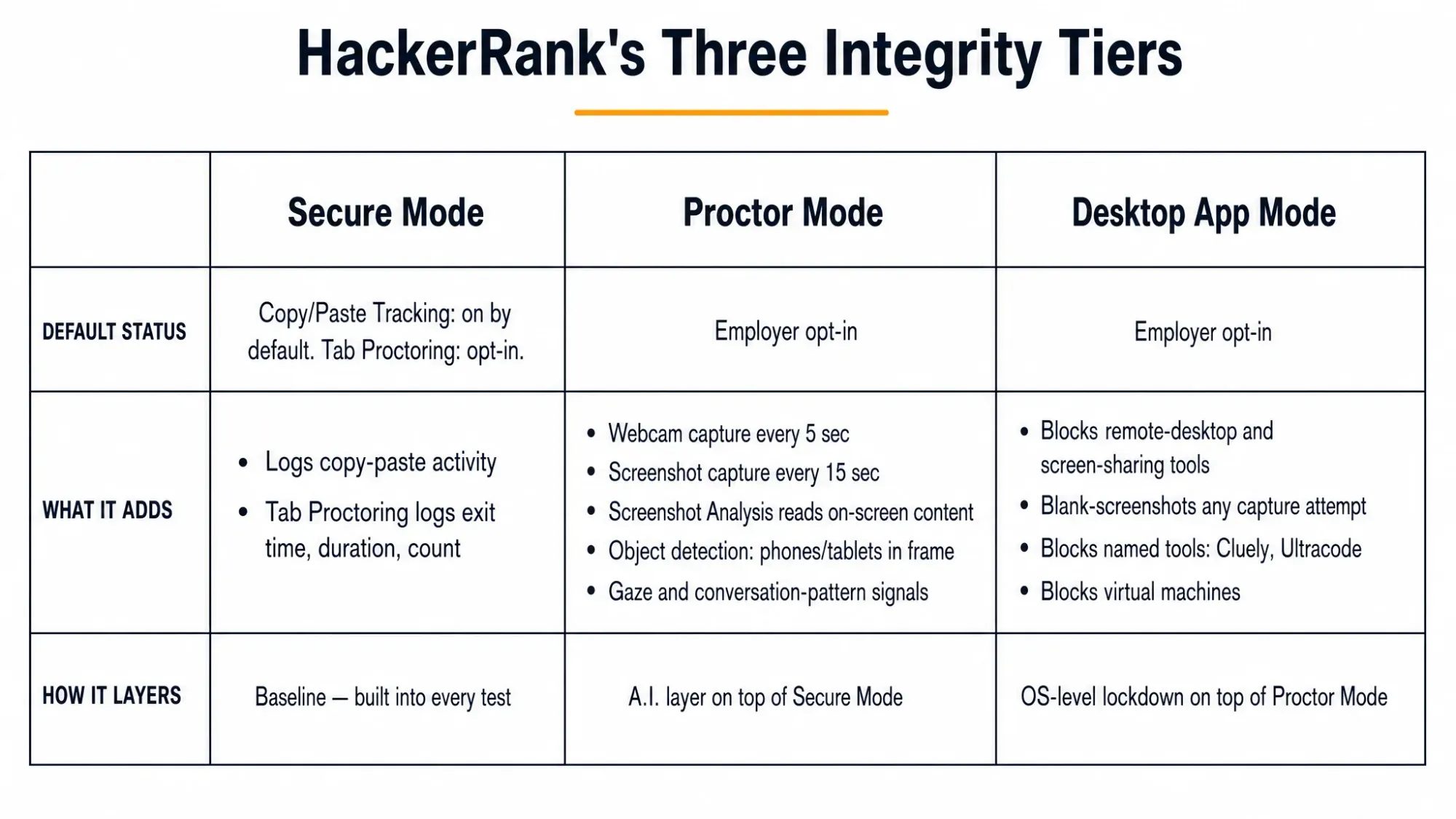
The practical takeaway: you can't see from the test screen which of these is active. The only thing you can assume is running on every HackerRank test is Copy/Paste Tracking.
Everything else stays employer-dependent. That includes whether your webcam is being sampled and whether your screen content is being read. It also includes whether the test is locked down at the OS level. Which of these apply depends on what the specific employer configured for this specific assessment.
One narrower Proctor Mode signal, gaze detection, has limited availability on top of that. It may not be turned on even when the rest of Proctor Mode is.
What HackerRank Actually Sees in Real Time
This is where most of the anxiety searches land, and it's also where the most common misconception lives. The misconception is that HackerRank always knows exactly what you're doing outside the test window. It doesn't. But whether that's true for you depends entirely on which tier from the section above is running.
Tab Switching and Screen Content
Base Tab Proctoring (Secure Mode) does not see what you switched to. When it's on, it logs only that you left the test window, when, and for how long. It has no visibility into the destination tab, application, or content.
If your employer only enabled this baseline layer, alt-tabbing to check something briefly is logged as an exit event. Nothing more.
Proctor Mode's Screenshot Analysis changes that, but only when it's active. This is a distinct, opt-in layer inside Proctor Mode, separate from base Tab Proctoring.
When enabled, it captures periodic screenshots of the candidate's screen. That happens roughly every 15 seconds, dropping to every 5 seconds around a detected violation. It also runs AI analysis on the content to flag tutorial sites, external AI assistants, and leaked-solution repositories. That same analysis flags collaboration or remote-desktop tools.
So the honest answer to "does HackerRank see what I switched to" is conditional: no, if only base Tab Proctoring is running; yes, if Screenshot Analysis is also on. You can't tell which is true for your test from the interface. That's exactly why treating any on-screen assistance as potentially visible is the safer assumption.
The Dual-Device Difference
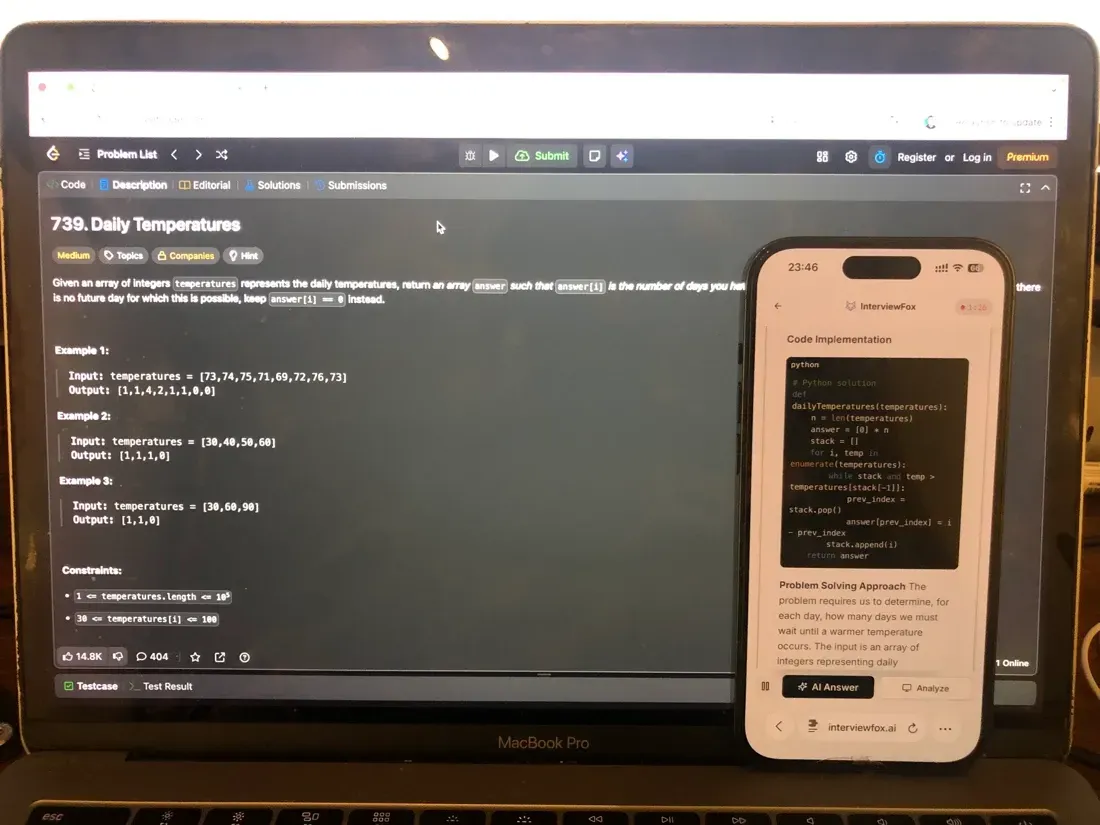
That distinction is the reason dual-device tools exist as a separate category from same-device overlays. Screenshot Analysis reads whatever is rendered on the interview computer's screen. Any assistant window, browser extension, or desktop overlay running there is exactly the kind of surface it's built to catch. That's true regardless of which specific tool it is.
InterviewFox's dual-device mode sidesteps that exposure path structurally rather than by hiding better. The assistant runs on your phone, and answers display on the phone. No InterviewFox window, overlay, or process ever touches the interview computer. Because there's nothing on that screen to capture, InterviewFox's dual-device mode is undetectable by software running on the monitored interview computer.

Answers On Your Phone, Not Your Shared Screen
Skip the risky invisible-overlay tricks. Our dual-device mode keeps answers on your phone, never on the screen you're sharing or recording. Nothing for a platform or interviewer to catch, because there's nothing on the shared screen to find.
Get started. It's freeLoved by 100,000+ candidates
Webcam Monitoring and Device Placement
If your test also runs webcam monitoring, that's a second, independent signal. Proctor Mode captures webcam images roughly every 5 seconds. Desktop App Mode, when layered on top, runs its own webcam cadence around every 15 seconds. Neither is continuous video — both are periodic still-image capture.
Object detection on those webcam images specifically looks for phones and tablets in frame, including partially visible devices. Those get flagged and saved as evidence images. Off-camera device use isn't addressed by this mechanism at all — it only catches what's visible in the frame.
The interview computer and a second device don't have to occupy the same physical space. That's why where you place that second device matters for webcam-based monitoring specifically.
Keeping a phone in your lap or angled far to one side creates a repeated downward or sideways glance. A webcam-based reviewer — human or automated — is more likely to notice that kind of movement.
Positioning it near the laptop camera, or anywhere inside your natural forward sightline, avoids the conspicuous off-screen glance. A poorly placed second device is what creates that glance.
For an AI interview tool, that placement flexibility is a direct consequence of the architecture. The phone and the interview computer are genuinely independent devices. That means you're not constrained to hiding a screen out of frame. You can keep the phone close to where you're already looking.
Read the specifics directly from HackerRank's own Proctor Mode documentation. It has the full breakdown of what Screenshot Analysis and webcam monitoring each cover.
Does HackerRank Detect ChatGPT and Other AI Tools?
Separately from screen-content monitoring, HackerRank runs a purpose-built detection layer aimed specifically at AI-assisted coding. It's opt-in, and it only applies to Coding questions. It works by pattern rather than by identifying a specific tool.
The Advanced AI plagiarism model reads how you write code, not just what you submit. It looks at typing cadence, "Suspicious Code Resetting," external copy-paste activity, and tab-switching during execution.
Suspicious Code Resetting means a large block of code deleted and replaced with irregular typing rhythm or cursor movement. That's the signature of pasting a full AI-generated solution and lightly reworking it.
Sessions matching this pattern get flagged at "High" or "Medium" confidence for human review.
This is a genuinely different mechanism from Screenshot Analysis above. One reads your screen content, the other reads your coding behavior. But they can both fire on the same incident.
If you have an external AI tool visibly open while Screenshot Analysis is active, that's caught as screen content. If you paste its output into the code editor while the Advanced AI model is active, that gets caught. It's flagged as a behavioral pattern. Either layer alone can trigger a flag.
The Projects Workflow Exception
One specific distinction is worth knowing if you use AI tools as part of your normal development process. Coding through HackerRank's offline "Projects" workflow does not trigger this flag. That workflow lets you write code in your own environment and push it to HackerRank.
Pasting externally-written code — AI-generated or otherwise — directly into a standard coding question does. The detection targets the pasting pattern into the monitored editor, not AI use in the abstract.
None of this amounts to HackerRank naming a specific tool with certainty. It's behavioral and pattern-based — a flag for a human reviewer to look at, not a verdict.
Does HackerRank Detect Code Copied From Another Candidate?
This is a separate mechanism from AI-tool detection above. It runs on every test by default, not just as an opt-in add-on.
HackerRank's standard plagiarism system uses MOSS-style similarity scoring on every submission by default. It flags a match at 75% similarity or higher once a candidate has written at least 10 lines of code. For shorter submissions under 10 lines, the threshold is 90% or higher.
HackerRank's own recommended sensitivity scales by difficulty: 90% for Easy questions, 80–90% for Medium, and 75% for Hard. That gradient reflects that harder problems naturally produce more convergent solutions between honest candidates.
On top of that always-on baseline, employers can opt into the Advanced AI plagiarism model described above. That model is a separate ML system, not a stricter version of MOSS. HackerRank states its precision as 85% — "flagged sessions are correct 85% of the time," per current technical documentation.
This two-tier structure resolves what looks like a contradiction if you only read one HackerRank page or the other. The platform genuinely runs both a similarity-matching baseline and a separate opt-in behavioral model. Both run at the same time, on different signals.
One more concrete number is worth knowing for calibration. Across attempts HackerRank's own system has associated with plagiarism, the median out-of-window duration is 65 seconds. The median number of window exits is one. That's a real anchor point for the next section.
Can Normal, Honest Behavior Get You Flagged by Mistake?
This is usually the actual fear behind the search, more than "will I get caught cheating". It's losing an opportunity over something you didn't do wrong.
The clearest reassurance available comes from HackerRank's own numbers. A single brief tab-out sits below the pattern the platform itself associates with plagiarism. The median for flagged attempts is 65 seconds out-of-window and one exit.
A quick glance away, a five-second tab switch, a moment checking the time, doesn't resemble that pattern. It's the clustering of repeated long exits, large pasted blocks, and irregular typing rhythm together. That's what the system is built to catch, not an isolated incidental action.
The same logic covers a brief camera drop or connectivity glitch. Proctor Mode's webcam capture is periodic snapshots, not continuous video. A few seconds of dropped connection sits far below the 65-second, one-exit median tied to plagiarism. That's a reasoned read of HackerRank's own calibration numbers, not a published guarantee about camera disconnects specifically.
Several signals are covered above: webcam capture, screenshot content, tab exits, code similarity, AI-pattern detection. None of them reject a candidate automatically on its own. HackerRank states this independently in two separate posts on its own blog. The detection system flags potential cases and hands the decision to the hiring team. It does not automatically disqualify anyone.
A flag is a prompt for a human to look closer. Tools like Code Playback let them review exactly what happened, not a verdict rendered by the software.
When Policy and Practice Diverge
That said, the gap between HackerRank's stated policy and how an individual hiring team applies it in practice is real. It's worth naming honestly rather than smoothing over.
One candidate reported reaching for their phone mid-assessment during webcam proctoring, then stopping before using it. They were left uncertain whether the gesture itself registered as a flag. That's a reminder that "not cheating" and "not looking suspicious" aren't always the same thing under monitoring.
Here's a more concrete case. A candidate in a VLSI-track assessment wrote out work on paper — a normal, sometimes required, part of that discipline. The candidate reported that a flag was later treated by the hiring team as conclusive. That happened without the manual review HackerRank's own documentation says should happen first.
HackerRank doesn't publish a false-positive rate for these behavioral flags specifically — there's no number to cite.
But the mechanism-level evidence includes a documented review step and a documented low-signal threshold for brief exits. That evidence, together with these individual reports, points the same direction. The system is designed not to punish incidental behavior. That design intent doesn't always survive contact with how a specific hiring team reads the report.
What Happens if You're Flagged, and What to Do About It
If something on your test did get flagged, three separate questions matter. Is it automatic, what's the actual consequence, and can you do anything about it?
It is not automatic. As covered above, HackerRank states this plainly in two independent posts. Its detection system does not auto-fail or auto-reject candidates. A flag routes to the hiring team, who are expected to manually review the specifics before making any decision. Those specifics include Code Playback, the copy-paste indicator, and time-taken insights.
The documented consequence, if a hiring team does confirm an issue, is disqualification from subsequent rounds. That's the language HackerRank's own candidate help center uses. There's no evidence of a separate HackerRank-issued account suspension or platform-wide ban tied specifically to a cheating flag.
The finding is reported to the employer who ran the test. It's the employer's hiring decision, not a HackerRank-side penalty against your account.
Appealing a Flag
There is no documented candidate-facing appeal process. This is the part worth stating without softening.
HackerRank's own help center is explicit about this. It does not share plagiarism check results with candidates. If you have questions about your assessment, contact your recruiter or hiring manager directly. That's the only stated path.
There's no in-platform dispute form, no HackerRank-run review request, no structured appeal workflow published anywhere in their documentation. If you suspect a flag cost you an opportunity, go straight to the person who invited you to the assessment. That's the only channel that exists. It is not a HackerRank support ticket.
What Data HackerRank Keeps, and Who Can See It
A separate concern from "will I get flagged" is the surveillance question itself. What's actually being collected, and for how long?
There's no single, universal retention number. HackerRank's privacy policy states that it processes candidate data "for as long as permitted by our agreement with the Employer or as otherwise required by applicable law." That means retention is set contractually, per employer, not by a fixed platform-wide rule.
The one specific figure that does exist is narrower than it might look. For candidates located in Illinois, HackerRank commits to destroying facial-image data at the earlier of the collection purpose being satisfied or three years after your last interaction with HackerRank.
That's a backstop tied to Illinois's biometric privacy law (BIPA), not a general retention period that applies everywhere.
Who controls that data also isn't HackerRank by default. Under GDPR, HackerRank is the data processor and the hiring employer is the data controller. That split means if you want to exercise a data-subject right (access, deletion, correction), you go through the employer who ran the assessment, not HackerRank directly.
Two narrower points are worth knowing if the webcam element specifically concerns you. HackerRank states that its facial-recognition analysis is not used for unique identification. Separately, it states that it does not train AI models on candidate personal data and does not sell personal information.
What This Means for How You Take the Assessment
Pulling the pieces above into a decision rule: assume Copy/Paste Tracking is always running, because it is. Treat webcam monitoring, screenshot content analysis, and OS-level lockdown as employer-dependent rather than universal. You can't verify which is active from the test interface. So the safer assumption is that any of them might be.
Avoid the specific pattern HackerRank's own system is calibrated to catch. That includes long or repeated window exits and large pasted code blocks. It also includes code that appears with irregular typing rhythm rather than being built up incrementally. A brief, isolated tab-out doesn't resemble that pattern, but a cluster of these behaviors together does.
And if you are flagged, skip looking for an in-platform appeal that doesn't exist. Go straight to your recruiter or the hiring manager instead.
The Preparation Side of This
The preparation side of this is worth separating from the detection side entirely. Most of what actually determines the outcome of a HackerRank assessment isn't whether you triggered a monitoring signal. It's whether you were ready for the specific format and difficulty of what showed up.
Sometimes the worry isn't "will I get flagged". It's "did I prepare for the right thing" instead — and that's a different problem. It calls for a structured plan, tailored to the specific role and assessment format. That plan runs through resume review and practice rather than through anything related to in-test monitoring.
InterviewFox's Prep Agent, reachable over WhatsApp or SMS, works through exactly that. It covers resume feedback, a preparation plan scoped to what's actually coming up, and mock-interview practice. All of it happens before you're staring at a live timer.
Prepare Once, Walk In Ready
The durable fix isn't a cleverer hiding trick, it's going in prepared. Our Prep Agent reviews your resume, builds a study plan, and runs mock interviews with you over WhatsApp or SMS, so you rehearse the content before it counts.
Get started. It's freeLoved by 100,000+ candidates
FAQ
Does using a phone or a second device during a HackerRank test get detected?
Only if it's visible in the webcam frame — the object-detection layer described above catches phones and tablets in frame, including partially visible ones, but has no visibility into device use that stays off-camera.
How accurate is HackerRank's detection — how often is it wrong?
Current technical documentation for the Advanced AI plagiarism model states its precision as 85% — "flagged sessions are correct 85% of the time." An older figure of 93% traces to a 2023 launch-era press release and still appears in some current marketing copy.
No HackerRank source reconciles the two numbers or clarifies whether they measure the same thing at different points in the system's development. Treat 85% as the more current, more specific figure, and the 93% figure as dated.
Can HackerRank tell if two candidates worked together on the same test?
Yes. The same pairwise code-similarity mechanism used for general plagiarism detection — both the default MOSS-style scoring and the opt-in Advanced AI model — compares submissions across candidates who took the same assessment, not just against a general reference database.
Can you search Google or look up a tutorial during a HackerRank test?
It depends entirely on which tier is running. Under base Secure Mode with only Tab Proctoring on, HackerRank logs that you left the tab. It also logs how long you were gone, but not which site you visited.
If Proctor Mode's Screenshot Analysis is also active, that changes. HackerRank's own documentation lists tutorial sites and answer-sharing platforms among what its AI-analyzed screenshots are built to flag.