

You're about to open a HireVue assessment. The question in your head is less "does it record my screen" and more "if I get a little AI help, will anyone know?" Here's the straight answer before you decide anything.
By default, HireVue does not record your screen. In a standard one-way video interview it captures your camera and microphone only. It can see your screen only when an employer adds a coding or technical assessment with screen sharing. You'd see a clear permission prompt first.
But "no screen recording" doesn't mean any AI tool is safe. There is no public evidence of a dedicated "AI detector," but AI help can still be exposed through your camera, your audio, and human review. Moving the answer onto a separate phone changes the software-exposure math entirely. Software on the monitored interview computer cannot detect InterviewFox's dual-device mode, because the answer and the InterviewFox process stay on the phone.
If you're weighing whether help is worth the risk, start from what's actually monitored. A AI interview assistant keeps answers on a phone, off the recorded screen.
What HireVue Records
In a standard OnDemand interview, HireVue records your video and audio. That is the default capture, and it is what almost every candidate experiences. The platform's own candidate FAQ is explicit: this is a competency assessment. It studies how you answer structured questions, the same things a recruiter would look for.
What it does not do by default matters just as much:
- No screen recording. Nothing on your display is captured in a normal video interview.
- No facial recognition or emotion scoring. HireVue states it "never uses the video recording of your interview in order to identify you," which is how it defines facial recognition. It once offered facial-emotion analysis as a scoring factor, but retired that capability in 2021 after an FTC complaint (filed by the privacy group EPIC) argued the practice was opaque and potentially discriminatory. Current HireVue scoring looks at what you say, not your facial expressions.
- No keystroke, mouse, or browser-history logging in the standard flow.
The features that do change the picture are employer-enabled settings, not the platform default. A company can attach a coding exercise, a game-based assessment, or a live screen-share step. Those are configuration choices made per job, and they are the only path by which your screen enters the equation.
On your data and consent: a U.S. Office of Personnel Management privacy assessment
of a HireVue deployment lists the collected information. It includes name, email, voice recording, and your recorded responses. These are kept on a schedule — the federal example destroys records two years after the hiring action closes.
HireVue's FAQ confirms the employer sets retention, and you can request deletion at any point.
What it records: camera, microphone, your spoken answers. What it doesn't: your screen, your faceprint for ID, your keystrokes. Keep that line clear and the rest of the decision gets much simpler.
The One Case Where HireVue Can See Your Screen
The exception is narrow and loud. If your assessment includes a technical or coding portion, the employer may have enabled screen sharing. When that happens:
- You are prompted to share your screen and choose what to share: the entire screen, a window, or a tab.
- Browser and OS permission for screen capture is explicit. You cannot be screen-recorded without seeing that prompt and granting it. While a share is live, the browser keeps a persistent indicator on screen — a colored border around the shared window and a "sharing" badge in the toolbar — so you always know when it's on.
- If you grant "entire screen," the employer or their reviewer sees everything on it. That includes any AI tool, notes, or chat window you have open.
So the honest test is simple: if you were asked to share your screen, assume the screen is visible. If you were not — a plain video interview with only a camera/mic prompt — then your screen is not being captured. You'll know which mode you're in within the first minute, because the permission request is impossible to miss.
This is also why the literal question and the real fear diverge. "Does it record my screen?" is usually no. "Will my AI tool on that screen be seen?" is a different question that depends entirely on whether screen sharing was switched on for your specific assessment.
AI Help vs Human Review
This is the question behind your question, so answer it directly: there is no public evidence that HireVue runs a dedicated "AI-answer detector." What it does monitor, and what human reviewers look at, is a different — and very real — mechanism.
HireVue's own cheating-mitigation guidance describes two signals. Browser Focus Tracking monitors whether you switch tabs or windows. Candidate Image Capture takes periodic snapshots to confirm identity and flag suspicious activity.
Final judgment comes from people who look closely at responses — not an automated "this is AI" stamp. A HireVue cheating-mitigation explainer
lays out the same signals the company says it relies on.
What that means in practice:
- Tab and window switching is logged. Jumping out to paste an answer triggers closer review, even if no "AI" is involved.
- Your camera and audio are the real tell. Reviewers can see where your eyes go, hear a second voice, and notice answers that sound coached or read rather than spoken.
- The disclosure agreement matters. You typically confirm you'll "answer all questions in my own words." A flagged mismatch between that agreement and your performance is a conduct issue, not a software glitch.
So "no AI detector" is true and also misleading if you read it as "safe." The exposure is not a scanner. It's the recording HireVue already makes, plus a human watching for signs you didn't produce the answer yourself.
Why the Common AI Help Methods Get Exposed
Every popular workaround fails for a specific, nameable reason. None of them is caught by a mythical AI scanner. They're caught by the channels HireVue already records or monitors, plus human judgment.
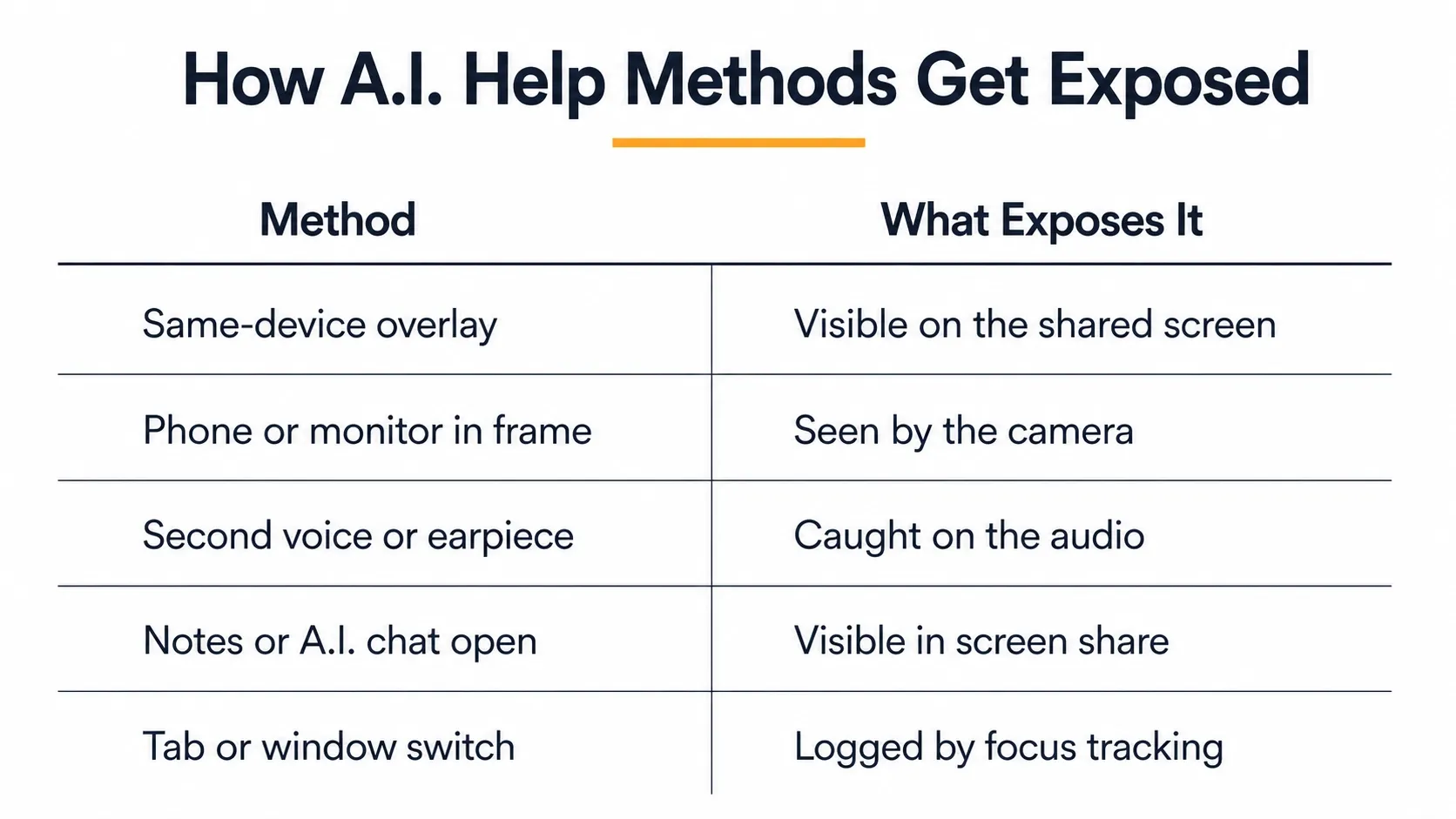
- Same-device overlay / split-screen AI on your laptop. If screen sharing is on, the tool is plainly visible. Even when it's off, a second window can show in your camera's reflection. It can also appear in task-bar and process activity a reviewer can ask about.
- Reading answers off a second monitor or a phone held in frame. HireVue literally tells candidates to "look into the camera, not the screen." Eyes leaving the lens to read, plus a flat reading cadence, is exactly what a reviewer is trained to notice.
- A second voice or live earpiece feeding answers. Your audio is recorded. More than one voice in the room is noticeable and hard to explain away.
- Notes or an AI chat open on the same screen during a shared-screen assessment. This is the most directly visible case — the employer sees it in real time.
- Jumping tabs or windows to copy text. Browser Focus Tracking logs the switch and routes your response to closer review.
The pattern is consistent. The methods that feel sneaky fail for one reason: they put help on a surface HireVue already watches. That surface is the screen, the camera, or the mic.
A Safer Device Boundary
If the exposure path is the shared or recorded screen, the camera, and the audio, one move helps. Keep the answer off the device HireVue sees.
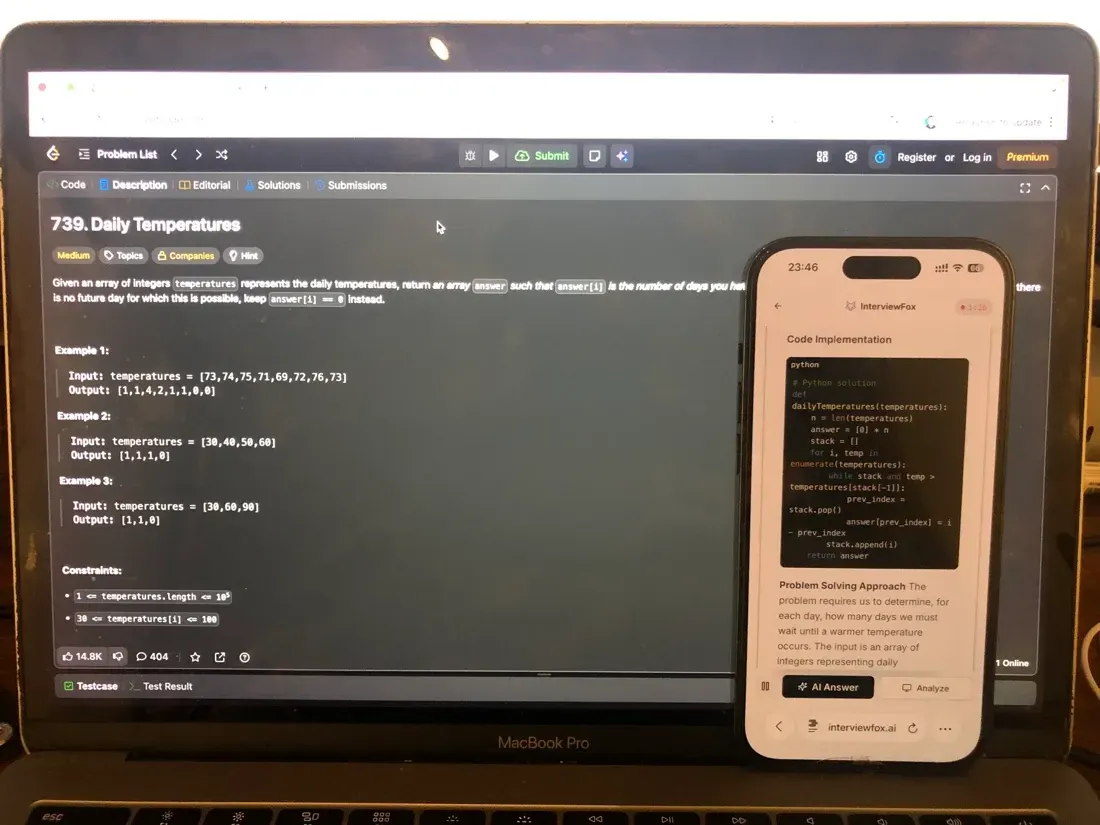
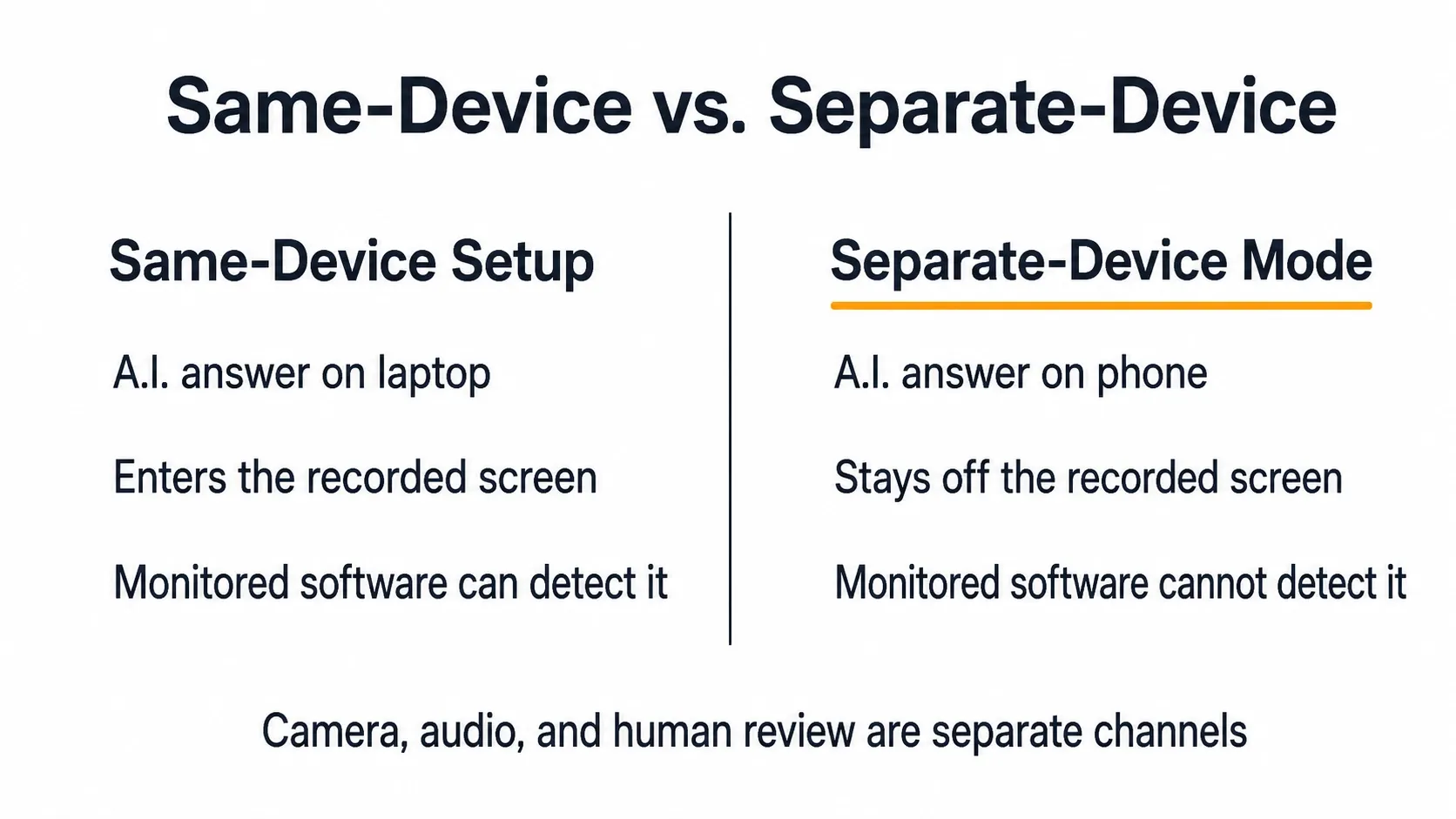
When the answer displays on a separate phone instead of your laptop, it never enters the screen HireVue records. Software on the monitored interview computer cannot detect InterviewFox's dual-device mode. No answer surface, overlay, or InterviewFox process runs on that machine, so its monitoring has nothing to catch. That removes the same-screen exposure path — the specific way an on-laptop AI tool gets caught.
Two honest boundaries sit beside that conclusion, and they are different questions:
- Your camera and audio still capture what a person can observe, and a reviewer can notice eye movement or a second voice. Because the phone and the interview computer are separate devices, you can position them independently: rest the phone near the laptop camera or within your natural forward sightline rather than in your lap or off to one side. That placement avoids the conspicuous off-screen glance a poorly placed second device creates.
- Human review still applies. Authenticity, coherence, and the disclosure agreement you signed are judged by people. Dual-device mode changes the software-exposure path. It does not change who reviews the interview or what the employer's rules require.
A dual-device AI interview tool keeps the answer on your phone. No InterviewFox process runs on the assessed computer.

Answers On Your Phone, Not Your Shared Screen
Skip the risky invisible-overlay tricks. Our dual-device mode keeps answers on your phone, never on the screen you're sharing or recording. Nothing for a platform or interviewer to catch, because there's nothing on the shared screen to find.
Get started. It's freeLoved by 100,000+ candidates
What Happens If You Get Flagged
A flag is not an automatic rejection. A tab switch, a suspicious snapshot, or a reviewer's doubt routes your interview to human review. There, a person decides what the signal means. From there, the outcome is employer-dependent. It can range from a note in your file to disqualification, depending on that company's integrity policy and the disclosure agreement you accepted.
What a flag is not: HireVue does not publicly claim that an algorithm auto-fails candidates. Its FAQ states plainly that "no robots are involved" in hiring decisions and that assessments are a first screening step. The risk worth weighing is reputational and practical — a flagged, reviewed, and rejected interview — not a silent algorithmic ban.
Your Privacy Rights: Retention, Deletion, and Disclosure Laws
HireVue is the tool; the employer is usually the one who decides what happens to the recording. A few rights are worth knowing before you click start:
- Retention is set by the employer, not HireVue. HireVue's candidate FAQ states your data is kept for the period the hiring company chooses, and you can request deletion at any time.
- Biometric privacy laws apply in some states. In Illinois, the Biometric Information Privacy Act (BIPA) and the AI Video Interview Act require employers to tell you they're using AI and get your consent before an AI-analyzed video interview. A BIPA class action against HireVue (Deyerler v. HireVue) was filed in 2022 and survived a motion to dismiss in 2024 — a sign biometric-data handling in interviews is still actively litigated.
- Disclosure rules are spreading. New York City and Maryland require notice when automated employment decision tools are used; California is broadening similar requirements. In the EU, GDPR gives you access and deletion rights against the employer as the data controller.
- Requests go to the employer. Because the hiring company controls the recording, deletion and access requests are directed to them, not to HireVue.
None of this changes the core answer: your screen still isn't recorded by default. It does mean the video and audio you do produce are governed by law and by the employer's own retention choice.
Preparing Without Crossing the Line
The sturdier risk to manage is usually preparation, not detection. Candidates get flagged less for malice than for panic. They reach for help because they don't know the questions or haven't practiced speaking answers out loud.
Invest in this before the assessment opens. Rehearse the competency questions, time your responses, and build a plan you actually follow. InterviewFox's Prep Agent turns your resume and the job description into a practice workflow over WhatsApp or SMS. Then the answers in the room are genuinely yours.
Prepare Once, Walk In Ready
The durable fix isn't a cleverer hiding trick, it's going in prepared. Our Prep Agent reviews your resume, builds a study plan, and runs mock interviews with you over WhatsApp or SMS, so you rehearse the content before it counts.
Get started. It's freeLoved by 100,000+ candidates
FAQ
Does HireVue use facial recognition? No. HireVue states it never uses the interview video to identify you, which is how it defines facial recognition.
Can HireVue see my browser tabs or track my mouse? It monitors tab and window switching (Browser Focus Tracking). It does not publicly document capturing tab content, mouse movement, or browser history in the standard flow.
Is using ChatGPT during a HireVue illegal? It is not a crime, but it typically violates the employer's assessment-integrity rules and the disclosure agreement you accept at the start. "Allowed elsewhere" and "allowed in this interview" are different things.
How long does HireVue keep my recording? Retention is set by the employer you applied to. You can request deletion of your data at any point, and HireVue purges it when the employer's retention period expires.