

You are about to open a HireVue interview. The question in your head is if I get a little help on the side, will anyone know? So you are deciding whether that help is worth the risk.
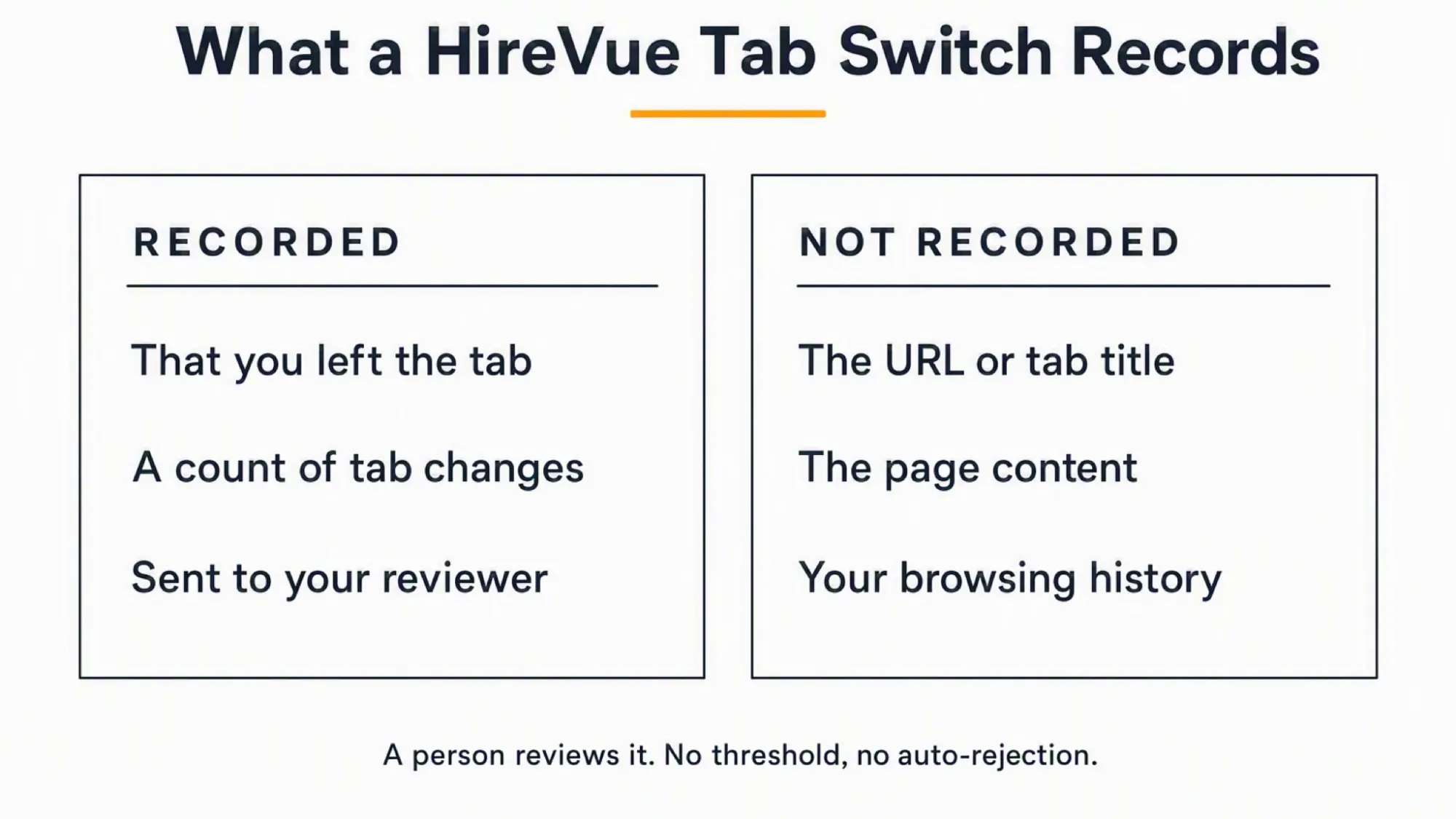
Yes. HireVue logs an event that you left the tab and gives your reviewer a count, not its content.
Still, the missing content is not the same as a missing record. The event does show that you left. Your reviewer sees you broke focus, so same-device help stays exposed.
Dual Device Mode shows answers on your phone, where software on the monitored computer cannot see them. Your answer surface then never sits on the interview machine. It is an AI interview assistant built for that boundary.
What HireVue captures when you switch tabs
HireVue describes tab and window switching as Browser Focus Tracking. The documented artifact is an event.
That event records that you left the interview. But it does not record the URL, title, or page you opened.
No HireVue source documents capturing the other tab's content. In fact, the privacy policy names only standard web analytics.
Tab switching is not the same as screen recording
A focus event is a log entry. Screen recording, however, is a separate and permission-gated feature.
Screen sharing needs desktop Chrome or Edge plus your explicit permission. It is unavailable on mobile.
Sharing your screen is a different mechanism from leaving the interview tab. The two are not the same.
If a focus event only records that you left, does HireVue also record your screen? Our guide on whether HireVue records your screen explains the narrow cases where capture can turn on.
Why older answers say HireVue can't tell
HireVue's 2024 material listed tab-change monitoring under future investigation. But the 2025 blog presents it as current.
This is capability evolution, not contradiction. That timeline explains why some older pages still say no.
HireVue's own 2025 blog states that the platform monitors whether you switch tabs or windows during an interview. Even so, some older pages dispute that exact claim.
What the reviewer sees when you switch
The reviewer's interview data includes a record of changing active browser tabs. It sits beside recording count, completion time, and IP address.
The artifact is an event record and a count of tab changes. Still, HireVue does not describe the exact dashboard rendering.
HireVue publishes no activation setting for this signal. So treat it as active, because you cannot check it from inside the session.
The 2025 whitepaper lists records of changing active browser tabs in the reviewer's interview data. The entry sits beside recording count and login count.
You cannot confirm if the tracking is on
No HireVue page names an activation model here. Meanwhile, the employer enables some other features, while permission gates others.
Neither statement names focus tracking specifically. So the honest move is to assume it is on.
Software on the monitored interview computer can read a tab-change record that reaches your reviewer. A dual device AI interview assistant keeps answers on a phone, where that same-computer software cannot detect them.
Place the phone near the laptop camera or within your natural forward sightline. That keeps your glance subtle, unlike the obvious downward look a lap phone creates.
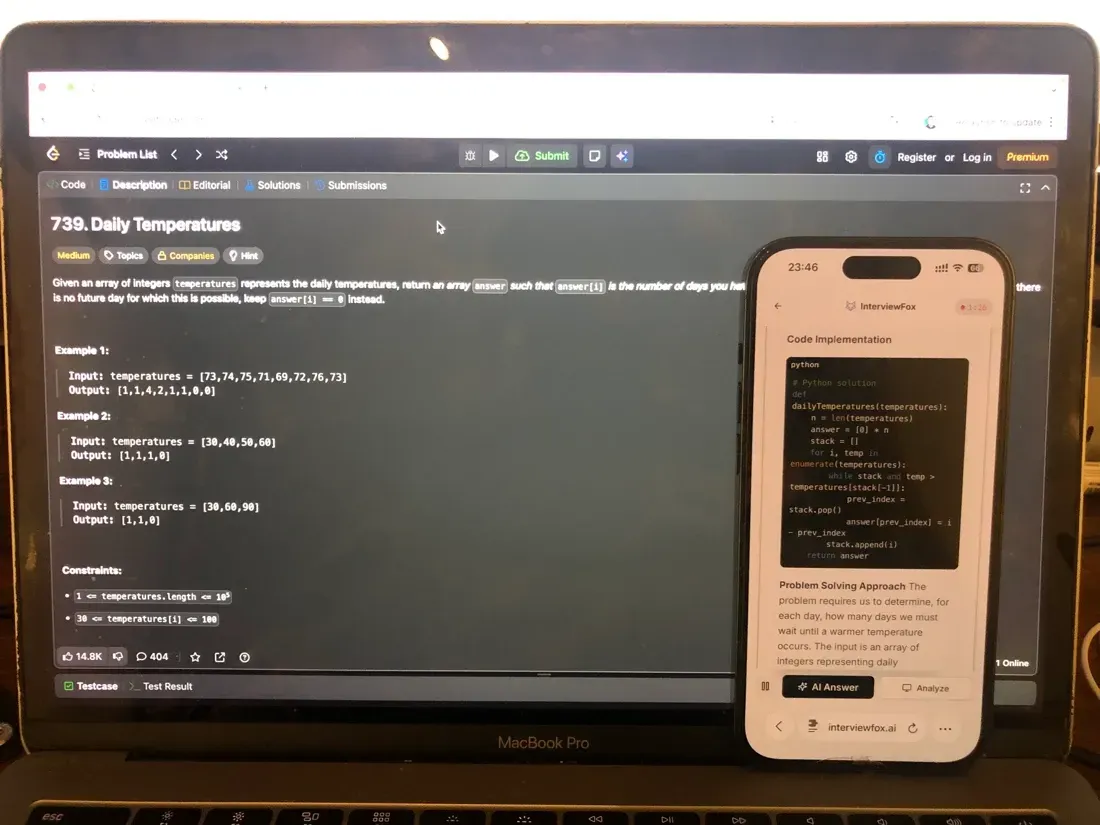

Answers On Your Phone, Not Your Shared Screen
Skip the risky invisible-overlay tricks. Our dual-device mode keeps answers on your phone, never on the screen you're sharing or recording. Nothing for a platform or interviewer to catch, because there's nothing on the shared screen to find.
Get started. It's freeLoved by 100,000+ candidates
The two ways HireVue catches a tab switch
HireVue uses two separate mechanisms for tab switching. Merging them is the error this section avoids.
First, General Browser Focus Tracking applies to the whole interview. HireVue describes it without surface qualification.
Second, code-challenge window-leave and paste notification is narrower. Inside a coding test, leaving the window or pasting text alerts the reviewer.
HireVue documents little about surface scope. It names only OnDemand for the focus signal. Live, game-based, and mobile surfaces get no separate description.
Tab tracking across interview surfaces
For the focus signal, HireVue names only OnDemand. No source documents the other surfaces separately for tab tracking.
Threshold, warning, or auto-rejection
HireVue publishes no duration or count threshold for tab switches. So you cannot import another platform's numbers here.
No source documents a candidate-facing warning either. The 2024 blog listed tab-locking as future exploration only.
A human reviews the flag. So no automatic rejection exists. The employer makes the final call.
No published switch-count threshold
HireVue publishes no count threshold. This guide states the absence and invents no tier.
No warning, lock, or auto-submit
No source documents a warning, a countdown, or a forced submission. Only the future-investigation listing shows HireVue ever considered either one.
What HireVue does not flag
HireVue does not analyze some feared behaviors. But the heading names a gap, not a guarantee of safety.
For example, HireVue does not analyze looking away or reading paper notes. A focus event comes from leaving the tab, not from gaze. Some articles claim that sustained off-camera focus is monitored. HireVue's own FAQ addresses eye contact only as a personal comfort question, not a detection signal. What a reviewer can spot on a recording is different from what the software flags.
HireVue also runs no facial recognition and no eye or blink scoring. Periodic webcam snapshots are a separate identity feature. Other articles wonder if some employers still enable it. HireVue's FAQ answers plainly: it never uses your video recording for identification. SHRM, the largest HR professional society, reported the same conclusion in 2021.
No source documents mouse or pointer telemetry. Three items remain genuinely unknown.
No eye, face, or mouse tracking
Sources confirm that facial recognition and eye scoring are absent. Voice pattern analysis is another common claim. But one recent independent guide checked this. It found that scoring runs on what you say, not on tone or micro-expressions. No mouse telemetry appears in any HireVue source either.
Prep time, second screens, and accidents
No source says whether HireVue captures prep time before recording. Second-screen or phone detection is also unknown.
The event record does not distinguish an involuntary focus loss from a deliberate one. No documented tolerance exists either.
Notes, disclosure, and what you were told
HireVue sets no rule about outside materials. Instead, the employer grants or denies permission.
HireVue also offers clients customizable disclosure agreements that appear before the interview. Still, whether yours names focus tracking is unknown.
Keeping reference material in another tab
The platform neither forbids nor permits outside materials. The employer's rules govern the practice.
Leaving the interview tab still produces a record. No rule changes the signal itself.
What to do instead of switching tabs
Keep reference material off the interview browser entirely. Expect no warning and no published threshold.
Anything you need must sit off that browser. Otherwise it must live somewhere that never requires leaving the tab.
InterviewFox's Prep Agent can review your resume and build a practice plan. Steady preparation still beats last-minute help you cannot defend.
Prepare Once, Walk In Ready
The durable fix isn't a cleverer hiding trick, it's going in prepared. Our Prep Agent reviews your resume, builds a study plan, and runs mock interviews with you over WhatsApp or SMS, so you rehearse the content before it counts.
Get started. It's freeLoved by 100,000+ candidates
What else does HireVue monitor?
HireVue monitors several behaviors beyond the tab-switch signal. The list below covers the adjacent ones.
- Periodic webcam snapshots confirm the same person stays on camera. This is identity checking, never facial recognition.
- Copy and paste can be disabled in the candidate interface. The interface tells you when it is off.
- Submitted answers and code are compared across candidates for near-identical matches. This is what actually produces a flag.
- HireVue runs no dedicated AI or ChatGPT text detector on your answers. That absence is documented, not a promise of safety.
This guide covers the tab-switch signal in depth. The parent guide explains how HireVue detects cheating across all its signals beyond this one.
FAQ
I already switched tabs in a HireVue interview. What now?
A tab switch is an event log, not a verdict. No published threshold exists. So a reviewer looks before any decision.
One switch is a data point, not proof. A human decides what it means.
Does a tab switch feed my HireVue score?
No HireVue source describes browser-focus records as a scoring input. Instead, they appear as reviewer-visible interview data.
Still, this guide does not claim scoring is impossible. It only states that no source describes it.