
I Aced HackerRank Tableau in 2026: Real Questions and Prep Plan

Quick Facts
| Format | 3 coding problems, single sitting |
| Platform | HackerRank |
| Time limit | Not published by employer |
| Language | Python, Java, C++, and other HackerRank-supported languages |
| Proctoring | Proctor Mode with periodic desktop screenshots and single-monitor check when enabled |
| Scoring | Per-test-case evaluation with partial credit |
I took the hackerrank tableau assessment for a software engineering new grad role during the 2026 hiring cycle. Solving all three coding problems in Python 3 went cleanly, and this guide explains what candidates actually face.
With twelve minutes remaining on the 300 by 300 grid question, a recursion depth error crashed the largest test case. Checking a dual device AI interview assistant helped isolate the iterative fix, which I walk through in the breakdown below.
Before my test, I went through every Tableau HackerRank post from the past two years on Reddit, LeetCode Discuss, and Teamblind. What I found tracks closely with what I experienced. Specifically, what follows covers the format, the scoring rules, and the traps that get candidates flagged or rejected.
The Real Questions on My Tableau HackerRank Test
I sat this one for a software-engineering new-grad role in the 2026 cycle, in Python 3. Three coding problems, no SQL, no dashboards.
This was the assessment attached to my engineering application, not the Tableau product skills test. I rebuilt each prompt below from those reported shapes rather than quoting the paper.
Question 1: Budgeted Graph Traversal
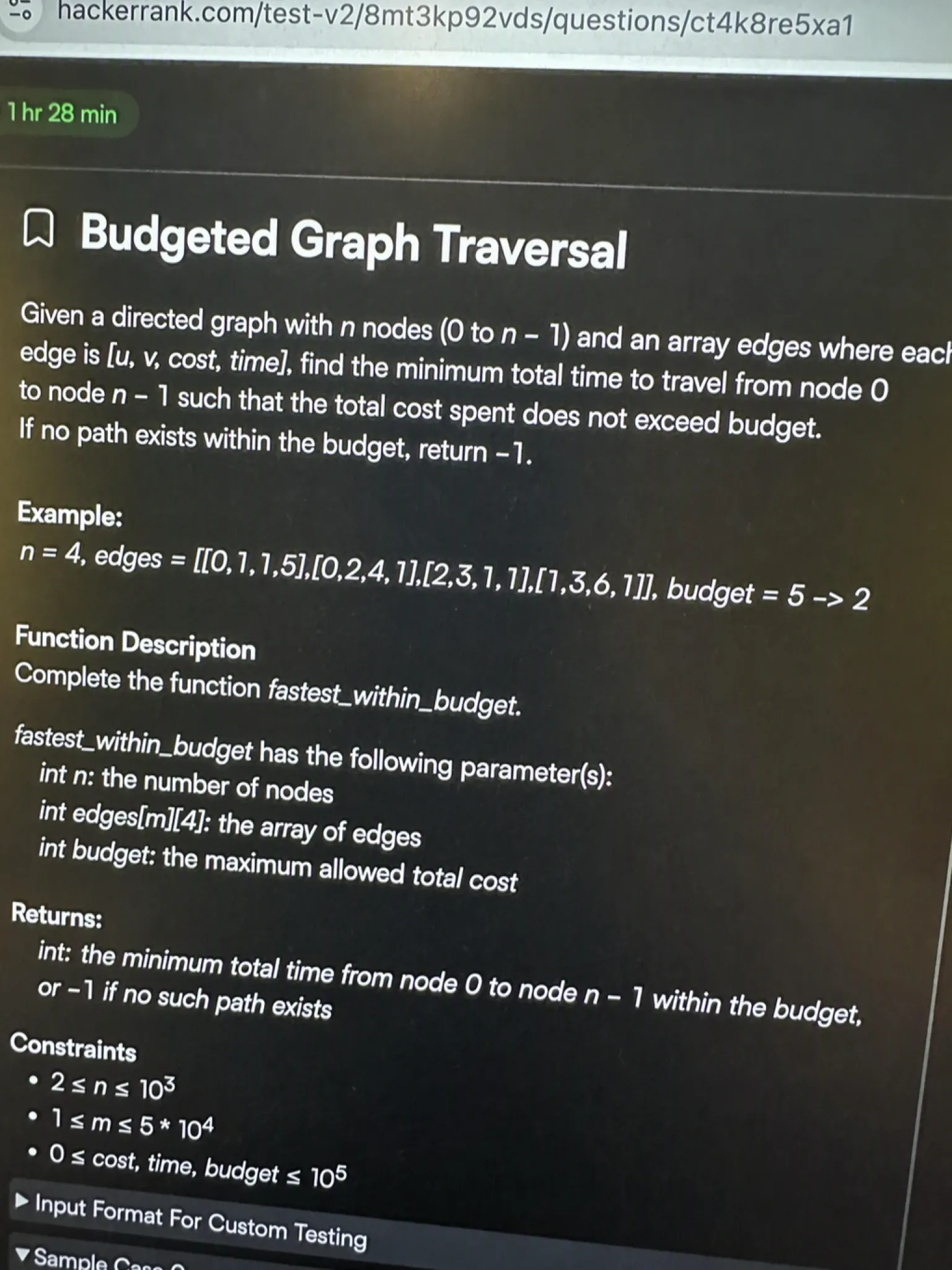
The problem I got: The starter, as I rebuilt it, was fastest_within_budget(n, edges, budget). Each edge arrived as [u, v, cost, time] on a directed graph with nodes 0 through n - 1. I had to return the smallest total time for a path from 0 to n - 1 within budget, or -1 when none fit.
Limits were n <= 200, edges <= 2000, cost <= 200, budget <= 2000. Enumerating paths was not an option at that size.
The first sample had n = 4, edges = [[0,1,1,5],[0,2,4,1],[2,3,1,1],[1,3,6,1]], and budget = 5. It returned 2. The second had n = 3, edges = [[0,1,5,1],[1,2,5,1],[0,2,6,4]], and budget = 6. It returned 4, not the faster two-hop route, which costs 10 against the budget.
The third sample had n = 3, edges = [[0,1,2,1],[1,2,2,1],[0,2,10,3]], and budget = 3. It returned -1.
My approach: My first instinct was to take the fastest edge at every step, and the second sample killed it. That two-hop route costs 10 against a budget of 6, while the slower direct edge fits. So cost had to become part of the position.
best[node][cost] holds the smallest time for reaching a node having spent exactly that much. Running Dijkstra over those pairs folds the constraint into the graph, and each state settles once.
import heapq


def fastest_within_budget(n, edges, budget):
    graph = [[] for _ in range(n)]
    for u, v, cost, time in edges:
        graph[u].append((v, cost, time))

    INF = float("inf")
    best = [[INF] * (budget + 1) for _ in range(n)]
    best[0][0] = 0
    heap = [(0, 0, 0)]  # (time, node, cost spent)
    answer = INF

    while heap:
        time, node, cost = heapq.heappop(heap)
        if time > best[node][cost]:
            continue
        if node == n - 1:
            answer = min(answer, time)
            continue
        for nxt, edge_cost, edge_time in graph[node]:
            new_cost = cost + edge_cost
            if new_cost > budget:
                continue
            new_time = time + edge_time
            if new_time < best[nxt][new_cost]:
                best[nxt][new_cost] = new_time
                heapq.heappush(heap, (new_time, nxt, new_cost))

    return -1 if answer == INF else answer
Time complexity: O(E * B log(n * B)) | Space complexity: O(n * B)
Forty-five minutes went into this one, most of it spent convincing myself the state table would stay small. I never wrote that argument down.
Question 2: Longest Increasing Subsequence Variant
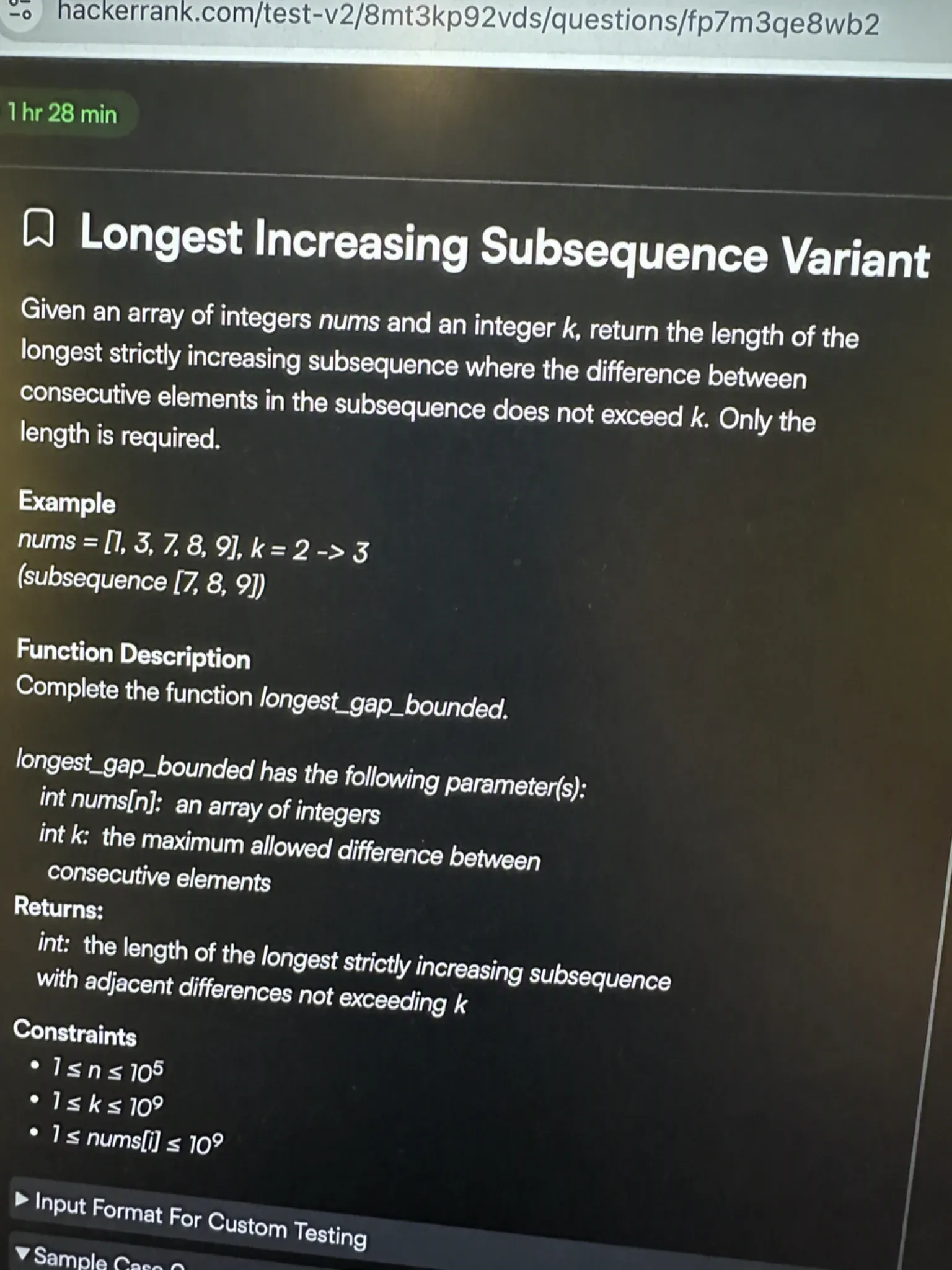
The problem I got: The signature was longest_gap_bounded(nums, k). It asked for the length of the longest strictly increasing subsequence where each step up is at most k. Only the length, no indices.
Inputs went to n = 3000, with values and k up to 10^9. Three samples shipped with it. [1,3,7,8,9] with k = 2 returned 3. [4,5,6,1,2] with k = 1 returned 3. [5,5,5] with k = 0 returned 1.
My approach: It read like LIS until the gap cap. Patience sorting keeps the smallest tail for each length. That tail stops being the right choice once a large jump is illegal. On the first sample plain LIS answers 5, while the cap brings it down to 3.
So I went back to pairs. dp[i] is the best chain ending at i, extended from any j where nums[j] < nums[i] <= nums[j] + k.
Four and a half million pair checks run fine in Python at that bound. A segment tree over values would cut it to n log n, and I set the idea aside once the bound fit.
def longest_gap_bounded(nums, k):
    n = len(nums)
    if n == 0:
        return 0
    dp = [1] * n
    best = 1
    for i in range(n):
        for j in range(i):
            if nums[j] < nums[i] and nums[i] - nums[j] <= k:
                if dp[j] + 1 > dp[i]:
                    dp[i] = dp[j] + 1
        if dp[i] > best:
            best = dp[i]
    return best
Time complexity: O(n^2) | Space complexity: O(n)
Ten minutes or so on this one. The cap looked like a typo in the statement, so I read the line twice before starting.
Question 3: Grid Component Counting
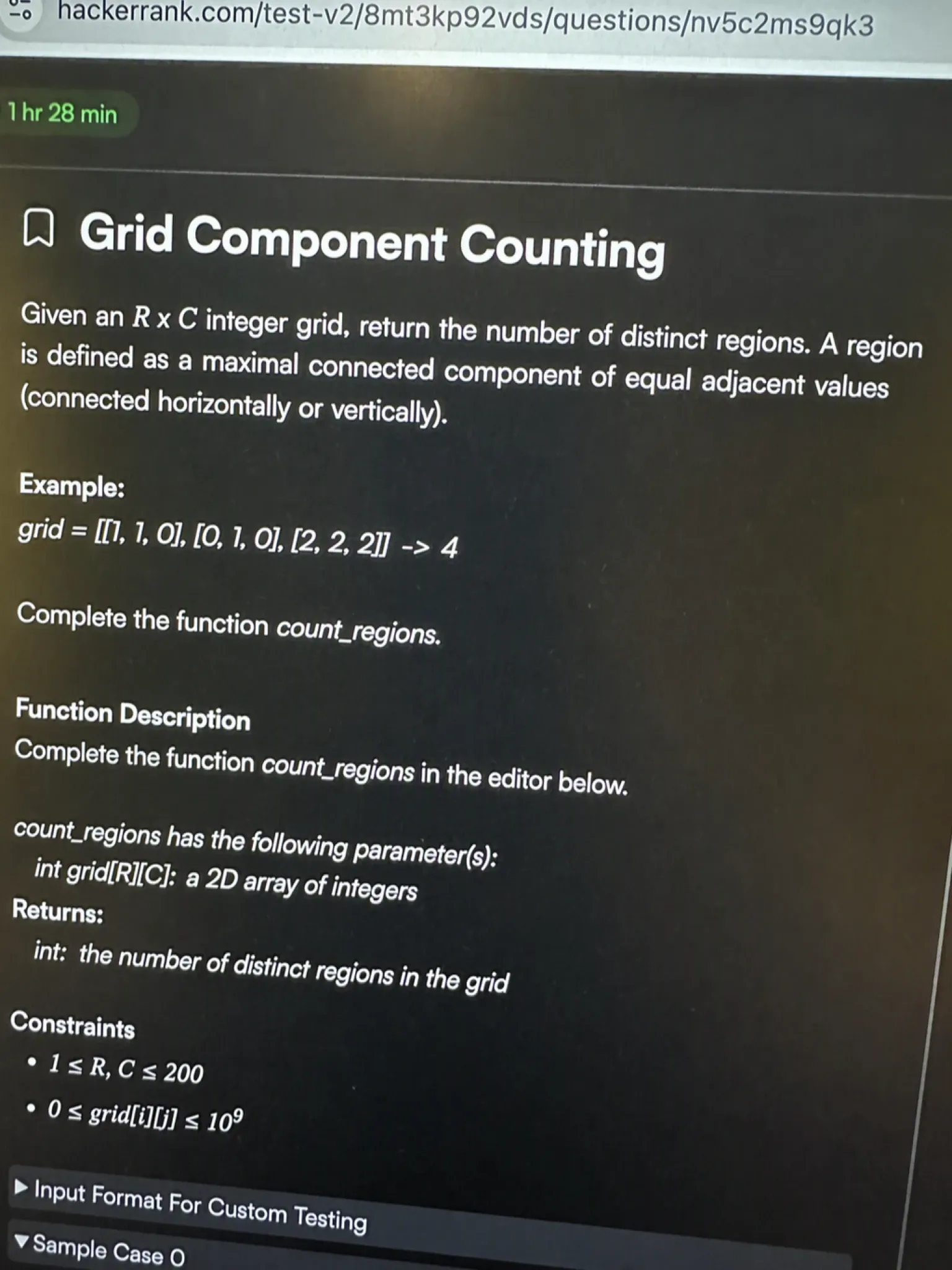
The problem I got: This was count_regions(grid). A region is a maximal block of equal values joined up, down, left, or right. Every cell belongs to exactly one region, and I returned the count of regions.
Grids went up to 300 by 300. [[1,1,0],[0,1,0],[2,2,2]] returned 4, since the lone zero at row 1, column 0 is boxed in by different values. [[1,2],[3,4]] returned 4. [[7]] returned 1.
My approach: Plain flood fill. Scan the cells in order and open a new region on any unvisited cell, then push neighbours until the stack empties.
My first version was recursive, and the 300 by 300 grid crashed with a recursion error with twelve minutes remaining. A single region can run 90,000 cells deep, which is past Python's default recursion limit.
I didn't want to use a desktop overlay: the answer would have been on the same screen the proctoring system was monitoring, hidden by a basic rendering layer. Whether that gets flagged depends on what detection is currently running, and I didn't want that uncertainty in the background.
I pressed a keyboard shortcut to auto-capture the problem, which pushed the solution directly to my phone. Iterating with a coordinate stack and marking on push made the fix clear. My laptop screen remained clean and unchanged outside the platform's screenshot monitoring.
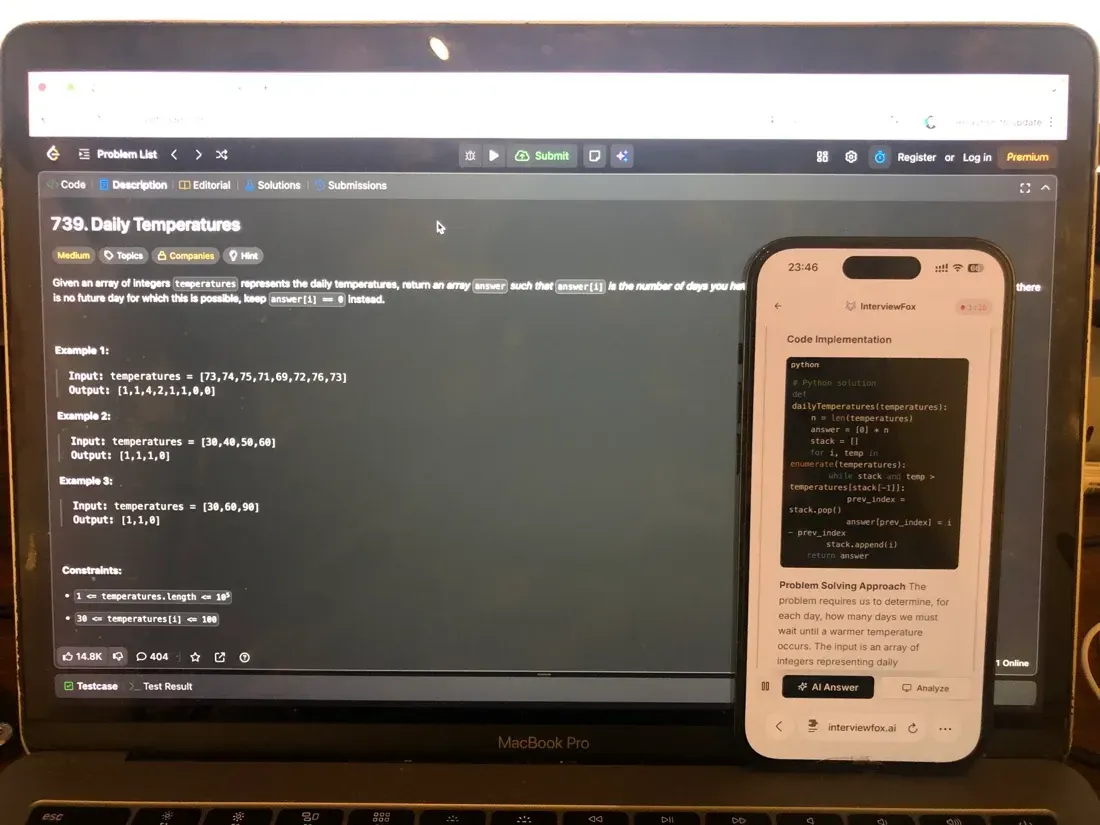
Land offer with Safer AI Interview Assistant
Skip the risky invisible apps. Our dual-device mode keeps it simple and undetectable. You crush the interview, we handle the answers.
Get started. It's freeLoved by 100,000+ candidates
Marking a cell when it goes on the stack, not when it comes off, kept each cell handled once. The rewrite held a list of coordinates and passed all three samples.
def count_regions(grid):
    if not grid or not grid[0]:
        return 0
    rows, cols = len(grid), len(grid[0])
    seen = [[False] * cols for _ in range(rows)]
    regions = 0

    for r in range(rows):
        for c in range(cols):
            if seen[r][c]:
                continue
            regions += 1
            value = grid[r][c]
            seen[r][c] = True
            stack = [(r, c)]
            while stack:
                cr, cc = stack.pop()
                for dr, dc in ((1, 0), (-1, 0), (0, 1), (0, -1)):
                    nr, nc = cr + dr, cc + dc
                    if 0 <= nr < rows and 0 <= nc < cols:
                        if not seen[nr][nc] and grid[nr][nc] == value:
                            seen[nr][nc] = True
                            stack.append((nr, nc))
    return regions
Time complexity: O(R * C) | Space complexity: O(R * C)
Twelve minutes were left when the rewrite landed. I never re-ran the 300 by 300 grid, so the largest input went in untested.
Tableau's Proctoring Policy for HackerRank
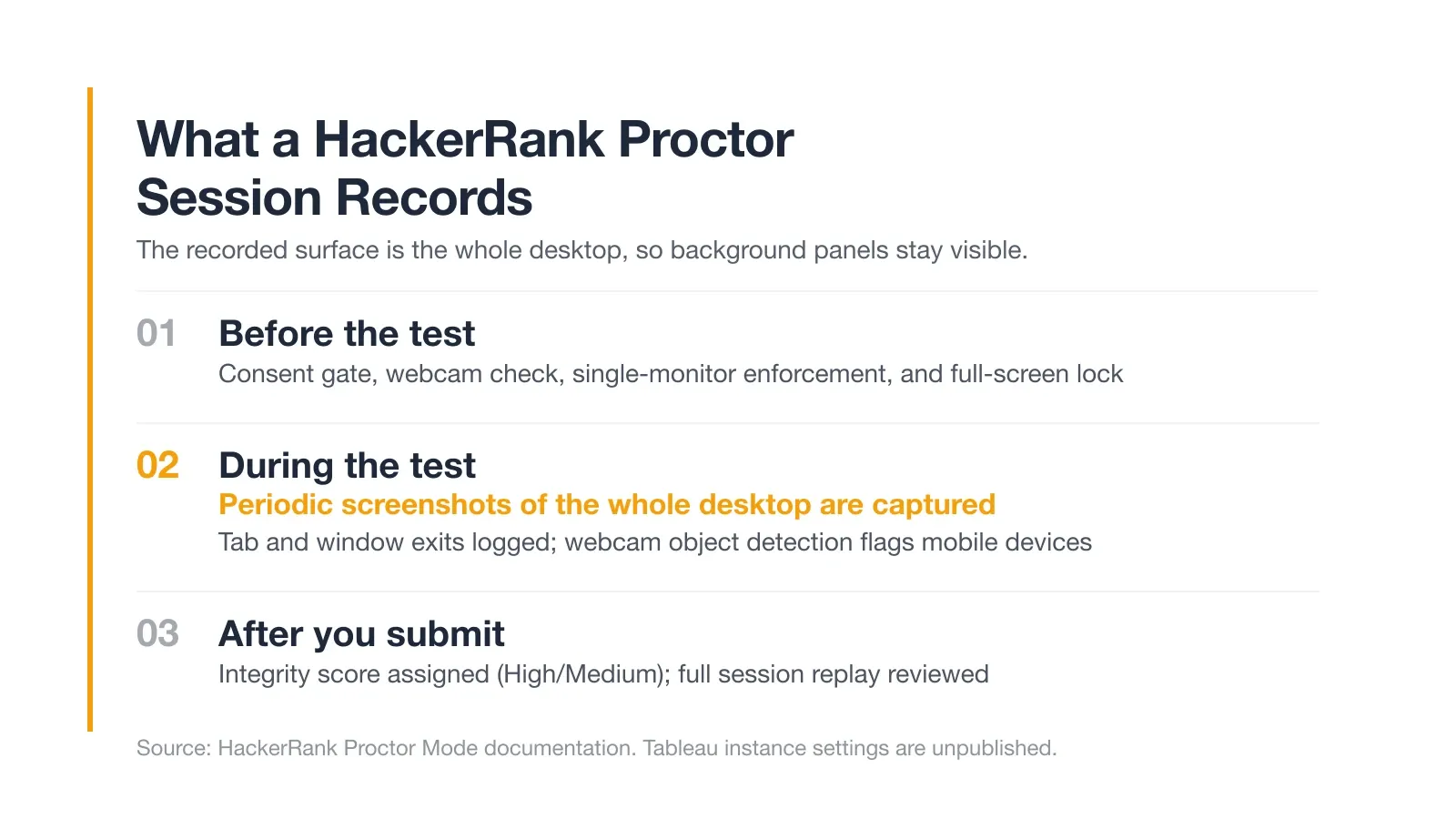
Many people wonder what the proctor watches. In addition, HackerRank's documentation shows Proctor Mode only runs on tests built after July 2025.
The capture surface is the desktop. While this overview focuses on test policies, our guide on how HackerRank records candidate screens details the exact screenshot intervals and replay tools. The tool grabs desktop screenshots at set times. It also builds a full replay to catch unapproved apps.
What the invitation tells you wins. No public post proves Tableau turns on webcams or Secure Mode. Instead, HackerRank says your invite email will state every rule that applies.
One monitor, or you don't start. Candidates frequently ask whether HackerRank detects multiple monitors during onboarding, and the system halts testing until extra displays are unplugged. If you plug in a screen mid-test, the system logs a flag right away.
Copy-paste is off. Understanding what HackerRank tracks when candidates paste code helps avoid integrity alerts when working inside the editor. The editor locks paste shortcuts. Broken rules can get you dropped from future rounds.
What Tableau's HackerRank Test Format Actually Looks Like
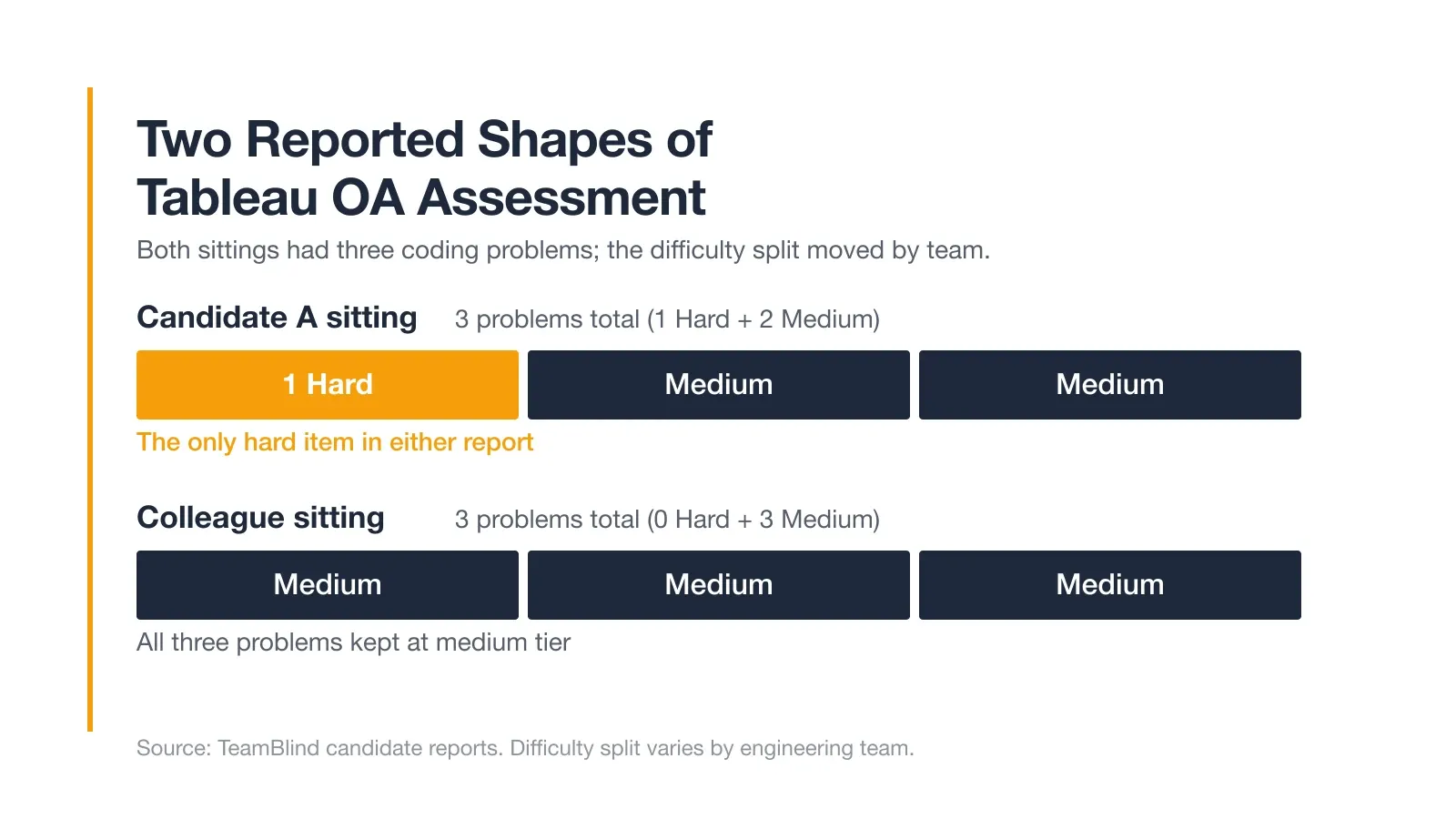
Tableau never posts a test guide or time limit for its SWE jobs. Instead, we have to look at what real applicants report.
No published spec exists. Tableau gives no public facts on test length, deadlines, or problem counts. Job posts and online guides have no verified specs for this test either.
Three problems, two splits. Past posts describe three coding tasks, but the mix shifts by team. One person got one hard task and two mediums. Another person faced three medium problems.
The 24-question page is not Tableau's. A widely circulated HackerRank page listing 24 questions, 100 minutes, and SQL sections belongs to Zscaler. When a test has product sections and quiz questions, it is a skills quiz, not the SWE test.
How Tableau's HackerRank Scoring Works
HackerRank grades code on test cases, not on style or clean structure. Knowing how the platform scores helps you spend your time well under clock pressure.
Points are per test case. Each code run earns full, partial, or zero points based on passing checks. Hidden cases keep their answers hidden to check edges, memory, and time caps.
A correct answer can still score zero. Bad output prints make good code fail every test case. An extra space, wrong letters, or missing commas can wipe out all your points.
No cut-off has ever been published. HackerRank sets no flat passing grade. Each hiring team picks its own cut-off. Since partial points add up, a working brute force beats an unfinished fast answer.
Why Candidates Fail the Tableau HackerRank Assessment
Most online guides skip why people fail or get ghosted after tests. Looking at real test flags shows the traps that cost applicants their chance.
Overlay Panels Still Land in Periodic Screenshots
During a late February 2026 assessment, a candidate ran a translucent AI sidebar over the task window and expected it to remain outside the recorded view. Just after pasting a revised function, a screen-state warning appeared even though the panel was set to click-through.
The test ended early, costing the candidate the only assessment attempt attached to their application. HackerRank snaps full-screen shots at set times. That means any side window shows up in the final recruiter replay.
At least one candidate was flagged for using a desktop overlay tool: the tool renders the AI's answer on the same screen the proctoring system is monitoring, hidden by a basic OS-layer trick. InterviewFox works differently: the answer goes to my phone, a physically separate device that no screenshot or session recording can reach by design.
Land offer with Safer AI Interview Assistant
Skip the risky invisible apps. Our dual-device mode keeps it simple and undetectable. You crush the interview, we handle the answers.
Get started. It's freeLoved by 100,000+ candidates
While this incident highlights a single overlay failure, candidates looking beyond individual alerts can review how HackerRank detects cheating signals across the entire assessment lifecycle. The platform joins weird events into one final trust score.
A Late Language Switch Reads as Substitution
An engineering evaluator reviewed an assessment where a candidate struggled with buggy Java for most of the session. In the final five minutes, the applicant switched to JavaScript and pasted a complete, working solution.
That quick jump in syntax and style brought a fast fail from the grader. HackerRank logs full code edits and typing rhythm. A sudden code jump looks like copied work, even if nobody writes back to tell you.
A Visible Phone Produces Silence Not a Score
During a proctored 2026 assessment, an applicant kept their mobile device just outside the webcam field of view. Following the submission, the candidate received no status updates or recruiter contact after two days of silence.
HackerRank's camera tools spot phones and pads in view. While no post proves the phone caused the silence, keeping gear near the lens brings unwanted risk.
How to Prepare for the Tableau HackerRank in 7 Days
Tableau shares no prep lists, so you need to plan around confirmed facts. Spending seven days on DP, graphs, and banking points builds the speed you need.
In the days leading up to the test, I sent the confirmed Tableau question shapes to the InterviewFox Prep Agent over WhatsApp to get a daily drill schedule and pacing benchmarks.
Days 1-4: DP and Graph Items Under a 35-Minute Cap
Spend four days drilling DP and graph tasks on a clock. Do twelve medium problems and three hard tasks, giving yourself 35 minutes each with no hints.
Try to pass eight of the twelve mediums in time. On hard tasks, aim to write a working brute force before the clock runs out.
Skip every Tableau-product drill. HackerRank sells a skills test on charts, calculated fields, and LOD tags. Tableau's SWE test has zero product questions.
Skip SQL section practice. Guides that talk about SQL plus Tableau tests point to a Zscaler test, not Tableau's coding test.
Days 5-6: Bank Partial Credit Before Optimizing
Since HackerRank scores per test case, get working code in place before trying to make it fast. Spend two days writing brute force code first, checking outputs before tuning speed.
Send in your code early to lock in points on simple cases. Make sure you pass tests on six practice tasks in a row on your first run.
Day 7: One Clean Run Under Proctoring Conditions
Spend the last day doing a mock test on your laptop. Unplug extra screens, close background apps, and run HackerRank's sample test to check your camera.
Solve three tasks in full screen without switching tabs or moving windows. Also, keep your ID card near your desk so test day starts smoothly.
What Happens After You Submit the OA
Once you submit, HackerRank sends test scores and logs to Tableau recruiters. Applicants who clear the bar move on to live video rounds on HackerRank Interviews.
Rescheduling is not a platform feature. HackerRank has no self-serve button to change test dates or deadlines. If you need more time, you must email your Tableau recruiter directly.
No Tableau timeline exists. Tableau has no public turnaround window for grading SWE tests. Wait times shift a lot across teams and seasons.
Silence is not a verdict. Grader notes show that poor scores or flags can lead to silent drops without an email. Still, waiting on news often just means your file is under review.
FAQ
Is the Tableau HackerRank test really three questions?
Candidate reports from verified applicants describe three coding problems. Reported sittings vary between one hard problem with two mediums or three medium problems.
Does the assessment include a Tableau dashboard section?
No applicant reports show dashboard tasks or BI tests. Tests that ask Tableau product questions and quiz items are vendor skills tests, not the SWE OA.
What score clears the Tableau assessment?
Tableau has not published an official passing threshold for its engineering assessment. Scoring awards partial credit per passed test case rather than using a universal cut-off.
How long is the Tableau HackerRank assessment?
Tableau does not publish an official time limit for this online assessment. Widely cited 100-minute durations belong to third-party assessment pages owned by other employers.
Will a second monitor or a visible phone get flagged?
HackerRank halts the test if extra screens are plugged in and spots devices on camera. Your invite email says if these checks are on.
Can I use an AI tool or invisible app during the Tableau HackerRank OA?
Desktop overlay tools render answers on your computer screen using basic operating-system window layering. Because the interface remains on-screen and proctoring systems continually expand detection capabilities, using an overlay leaves active risk exposure. InterviewFox delivers assistance to a secondary phone screen outside the testing machine's monitoring scope, keeping your exam window unaltered.
Land offer with Safer AI Interview Assistant
Skip the risky invisible apps. Our dual-device mode keeps it simple and undetectable. You crush the interview, we handle the answers.
Get started. It's freeLoved by 100,000+ candidates
Can I retake or reschedule the assessment?
HackerRank has no button to retake tests or change deadlines. You must email your Tableau recruiter directly to ask for extra time.
How soon should I expect to hear back?
Hiring posts show no fixed reply timeline after you submit. Hearing nothing right away does not mean you passed or failed.