

You are about to start a CoderPad assessment, deciding whether to reach for outside help. The question in your head is whether switching away would be caught before you commit to the risk.
Yes, CoderPad detects when you leave the test window. The answer splits by product line, and every anti-cheat measure is employer-enabled.
That does not mean your test is monitored. Whether it applies depends on the employer enabling it. Help on the same screen is the surface that gets flagged.
A safer setup keeps the answer on another device. A dual device real time AI interview assistant is undetectable by software on the monitored computer. Nothing runs on that machine.
How CoderPad detects leaving the test window
CoderPad sells two products under one name, and they detect leaving the window differently. Screen is the async take-home test. Interview is the live pad with an interviewer. The keyword asks about both, so the answer has to be split.
The difference comes down to one mechanism each. Screen watches the full-screen boundary and monitor switches. Interview watches focus on the pad window.
Tab switching is one behavior inside a larger monitoring set. The platform-wide view of how CoderPad detects cheating brings every signal together.
On CoderPad Screen
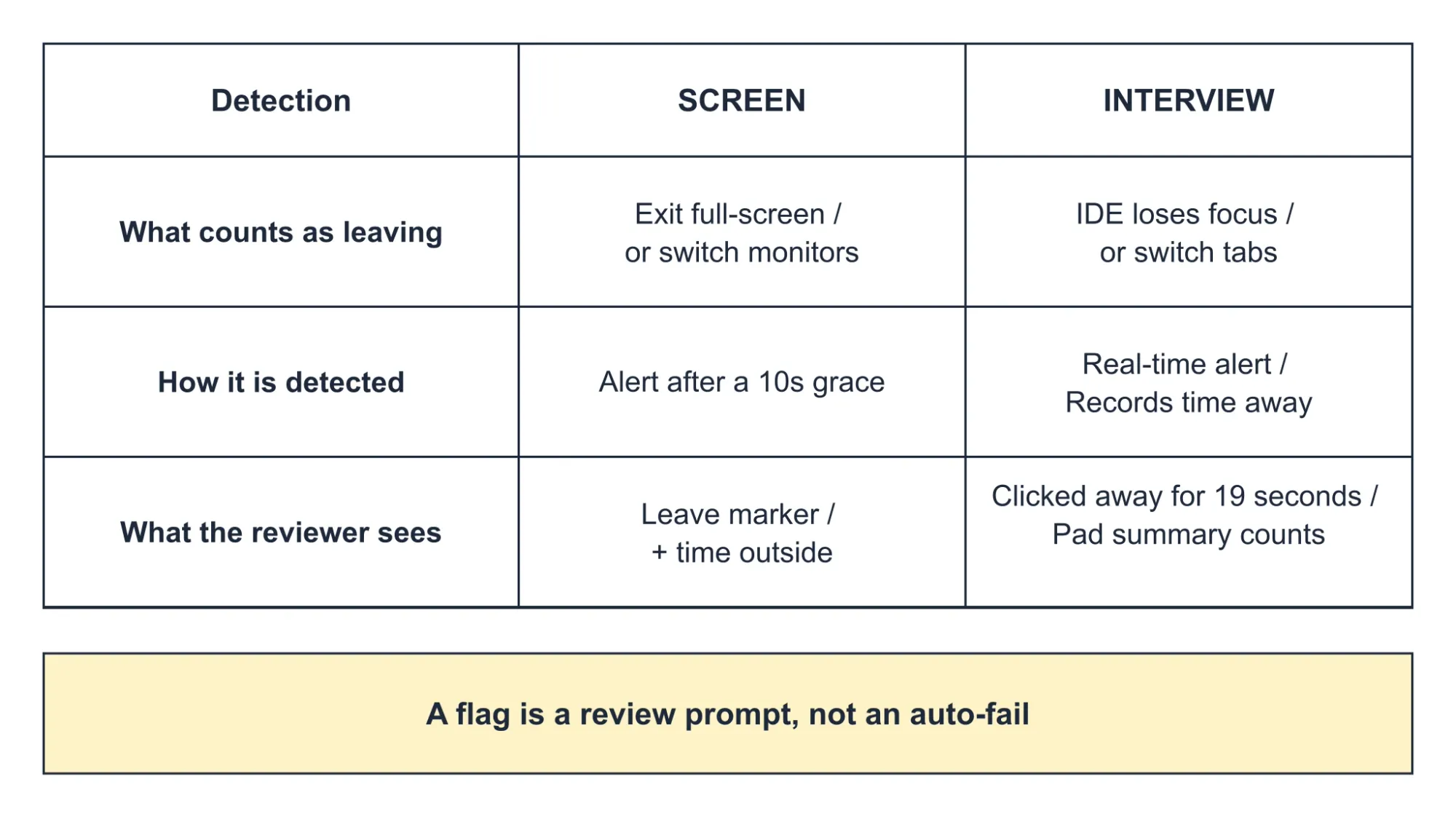
For an async Screen test, detection starts with full-screen mode. When the employer enables it, you must enter full-screen before the test opens. If you then switch monitors or leave the window, CoderPad alerts the employer after a 10-second grace period. The official Screen documentation states the grace period and the enablement model.
Screen also has a separate automatic check called "Leaving the IDE" that can tell when you leave the test environment. It runs apart from the full-screen alert.
On CoderPad Interview
On a live Interview pad, CoderPad alerts the interviewer in real time when you leave the IDE. It lists tab-switching among those events. The Interview documentation describes the alert.
Playback records the click-away duration rather than a fixed timer. A tooltip can show text such as "Clicked away for 19 seconds." No numeric grace period is published for Interview. That is focus blur with a recorded duration, not a documented countdown.
Is detection always on?
No. Every anti-cheat measure is employer-toggleable during test creation. Full-screen mode on Screen is opt-in. Whether your specific test is monitored depends on the employer's configuration, not on CoderPad defaults.
What counts as leaving
On Screen, leaving means exiting full-screen or switching monitors, plus the broader "Leaving the IDE" check. On Interview, leaving means the pad loses focus, whether you switch tabs, change windows, or move to another app.
The browser console counts as a left event because it is a technically different tab. Official docs do not enumerate minimized windows or alt-tab to a native app, so that boundary stays undocumented.
How long outside before a flag fires
Screen uses a documented 10-second grace period. Interview publishes no number; playback records the actual time you were away. Do not carry the Screen figure into Interview.
What the employer or interviewer sees when you leave
A detected leave becomes a concrete artifact. What shows up depends on the product line.
On Interview, the live interviewer sees the alert in real time. After the session, playback shows orange markers where the pad lost focus, with a duration tooltip. The pad summary totals the left-pad events, such as "three left-pad events totaling 12 minutes."
On Screen, the employer reviews after the test. Code playback marks a leave with a dark-grey marker and the time outside in light grey. The generic surfaces, such as a candidate-list icon and summary report, also show leaving-the-IDE notifications. Those are not tab-specific.
The exposure point matters here. If your assistance lives on the interview computer, viewing it forces you to leave the pad. That produces exactly the leave event that gets flagged and recorded.
A separate phone keeps the answer surface off that machine, so you stay in the IDE. An assistant on a separate device, such as a dual device AI interview assistant, removes that same-screen exposure path.

Answers On Your Phone, Not Your Shared Screen
Skip the risky invisible-overlay tricks. Our dual-device mode keeps answers on your phone, never on the screen you're sharing or recording. Nothing for a platform or interviewer to catch, because there's nothing on the shared screen to find.
Get started. It's freeLoved by 100,000+ candidates
What happens after a flag
A flag is not a verdict. CoderPad treats leaving-the-IDE alerts as prompts for clarification, not immediate disqualification. On Screen, suspicious behavior is flagged so the employer can investigate and make a determination. Auto-reject exists only as an employer-configured workflow.
So a single tab-switch flag does not fail you automatically. A human reviewer decides what it means, and that applies to tab-switch flags specifically, not just generic cheating.
Before the test, Screen shows a pre-test anti-cheat warning and a confirmation pop-up. Webcam monitoring is disclosed too. During the test, CoderPad documents no candidate-facing leave-countdown, so treat that as unknown rather than assumed.
Everyday behaviors that do not create a tab flag
Several fears do not produce a tab flag, and each has a mechanism. These rest on confirmed absences, not on a guarantee.
CoderPad does not detect whether you used AI. Its stated position is that it evaluates how candidates use AI, not whether they used it. External AI in another tab is not read as a flag. In-pad AI Assist usage is logged separately only when the employer enables that tool.
CoderPad documents no reading of other-tab content. Capture stays inside the pad, so it records code edits, runs, cursor movement, and IDE exits. It documents no full-desktop video.
A webcam anomaly is a separate Screen signal, not a tab flag. Periodic snapshots flag a missing, multiple, or different face, and that runs on a different tab.
Copy-pasting is its own mechanism, separate from tab switching. An IP or location change is a separate Screen signal with an approximate geolocation and a VPN or travel caveat.
What actually creates flags is concrete. External pastes, leaving the pad repeatedly, near-identical code, and timing anomalies are the patterns the record shows.
What else does CoderPad monitor?
Tab switching sits inside a broader monitoring set. Several other behaviors carry their own evidence-backed signals.
- Copy and paste: a separate mechanism with its own detection, optional blocking, and real-time Interview alert. For the depth on how that works, see CoderPad's copy and paste detection.
- Code plagiarism: an exact match against a previous submission draws a flag.
- Abnormal timing: a hard question finished in a fraction of the usual time looks suspicious.
- Webcam face anomalies: no face, multiple faces, or a different face on the proctoring tab.
- IP or location changes: a different place or device mid-test, with a travel caveat.
- In-pad AI Assist usage: logged for playback review when the employer enables it.
- An automated interview transcript.
- Code-playback recording and a live in-pad activity timeline: the carrier of leave and paste events. For what CoderPad actually records and its limits, see CoderPad's screen recording.
- Webcam snapshots: periodic images only, no video or audio, kept up to 90 days.
How to prepare so tab switching is not a risk
Preparation prevents the flag from arising. The steps below stay evidence-bound and do not describe bypassing anything.
Before the test, know which product you are in. If Screen requires full-screen, enter it before starting. Close unrelated tabs and windows that could register as focus blur. On Interview, treat the console as a left event. For Screen programming questions, CoderPad allows legitimate resource use such as StackOverflow or Google. It does not allow another person solving for you.
If you accidentally switch away, the event is logged with a duration and a count. The interviewer can ask about it. CoderPad frames that as a prompt for clarification, so an honest explanation is the documented handling path.
You can also prepare thoroughly before the session so the need to leave the window rarely comes up. A structured prep plan through InterviewFox's Prep Agent can shape that groundwork over WhatsApp or SMS.
Answers On Your Phone, Not Your Shared Screen
Skip the risky invisible-overlay tricks. Our dual-device mode keeps answers on your phone, never on the screen you're sharing or recording. Nothing for a platform or interviewer to catch, because there's nothing on the shared screen to find.
Get started. It's freeLoved by 100,000+ candidates
FAQ
Does CoderPad flag an IP or location change the same as a tab switch? No. IP and location changes are a separate Screen signal with approximate geolocation. They also carry a VPN or travel caveat, distinct from the leave detector.
Does CoderPad keep tab-switch flags or webcam data after the assessment, and for how long? Webcam snapshots are kept for up to 90 days. CoderPad's FAQ says interviews are stored for review, but that page is from 2021 and may be stale. General pad retention beyond that is not documented for candidates.
Does minimizing the window or alt-tabbing to another app count as leaving? On Interview, leaving the IDE counts as a left event, and so does the browser console. The official docs do not enumerate minimized windows or alt-tab to a native app, so that boundary stays undocumented. On Screen, exiting full-screen triggers the 10-second-grace alert.