

You are weighing Cluely-like assistance during a CodeSignal assessment. The question is whether that help could expose you.
Yes, potentially. CodeSignal can review Cluely-like assistance through submitted work and configured assessment activity, including paste, similarity, telemetry, and proctoring signals.
The practical risk is the assessment evidence created by the assistance. Submitted code or paste activity can trigger review. So can session behavior or proctoring evidence.
The device architecture is separate. Dual Device Mode keeps the answer surface on your phone. No InterviewFox answer window or process runs on the monitored computer. Answers stay on your phone through a live AI interview assistant.
What CodeSignal can review when Cluely-like help is used
Cluely-like help can affect both code and test activity. CodeSignal can use those outputs in its review flow.
CodeSignal lists AI code patterns, code match scores, paste events, some session data, and proctoring media as review inputs.
This gives the practical answer. So, treat such help as reviewable when these controls are on.
Observable work can be reviewable
AI-made code can look like a code pattern. It can also match other work.
Those matches add context to a test report. An odd output or close match can lead to review.
The code and the work trail are the key risk. For example, check them before you start the test.
Output and activity are the practical exposure path
The app name is not the useful safety test. The work and test trail are.
First, check the rules that apply. Ask which tools, screens, and devices the test allows.
Which CodeSignal assessment conditions change the answer?
CodeSignal uses more than one test setup. The setup sets which controls are on.
Proctored and configured assessments
Some tests record camera, mic, and screen. Some certified flows also check ID.
For the exact capture scope, see CodeSignal's proctoring documentation.
Also, read the pre-start page. It tells you which screen and device rules apply.
If you need the selected-screen boundary, what a CodeSignal proctored screen can show explains that capture path.
AI rules are not universal across CodeSignal
The General Coding Assessment bans AI help in that test.
However, other CodeSignal test types list AI-assist options. Apply the rule in your own invite.
Screens, monitors, and other devices
Screen share shows content on the chosen screen. Read the screen and device rules before you start.
One proctored flow lists another device and an outside IDE as not-verified reasons. Treat those rules as active test rules.
What can make AI-assisted work reviewable?
Each signal has a scope. Match it to the test setup.
AI-pattern and similarity signals
AI pattern checks can make code reviewable. CodeSignal also lists code match scores, diffs, and comparisons.
A close match can raise an integrity question. The review then follows the test's rules.
Paste activity and bounded telemetry
Paste events can add review context. CodeSignal's Suspicion Score guidance describes copied text from another window. It also says the text can be tracked.
The same guide limits typing or speech data to advanced work simulations.
Paste can be fine when the test allows the source. A paste event can still lead to closer review.
Review uses signals before it reaches an outcome
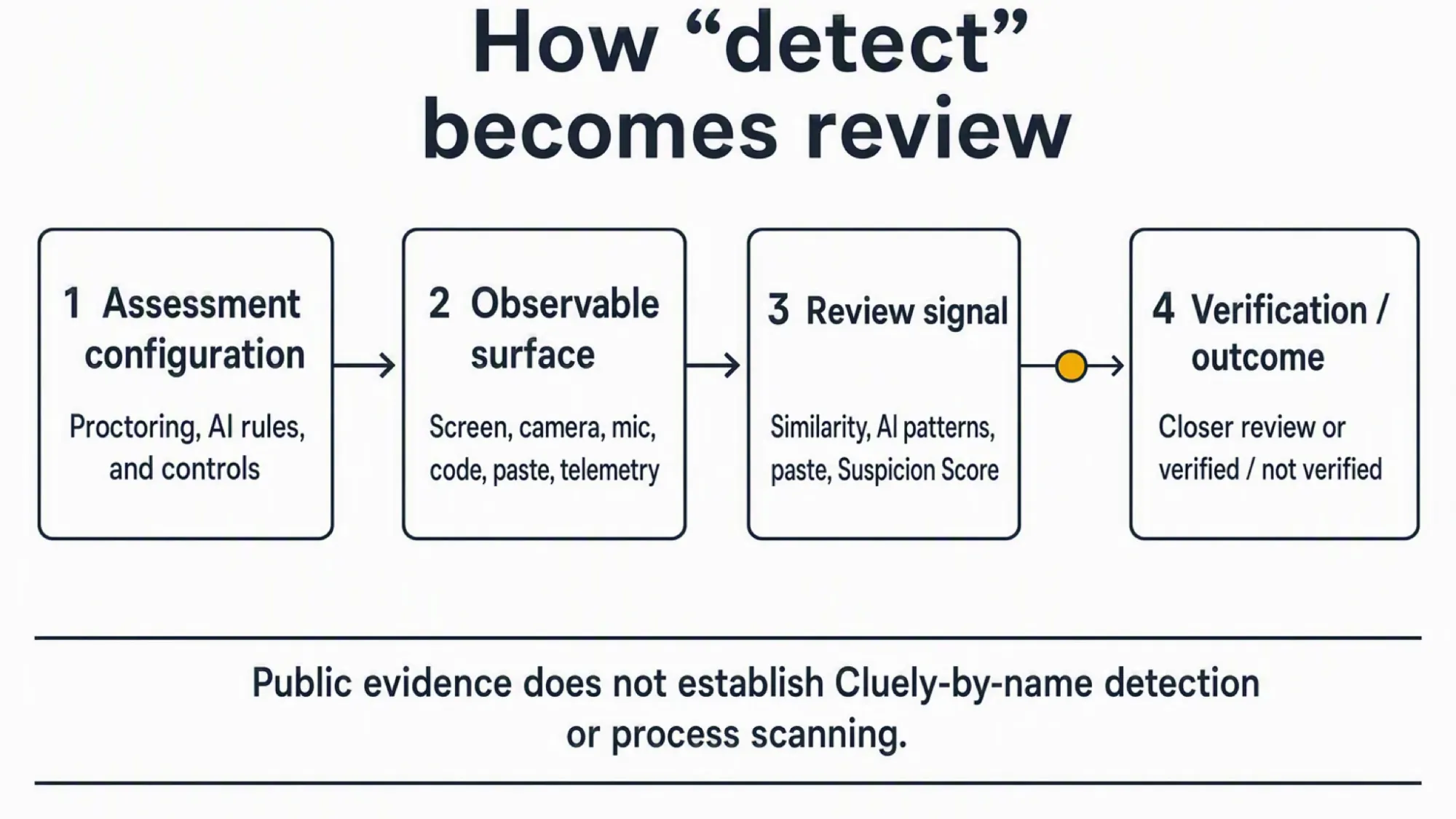
In short, signals start a review. They do not settle the case.
A Suspicion Score gives a reviewer more context. A flag can lead to closer review.
Separate four steps: signal, review, verification, and employer action.
What happens after a suspicious signal?
Overall, a signal starts a review question. It is not the final verdict.
A flag is a review prompt, not proof
A flagged result does not prove cheating. CodeSignal says it supports closer review.
The same guide says a high score does not mean the test-taker cheated.
Therefore, see how CodeSignal evaluates cheating signals for the wider review path. It covers the full integrity flow.
Proctoring verification is separate from the coding score
Proctoring status and coding score are separate results. CodeSignal says proctoring does not affect the score.
Recruiter guidance uses verified and not-verified results. Reasons can include leaving camera view, using another device, or using an outside IDE.
Instead, use the stated result and its follow-up steps. A not-verified result and the coding score are separate outcomes.
Your practical decision rule
Treat Cluely-like help as reviewable when work, paste, session, or proctoring controls are on.
Finally, use the invite and pre-start page. Treat the stated screen, device, paste, AI, and proctoring rules as the boundary.
For prep, the InterviewFox Prep Agent can help with a resume or study plan. It can also run a mock interview through WhatsApp or SMS. That context can then aid the live assistant.

Answers On Your Phone, Not Your Shared Screen
Skip the risky invisible-overlay tricks. Our dual-device mode keeps answers on your phone, never on the screen you're sharing or recording. Nothing for a platform or interviewer to catch, because there's nothing on the shared screen to find.
Get started. It's freeLoved by 100,000+ candidates
Keeping the answer surface off the monitored computer
Same-device help puts the answer surface on the test computer.
Dual Device Mode puts answers on your phone. No InterviewFox answer window or process runs on the test computer.
Software on that computer cannot detect the phone answer surface. This mode handles the same-device software path.
However, it does not change CodeSignal's rules. Place the phone near the laptop camera or in your normal sight line.
Avoid the lap or far side. That can create a clear downward or side glance.
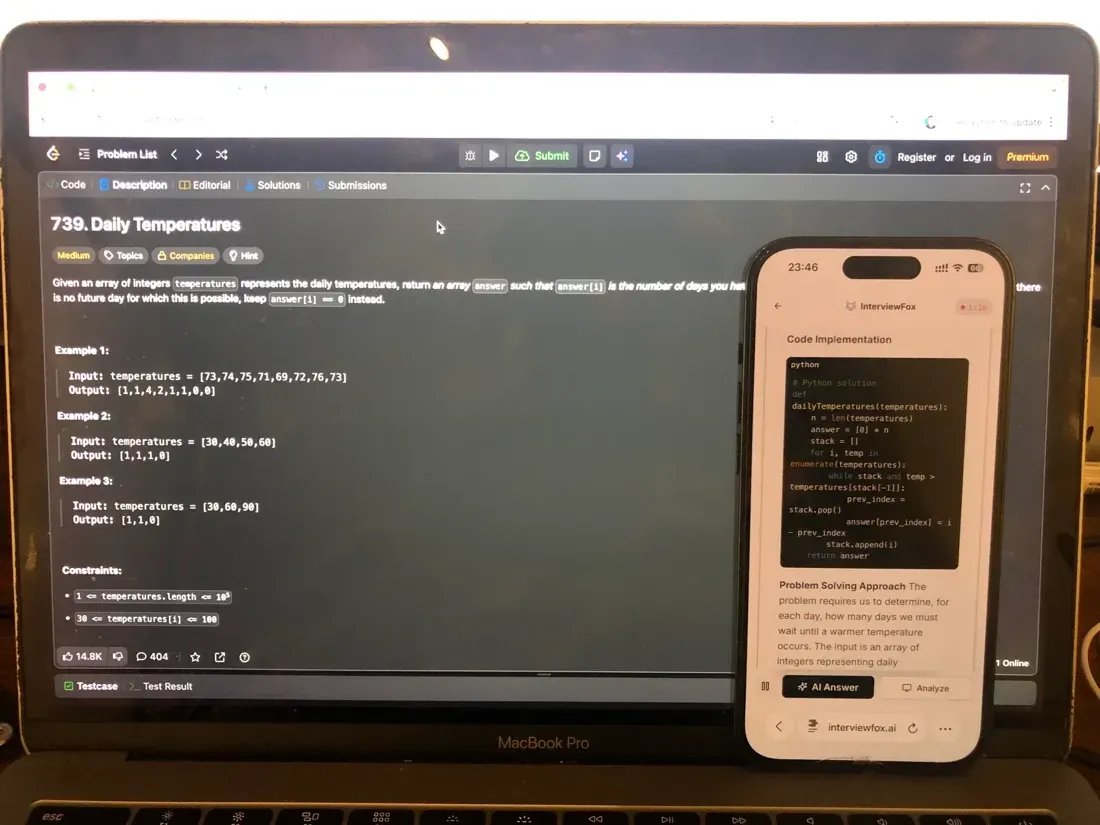
A dual device AI interview tool fits this device-separation problem.
Answers On Your Phone, Not Your Shared Screen
Skip the risky invisible-overlay tricks. Our dual-device mode keeps answers on your phone, never on the screen you're sharing or recording. Nothing for a platform or interviewer to catch, because there's nothing on the shared screen to find.
Get started. It's freeLoved by 100,000+ candidates
What else does CodeSignal monitor?
CodeSignal reviews more than the final code. The main review inputs include:
- Proctored flows can record camera, mic, and screen when enabled. See what CodeSignal can record from your camera.
- Identity checks can ask for a government ID, a face photo, and a match.
- Copy and paste can add review context. See how CodeSignal handles copy and paste.
- Code match scores, diffs, and comparisons can aid an integrity review.
- AI code patterns can aid review in the right test context.
- Typing or speech data applies to advanced work simulations.
- Other-device and outside-IDE use can appear in not-verified reasons.
- IP or location data can serve as an optional check.
FAQ
What is the practical answer to “does CodeSignal detect Cluely”?
Treat Cluely-like help as reviewable. CodeSignal can review code, paste activity, session data, and proctoring evidence when the test enables those controls.
What can CodeSignal review when AI-assisted work is used?
The test can review the submitted output and the controls enabled for that session. Check the invite before you start.
How should I treat overlays and second monitors?
Treat them as part of the test's screen and device rules. Follow the setup shown in the invite and pre-start page.
Does a Suspicion Score mean automatic rejection?
No. CodeSignal describes a flag as a reason for closer review. Proctoring status and coding score remain separate.
Can CodeSignal's AI rules differ by assessment?
Yes. The General Coding Assessment bans AI help in that test. Other CodeSignal test types list different AI-assist options.