You are getting ready for a live Karat interview and thinking about outside help. Your immediate concern is whether using AI tools will trigger an integrity flag. You want to know if outside help will be seen.
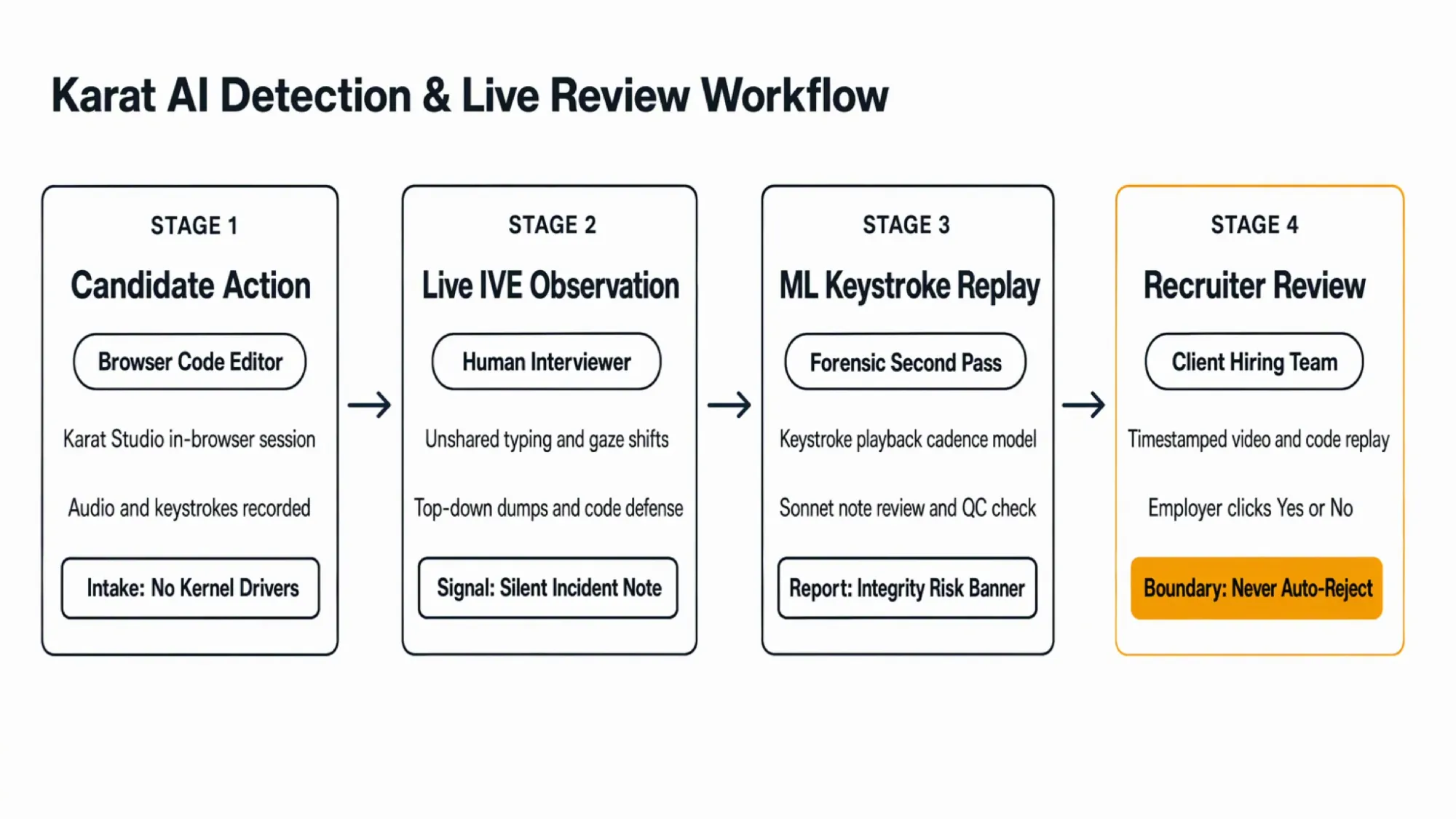
Yes, potentially. Karat identifies unauthorized AI tools through live interviewer observation and post-interview keystroke playback analysis.
Running a desktop assistant creates severe risk because interviewers listen for typing sounds while your editor cursor is idle. They also watch for off-screen glances and unnatural code dumps.
A safer approach keeps the help completely off the test laptop. A dual device AI interview copilot runs on your phone so no assistant process exists on the interview computer.
How Karat detects AI tool use in live interviews
Karat reviews your code with a live human engineer instead of lockdown software. A trained host runs the sixty-minute coding call in real time.
Human-in-the-loop oversight vs. automated lockdown software
Many people think Karat installs invasive tools like lockdown browser plugins. In reality, Karat runs inside a normal web browser. You do not install kernel drivers or hidden system tools.
Instead, conduct rules apply under Karat terms of use. The platform relies on human skill. An expert engineer tracks your design steps, speech, and technical depth.
Karat Studio in-browser environment and telemetry capture
The call takes place in Karat Studio, a web code editor. The studio logs editor keystrokes, mic audio, and tab blur timestamps. It also logs webcam video when your camera stays on.
However, the browser sandbox cannot inspect outside apps or scan running desktop tools. The host spots outside help from your visible habits and coding pace.
The behavioral and authoring tells that trigger an IVE flag
Live interviewers spot unapproved AI use by watching for physical timing mismatches and odd coding habits. They log these signals quietly during the interview without stopping your work.
Unshared typing audio and editor desynchronization
The most direct physical tell is typing audio while the code editor cursor sits still. Interviewers listen closely to your microphone sound.
If they hear rapid keyboard clicks while no code appears on screen, they suspect outside prompting. Unexplained typing outside the browser window is logged directly as a flag.
Off-screen gaze shifting and secondary monitor cues
Interviewers also track eye movements during video calls. Natural pauses to reflect or look upward while planning logic are expected.
In contrast, steady eye movement toward a second screen or phone creates doubt. Repeatedly reading text off-screen before typing fluent code signals outside help.
Top-down code dumps vs. iterative problem-solving
Authentic software work is step-by-step. Real coders write helper functions, tweak logic, test sample inputs, and fix syntax errors in stages.
External AI tools produce finished code blocks from the top down. Pasting large code blocks without trial runs or typing pre-computed logic instantly draws scrutiny.
Karat details these signals in Karat's guide on detecting interview AI tool use. The framework outlines six specific behavioral tells that interviewers document.
Adapting code to edge cases and live follow-up questions
When an interviewer suspects AI help, they do not stop the session. Instead, they test your skill through live technical questions.
They ask you to explain design trade-offs, check time limits, or adapt code to new bounds. Coders who copy AI output often struggle to explain edge cases or modify new logic.
Keystroke playback and post-interview automated review
Live interviewer notes are verified by a multi-stage review pipeline after the call ends. Karat turns real-time suspicions into hard evidence.
The keystroke-by-keystroke session playback timeline
Karat Studio records a full keystroke timeline of your coding work. Reviewers can replay every typed key, backspace, paste event, and pause across the entire session.
This replay shows whether code grew step by step or appeared in sudden chunks. Large paste events and fast typing leave a clear timeline.
Automated telemetry second pass and ML model analysis
After the call, an automated check re-runs on recorded session logs. Karat runs a smart model trained on past candidate keystroke data.
This model checks typing speed, paste bursts, and edit variance against normal coder habits. It flags sessions where activity logs drift far from standard step-by-step work.
Karat Quality Control (QC) review and note validation
If host notes and automated logs clash, Karat routes the call to Quality Control. Human reviewers check the replay to resolve differences.
Karat also uses Claude Sonnet models to check host notes. This step filters weak remarks and turns findings into clear reason codes.
Permitted and prohibited AI across Karat tracks
Allowed tools depend on the interview track chosen by the hiring firm. You must know whether your session allows reference docs or outside help.
External assistance bans in standard Core interviews
In standard Core coding sessions, outside generative AI tools are strictly banned. You cannot use ChatGPT, GitHub Copilot, Claude, or Cursor to write code.
Karat terms ban submitting copied code or sharing prompts with third-party AI models. Breaking these rules leads straight to an integrity review.
Built-in assistants and external bans in NextGen tracks
Karat NextGen tracks include a built-in AI helper inside a multi-file web workspace. Coders work with this built-in tool during the task.
However, outside AI tools and unauthorized browser tabs remain strictly banned on NextGen tracks. In addition, your webcam must stay on during NextGen tests.
How narrating documentation lookups prevents integrity flags
Many employers let coders check official language docs for syntax details. When checking syntax in permitted tracks, tell the host what you are doing out loud.
Simply say that you are checking language docs for a specific function name. Speaking out loud stops simple syntax lookups from looking like secret AI prompts.
What happens after an integrity flag on Karat
When odd activity occurs, Karat starts a clear review report for the hiring firm. Karat logs the evidence, but the hiring team decides candidate results.
Karat Central dashboard banners and timestamped video
Flagged sessions show an Integrity Risk banner on your scorecard in Karat Central. The platform adds clear reason codes explaining the logged issue.
Hiring teams get direct timestamped links to the exact spots in video, audio, and code replay. This workflow is documented in Karat's official overview of interview integrity.
Why Karat never auto-disqualifies candidates
Karat never drops coders automatically, ends tests early, or changes scores. Karat acts as a testing partner rather than the hiring judge.
Instead, client tech leads review the recorded evidence. Hiring managers click Yes or No buttons in the portal to confirm if a rule was broken.
Employer decision authority and profile visibility
The hiring firm keeps full power to pass or reject a coder after checking replays. Karat provides the video record, but the employer makes the final call.
However, confirmed flags can lead to a profile note seen by other firms in Karat's client network. This shared visibility makes laptop tools very risky.
Because Karat logs keystrokes and listens for typing, running tools on your laptop creates fast exposure. A dual device AI interview tool solves this setup challenge.
Questions are handled in the live flow while answers show on a separate mobile phone. No assistant window, overlay, or background task lives on the monitored interview computer.
InterviewFox's dual-device mode is undetectable by software running on the monitored interview computer. Keep the phone near your laptop camera or within your natural forward sightline.
This sightline placement avoids the conspicuous downward glance caused by resting a phone in your lap.
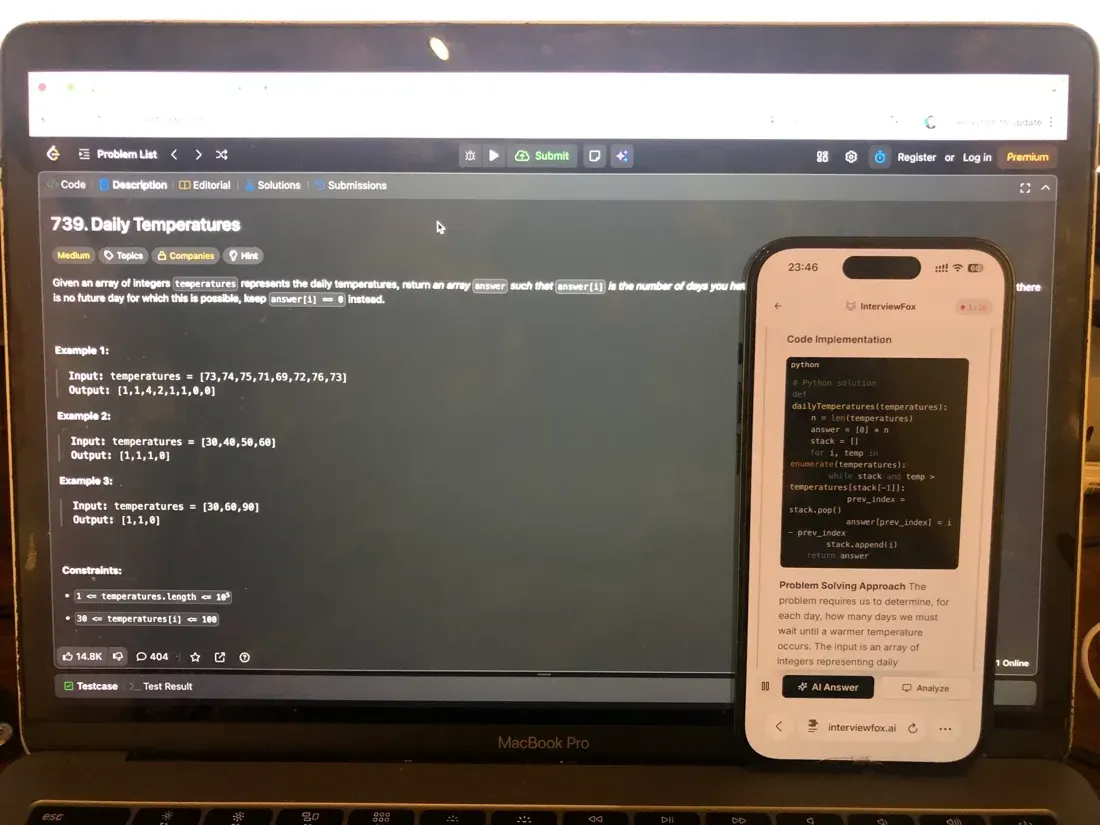

Answers On Your Phone, Not Your Shared Screen
Skip the risky invisible-overlay tricks. Our dual-device mode keeps answers on your phone, never on the screen you're sharing or recording. Nothing for a platform or interviewer to catch, because there's nothing on the shared screen to find.
Get started. It's freeLoved by 100,000+ candidates
Everyday behaviors that do not get you flagged
People often worry that normal habits will look like cheating. Karat's review model knows common coding habits and does not penalize natural actions.
Interviewing with your camera turned off in Core modules
In standard Core sessions, webcam video is optional. You may turn off your camera if you prefer not to appear on video.
Turning off your camera does not trigger a flag. However, mic audio and keystroke replay still catch typing sounds and sudden code dumps.
Pausing in silence to plan your algorithm
Taking time to think in silence before typing code is fine. Interviewers expect you to reflect, study problem limits, and plan your steps.
Quiet thinking only raises doubt when followed by instant, complete code blocks without any talk. Speaking your thoughts out loud keeps your logic clear.
Checking official standard library documentation
Searching official language docs for standard library syntax is allowed in open tracks. Looking up API details or function names does not cause a flag.
Keep searches focused on syntax lookups rather than full algorithms. Stating your search goal to the host ensures a clean review.
Mastering spoken problem defense and algorithm design is the best way to pass on Karat. InterviewFox's Prep Agent provides practice plans and live mock interviews to build strong coding confidence.
Answers On Your Phone, Not Your Shared Screen
Skip the risky invisible-overlay tricks. Our dual-device mode keeps answers on your phone, never on the screen you're sharing or recording. Nothing for a platform or interviewer to catch, because there's nothing on the shared screen to find.
Get started. It's freeLoved by 100,000+ candidates
What else does Karat monitor?
Karat tracks multiple signals beyond AI tool use during a live coding call.
- If you wonder how leaving the editor is tracked, Karat relies on detecting tab switching through unshared typing sounds. The platform avoids automated browser lockout popups.
- Interviewers watch eye movements across extended displays, noting prolonged glances away from the camera and active code editor.
- Complete session playback records every keystroke, backspace, and paste event for subsequent machine learning evaluation.
- Audio recording runs continuously throughout the entire interview, capturing mechanical typing cadence even when candidate webcams are turned off.
- This guide examines AI tools specifically. For broader reviewer workflows, explore Karat's platform-wide cheating detection model, where client employers confirm all flagged violations.
FAQ
Does turning off my webcam prevent Karat from detecting AI tool use? No. Webcam video is optional in Core calls, but mic audio is on at all times. Hosts hear unshared typing sounds, session replay records typing pace, and hosts test your logic out loud.
Does Karat scan background desktop processes or inspect open applications? No. Karat Studio runs inside a normal web browser sandbox. It does not install desktop tools, kernel drivers, or app sniffers. Tool bans are conduct rules under Karat user terms.
Can the hiring employer watch the full video recording if an integrity flag is raised? Yes. When a flag occurs, Karat Central gives hiring managers direct timestamped links to key interview moments.
Can a candidate appeal an integrity flag issued by Karat? No formal appeal portal exists because Karat does not make hiring choices. The hiring firm holds sole power to confirm or drop flags, so you must talk with your recruiter directly.