
How I Passed Verisk HackerRank Test in 2026: Real Questions

Quick Facts
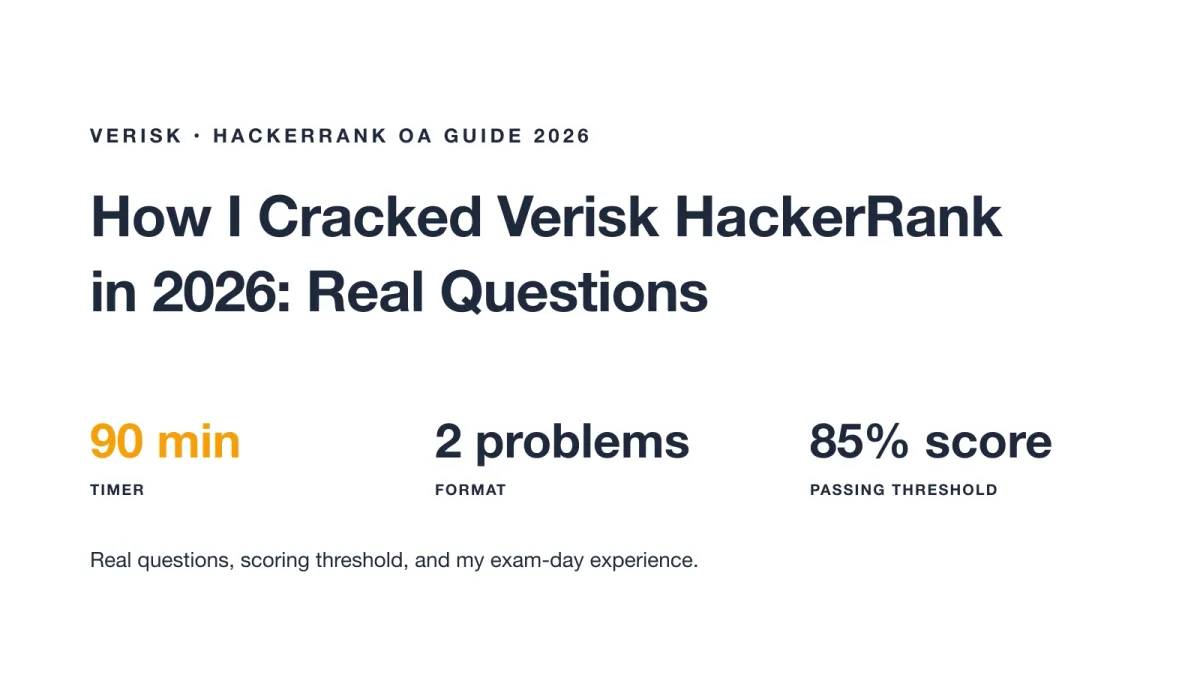
| Platform | HackerRank Screen (Verisk Technical Assessment) |
| Format | 2 technical questions, 90 minutes |
| Language rule | Python for Data/ML, SQL for SQL queries, C++/Java permitted for algorithms |
| Question types | Jupyter Notebook ML Pipeline, SQL SQL Aggregation, Math Series |
| Difficulty | 7 to 8 out of 10 across reports |
| Monitoring | Fullscreen enforcement, focus loss tracking, background process / overlay detection |
| Invitation validity | 5 to 7 days from invitation email |
| Scoring | Test cases passed plus integrity score; ~80-85% threshold to pass team review |
I took the Verisk technical test on HackerRank Screen for a data and software engineering position in 2026. The invitation gave me five days to start. The test allotted 90 minutes for two challenges: a dirty-data scoring notebook and an advanced SQL SQL query.
Under the ticking clock, juggling feature engineering and SQL edge cases proved difficult. Having a reliable AI interview copilot during prep was essential for stress-testing rules and structuring clean solutions.
Before sitting the test, I spent days analyzing candidate debriefs across Reddit, LeetCode Discuss, and 1Point3Acres. Community reports were consistent. Verisk tests data cleaning, SQL grouping precision, and strict runtime limits. Minor parsing oversights can cost entire submissions.
The Real Questions on My Verisk HackerRank Test
I took the Verisk technical test on HackerRank Screen for an early-career software engineering and data role. The test gave me 90 minutes for two distinct problems. These included an applied machine learning pipeline and a multi-table SQL query.
Question 1: Patient Hospitalization Risk Prediction
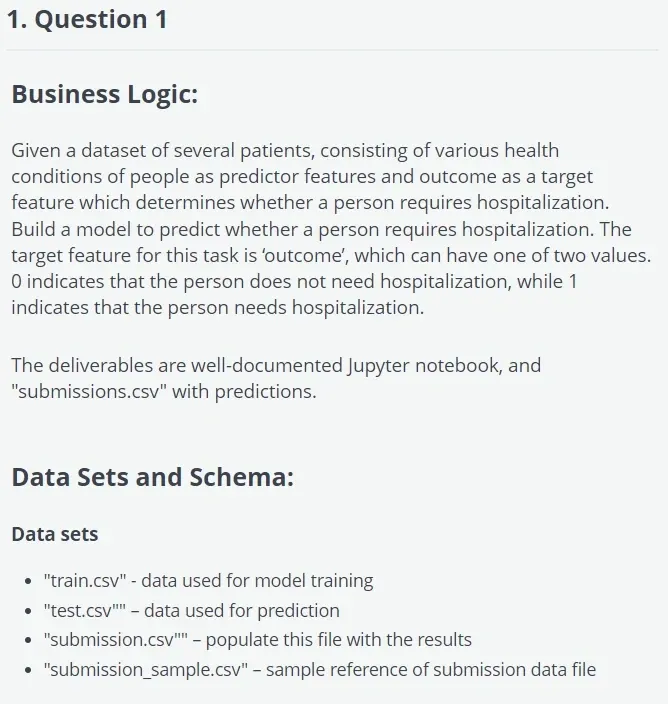
The problem I got: I opened the first question to find an in-browser Jupyter Notebook setup rather than a standard code editor. Four CSV files were pre-loaded in the workspace: train.csv, test.csv, submission_sample.csv, and an empty submission.csv. This challenge required building a binary scoring model to predict whether a patient requires hospitalization, indicated by the target column outcome (0 for no hospitalization, 1 for hospitalization). Predictor features consisted of patient vitals: Age, SystolicBP, DiastolicBP, BS (blood sugar), BodyTemp, and HeartRate. A critical obstacle surfaced immediately when inspecting the raw data: the numeric columns contained messy strings. Specifically, the Age column mixed actual integers with written-out English words like "twenty-one", "forty-three", and "twelve", alongside irregular formatting in BS and HeartRate. Submissions were graded strictly on prediction accuracy against a hidden test set via submission.csv, requiring exactly two columns: id and outcome.
My approach: Under the running 90-minute clock, I knew training a complex neural network was a mistake because the dataset was small and noisy. First, I wrote a text-parsing function with a word-to-number mapping dictionary to normalize written-out string numbers in Age into standard integers. Second, I applied regular expressions to strip extraneous punctuation marks from BS and HeartRate, converting all predictor columns to numeric floats. Third, I set up a Scikit-Learn Pipeline combining median imputation to handle missing values, StandardScaler to normalize feature scales, and a RandomForestClassifier with 100 estimators. After validating the pipeline locally with 5-fold cross-validation to ensure reliable accuracy, I generated predictions on test.csv and exported the formatted submission.csv file without row indices.
import re
import numpy as np
import pandas as pd
from sklearn.ensemble import RandomForestClassifier
from sklearn.impute import SimpleImputer
from sklearn.pipeline import Pipeline
from sklearn.preprocessing import StandardScaler

# 1. Load train and test datasets
train_df = pd.read_csv('train.csv')
test_df = pd.read_csv('test.csv')

# 2. Map word representations of numbers to numeric values
word_to_num = {
    'zero': 0, 'one': 1, 'two': 2, 'three': 3, 'four': 4,
    'five': 5, 'six': 6, 'seven': 7, 'eight': 8, 'nine': 9,
    'ten': 10, 'eleven': 11, 'twelve': 12, 'thirteen': 13,
    'fourteen': 14, 'fifteen': 15, 'sixteen': 16, 'seventeen': 17,
    'eighteen': 18, 'nineteen': 19, 'twenty': 20, 'thirty': 30,
    'forty': 40, 'fifty': 50, 'sixty': 60, 'seventy': 70,
    'eighty': 80, 'ninety': 90
}

def clean_number(val):
    if pd.isna(val):
        return np.nan
    val_str = str(val).strip().lower().replace('-', ' ')
    try:
        return float(val_str)
    except ValueError:
        pass
    parts = val_str.split()
    total = 0
    matched = False
    for part in parts:
        if part in word_to_num:
            total += word_to_num[part]
            matched = True
    return float(total) if matched else np.nan

def clean_dirty_column(series):
    # Extract leading numeric float or integer if present
    extracted = series.astype(str).str.extract(r'(\d+\.?\d*)')[0]
    return pd.to_numeric(extracted, errors='coerce')

# 3. Clean and normalize predictor columns across train and test
feature_cols = ['Age', 'SystolicBP', 'DiastolicBP', 'BS', 'BodyTemp', 'HeartRate']

for df in [train_df, test_df]:
    df['Age'] = df['Age'].apply(clean_number)
    for col in ['SystolicBP', 'DiastolicBP', 'BS', 'BodyTemp', 'HeartRate']:
        df[col] = clean_dirty_column(df[col])

X_train = train_df[feature_cols]
y_train = train_df['outcome'].astype(int)
X_test = test_df[feature_cols]

# 4. Construct preprocessing and model training pipeline
pipeline = Pipeline([
    ('imputer', SimpleImputer(strategy='median')),
    ('scaler', StandardScaler()),
    ('model', RandomForestClassifier(n_estimators=100, random_state=42))
])

# 5. Fit model, predict test labels, and generate submission file
pipeline.fit(X_train, y_train)
test_predictions = pipeline.predict(X_test)

submission = pd.DataFrame({
    'id': test_df['id'],
    'outcome': test_predictions.astype(int)
})
submission.to_csv('submission.csv', index=False)
Time complexity: O(N * M) | Space complexity: O(N * M)
Debugging the irregular word numbers and dirty mark strings in the Age column under the ticking clock burned nearly 15 minutes before my pipeline executed cleanly. Watching the test runner finally output a valid submission.csv was a relief, but the lost time left me with little room for error on the remaining problem.
I did not want to use a desktop overlay. The answer would have sat on the same screen the monitoring system was monitoring, hidden by a basic rendering layer. Whether that gets flagged depends on what detection is currently running, and I didn't want that uncertainty in the background. I pressed the keyboard shortcut instead, the tool auto-captured the screen, and the approach landed on my phone. My laptop screen stayed on the Jupyter editor, unchanged.
Land offer with Safer AI Interview Assistant
Skip the risky invisible apps. Our dual-device mode keeps it simple and undetectable. You crush the interview, we handle the answers.
Get started. It's freeLoved by 100,000+ candidates
Question 2: Cloud Server Instances & Metrics Aggregation
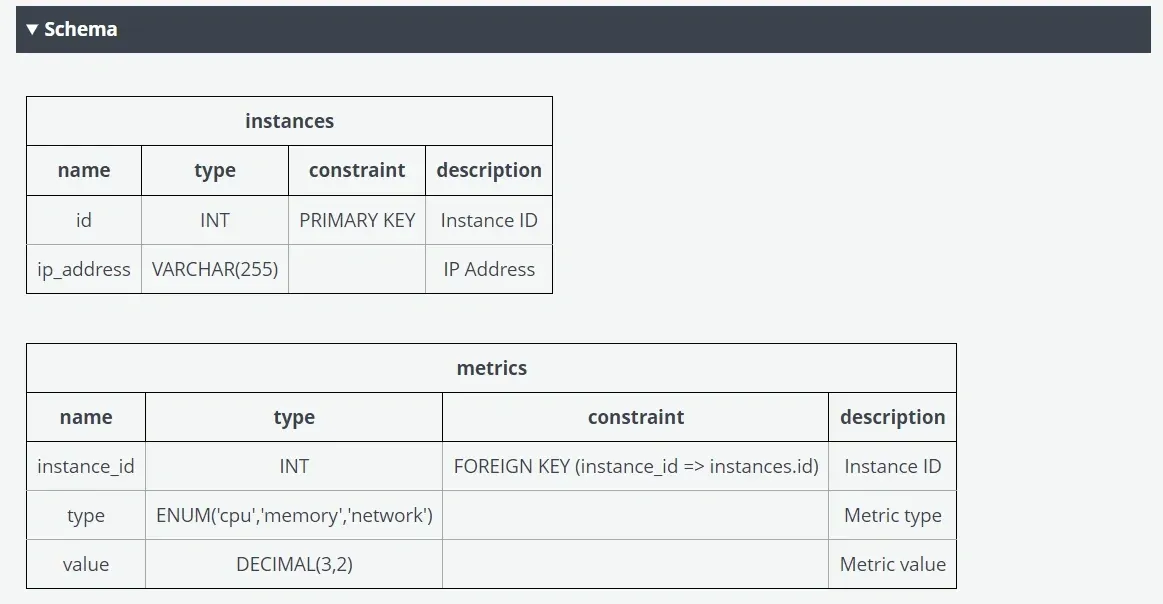
The problem I got: For the second challenge, the platform presented a SQL database design for a cloud hosting dashboard. Two tables defined the schema: instances (with columns id as the primary key and ip_address as VARCHAR(255)) and metrics (with columns instance_id as a foreign key referencing instances.id, type as ENUM('cpu', 'memory', 'network'), and value as DECIMAL(3,2)). Each row in the report needed to return a server's ip_address, total metric events, and the rounded average for each metric type: avg_cpu, avg_memory, and avg_network. Output records required ascending alphabetical ordering by ip_address. An edge trap caught servers with zero recorded events: they had to remain in the final report with 0 events rather than disappearing from the join.
My approach: I began with a LEFT JOIN from instances to metrics on instances.id = metrics.instance_id to guarantee that servers without metrics were preserved. Next, I used COUNT(m.type) rather than COUNT(*) so instances with no metrics correctly reported 0 events instead of 1. For each metric category, I implemented conditional aggregation using CASE WHEN m.type = 'cpu' THEN m.value END inside an AVG() function. I then wrapped each conditional average in ROUND(..., 2) to adhere to the required two-decimal precision. Finally, I grouped the results by instances.id and instances.ip_address, ordering the records by instances.ip_address ASC.
SELECT
    i.ip_address,
    COUNT(m.type) AS events,
    ROUND(AVG(CASE WHEN m.type = 'cpu' THEN m.value END), 2) AS avg_cpu,
    ROUND(AVG(CASE WHEN m.type = 'memory' THEN m.value END), 2) AS avg_memory,
    ROUND(AVG(CASE WHEN m.type = 'network' THEN m.value END), 2) AS avg_network
FROM instances i
LEFT JOIN metrics m ON i.id = m.instance_id
GROUP BY i.id, i.ip_address
ORDER BY i.ip_address ASC;
Time complexity: O(N log N) | Space complexity: O(N)
I secured all passing test cases on this SQL query in less than 20 minutes, locking in full points on the second problem. Banking that deterministic score early settled my nerves and gave me the confidence to submit the test.
[CHART: verisk-cloud-metrics-pipeline] title: Cloud Server Metrics Aggregation Architecture message: Joining server instances with multi-metric logs requires conditional aggregation and two-decimal rounding type: flow focal: node-aggregation data:
- label: Input Instances Table | value: id, ip_address | note: Primary key lookup
- label: Input Metrics Table | value: instance_id, type, value | note: Foreign key to instances
- label: Filtering & Joining | value: LEFT JOIN on instances.id = metrics.instance_id | note: Preserves instances with zero readings
- label: Conditional Metric Aggregation | value: CASE WHEN type = 'cpu' THEN value END | note: Independent averages for CPU, Memory, Network
- label: Output Formatting | value: ROUND(AVG(...), 2) & ORDER BY ip_address | note: Exact decimal precision footnote: Based on real Verisk technical test SQL question schema [INFOGRAPHIC: infographic/verisk-cloud-metrics-pipeline.webp]
Verisk's Monitoring Policy for HackerRank
Verisk administers its technical tests on HackerRank Screen with automated monitoring enabled. The platform operates within strict browser-level and operating-system boundaries to verify test fairness.
Browser Environment and Fullscreen Lockdown
Before entering the workspace, HackerRank Screen runs a system check. Candidates must grant camera access and enter forced fullscreen mode. The testing portal continuously monitors browser visibility events:
- Window blur and tab switching are logged with millisecond timestamps and reported directly to the Verisk hiring team.
- Attempting to exit fullscreen mode triggers a persistent on-screen warning banner, logging an integrity strike against the session.
- Copy and paste actions from external windows are disabled within the code editor.
Reviewing the official HackerRank Screen platform clarifies browser checks. Candidates should also check how HackerRank records candidate screen activity. Standard tests rarely record continuous desktop video. However, regular screen checks and browser event logs capture any loss of active window focus.
Background Process & Desktop Overlay Detection
Beyond in-browser DOM event listeners, HackerRank Proctor Mode detects background system activity and hidden background windows. Reviewing HackerRank's multi-display detection policies confirms key platform rules. Connecting multiple monitors or leaving window utilities active triggers immediate alerts.
An early April 2026 report shows how strict this is. One candidate kept a desktop app minimized to the taskbar. During the test, an OS hotkey accidentally brought the tool into window focus. HackerRank detected the window state shift and flagged the process. This caused an instant test suspension and a permanent ban.
3 Other Confirmed Verisk HackerRank Questions
My sitting featured the machine learning notebook and server metrics SQL query. However, recent candidate reports identify three other recurring questions in Verisk's pool.
Sequence Sum
The problem: Given three integers i, j, and k, calculate the sequence sum. This is the sum of integers from i up to j, followed by the sum from j - 1 down to k. Constraints state that i <= j and k <= j, with values up to $10^9$.
The approach: A naive loop running from i to j and then down to k runs in $O(j - i + j - k)$ time, which immediately triggers a Time Limit Exceeded error on hidden test cases with large inputs. The optimal solution uses the closed-form math series formula:
def getSequenceSum(i, j, k):
    # Sum from i to j: (j - i + 1) * (i + j) // 2
    sum_up = (j - i + 1) * (i + j) // 2
    # Sum from j - 1 down to k: (j - k) * (j - 1 + k) // 2
    sum_down = (j - k) * (j - 1 + k) // 2
    return sum_up + sum_down
Complexity: $O(1)$ time and $O(1)$ space. In typed languages like Java or C++, intermediate products must use 64-bit integers (long or long long) to prevent integer overflow.
Election Exit Poll Analytics
The problem: Verisk's data analytics pool frequently features an advanced SQL query tracking election exit poll data. The schema comprises states, candidates, and exit_polls. The query aggregates candidate vote shares within each state. Results must be formatted as a semicolon-delimited string and ordered alphabetically by state name.
The approach: Solving this requires conditional grouping and MySQL's GROUP_CONCAT() or PostgreSQL's STRING_AGG() with explicit ordering inside the joining function:
SELECT
    s.state_name,
    GROUP_CONCAT(
        CONCAT(c.candidate_name, ' (', ROUND(ep.vote_share, 1), '%)')
        ORDER BY c.candidate_name ASC
        SEPARATOR '; '
    ) AS candidate_breakdown
FROM states s
JOIN exit_polls ep ON s.id = ep.state_id
JOIN candidates c ON ep.candidate_id = c.id
GROUP BY s.id, s.state_name
ORDER BY s.state_name ASC;
Complexity: $O(N \log N)$ time and $O(N)$ space. Missing exact whitespace after marks (such as ; instead of ;) causes automated string match failures.
Queue Tasks
The problem: A model problem modeling multi-server task execution. Given k worker nodes and an array of task durations, tasks are assigned to the earliest available server. If multiple servers become idle at the same time, the task goes to the server with the smallest numerical index. Return the total latency required to clear all queue tasks.
The approach: Use a min-heap storing tuples of (available_time, server_id). For each incoming task duration, pop the earliest available server, calculate its new completion time, and push it back into the heap.
import heapq

def queueTasks(k, tasks):
    # Heap stores (idle_timestamp, server_id)
    server_heap = [(0, i) for i in range(k)]
    heapq.heapify(server_heap)

    for duration in tasks:
        idle_time, server_id = heapq.heappop(server_heap)
        heapq.heappush(server_heap, (idle_time + duration, server_id))

    return max(idle_time for idle_time, _ in server_heap)
Complexity: $O(N \log k)$ time and $O(k)$ space, ensuring fast execution even with $10^5$ queued tasks.
What Verisk's HackerRank Test Format Actually Looks Like
Knowing the test workflow helps candidates allocate time efficiently across machine learning and SQL tasks.
[CHART: verisk-hackerrank-session-timeline] title: Verisk HackerRank 90-Minute Assessment Timeline & Flow message: Open bidirectional navigation allows candidates to bank deterministic SQL points before tackling machine learning type: timeline focal: block-sql data:
- label: 00-05 min: System Check & Problem Scan | value: Read both problem statements | note: Verify setup and dataset loading
- label: 05-30 min: SQL Problem Execution | value: Write and test Server Metrics query | note: Secure 50% score early with passing test cases
- label: 30-75 min: ML & Data Pipeline Execution | value: Clean dirty data, fit classifier, generate submission.csv | note: Validate on local train/test split
- label: 75-85 min: Hidden Test Case Stress Testing | value: Custom input testing against edge bounds | note: Check NULL metrics and scale bounds
- label: 85-90 min: Final Review & Submission | value: Code cleanup and official submission | note: Speed does not impact score footnote: Timeline observed across 2026 Verisk SWE and Data Science test candidates [INFOGRAPHIC: infographic/verisk-hackerrank-session-timeline.webp]
Free Question Toggling and Pacing Freedom
Unlike adaptive test systems that force sequential question series, Verisk's HackerRank Screen setup permits full bidirectional navigation. Both problems are unlocked at minute zero.
Candidates can switch between the SQL SQL problem and the machine learning pipeline at any time without penalty. Submission speed does not impact scoring. Finishing in 40 minutes earns no bonus points over finishing at minute 88. Prioritize full correctness and edge-case testing over rushing to finish early.
The In-Browser IDE & Jupyter Notebook Environment
The testing setup changes based on the question type:
- SQL Questions: Provide an interactive query editor, schema viewer, and instant output pane comparing your query's output against the expected table.
- Data Science / ML Questions: Launch an embedded Jupyter Notebook setup with pre-installed data science packages (
pandas,numpy,scipy,scikit-learn). File I/O operations read from and write to the local/workspacepath. - Custom Input Runner: Allows candidates to supply arbitrary input inputs to test custom edge boundaries before committing an official submission.
How Verisk's HackerRank Scoring Works
Verisk's technical recruiting team uses automated test-case scoring paired with monitoring audit logs to evaluate candidates.
Visible Sample Tests vs. Automated Hidden Test Cases
When executing code in HackerRank, the editor grades two or three visible sample cases. Passing these confirms basic syntax and expected output columns.
Once submitted, the grading engine executes a full suite of hidden test cases (typically 10 to 20 tests per problem). These test cases stress:
- Large input volumes ($N = 10^5$) to detect $O(N^2)$ coding bottlenecks.
- Extreme values (negative numbers, zero, large integers up to $10^9$).
- Edge-case database records (zero-event servers, NULL metric values, ties in ordering).
Partial Credit Allocation & Passing Thresholds
HackerRank awards partial credit by share based on the share of passed hidden test cases. Passing 8 of 10 tests on Question 1 and all tests on Question 2 yields a 90% score.
Verisk publishes no official cutoff. However, clearing the screening team typically requires an aggregate score between 80% and 85%. The integrity report must also remain clean.
Verisk HackerRank Exam-Day Strategy
Adopting a disciplined tactical plan maximizes point yield during the 90-minute testing window.
Locking Down the SQL Query First
Because SQL questions possess deterministic schemas and immediate feedback, solve the SQL query first. Writing and verifying the Server Metrics or Exit Poll query takes roughly 20 to 25 minutes. Solving the SQL problem first banks half of the points early. This provides peace of mind before tackling messy machine learning data.
Adversarial Custom Input Testing
Do not rely solely on the provided sample test cases. Before submitting, construct adversarial custom test cases in the test runner:
- Feed single-row tables and empty instances into the SQL runner to verify zero-event preservation.
- Input negative numbers and maximum integer values into math sequence solvers.
- Feed irregular capitalization and unmapped string tokens into data-cleaning functions to check imputation fallbacks.
Recovering from Stuck States Without Focus Loss
If the browser interface experiences a brief stall or notebook kernel cut, avoid frantic keyboard shortcuts or switching windows to check internet speed. Sudden window blur events are recorded immediately. Instead, use the built-in "Restart Kernel" button in Jupyter or refresh the individual page frame to restore editor speed without exiting fullscreen mode.
Why Candidates Fail the Verisk HackerRank Assessment
Analyzing test debriefs reveals three predominant failure modes that eliminate candidates during the Verisk test.
The O(N) Loop Trap and 64-Bit Integer Overflow
On sequence or array problems like Sequence Sum, candidates frequently default to iterative for loops. Iterative loops pass small sample tests. However, hidden tests with values up to $10^9$ trigger execution timeouts. In addition, multiplying large numbers causes 32-bit integer overflow in C++ or Java, producing negative intermediate sums.
Missing Precision and Delimiter Errors in SQL Aggregations
Automated SQL graders perform exact text comparison on output tables. Omitting ROUND(..., 2) produces variable floating-point decimals and fails string validation. Similarly, formatting errors like missing spaces in GROUP_CONCAT() invalidate the entire query output.
Background Overlay Detection and Session Invalidation
The top non-technical rejection trigger involves background application detection. In early April 2026, a candidate was banned after minimizing an invisible AI copilot. Monitoring logs detected the active process handle and flagged the session for cheating. The test score was voided before any code review took place.
The window stayed on the same screen the monitoring system was monitoring, hidden by a basic OS-layer trick. InterviewFox works differently. The answer goes to my phone, a physically separate device that no screenshot or session recording can reach by design.
Land offer with Safer AI Interview Assistant
Skip the risky invisible apps. Our dual-device mode keeps it simple and undetectable. You crush the interview, we handle the answers.
Get started. It's freeLoved by 100,000+ candidates
Our Cluely review and Parakeet AI review show why desktop tools fail. Proctors monitor window handles and browser focus continuously. Running desktop overlays on the testing machine creates high risk of instant session termination.
How to Prepare for the Verisk HackerRank in 5 Days
With a 5 to 7 day window, follow this targeted 5-day plan. Allocate 2 hours daily for 10 hours of focused prep.
In the days before the OA, I used the Prep Agent from InterviewFox over WhatsApp and SMS. I sent it the confirmed Verisk question patterns and got back a personalized drill plan and strategy.
Day 1-2: SQL Mastery & Conditional Metrics Aggregation
- Focus: Master multi-table
LEFT JOIN, conditional aggregation withCASE WHEN, string joining (GROUP_CONCAT/STRING_AGG), and numeric precision formatting withROUND(). - Practice: Solve 5 HackerRank medium SQL challenges involving log metric tracking and grouped reporting.
- Success Check: Construct queries handling zero-reading records and NULL values cleanly within 20 minutes.
Day 3-4: Data Preprocessing & Algorithmic Constraint Handling
- Focus: Build end-to-end Python preprocessing pipelines using
pandasandscikit-learn. Practice mapping non-standard string numbers, imputing missing data, and training baselineRandomForestClassifierorLogisticRegressionmodels. Review closed-form $O(1)$ math series equations. - Practice: Take a dirty tabular dataset and build a pipeline that cleans mixed string types and outputs a compliant two-column
submission.csvwithout indexing errors. - Success Check: Execute complete data cleaning and model inference scripts in under 35 minutes.
Day 5: Timed 90-Minute Mock Assessment
- Focus: Simulate real testing conditions. Set a strict 90-minute countdown timer, enter fullscreen mode, and disable all secondary browser tabs.
- Practice: Solve 1 complex SQL aggregation query and 1 tabular data pipeline script back-to-back.
- Success Check: Complete both problems and verify custom edge cases with at least 15 minutes remaining on the clock.
What Happens After You Submit the OA
Submitting your Verisk HackerRank test initiates an automated and human review pipeline.
Automated Scoring and Committee Evaluation
Upon clicking "Submit Test," HackerRank instantly grades all hidden test cases and compiles an test summary report. This summary logs total points, code complexity, runtime stats, and an integrity audit tracking window blurs. The Verisk recruiter receives this dossier within 24 hours.
Recruiter Call & Technical Round 2 Milestones
Scoring above 80% typically earns an invitation for a recruiter screen. Recruiters reach out within 3 to 7 business days. This call covers background fit, visa status, and role expectations.
Passing the recruiter screen leads to Technical Round 2. This is a 60-minute live interview with a senior engineer on CodePair or Teams. This session dives deeper into data structures, system design, and the design choices behind your OA submission.
FAQ
Can I use an AI interview assistant during the Verisk HackerRank OA?
Traditional desktop overlay tools render AI suggestions directly on your computer screen. HackerRank Screen monitors window focus and background processes continuously. Running invisible overlays creates high risk of session suspension. Candidates seeking help should use dual-device setups where no software touches the testing workstation.
Land offer with Safer AI Interview Assistant
Skip the risky invisible apps. Our dual-device mode keeps it simple and undetectable. You crush the interview, we handle the answers.
Get started. It's freeLoved by 100,000+ candidates
How many questions are on the Verisk HackerRank test?
The standard Verisk technical test consists of 2 questions in 90 minutes. Data tracks feature two challenges: one machine learning notebook and one SQL SQL query.
Can I switch between questions during the Verisk HackerRank test?
Yes. Verisk's test allows full switching between questions. Both questions are unlocked from the start. Candidates can move back and forth freely to verify solutions.
Does Verisk penalize you for taking the full 90 minutes?
No. Pacing and completion speed do not affect your final score. A candidate who finishes in 45 minutes receives no extra credit over someone who submits with 2 minutes remaining. Use all available time to stress-test edge cases.
What is the passing score for the Verisk HackerRank OA?
Verisk does not publish an official passing threshold. Reports indicate that an aggregate score between 80% and 85% on hidden tests is needed to advance.