
Parakeet AI Review 2026: Is It Undetectable and Worth It?

You've got an interview coming up and you're weighing whether to lean on an AI copilot. Parakeet AI keeps coming up in your search. The two questions that matter are whether it will actually stay hidden, and whether its answers sound like something you'd say.
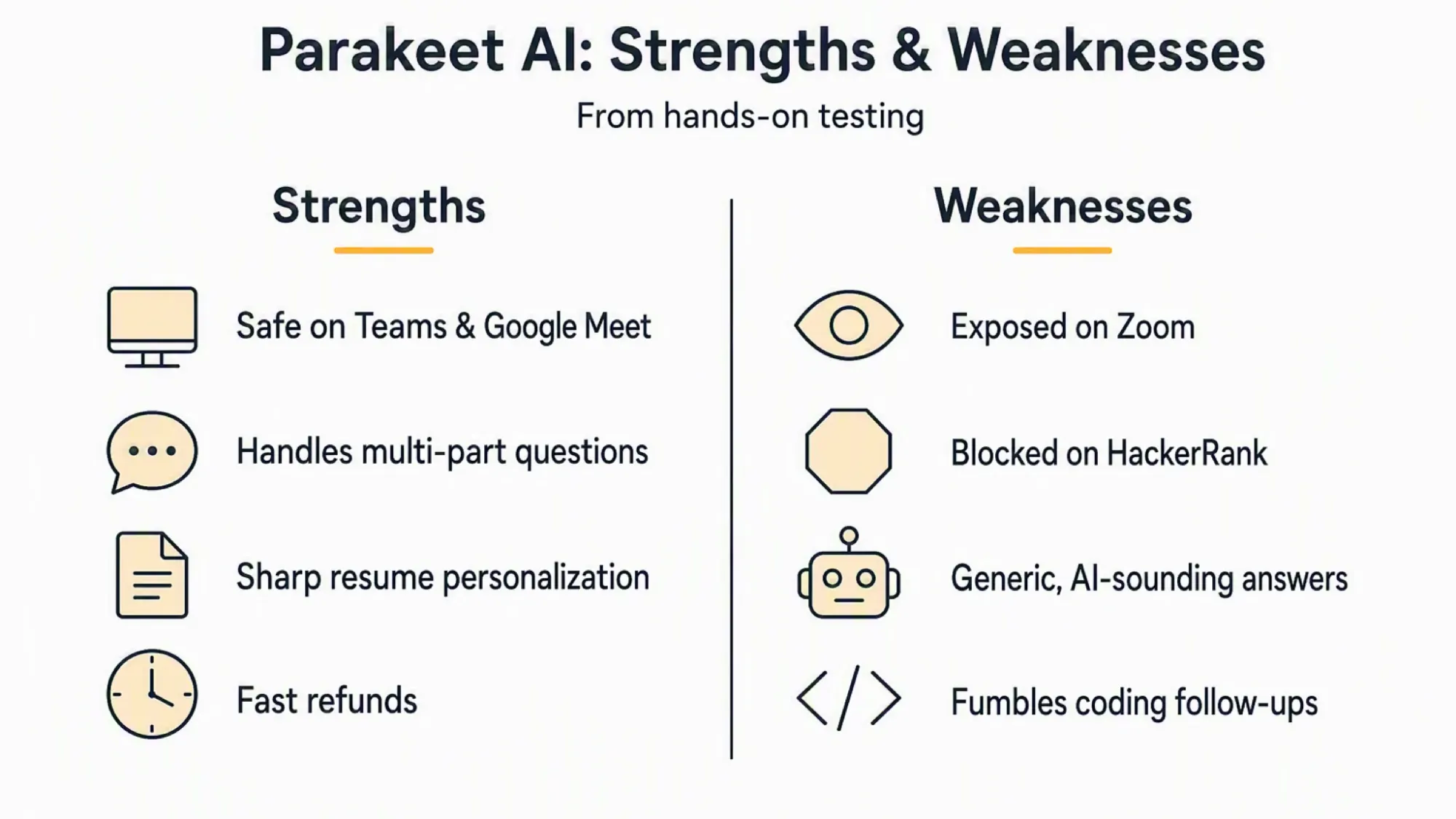
Our answer is clear: Parakeet AI is not reliably undetectable. In our tests, it appeared in Zoom's entire-screen share and was blocked before a HackerRank exam could start. It stayed hidden on Teams, Google Meet, Webex, and Zoom's window- and tab-share modes. The practical result is platform-specific, not the blanket "Undetectable" promise on its homepage.
That makes Parakeet AI a narrow fit. Its single-device setup is convenient, resume personalization is a genuine strength, and it handled the core of several coding problems well.
But the detection risk outweighs that convenience on a shared screen, a proctored assessment, or a managed computer. Its answers also often sound generic and AI-written, so it is a poor fit if your response needs to sound naturally like you.
We paid for Parakeet AI ourselves and tested it on our own computer, not from a marketing page. Anyone can rerun our tests. You don't have to take our word for it. The sections below explain what we tested, what happened, and what each result means for an actual interview.
Verdict at a Glance
| Detectability & Safety | Not reliable: exposed on Zoom full-screen share and blocked on HackerRank |
| Speed | Noticeably slow, a real pause mid-interview |
| Question Recognition | Audio capture is a common failure point; assembles multi-part questions correctly once heard |
| Answer Quality | Generic, reads as AI-written |
| Coding Support | Strong on the core problem, weak on natural follow-ups |
| Ease of Use | Simple to start, but real friction in daily use |
| Price | Subscription from $39/week ($74.95/month; $449.95/year). Credit-based use from $29.50 for 3 hours |
What Is Parakeet AI
Parakeet AI is a desktop overlay app for AI interview assistance. It runs as a floating window on top of whatever meeting or exam software is active. It's available for both Mac and Windows, with a browser-based mobile version as a fallback.
During our tests, the interface centered on two buttons: "AI Answer" and "Analyze Screen". A live transcript panel shows what it's picked up from the conversation. Clicking "AI Answer" generates a formatted response, usually a short bulleted answer, based on the spoken question.
Its main features are real-time interview Q&A, resume-based personalization, and coding-question support. Upload a resume, and it references specific details from it in later answers. For coding questions, it reads a shared LeetCode-style problem and provides code suggestions. It works across Zoom, Google Meet, Microsoft Teams, and Webex.
Parakeet AI targets a broad range of interview types rather than one niche. Its own interface toggles between "Non-Coding" and "Coding" modes. It markets explicit support for technical assessment platforms (LeetCode, HackerRank, Coderpad) alongside general video-call interviews.
One distinguishing detail is worth noting. Parakeet AI lets a user choose between GPT-5, GPT-4.1, and Claude 4.0 Sonnet for generating answers. That's a real model choice, not a single fixed model locked behind the scenes. We come back to what that choice does and doesn't buy in Answer Quality below.
Detectability and Safety
Parakeet AI leaks on Zoom desktop's entire-screen share. It stayed hidden on Teams, Google Meet, and Webex, and on Zoom's own window and tab-share modes in our tests. That is a useful distinction for a buyer: the product does not have one universal detection result.
Test - Zoom Desktop Entire-Screen Share
Method: shared the entire screen through Zoom desktop's own share picker. Checked visibility from the presenter's own view, and from a second device receiving the call.
Result: the overlay sits directly on the shared screen. It's visible even in the share-preview thumbnail, before the share fully activates. Confirmed from the receiving side, not just the sharer's own recording.
. The recording combines a native screen capture with a phone filming the external monitor, including the receiving side of the call.
Assessment-platform exposure
Assessment platforms are worse. On HackerRank, the session gets actively detected and blocked before it can even start. That's real-time enforcement, not a passive recording that merely "sees" the app. Coderpad.io shows the same pattern. A themed cluster of 15 Featurebase posts, 124 total upvotes, corroborates this on HackerRank and similar platforms.
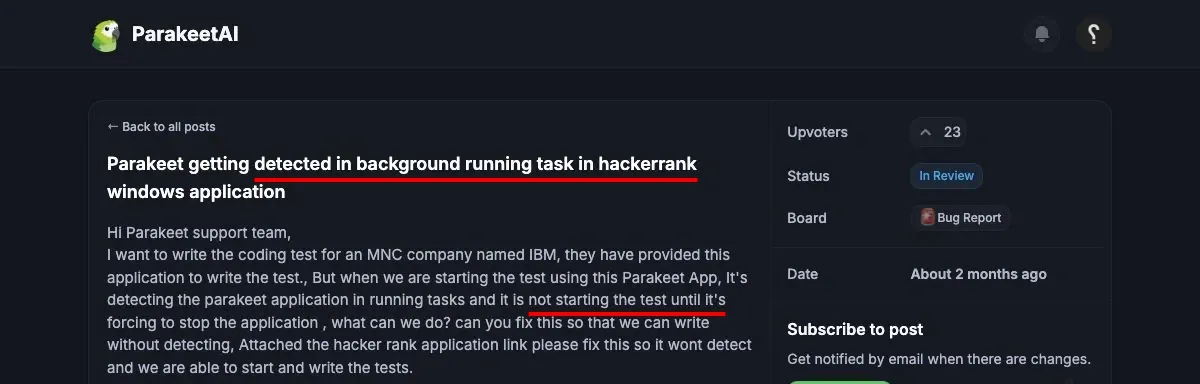
On OnVUE's online exam platform, the same detection happens. Parakeet AI gets flagged as a background application before the candidate can proceed.
Even outside meeting and exam software, a screen-clipping detection service catches the desktop app running in the background.

Three more badges held up under testing: invisible in Dock, invisible to tab switching, and cursor undetectability. Window and tab sharing checked out too, on both Teams and Zoom, confirmed separately rather than assumed.
Parakeet AI's own homepage badges every platform as "Undetectable," with no distinction between share modes. That blanket claim doesn't survive testing them separately. That's why we tested each platform on its own.
Install and first-launch didn't raise any red flags. It asked for the standard screen-recording, accessibility, and microphone permissions, normal for this product category. Nothing asked us to disable SIP or install a kernel extension.
InterviewFox is a dual device AI interview assistant, so its answers run on a separate physical device by design. They never touch the screen a meeting platform could capture.
What Happens If You're Caught
Getting caught doesn't necessarily mean instant disqualification. It means a flag, a hiring-team review, and a decision you never see coming.
HackerRank ran its own test of an "invisible" AI copilot in 2025, the same category Parakeet AI belongs to. The tool got flagged for plagiarism at over 99% confidence, and the final test score came in at 25%.
HackerRank's own session replay captured a screenshot of the tool in use. They describe it as "clear, undeniable evidence". A flag doesn't automatically disqualify anyone, by their own policy. The hiring team reviews the flagged incident and makes the final call themselves.
Karat, a live technical-interview platform, publishes a similar process. A flagged interview gets reviewed by the hiring team, who confirms or dismisses the violation. Karat calls that decision "final and cannot be changed". Candidates are never told a flag exists, on either platform.
That setup dependence is not unique to Parakeet AI. The Cluely review, Final Round AI review, LockedIn AI review, Interview Coder review, and ShadeCoder review show other cases where screen sharing or platform monitoring exposed the answer surface.
Latency
Time-to-usable-answer came in at approximately 5.5 seconds. At that speed, a candidate would notice the wait. It's long enough to lose the thread of what they were about to say.
Test - Time-to-Usable-Answer
Method: spoke the prompt "Can you tell me about yourself" into a live Parakeet AI session. A custom stopwatch tool ("SpaceTimer," precision to 0.01s) ran in a second browser window, filmed side by side. Timed from the prompt to the point the answer was readable.
Result: ≈5.5 seconds. First-transcription ≈2.6–3.1s, first-answer-text ≈5.8s. Stopwatch stop ≈6.05s.
. It shows the stopwatch and Parakeet AI's answer panel side by side.
Parakeet AI's homepage claims "Blazing Fast Transcription" and "record breaking speed," with no millisecond figure to back it.
The stopwatch was hand-started rather than triggered from the moment speech ended. So the L1 reading also absorbs time spent speaking the question, not pure transcription latency alone.
Question Recognition
Before Parakeet AI can recognize a question, it first has to reliably hear it. That's not always the case.
A broader theme of audio-capture and connection failures spans 103 posts and 431 upvotes, March through July 2026. That includes a named error, "Speechmatics connection became unresponsive," concentrated around 2026-06-30. In the most common version, the interviewer's voice never reaches the app at all (111 upvotes).

On Microsoft Teams specifically, the app has stopped responding entirely once an interview started.

What worked
When audio capture does work, question assembly itself holds up well. Parakeet AI correctly assembles a question when a candidate splits it across several utterances. That's a common real-interview pattern. Interviewers often add context or clarify a question in pieces, rather than in one clean sentence. Parakeet AI integrated the multi-utterance input into the complete intended question correctly.
Parakeet AI's FAQ discloses one real limitation on its own: it "listens for one language at a time". Switching spoken language mid-call requires manually updating the session setting rather than being detected automatically. That specific limitation is exactly as described. It's an admission against Parakeet AI's own marketing interest, and we treat it as reliable on its own.
Answer Quality
Our blind review flagged the output as generic. Its tone "sounds AI-generated," rather than like something a candidate would naturally say. One reviewer with real interviewer experience did the review.
This is not a lone, low-confidence impression. It is independently corroborated by Parakeet AI's own community, at scale.
The answers run long and lack focus, sometimes missing the question entirely. 109 other users reported the same problem.

The tone reads as AI-generated too, not like something a candidate would actually say.

That same tone problem repeats across the board, not just as generic wording but as phrasing that reads unnatural aloud. It's a full theme bucket of 24 posts totaling 302 upvotes across a nearly five-month span. A single reviewer's qualitative impression, converging with a large, company-hosted complaint theme, is a stronger signal than either alone.
Parakeet AI's homepage claims its responses are "Accurate," badged at "100%." It's backed by a choice of leading models. See What Is Parakeet AI above.
That badge isn't something a qualitative blind review can falsify with a percentage of its own. But "generic" and "sounds AI-generated" were repeated independently, by our reviewer and by Parakeet AI's own users. That's a direct contradiction of "the most accurate answers," even without a competing number next to that "100%."
Personalization
Parakeet AI correctly recalled a fabricated resume detail when asked a leading question. It reproduced specific details unprompted: the Raspberry Pi, the camera-based motion tracking, the rotation-direction trigger logic. This wasn't a generic side-project answer.
Test - Resume-Recall
Method: uploaded a resume with one fabricated, verifiable project detail: a side project called "Alpha-Hamster". It's a trading bot using a Raspberry Pi and a camera to track a pet hamster's wheel rotation. Clockwise and counter-clockwise rotation trigger buy and sell orders.
Then asked a leading question designed to surface it: "I see you have some interesting side projects. Can you tell me about the one involving machine learning or financial data?"
Result: Parakeet AI named "Alpha-Hamster" directly and reproduced its specific fabricated details. It passed cleanly, no caveats.
. It shows the upload, the interview prompt, and the resulting answer.
Parakeet AI's own site claims resume upload delivers "instant interview answers perfectly matched to your experience and background". This is one of the few claims on this page we can report holding up cleanly.
Coding Interview Support
Parakeet AI's coding answers were strong on the core problems. It mishandled a natural follow-up question on a separate task.
Test 1 - Design Twitter
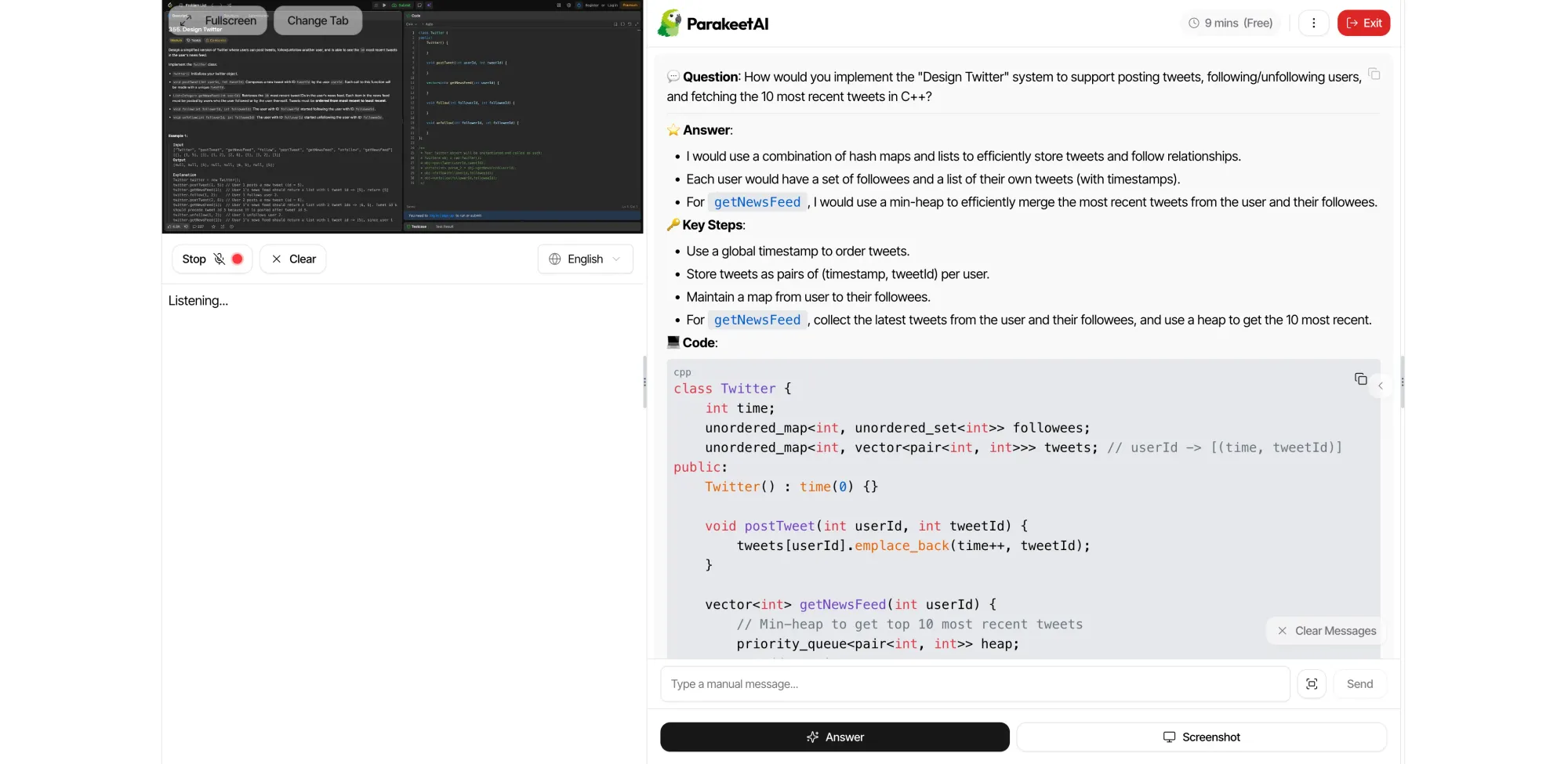
Method: gave Parakeet AI the standard "Design Twitter" LeetCode-style system-design problem, in C++.
Result: the standard optimal approach, structured clearly. This test evaluated the solution's reasoning and structure, not an online-judge submission.
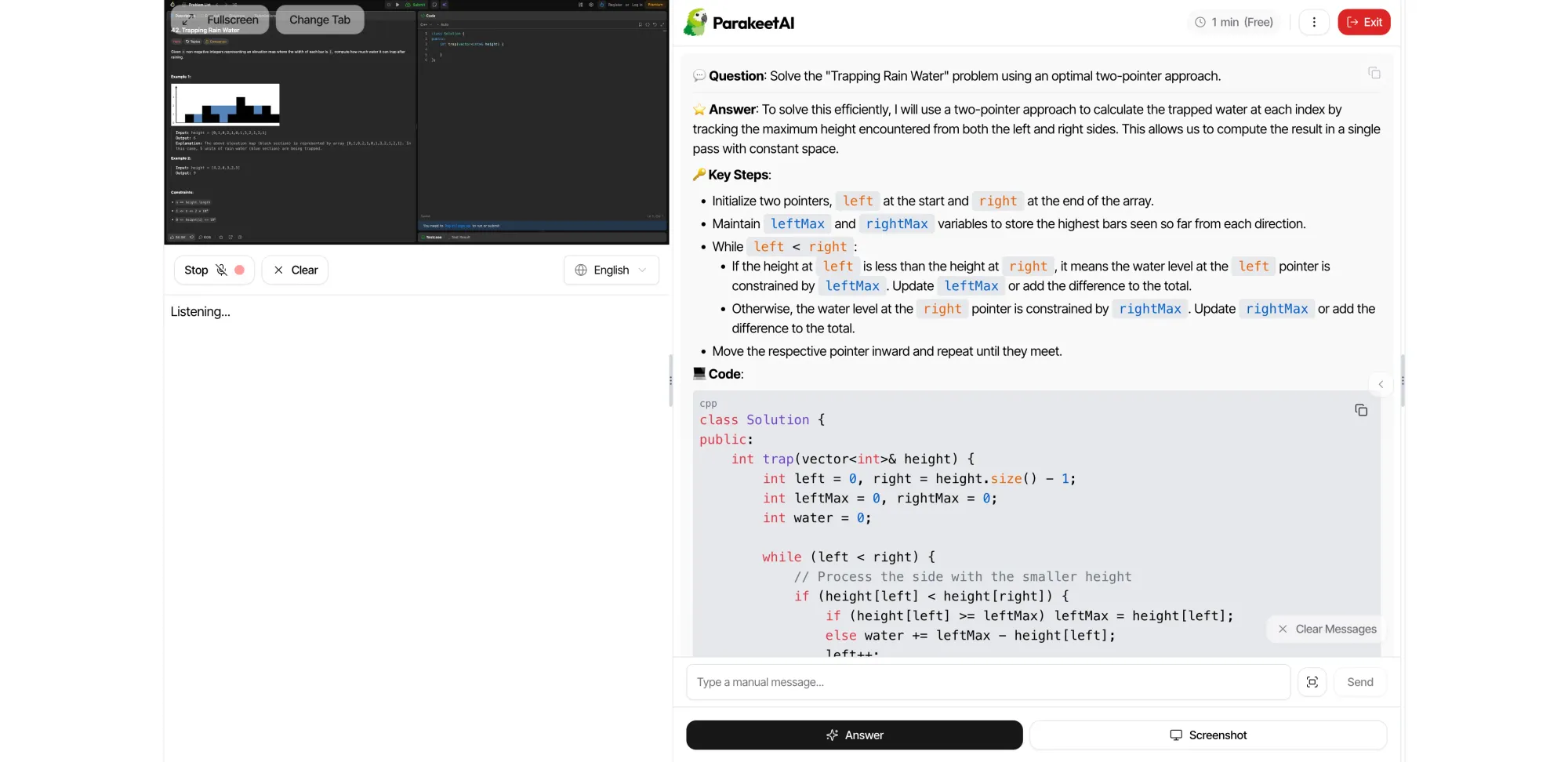
Test 2 - Trapping Rain Water
Method: same problem, same language.
Result: same pattern as Test 1. The answer used the standard optimal approach and was structured cleanly; this was a reasoning test, not an online-judge submission.
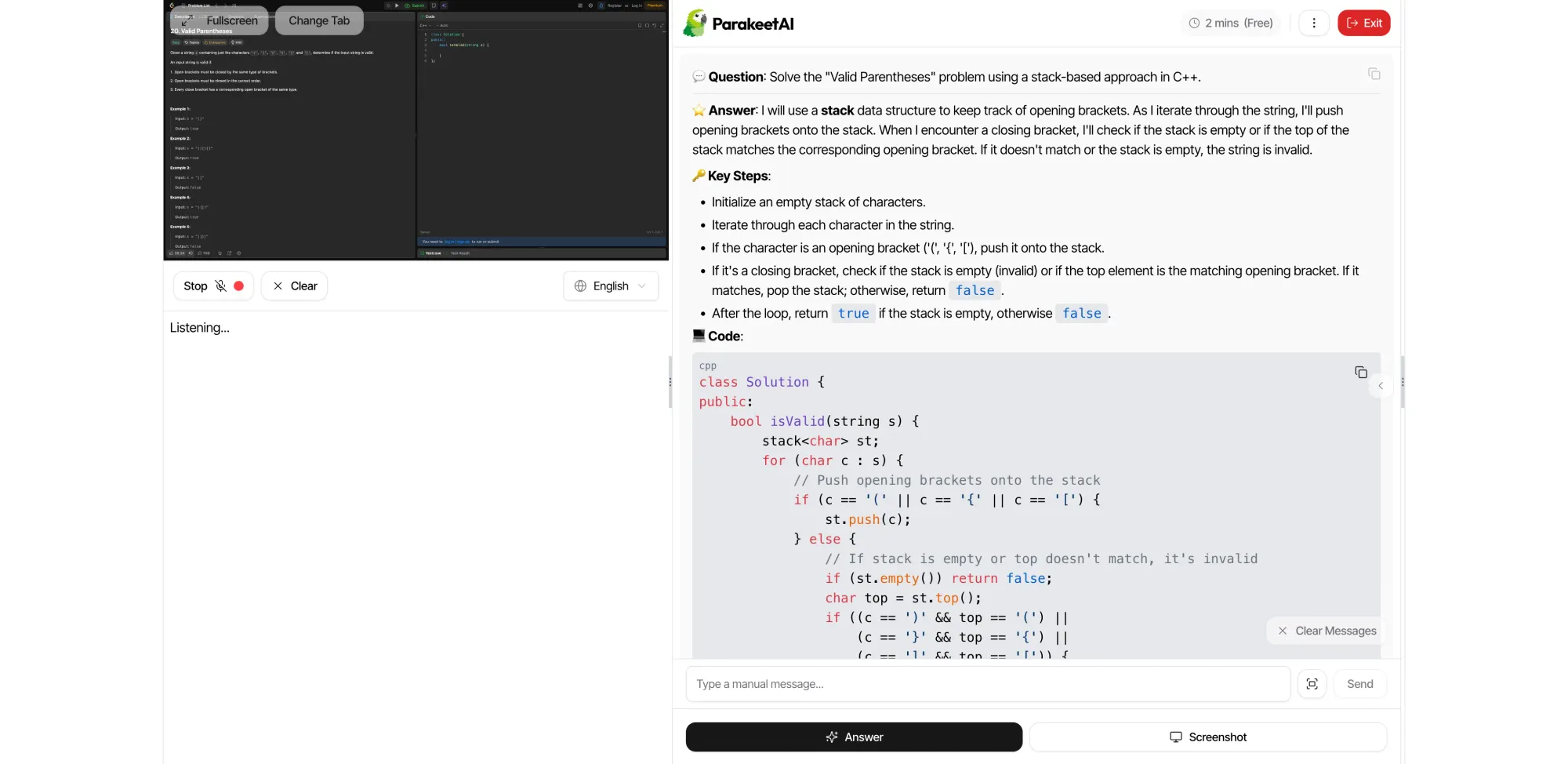
Test 3 - Valid Parentheses
Method: same problem, same language.
Result: same pattern again. The answer used the standard optimal approach and was structured cleanly; this was a reasoning test, not an online-judge submission.
Test 4 - Follow-Up Question
Method: a separate coding bug-fix task, a "top K frequent elements"-style problem. Then a natural follow-up after Parakeet AI's answer. The kind of thing an interviewer actually asks: "can you also add unit tests for this?"
Result: Parakeet AI didn't recognize it as a follow-up. It answered the original bug-fix task again instead of addressing what we'd just asked.
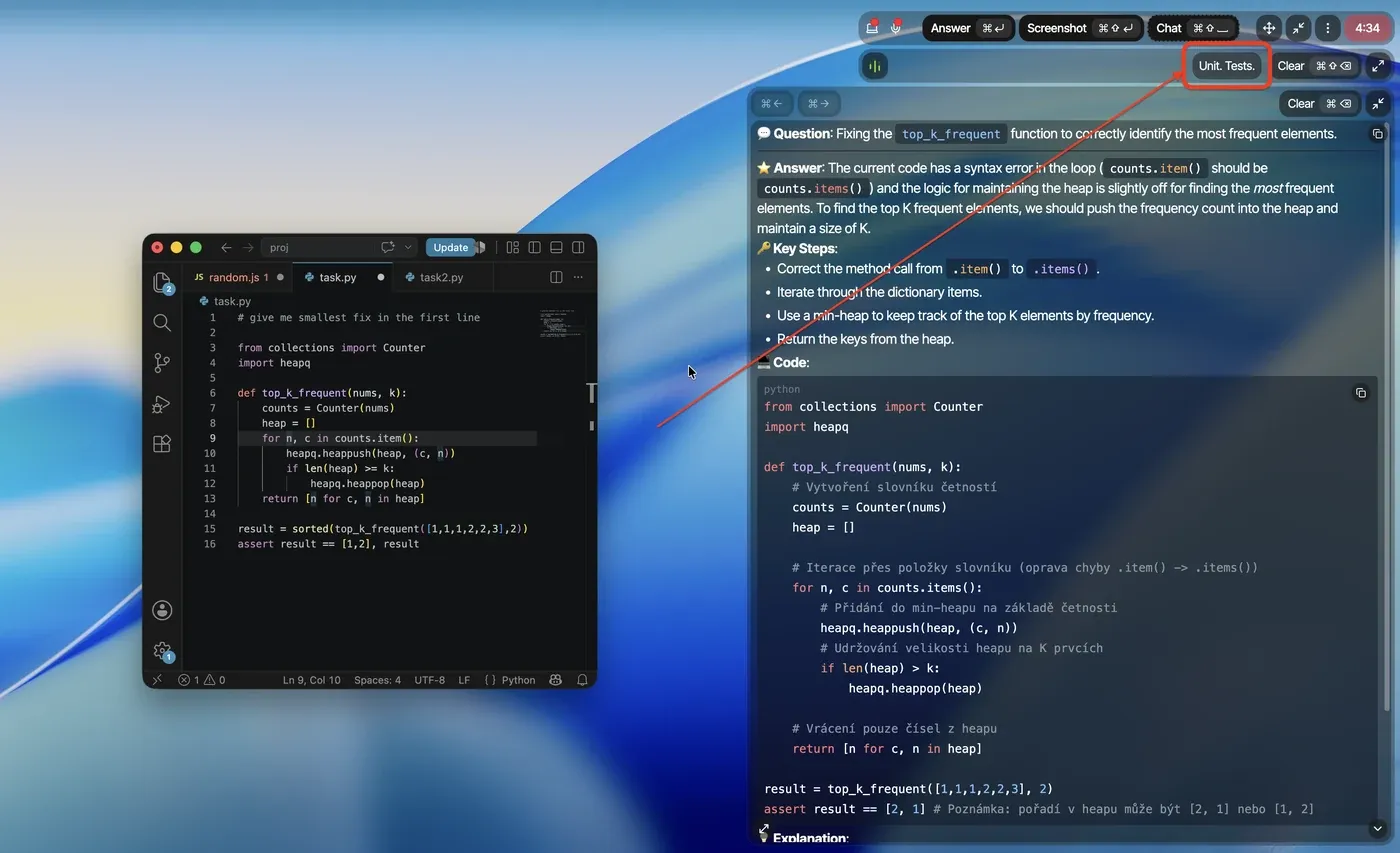
Parakeet AI claims "Full Coding Interview Support," including reading a shared LeetCode-style question and providing "code suggestions and explanations". The three core problems show genuinely strong technique. The follow-up test is a real weakness, not a flaw in the code itself. It didn't handle a normal part of how coding interviews actually go.
Easy to Use
It's easy to get up and running.
One real friction point stood out. The client window can't be freely dragged into position. Repositioning needs a dedicated button instead of a normal click-and-drag. Our tester called this "somewhat cumbersome" in practice. A Reddit comment matches it: "The overlay screen was fixed, you cant move it as per your choice."
A keyboard shortcut (Ctrl+Shift+Arrow) exists as the workaround, but it's not easy to discover on your own. One user asked support directly whether a shortcut even existed. Using it can also break the app's own question detection mid-interview. That's a separate, real bug on top of the discoverability problem.

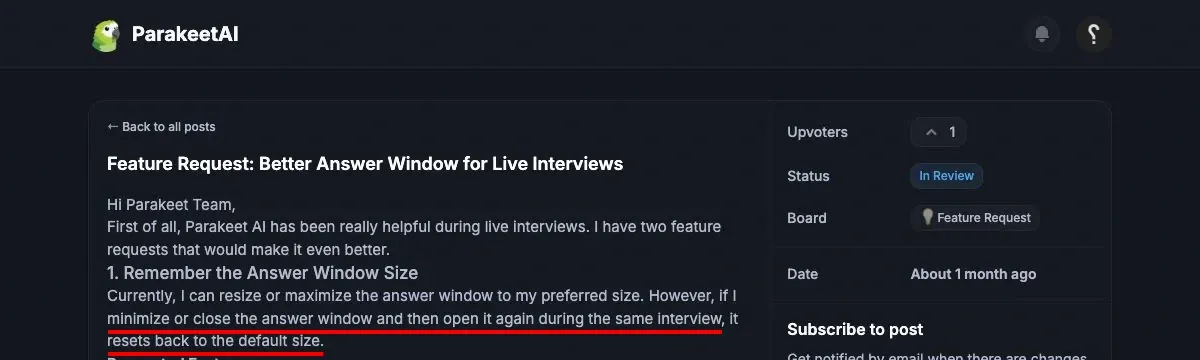
A different complaint targets the answer window itself: it doesn't remember its resized dimensions between sessions.
Parakeet AI runs entirely on the one device you're already using, with no second device to pair. That single-device architecture is a real structural advantage on this specific point.
On-screen readability is fine, but it depends on how you've arranged your windows. Keyboard shortcuts are a bit complicated, not something you figure out immediately.
Real Cost
Pricing Tiers
Current pricing: the page lists Weekly $78, Monthly $149.90, Yearly $899.90 as reference prices. Each is struck through next to a lower "with code INTERVIEW50" price. That discounted number is what actually renders as the price by default. Weekly is $39.00, Monthly is $74.95, Yearly is $449.95, all labeled "Unlimited Calls".
A separate credit-based pay-as-you-go option also exists, priced with the same strikethrough-and-code pattern. The starter bundle is $29.50 for up to 3 hours of active session time. Larger bundles are $59.00 for 6 credits plus 2 free, and $88.50 for 9 credits plus 6 free.
Each credit covers a 30-minute session, and credits are stated as non-expiring. The exact per-credit price wasn't visible without logging into the account dashboard.
A free trial is also available: 10 sessions, up to 10 minutes each. It's reopenable every 12 minutes from the dashboard or desktop app. We confirmed that reopening in practice. It's genuinely reusable, not a one-time allowance despite reading that way at first glance.
Current Price Snapshot
The pricing page currently lists the current subscription tiers and credit bundles below.
The pricing page currently shows Weekly $39.00, Monthly $74.95, and Yearly $449.95. Each carries a struck-through reference price above it.
The credit-based option is $29.50 for up to 3 hours, $59.00 for 6 credits plus 2 free, and $88.50 for 9 credits plus 6 free.
Pricing Tricks
The credit system itself has a real cost trap. Every session consumes a full 30-minute block the moment it starts, even if the actual call lasts five minutes. Parakeet AI's own FAQ confirms this: starting a session always deducts 0.5 credits for that 30-minute block.
Nothing in that FAQ describes a way to pause the clock either. A credit keeps burning for the full 30 minutes as long as the session stays active. That's true whether you're mid-answer or just sitting idle between questions.
InterviewFox works differently on both points. It bills by the second actually used, not a rounded-up block. It also supports pausing mid-session without losing time.
One clause is also worth flagging as a real pricing trick, not just fine print. Parakeet AI's terms include EU withdrawal-rights waiver language, citing EU Directive 2011/83/EU Article 16(m). Starting a call session waives withdrawal rights for that purchase.
Post-cancellation billing continuation is also a reported risk here, independently of any waiver clause. See What Users Are Saying below for the specifics.
Refunds
Refund, tested, real money. We purchased the minimum amount, then requested a refund on an unused purchase. Result: auto-approved, processed in roughly 2 hours. That's well inside Parakeet AI's own stated "5–10 business days". It's also well inside the fastest refund-speed bar we test against: three business days. For an unused purchase, no justification is required for the refund to go through.
This specific test covers only the "unused purchase" scenario. That's what the policy itself is narrowly scoped to. See What Users Are Saying below for a different scenario. That's used, cancelled subscriptions, reported by other users with a different outcome.
The company itself is identifiable, too: ParakeetAI d.o.o., Ljubljana, Slovenia, VAT SI96761202. That's a real, checkable company, not an anonymous storefront, and a genuine positive alongside the refund result above.
Who Should Use It
Skip It If
Skip Parakeet AI if there's any real chance you'll share your screen during the interview or exam. That covers Zoom desktop's entire-screen share and any proctored platform like HackerRank, both confirmed failures above, not edge cases.
Getting caught isn't a minor inconvenience. It can mean a flagged session, a hiring-team review, and a rejection you never see explained. That risk isn't worth trading for a copilot's help.
InterviewFox avoids this risk by design, not by getting better at hiding. Its answers render on a second, physically separate device. Nothing tied to the interview ever touches the screen a meeting platform could capture.
Skip it too if your answers need to genuinely sound like you. Our own testing found the tone generic and AI-written, not something a real candidate would naturally say. A resume-personalized fact is still correct with Parakeet AI; the voice around it isn't.
Worth Considering If
It's worth considering if your interview stays short, casual, and lightly monitored: no screen share, no proctored platform. In that scenario, single-device simplicity is a real advantage over a heavier two-device setup. By the way, InterviewFox also offers a simple, single-device mode for exactly this kind of lightly-monitored situation.
A generic, standard answer is also fine here, not a dealbreaker. Personalization is a genuine, tested strength when a resume detail needs to come through. That holds even if the surrounding tone doesn't sound distinctly like you.
If you want something simple to set up and quick to start using, that's also confirmed here. Just weigh it against the screen-share and tone trade-offs above.
What Users Are Saying
Featurebase patterns
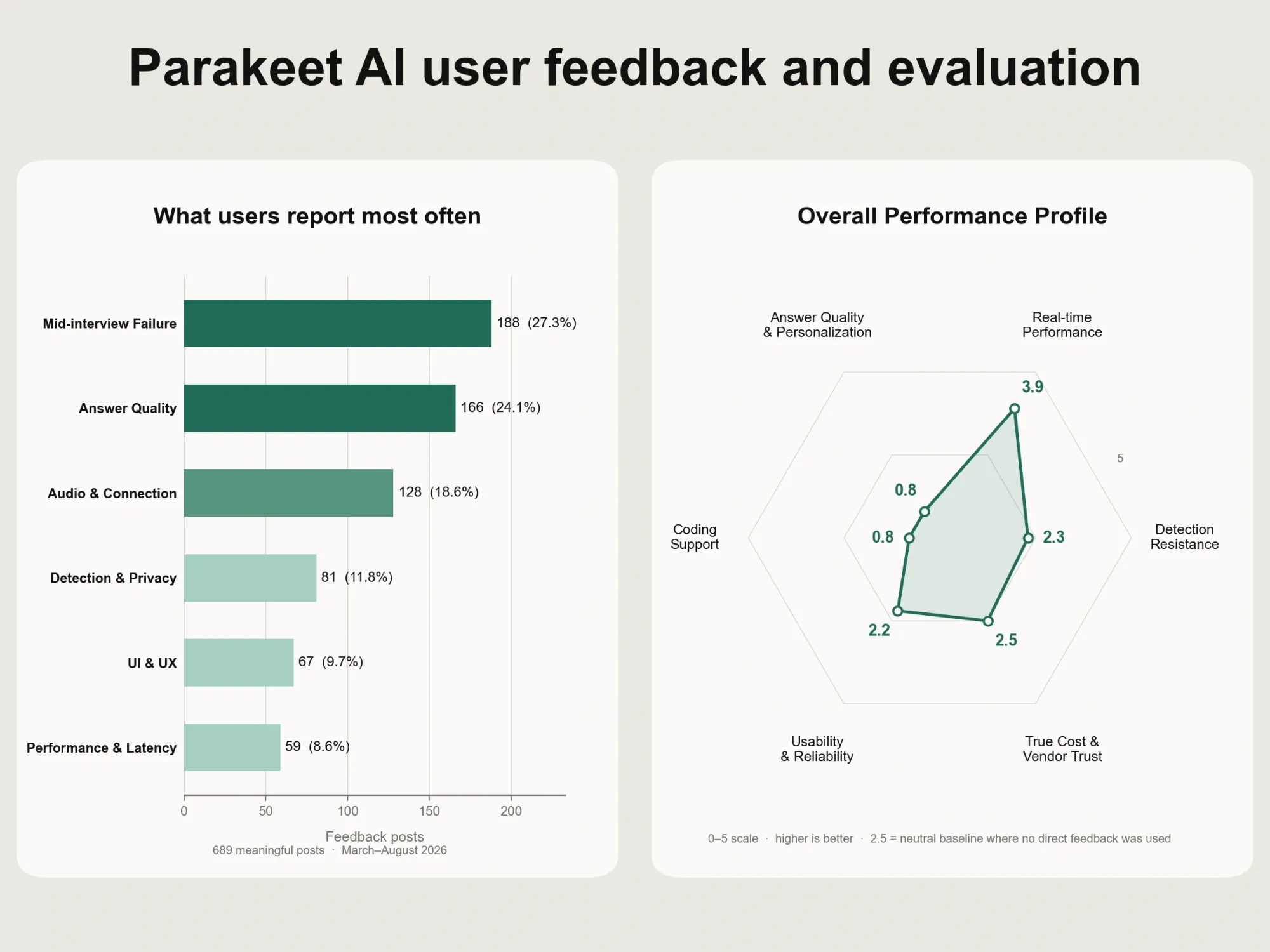
We ran every post on Parakeet AI's own Featurebase board through a language model. That's 1,115 posts total, sorted into one of six recurring themes. 689 had enough substance to classify; the rest were noise like login issues or one-line pricing gripes.
Mid-interview failures are the single largest theme: 188 posts, 27.3% of the total. The most common version is the app simply going unresponsive or dropping audio partway through a live call. That's not a setup problem, it happens mid-interview.
Answer quality complaints come second by post count, 166. One recurring complaint asks for shorter, more relevant answers instead of long ones that miss the question. 109 other users reported the same problem.
Audio and connection failures make up 128 posts. One recurring complaint is the app simply failing to hear the interviewer at all. 111 other users reported the same problem.
Detection and privacy complaints are a smaller share by count, 81 posts. 129 users backed the same request: stop the desktop app from showing up in Windows Task Manager. An interviewer can just open Task Manager and see the process running.
Performance and UI complaints round out the board. 59 posts cite slow responses, a complaint 87 other users confirmed running into themselves. 67 more cite interface friction, consistent with what we found testing it ourselves.
Independent user feedback
Trustpilot gave us a small sample. Just 3 reviews, averaging 2.9/5. All posted within one two-week window in April 2026. Too small for a reliable ratio, but specific enough to cite directly.
One reviewer found it inconsistent, not fully ready for real use.
Answers froze mid-call, and charges kept going every month after canceling.
We read these two reviews as consistent with our own testing, not as new information on their own. The freezing, the unreliability, and the refund pattern all match what we found firsthand. The wider Featurebase data shows the same pattern at scale.
Reddit adds a smaller, snippet-level sample. One post rates Parakeet AI 3.5/5. It confirms the fixed-position overlay complaint we documented ourselves in Easy to Use. Different users, different channels, same failure modes.
Comparing Parakeet AI and InterviewFox
Parakeet AI does some things well. Personalization held up cleanly, and refunds on unused purchases moved fast. It also passed our tests on Teams and Google Meet without issue.
But the one thing that matters most in a real interview is whether it stays hidden. And there, it doesn't hold up. It leaks on Zoom desktop's entire-screen share, confirmed from the receiving side on video. It gets actively blocked before a session can even start on HackerRank.
If a tool isn't reliably undetectable, what's it actually buying you? You could just open ChatGPT in a separate tab and type the question in yourself. ChatGPT is free, and it carries the same screen-share exposure risk once a shared screen catches it.
That's the gap InterviewFox is built to close. Its answers render on a second, physically separate device. Nothing a meeting platform's screen share ever touches that second device. There's no separate result to test platform by platform, because the exposure surface simply isn't there.
Here's how the two compare across everything we tested.
Conclusion
Parakeet AI is a capable tool with a real safety gap. Personalization is a genuine strength, and refunds on unused purchases go through fast. Zoom desktop's entire-screen share and proctored platforms like HackerRank will get it detected, confirmed on video, not just claimed. Stay off those, and it's relatively safe, though not something we'd call certain.
FAQ
Does Parakeet AI get detected on Zoom?
Yes, on the entire-screen share mode of the Zoom desktop client. This is confirmed by two independent video recordings of the receiving side. Zoom's window-share and tab-share modes, tested separately, stayed hidden.
Does Parakeet AI get detected on HackerRank?
Yes, and the mechanism is active blocking, not passive after-the-fact visibility. Our test found the session prevented from starting. A themed cluster of 15 community posts (124 upvotes) reports the same across HackerRank and similar assessment platforms. One post puts it directly: "Parakeet ai got detected in hackerrank live coding interview."
What happens if Parakeet AI gets flagged?
Getting caught doesn't automatically disqualify you. On platforms like HackerRank and Karat, a flagged session gets reviewed by the hiring team. They confirm or dismiss the violation themselves. That decision is final. Candidates are never told a flag exists, on either platform.
Does Parakeet AI freeze or drop audio?
The app fails to capture system audio, or freezes mid-call. It's the largest complaint theme on Parakeet AI's own Featurebase board. That's 103 posts and 431 upvotes, spanning March through July 2026.
A narrower, named-vendor subset (9 posts, 52 upvotes) points to one specific connection error. It's named directly: "Speechmatics connection became unresponsive," concentrated around 2026-06-30. This is a community-reported pattern, not a crash rate we measured ourselves.
Is Parakeet AI safe to use?
Zoom desktop's entire-screen share and assessment platforms like HackerRank will get it detected, confirmed with video evidence. Teams and Google Meet are relatively safe based on our own testing (text-only evidence). That's not something we'd call certain in every setup.
There is no single "safe" or "unsafe" answer that applies across every platform this product claims to support. That's the specific gap between its marketing (one "Undetectable" badge for every platform) and what we found testing them individually.
Does Parakeet AI work for coding interviews?
Yes, with a real limitation. It handled three standard LeetCode-style problems with the correct optimal approach in our tests. But on a natural follow-up question, it answered the original task again. It never addressed the follow-up we actually asked.
Can I try Parakeet AI for free?
Yes. The free trial gives 10 sessions, up to 10 minutes each. It's reopenable every 12 minutes from the dashboard or desktop app, and we confirmed that reopening ourselves. It's a genuinely reusable trial, not a one-time allowance, despite reading that way at first glance.
How much does Parakeet AI cost?
As of this review: Weekly $39.00, Monthly $74.95, or Yearly $449.95, all labeled "Unlimited Calls". Each is shown under a higher struck-through reference price. A separate credit-based pay-as-you-go option also exists.
The credit-based bundles are $29.50 for up to 3 hours, $59.00 for 6 credits plus 2 free, and $88.50 for 9 credits plus 6 free. We also found evidence of a discontinued lifetime-unlimited tier.
How does Parakeet AI's credit system work?
Each credit-based session consumes a full 30-minute block the moment it starts. That's true even if the actual call lasts five minutes. Parakeet AI's own FAQ confirms this: starting a session always deducts 0.5 credits for that block. There's no way to pause the clock while a session stays active.
Is Parakeet AI worth it?
It's worth it if every interview stays browser-based and never touches a proctored coding platform. That means Teams or Google Meet, never Zoom desktop, and never a platform like HackerRank. In that case, the platforms where it passed our tests and the clean personalization result are real strengths.
It's not worth the risk if any part of your process touches Zoom's desktop app or a platform like HackerRank. Those failures aren't theoretical. They're confirmed, with video and screenshot evidence.
Can I get a refund from Parakeet AI?
On an unused purchase, our real-money test got an automatic refund in about two hours. Used, cancelled subscriptions can keep being billed anyway, independently confirmed on Trustpilot. That's a scenario the stated refund policy doesn't cover in the first place. Which experience you get likely depends on which of those two situations you're actually in.