
Interview Coder Review 2026: Safety, Price & Coding

Before a technical interview, two questions matter. Will Interview Coder stay out of view? Can you get it ready in time?
Interview Coder fails the invisible-default test for live interviews. Zoom exposed the overlay. HackerRank and CoderPad monitor screen activity, tabs, copy/paste, screen capture, and unauthorized tools. Treat a desktop overlay as visible or detectable there. Its behavioral answers are generic, not grounded in your experience.
The review draws on coding and speed findings, official platform documentation, and third-party test observations.
This review covers safety, speed, question recognition, answer quality, personalization, coding support, ease of use, price, public discussion, and fit. Together, these findings show where Interview Coder fits and where it does not.
Quick Facts
| Detectability & Safety | Hidden in tested meeting software except Zoom; do not carry that result to HackerRank or CoderPad |
| Speed | About 3–4 seconds; middle-to-upper tier in the tested competitor set |
| Question Recognition | Basic audio recognition and question extraction are adequate |
| Answer Quality | Coding answers are good; behavioral answers are generic and not grounded in personal experience |
| Coding Support | Strongest on clean coding prompts; mixed context can change the task it answers |
| Ease of Use | Desktop client; inconvenient for a sudden, last-minute interview |
| Price | Free download; $299/month or $799 lifetime shown; published refund policy says purchases are final |
Strengths
- Clean coding prompts are the product’s strongest use case.
- About 3–4 seconds is fast enough to keep pace with many live coding exchanges.
- It adds explanations and reasoning hints alongside the generated coding answer.
Weaknesses
- Zoom sharing exposed the overlay in the captured test.
- HackerRank and CoderPad put this workflow in visible or monitored environments.
- Behavioral answers are generic rather than tied to the candidate’s experience.
- The desktop client is a poor fit for last-minute setup.
- The paid plans are expensive to reverse under a no-refund policy.
Overview
Interview Coder is a desktop overlay for live technical interviews. It combines screenshot or audio capture with a response panel. The official how-it-works explanation positions it around coding, system design, audio, and follow-up guidance.
The clearest fit is a prepared, desktop-first coding session. Clean prompts produce useful coding help. Risk rises when the platform monitors the session or the screen shows several tasks. Behavioral answers also lack personal grounding.
Use a simple rule. Check the exact interview platform first. Then prepare the desktop client before the interview. An “undetectable” label cannot replace either check.
Safety
Interview Coder’s safety is platform-dependent, not a single yes-or-no result.
Across the tested meeting software, the overlay stayed hidden except in Zoom. Zoom screen sharing showed the floating controls and response panels. The receiving side could see the assistant.
from the share picker to the remote view.
The official site claims 20+ undetectability features. It lists major platforms as undetectable. Verify the exact environment instead.
“Invisible” describes the interface, not protection from exposure. This is a category-wide limitation, not an Interview Coder quirk. Desktop overlays share the same exposure boundary: screen sharing, recording, or platform monitoring can still expose them.
Platform Detection
Coding-assessment platforms should be treated as visible environments. A meeting-app result does not transfer to a monitored coding platform.
Our results put Interview Coder on the visible side of that boundary for HackerRank and CoderPad. HackerRank documents full-screen enforcement, tab monitoring, copy/paste tracking, and screen capture. Its integrity modes also detect unauthorized tools and invisible overlays. HackerRank’s test-integrity documentation explains those controls.
CoderPad documents full-screen controls, copy/paste tracking, IDE-exit detection, and code playback. It also lists automatic detection and cheating notifications. CoderPad’s Screen detection documentation describes those signals and the review process.
Do not carry a hidden meeting-app result into HackerRank or CoderPad. If the interview is on either platform, use the platform’s own monitoring model as the controlling safety fact.
That changes the alternative when keeping answer output off the interview computer is the first requirement. InterviewFox's AI interview assistant uses Dual-Device Mode: the answer surface is on a separate phone, not the shared computer.
If You're Caught
Being caught is not just an on-screen problem. It changes the interview into an integrity review. CoderPad tells interviewers to clarify pasted code or an IDE exit. Its guidance says the alert is not an automatic disqualification.
CoderPad's Screen workflow goes further when cheating is confirmed. The exercise can lose its points. The candidate record can receive a “Cheated” notification. If Interview Coder appears during a monitored assessment, the session can shift from evaluating your solution to reviewing your conduct.
That is why hidden on your screen is not the same as safe in an evaluated interview. You may have to explain the answer without the assistant. You may also face deeper follow-ups and a review trail.
The same boundary appears in other products, though the exposure point changes by platform. Our Cluely review, Parakeet AI review, Final Round AI review, LockedIn AI review, and ShadeCoder review document where screen sharing or monitoring could still expose the assistant.
Speed
Interview Coder usually recognizes and responds in about 3–4 seconds. That places it in the middle-to-upper tier of the tested competitor set.
The speed is sufficient for many live coding exchanges. It does not replace listening for the next constraint or follow-up. Use the response as a starting point on a clean prompt. Do not let speed pull the conversation toward the wrong task.
Recognition
Audio recognition is not reliable enough for changing or multi-part prompts. In a third-party Bitly example, the answer panel said it could not see the current question.
That is a prompt-tracking failure, not a general accuracy score. Check the current question and latest constraint before using the response. For a clean coding prompt, screenshot input remains the clearer workflow.
Quality
Coding answer quality is good. Behavioral answer quality is generic and does not reliably connect the response to the candidate’s personal experience.
For coding, the output is a useful starting point on a clean prompt. For behavioral questions, a polished but generic answer can sound detached from the candidate’s resume, projects, or actual decisions. Prepare personal stories separately instead of expecting Interview Coder to supply them during the conversation.
Personalization
Interview Coder is weak on personal grounding. In use, behavioral responses stay general rather than pulling in the candidate’s own projects, trade-offs, or results.
That makes it a poor primary tool for “tell me about a time” questions. It also struggles with personal project follow-ups. Prepare resume-grounded stories in advance. A background-aware workflow is another option.
InterviewFox's Prep Agent starts this workflow. Through WhatsApp or SMS, it uses your resume and target interview context for resume optimization, preparation plans, and mock interviews. That context can carry into the real-time interview assistant. Live answers can then use your background and target role during follow-ups.
Coding
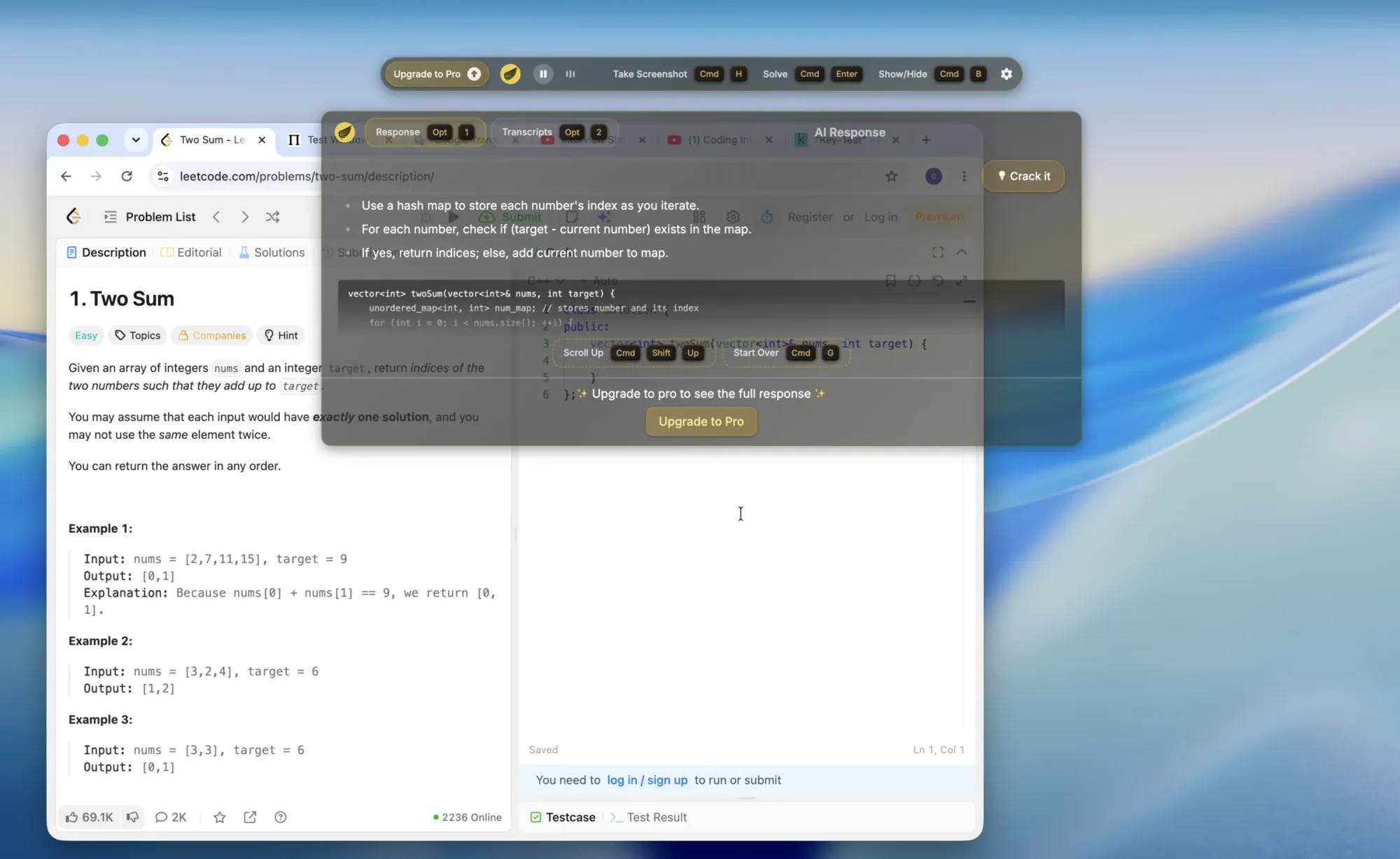
Clean coding prompts are where Interview Coder performs best. A clean Two Sum prompt produced a usable hash-map approach. That matches its positioning around algorithms, debugging, code review, and pair programming.
Context discipline matters. An older Two Sum problem sat beside an active top_k_frequent editor. The response followed the older task instead.
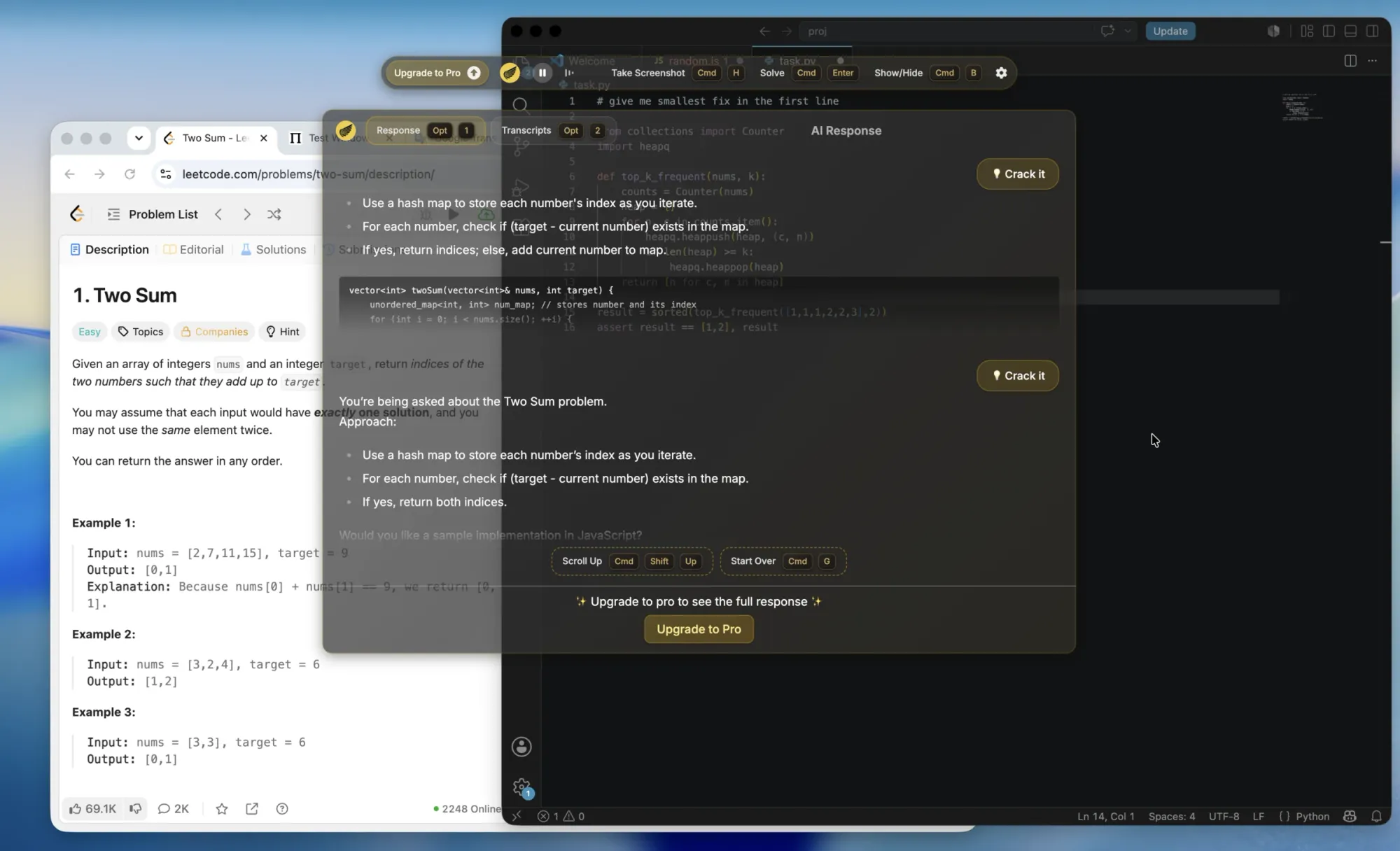
Use it with one clear prompt in view. If the screen contains several windows or stale problem statements, verify the selected task before using the code.
Usability
The desktop client is a poor fit for a last-minute interview. It works best when the candidate has already installed, configured, and practiced with it on the normal workstation.
The official Quick Start guide lists download, installation, account setup, basic checks, subscription, and language configuration before use. That setup cost matters when an interview appears suddenly or the candidate is away from the usual computer.
Set up the client before the interview, and rehearse the hotkeys, audio, and response panel. If that preparation is not possible, the desktop workflow is a liability rather than a convenience.
For a sudden interview, InterviewFox Full-Screen Mode opens assistance on a phone without downloading or starting a desktop client. That removes the desktop setup step. It is a rapid-start mechanism, separate from Dual-Device Mode's answer-separation function.
Pricing
Interview Coder’s pricing is a one-way purchase risk unless the checkout terms change. The homepage shows a free download, $299 monthly Pro with 1,000 credits, and $799 Lifetime Pro.
InterviewFox publishes a different model. Subscriptions cost $49 per month, $117 billed quarterly, or $348 billed yearly. One-time credits start at $58. Credit usage is measured by actual seconds, not fixed 30-minute blocks.
The official refund policy says all purchases are final. It describes a one-time lifetime purchase. It also says there is no recurring billing or cancellation process. That differs from the homepage’s monthly plan and “cancel anytime” language.
Download the free version to inspect the workflow, then read the checkout language carefully. The free tier reduces the trial barrier; it does not remove the no-refund risk.
Skip Interview Coder If
Skip Interview Coder for HackerRank or CoderPad. Also skip it if you cannot prepare the desktop client before a sudden interview.
Pass on it when behavioral answers and personal stories are the main requirement. Pass if $299 monthly or $799 lifetime is unacceptable under a no-refund policy.
Worth Considering If
Interview Coder is worth considering for a prepared, single-computer workflow built around clean coding prompts. The 3–4 second response time is useful, and coding answers are its strongest area.
It can be simpler than a separate-device workflow when one computer is the priority. Check the exact meeting software first: the tested meeting-app result was hidden except in Zoom. That result should not be extended to other platforms.
Users Say
The 28 readable external Reddit discussions are mainly about exposure, consequences, product fit, and credibility.
Exposure and interviewer-consequence discussions account for 11 of the 28 threads. Product fit and price or refund discussions account for five.
Trustpilot has no confirmed Interview Coder profile. G2’s directory lists 0 ratings. Capterra has no exact Interview Coder listing.
Comparing Interview Coder and InterviewFox
Interview Coder is a fit for prepared, single-computer coding sessions. The choice changes when answer exposure, startup time, or personal context is the main constraint.
First, InterviewFox's AI interview helper uses Dual-Device Mode, keeping answers on a separate phone.
Next, InterviewFox's Full-Screen Mode opens assistance on a phone when an interview starts without warning, with no desktop download.
Finally, InterviewFox's Prep Agent carries resume and target-interview context into the real-time assistant for personal follow-ups.
Choose InterviewFox when one of those constraints matters; choose Interview Coder for a prepared desktop workflow on the exact platform.
FAQ
Is Interview Coder really undetectable?
There is no single platform-wide answer. In tested meeting software, it stayed hidden except in Zoom. Screen sharing exposed the overlay there. HackerRank and CoderPad have their own detection mechanisms. Do not carry over the meeting-app result.
How fast is Interview Coder?
Recognition and response take about 3–4 seconds. That is middle-to-upper tier among tested competitors. Speed does not replace listening to follow-up questions.
Does Interview Coder work for coding?
Yes, clean coding prompts are its strongest use case and the answers are good starting points. Mixed windows can make it answer an older or unrelated task, so keep one clear prompt in view.
Does Interview Coder personalize behavioral answers?
Behavioral answers are generic rather than grounded in the candidate’s personal experience. Prepare resume and project stories separately if those questions matter.
Is Interview Coder convenient for a last-minute interview?
Not usually. Install and configure the desktop client before the interview. A sudden interview or unfamiliar computer makes the workflow inconvenient.
How much does Interview Coder cost?
The homepage shows a free download, a $299 monthly plan with 1,000 credits, and a $799 lifetime plan. The published refund policy says all purchases are final. Its billing language differs. Confirm the checkout terms before paying.
Can I get a refund from Interview Coder?
The published refund policy says no: all purchases are final. Treat a paid plan as non-refundable unless the terms presented at checkout explicitly say otherwise.
Conclusion
Interview Coder is a fast, coding-focused desktop assistant. It is not a universal live-interview default. It is strongest on clean coding prompts and responds in about 3–4 seconds.
Prepare the client before relying on it. Check the exact platform first. Zoom exposed the overlay. HackerRank and CoderPad have monitoring that can expose or flag this workflow.
Skip it for last-minute or behavior-heavy interviews. Consider it for a prepared, single-computer coding workflow.
If exposure, rapid startup, or personal context is the deciding risk, InterviewFox addresses each with a separate mechanism. These are Dual-Device Mode, Full-Screen Mode, and the Prep Agent-to-live context loop.