
LockedIn AI Review 2026: Safety, Speed and Real Cost

Before a high-stakes interview, two questions decide whether LockedIn AI is worth installing. Will the tool stay out of view when the interview computer is shared, recorded, or proctored? And is the price you pay the price you were shown?
LockedIn AI is convenient, but it is not a safe default for a monitored interview. The desktop overlay renders on the host screen during a Zoom entire-screen share. HackerRank's proctoring rules target invisible overlay applications by name. Users report three-to-five-second answers, and a live session ends around 90 minutes in. Use it only where the interview computer is not shared or proctored.
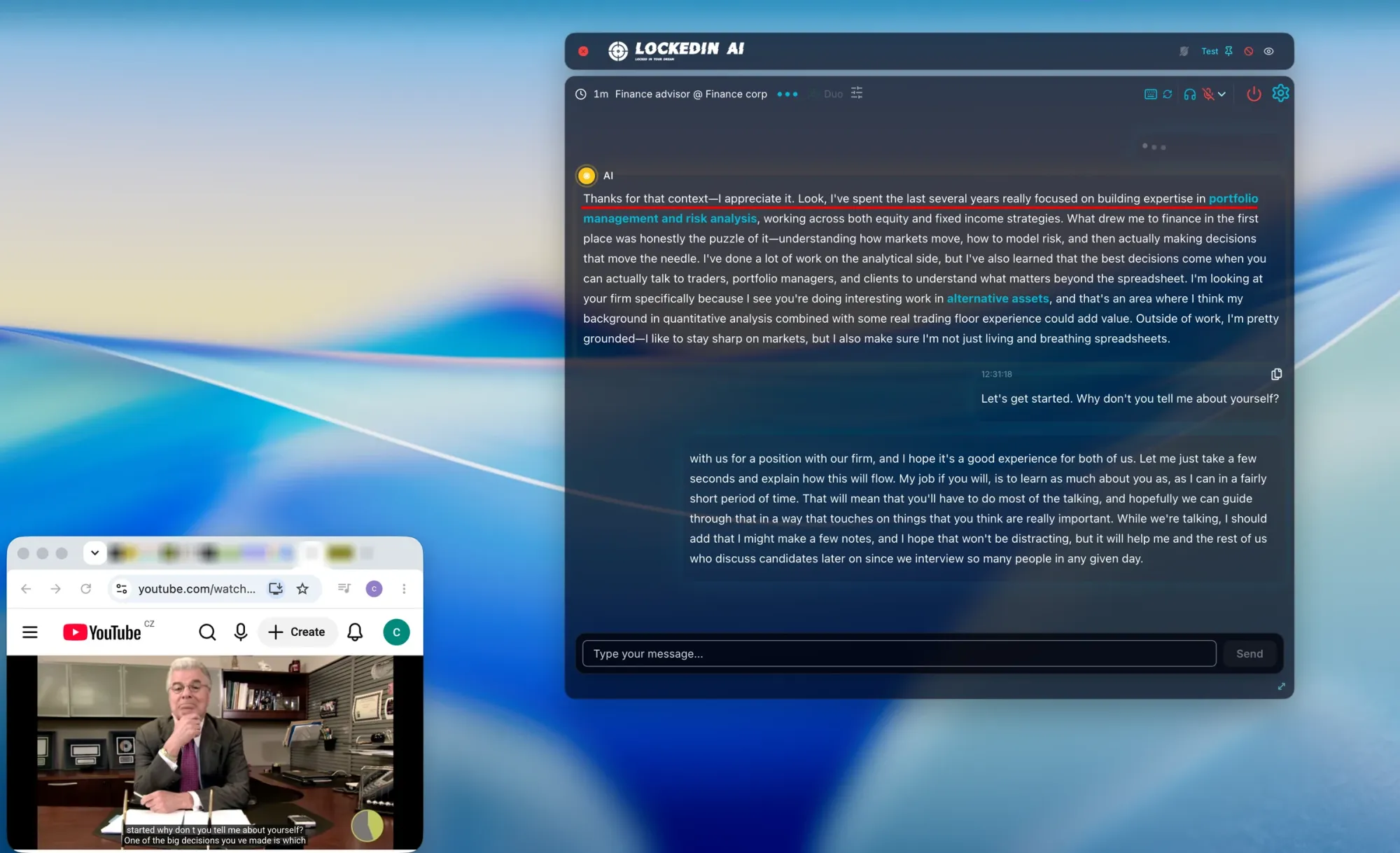
Our own screen-share capture shows the LockedIn answer window on the host screen while Zoom reported active sharing. The safe-use boundary is therefore narrower than the marketing suggests.
This review covers detectability, speed, question recognition, answer quality, and personalization. It also covers coding support, ease of use, price, fit, and the public signals candidates discuss. It is the complete picture for this competitor.
Quick Facts
| Detectability & Safety | Not safe to rely on for a monitored or screen-shared interview; the overlay renders on the host screen |
| Speed | The sub-second claim is marketing; users report 3-5s answers that slowed toward 5-6s over months |
| Question Recognition | Can miss the audio it needs; a third-party test showed system audio missed and Auto mode lagging |
| Answer Quality | Answers run long and dense; a third-party test showed long output even in concise mode |
| Coding Support | Coding output is hard to use live; a concise request still returned a long code block |
| Ease of Use | Needs a desktop install plus three permissions; leaves a visible audio device and process name |
| Price | Official sources list $69.99/mo, $54.99/mo, and $41.24/mo; monthly and quarterly plans are non-refundable |
Strengths
- LockedIn AI bundles live answers, resume-based prompts, coding help, and a phone mode in one product, so a candidate can prepare and get help without juggling tools.
- Its free tier and non-expiring credits let a candidate test the workflow before paying for a plan.
- Candidates who used it for practice in late 2025 reported structured answers and useful replay notes.
Weaknesses
- LockedIn AI's overlay renders on the host screen during a Zoom entire-screen share, so the invisible claim does not protect a candidate whose computer is shared.
- HackerRank's published proctoring rules name invisible overlay applications and external AI coding assistants as detection targets, so LockedIn AI's support claim does not make that platform safe.
- Its session cap is documented at 120 minutes but reported at about 90 minutes by users, so a long multi-round loop can lose assistance.
What Is LockedIn AI
LockedIn AI is an AI interview assistant. It listens to interviews and shows real-time answers, code solutions, and coaching on screen. It targets job seekers, students, and professionals.
Its main workflow is a desktop overlay for macOS and Windows. It also offers a web app, a separate-phone mode, and LockedIn Duo with a human helper. Candidates can upload a resume and job description to shape answers.
These modes have different exposure profiles, so "invisible" does not describe the whole product. The desktop overlay uses keyboard shortcuts or captured audio, can stay above other windows, and is the mode we tested.
Safety
LockedIn AI is not a safe default for an interview that shares or records the meeting screen. The desktop app is marketed as fully hidden and undetectable during screen sharing. Our own test does not support that as a blanket claim.
Test: Zoom entire-screen share.
Method: We shared the entire desktop in a Zoom meeting and filmed the host screen.
Result: The LockedIn answer window stayed on the host screen during active sharing.
.
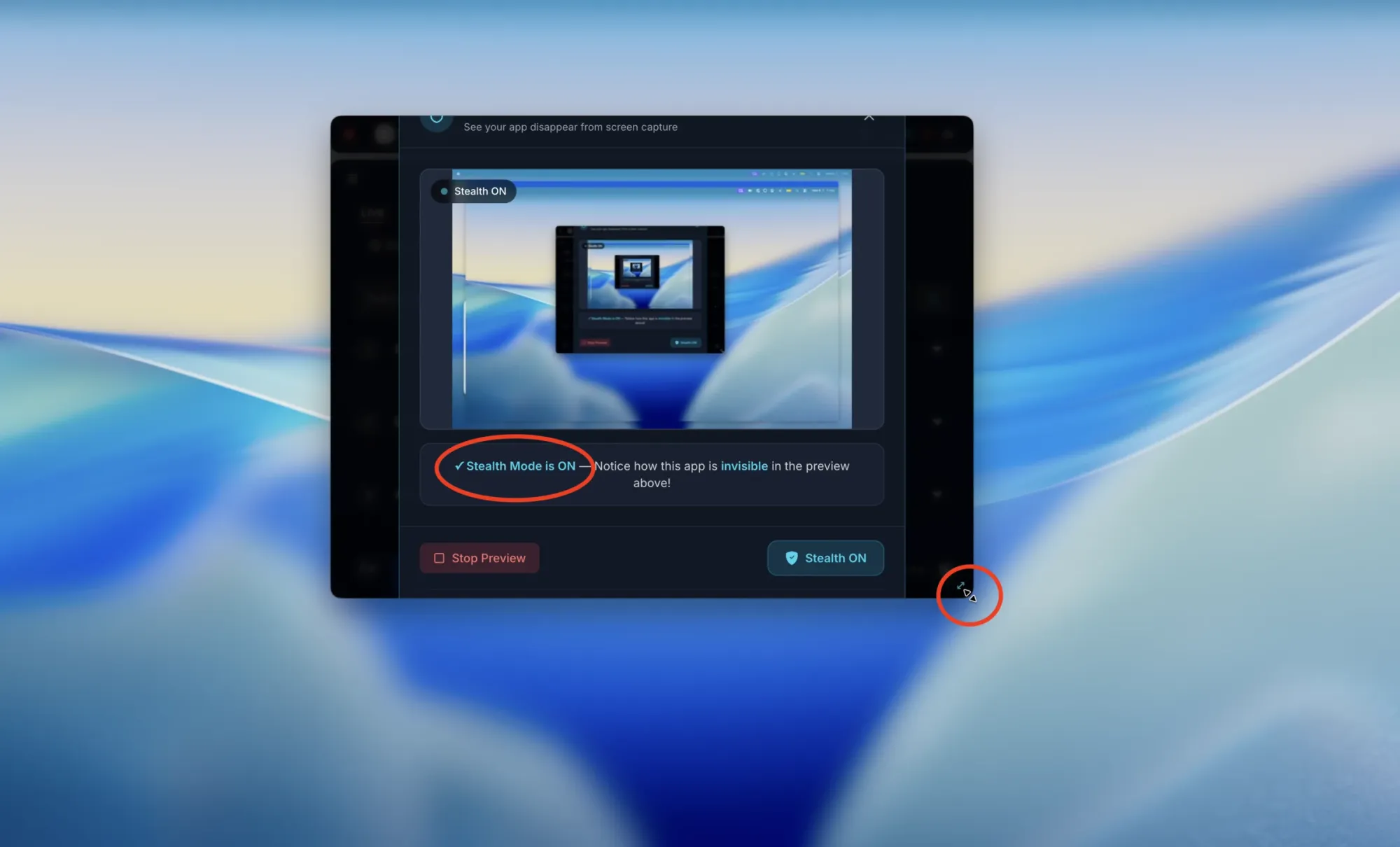
A later capture ran the app's own Test Stealth Mode check. That panel reported Visible with stealth off and Stealth ON with stealth on. The preview belongs to LockedIn itself, so it is not an independent receiver either.
Three other tells showed up in a July 2026 third-party macOS review. The active window changed, hotkeys still reached the active page, and the cursor left a visible mark. Those are third-party observations, not our test.
The local footprint is where the exposure becomes concrete. In an April 2026 Reddit report, a paid user found "LockedIn Virtual Input" sitting in the input devices list. The installer never mentioned the fake audio device. Another report described a recognizable process name in Activity Monitor. A Codility practice test screenshotted the running processes during proctoring. Two things surface without screen sharing: the installed device and the running process.
LockedIn's own help docs are candid about two gaps. The web app hides nothing, and sharing from Teams in a browser can expose the window. The supported setup is the desktop app in full-screen or single-window share mode.
Meeting apps and assessment platforms are different problems. A meeting share exposes the screen you choose to share. A proctored assessment can also watch the process list, the webcam, and the tab focus. The second case is where the overlay design is weakest.
Invisible is a label for the interface, not a promise that use cannot be exposed. The same exposure paths apply across desktop-overlay products: entire-screen sharing, screen recording, proctored screen capture, and platform monitoring. Read the label as a screen-layer claim.
Platform Detection
LockedIn lists HackerRank, CodeSignal, and CoderPad among its supported platforms. The platform rules are the part that decides safety there.
HackerRank's proctoring documentation names the exact category LockedIn belongs to. It lists invisible overlay applications and external AI coding assistants as targets of periodic screenshot analysis. HackerRank Proctor Mode .
CodeSignal records the screen, audio, and telemetry throughout a session. It also computes a Suspicion Score from solution similarity and copy-paste behavior. CodeSignal's cheating and fraud page .
CoderPad documents webcam proctoring, code playback, and copy-paste tracking. Its page does not list overlay detection, so the signal is less direct there.
The action is the same on all three. Do not rely on LockedIn AI on a proctored platform.
When the interview computer is the thing being shared or inspected, the safer architecture keeps the answer surface off it. InterviewFox's dual device AI interview assistant uses Dual-Device Mode. Answers appear on a separate physical phone, so the interview computer has no answer surface, overlay, or InterviewFox process. A screen share or a platform monitor has nothing answer-related to capture.
Land offer with Safer AI Interview Assistant
Skip the risky invisible apps. Our dual-device mode keeps it simple and undetectable. You crush the interview, we handle the answers.
Get started. It's freeLoved by 100,000+ candidates
If You're Caught
The documented signal matters most where the platform is proctored. HackerRank's periodic screenshot analysis and CodeSignal's Suspicion Score feed a human review. The realistic outcome is a flagged session, added scrutiny, or a score that gets reviewed. Treat the risk as a review flag on the platform, not a clean pass.
Speed
LockedIn AI's headline speed is a marketing figure, not a measured result. The site advertises 116ms on the homepage and under one second on a FAQ page. The Duo page claims sub-second sync. Those numbers describe different things: a homepage average, a FAQ response time, and a Duo sync figure. None of them measures the desktop overlay during a live call.
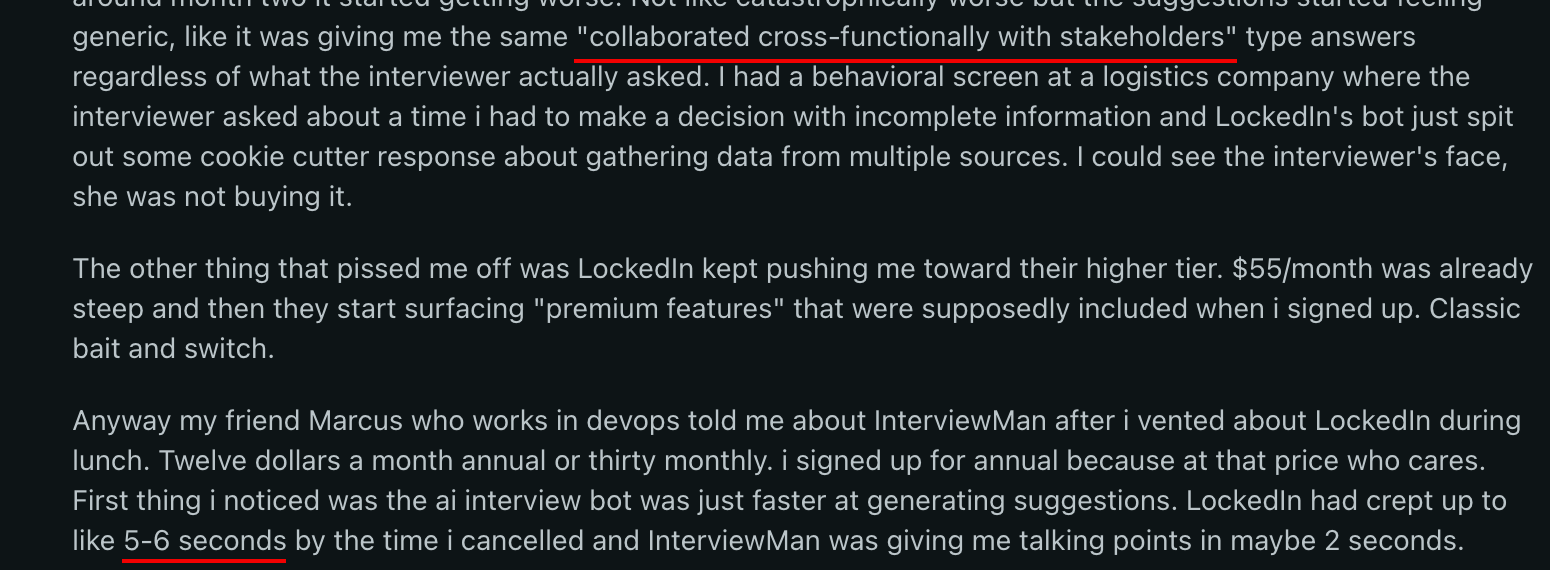
Users report answers arriving in three to five seconds, often with an AI-sounding voice. One candidate who cancelled in April 2026 described the delay as "maybe 3 seconds" at first. It crept to five or six seconds by month two. A three-second pause is hard to hide on a live call. A five-to-six-second one is worse than winging the answer.
One Reddit report pairs that slowdown with a repeated template phrase. It quotes: "collaborated cross-functionally with stakeholders." The screenshot below keeps both parts of the live-use complaint together.
LockedIn does not say whether the assistant answers automatically or needs a manual trigger. That trigger mode changes how you use the tool. Time one answer out loud on the exact computer, microphone, and network before the interview.
Recognition
LockedIn AI can miss the audio it needs to answer at all. That is the worst failure mode for a live call. LockedIn claims support for 45 or more languages and instant question-type detection. It also claims a bilingual mode that switches without a manual step. None of that helps if the question never reaches the model.
System audio went uncaptured in a July 2026 third-party macOS test. That interrupted a spoken interview flow before the model answered. Auto mode did not answer promptly in the same test. The question queued while the answer area kept old content.

A reviewer who used the app put it bluntly. "It's a trash app that doesn't even listen to the interviewer." A missed question is worse than a slow one. You can answer the wrong prompt while the room waits.
Treat the current spoken or on-screen question as the controlling input. Test the audio path with the exact meeting app and microphone you will use. A missed stream breaks every later step.
Quality
Answers run long and dense, which is the wrong shape for the live moment. LockedIn claims STAR-format, structured, resume-personalized answers, and markets clean code with complexity analysis. The product also lets you switch between several underlying models, including GPT, Claude, Gemini, DeepSeek, and Grok. That choice changes tone and length, so test the model you plan to use.
Outputs ran large and dense in a July 2026 third-party macOS test. A coding answer stayed long even when the reviewer selected concise mode. On screen, that is hard to read while you are also talking.
The generic-answer complaint shows up in live rounds, not just previews. One candidate reported getting the same 'collaborated cross-functionally with stakeholders' answer regardless of what the interviewer asked. The interviewer lost interest mid-round.
A long answer is not automatically wrong. The problem is reading it, deciding, and speaking at once. Shorter, decision-first output is easier to use under pressure. Pull the decision and the trade-off, then say the next sentence in your own voice.
Personalization
Uploaded context is not reliably used, even though resume matching is a headline feature. LockedIn markets resume matching and resume plus job-description upload. Its privacy policy confirms that uploaded resumes are extracted to text and stored as vector embeddings.
The privacy policy also says audio is transcribed by AssemblyAI and content is processed by Azure OpenAI, ElevenLabs, and Pinecone. That is a real data flow off the machine, even though the safety page describes an on-device design.
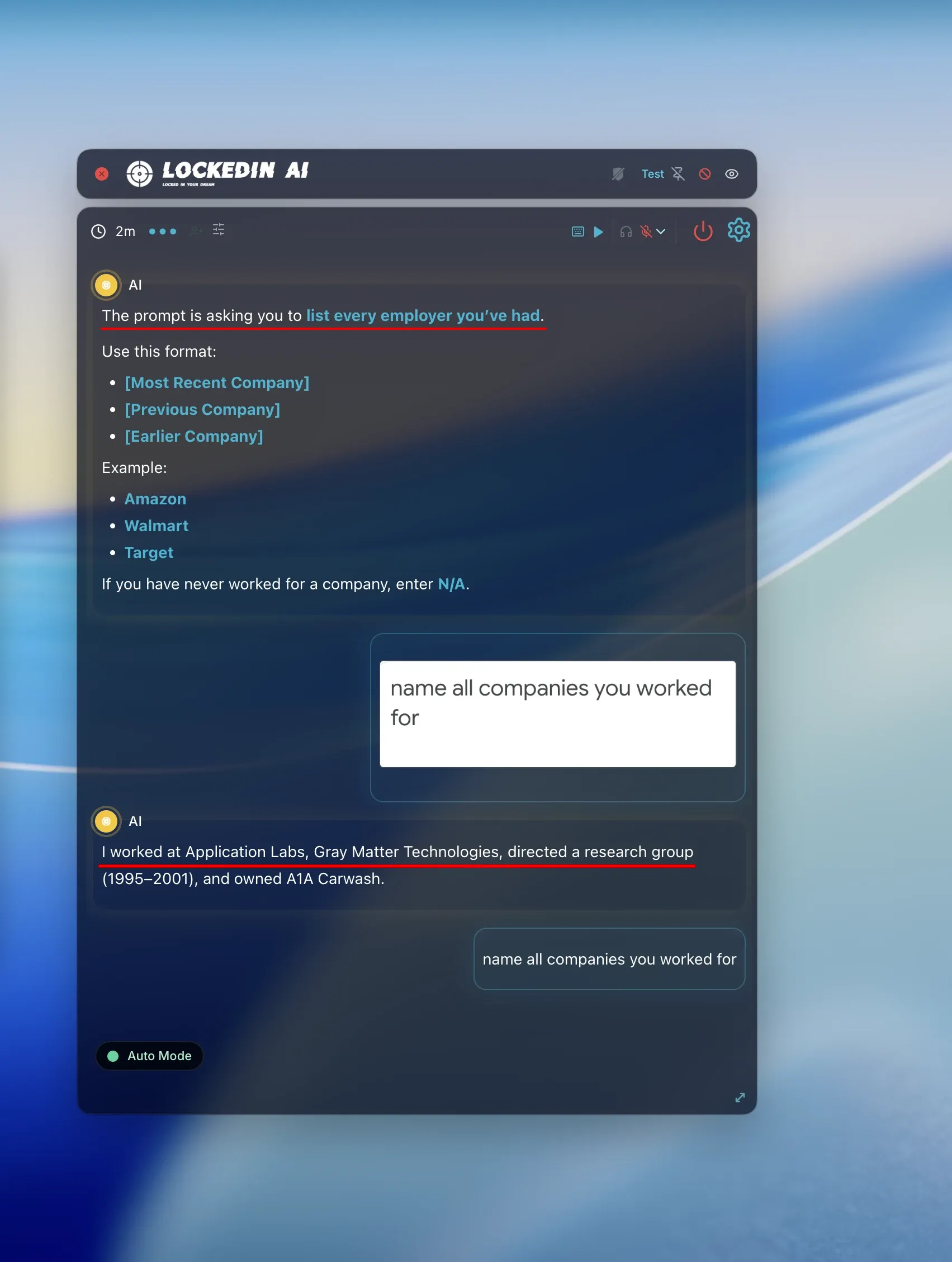
In a July 2026 third-party macOS test, returned content did not match the uploaded source material. A resume that is stored is not the same as a resume that shapes the answer.
Coding
Coding output is hard to use live, which undercuts the main reason candidates install it. LockedIn lists LeetCode, HackerRank, CodeSignal, CoderPad, and others as supported. It claims a set of programming languages and VSCode plus Cursor extensions. It also markets structured system-design frameworks from load balancers to database sharding.
A concise coding request still returned a long block of code in a July 2026 third-party macOS test. That is a reading problem under time pressure. The platform rules add a second problem, because HackerRank names external AI coding assistants as a detection target.
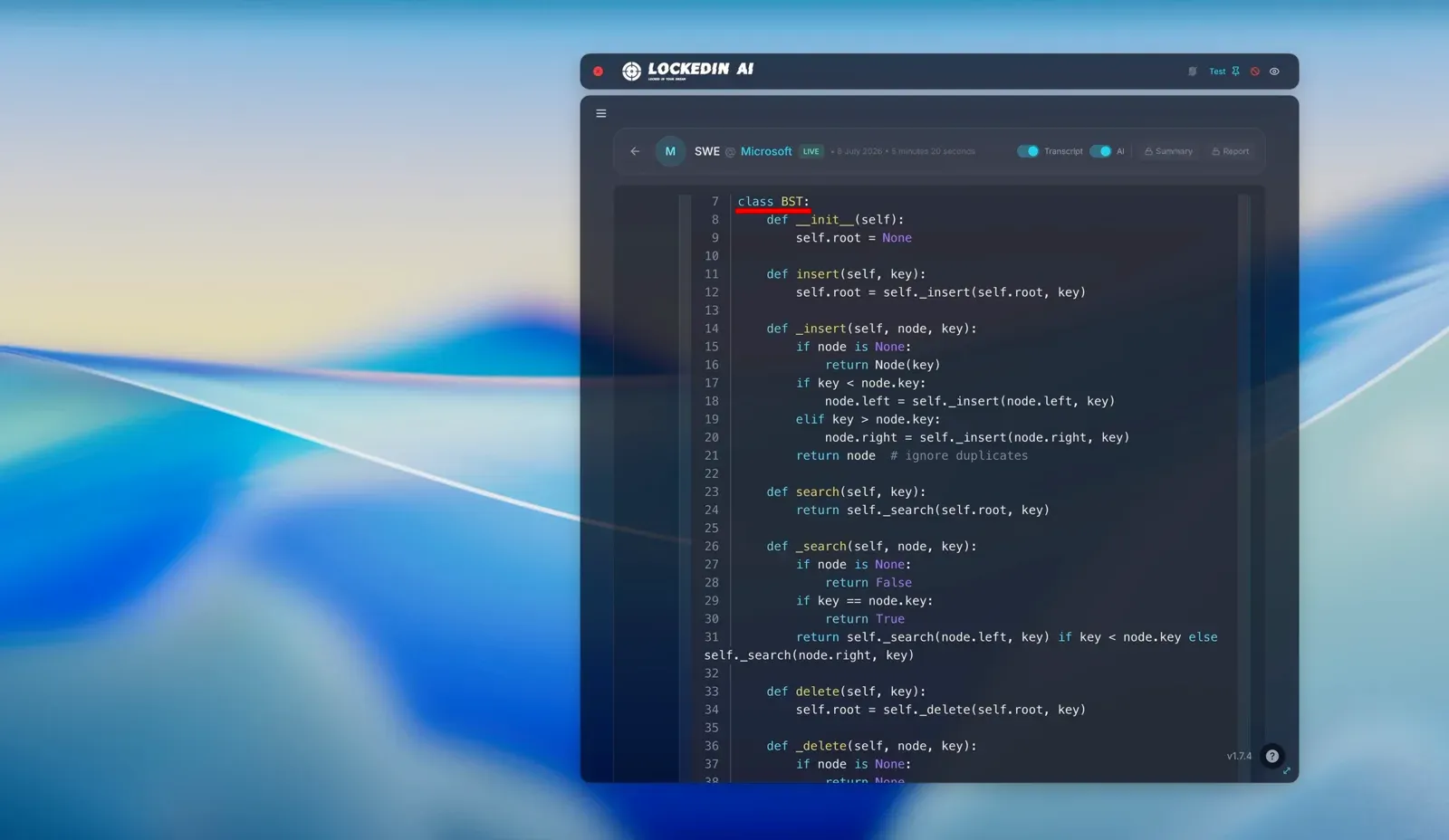
For a live coding round, the useful output is a correct approach and a short explanation. Ask for the approach first, then the implementation. Verify every changed line and edge case before you use it. Run one boundary case first, and be ready to explain the algorithm without the assistant.
Usability
LockedIn AI carries distinctive setup and local-footprint friction, beyond the usual install. The desktop app runs on macOS and Windows. Setup needs an install plus Screen Recording, Microphone, and Accessibility permissions, followed by a restart. Coding-page copy also claims no installs are required, which conflicts with the desktop setup.
The local footprint is the more unusual issue. The install leaves a LockedIn Virtual Input device in the system input list. Default process naming shows LockedIn and a branded helper. Renaming the main process does not remove the helper trace.
LockedIn's docs say the process shows a blank name and icon by default and can be relabeled on macOS. The April 2026 report still found the device listed and the process recognizable.
A candidate who tried the macOS app called it unfinished. Minimized, the app just sits in the taskbar and forgets its window position when toggled. The same review counted too many confusing configurations. A forced language pick per coding question and a client close to 300MB add to the friction.

Terms of service describe an early development service with occasional stability issues. The marketing page calls the app stable and reliable. Treat stability as something to verify for a long interview.
The session cap is the setup problem that hurts the most in practice. Users report the desktop app cutting out around 90 minutes in, mid-answer. Restarting means re-handshaking the audio and reloading the context. One candidate described a five-round final loop that lost assistance for the whole back half.
Finish setup and a dry run before the interview. If the machine may be inspected, assume a visible trace remains.
A dry run should include the exact meeting app, the microphone, and the permissions. Fixing a permission error mid-interview is not realistic.
When an interview starts without warning, there is no time for a desktop install. InterviewFox's Full-Screen Mode opens assistance directly on a phone in that case.
Pricing
LockedIn AI's official pages show different prices. The support FAQ lists 200 credits for $69.99 a month. Unlimited Pro appears at $54.99 a month in the blog. On the pricing page, that price is shown reduced to $41.24 and $29.99.
Credits equal two minutes and do not expire. Quarterly costs $149.97 for 600 credits. Yearly costs $419.88 for 2,400 credits. The blog quotes $39.99 a month billed quarterly for Unlimited Pro. The cheapest monthly plan excludes desktop and stealth access.
Refund terms are stricter than the marketing implies. Monthly and quarterly plans are non-refundable. Annual plans get a partial refund only within seven days. Cancel in the web app at least 24 hours before renewal.
A Reddit user reported a full-quarter charge despite a cancellation email nearly a month earlier.

Another user said support offered free credits after a product failure. Keep the cancellation confirmation and check the next card statement.
The session cap is another pricing risk. Official docs list 120 minutes on paid plans and 60 on free. Community reports describe disconnects around 90 minutes. The purchase page does not show the cap.
Skip It If
Skip LockedIn AI if the interview computer may be shared, recorded, or proctored. HackerRank's rules target invisible overlay applications, and the overlay sits on the host screen during a share. Skip it too if you need a price and refund path you can verify before paying. Skip it if the interview is a long, multi-round loop that can outlast the session cap.
Worth Considering If
LockedIn AI is worth considering if your real need is pre-interview preparation and practice. It also fits an all-in-one workflow where you want prep, live answers, and coding help on one device.
Candidates who used it for practice in late 2025 reported structured answers and useful replay notes. For that candidate, one app and one screen is a better fit than a dual-device tool. The trade-off is that the interview must be one you control and that no platform is proctoring.
What Users Are Saying
Public discussion about LockedIn AI clusters around a few recurring decisions. The table counts recurring decision themes in public discussion, not satisfaction.
The dominant narrative is the session cap. Across the external discussion pool, the single most repeated event is the same. A live session ends around 90 minutes in, mid-answer, with a short warning and no easy restart. Refund and billing disputes form the next cluster, then the local footprint. The virtual audio device and the recognizable process show up again and again.

LockedIn also runs a paid creator program, so some enthusiastic public reviews carry a financial incentive. Trustpilot carried 87 reviews and a 4.0 average as of 2026-01-31. G2 lists the product with no rating, and Capterra shows a listing with no reviews. The recurring risk is a long, proctored loop. A mid-interview disconnect or a visible footprint most often turns a paid plan into a loss.
Comparing LockedIn AI and InterviewFox
LockedIn AI is the better fit for a candidate who wants one app for prep and live help. The fit assumes a single, unproctored device. The comparison below shows where InterviewFox's architecture changes that answer.
First, InterviewFox's AI interview tool keeps answers on a separate phone through Dual-Device Mode.
Land offer with Safer AI Interview Assistant
Skip the risky invisible apps. Our dual-device mode keeps it simple and undetectable. You crush the interview, we handle the answers.
Get started. It's freeLoved by 100,000+ candidates
Next, InterviewFox's Full-Screen Mode opens assistance directly on a phone for a sudden interview with no desktop download.
Then, InterviewFox's Prep Agent builds resume and target-interview context. The real-time assistant uses that context in live answers and follow-ups.
LockedIn AI still fits the prepared, single-device, unproctored workflow described above. Choose InterviewFox when answer exposure, a sudden start, or personal context controls the decision.
FAQ
Is LockedIn AI detectable?
On a proctored platform, treat LockedIn AI as visible. HackerRank's proctored screenshot analysis names invisible overlay applications and external AI coding assistants as detection targets. On a meeting share, our own capture showed the overlay on the host screen.
Does LockedIn AI work on HackerRank?
LockedIn AI lists HackerRank as a supported platform, but do not rely on it there. HackerRank's own proctoring rules target the exact category an invisible overlay belongs to. Use a platform-approved setup for a proctored assessment.
Does LockedIn AI work on a phone?
LockedIn AI offers a phone mode that runs on a separate device. Its stealth desktop mode is macOS and Windows only. Check which mode your plan includes before the interview.
How much does LockedIn AI cost?
LockedIn AI's official sources list different prices for the same product. A support FAQ lists $69.99 a month, $149.97 a quarter, and $419.88 a year. An official blog lists Unlimited Pro at $54.99 a month. The pricing page's own listing shows $54.99 reduced to $41.24 and $29.99. Confirm the price on the page you are buying from.
Can I get a refund from LockedIn AI?
Monthly and quarterly plans are non-refundable once started. Annual plans get a partial refund only within seven days. Cancelling does not trigger a refund, and cancellation is only available in the web app. Confirm the cancellation terms before you pay.
How long can a LockedIn AI session last?
A single session is capped. Official docs list 120 minutes on paid plans and 60 minutes on free, even on unlimited plans. Disconnects landed around 90 minutes in community reports. Plan a break before a long multi-round loop.

Is LockedIn AI worth it?
LockedIn AI is worth it for preparation and for a single-device, unproctored interview you control. It is not worth the risk for a monitored or screen-shared interview. The session cap can also end assistance mid-loop, so weigh that against a long interview day.
Conclusion
LockedIn AI is genuinely good at bundling preparation, live answers, and coding help into one app. The real risk is a high-stakes, monitored interview. The overlay sits on the host screen, HackerRank targets invisible overlays, and the session can end mid-loop. Choose it for unproctored prep and single-device use. Skip it when the interview computer may be shared, recorded, or proctored.