

You are about to start a HackerRank test, weighing whether it can tell your session runs in a VM. Behind that sits a second decision, whether isolating help inside one is worth the risk.
HackerRank does not detect a virtual machine. In Desktop App Mode it blocks the test from launching on one. Browser-based Secure and Proctor Mode tests neither block nor flag VMs. The employer chooses that mode. This answer follows documentation dated July 22, 2026.
The answer is not an all-clear. Desktop App Mode prevents the test from launching on a VM. Any VM plan fails before the timer starts. Browser modes document no VM control or guarantee. Safer setups keep help off the monitored computer.
The answer appears on your phone, with no InterviewFox window, overlay, or process on the interview computer. Software running on the monitored computer cannot detect the setup. A dual device AI interview assistant answers from that device.
Only one HackerRank test mode acts on a virtual machine
HackerRank is not a single monitoring environment. The employer picks one of three integrity modes, and only one of them carries any virtual-machine language.
| Test mode | Who turns it on | Does it block a VM | Is a VM a documented signal | What the candidate experiences | Documentation date |
|---|---|---|---|---|---|
| Secure Mode | Browser baseline for proctored tests | No VM control documented | No | Nothing VM-specific; controls are full-screen, tab-switch, copy/paste, multi-monitor | 2026-04-22 |
| Proctor Mode | Employer opt-in; builds on Secure Mode | No VM control documented | No | Nothing VM-specific; AI monitoring, webcam, screenshot analysis, gaze | 2026-07-22 |
| Desktop App Mode | Employer opt-in; native app | Yes: prevents the test from running on a virtual machine | Not documented as a reported signal | The test does not launch | 2026-07-22 |
Your row follows from how the invite opens. A test in an ordinary browser sits in the first two rows. A test that requires the desktop app sits in the third.
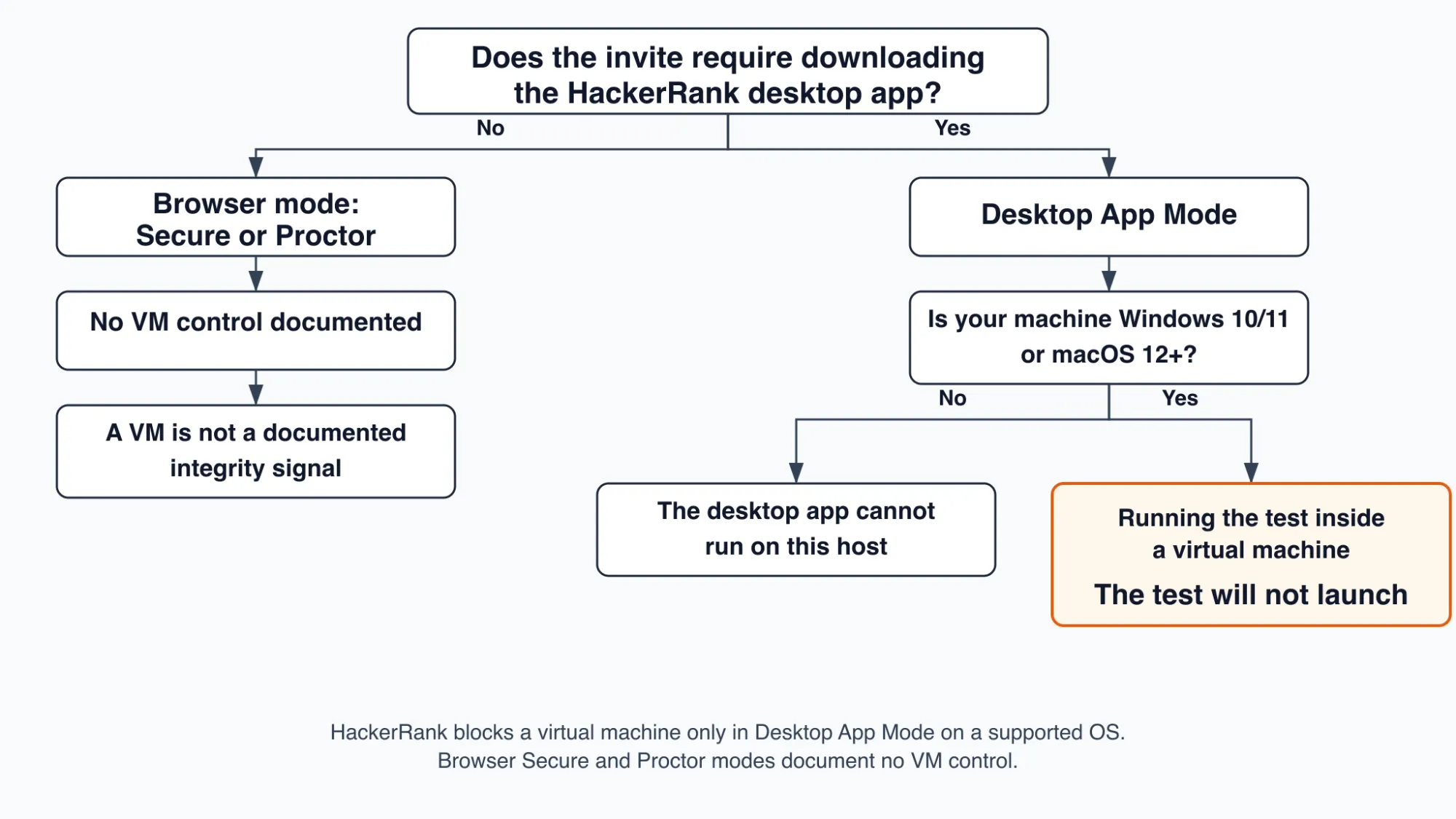
The grid is the whole conditional answer, and it creates the device problem. If the desktop app is required, a VM is not a working setup. The test never launches, so assistance isolated inside the VM has no session to attach to.
If the test opens in a browser, no VM control is documented. That assistance still runs on the machine hosting the session.
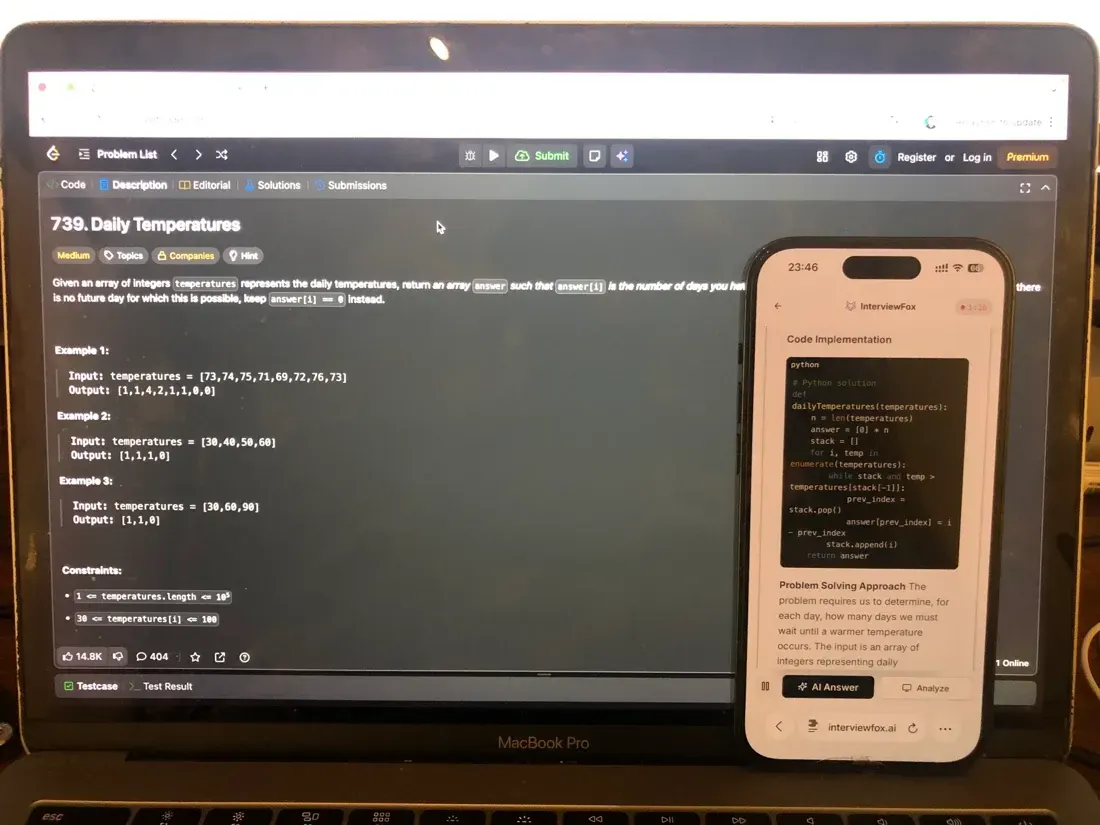
The fix is architectural rather than clever. InterviewFox's dual-device mode puts the answer on your phone, so nothing from InterviewFox runs on the interview computer. That setup stays outside what software on the monitored machine can detect. A dual device AI interview helper keeps the answer surface off the test computer entirely.

Answers On Your Phone, Not Your Shared Screen
Skip the risky invisible-overlay tricks. Our dual-device mode keeps answers on your phone, never on the screen you're sharing or recording. Nothing for a platform or interviewer to catch, because there's nothing on the shared screen to find.
Get started. It's freeLoved by 100,000+ candidates
If your test just opens in a browser
Both browser modes belong to the first two rows. Secure Mode and Proctor Mode run inside the browser session, and neither one's documentation contains any virtual-machine language.
HackerRank itself confirms the boundary. Its own writing on tab proctoring makes the point directly. Basic tab-proctoring can miss sophisticated cheating methods like using mobile devices, secondary computers, or virtual machines.
That concession is scoped to basic tab proctoring, and it stops there. It promises nothing about whether a browser test could surface a virtual machine by another route.
Three layers stay separate here. Capability means no VM control is documented for these modes. Configuration is whether the employer enabled the mode at all.
A third layer is human review, which is what any flag would actually trigger. The documentation names no VM-specific flag to begin with. So the browser rows amount to an absence plus a concession, never a guarantee.
Windows, macOS, and Linux
The mode that blocks a VM cannot run on every host. Desktop App Mode requires Windows 10/11 or macOS 12 or later. Two separate HackerRank documents confirm that Linux is unsupported.
This is a limit on availability rather than an exemption. On a Linux machine the desktop app cannot run at all. So a Linux candidate's test will be a browser mode by necessity. That reflects which modes are available, and it leaves the platform's controls unchanged.
One more surface also belongs in this scope. HackerRank's Chakra AI-interview desktop app carries the same control. Its documentation states that the interview cannot run inside a virtual machine. So an invite to an AI interview falls under the Desktop App Mode row.
Blocked is not detected and that decides your next move
Your search term asks whether HackerRank detects a virtual machine. HackerRank's documentation uses a different verb. Desktop App Mode prevents the test from running on a virtual machine, according to the platform's own help article.
Prevention is not detection, and the difference changes what you can do about it.
Detection would mean the platform knows a VM was used and records that somewhere. Prevention instead means the test refuses to start. A launch that fails before the timer starts is recoverable in the moment. A silent line in an integrity report is not, because you would find out later, if at all.
No reviewed HackerRank page claims a detection capability for virtual machines. That is the ceiling this page can support. An absence in the documentation still leaves room for technical capability.
Prevention presupposes the app can distinguish the environment at launch. Blocking, though, stops short of recording. Nothing in the documented outcome says the distinction is transmitted or shown to anyone.
What you actually see if it is blocked
If the block applies, the test does not launch. HackerRank's candidate-facing article on the desktop app documents permission checks for webcam, multi-monitor, and screen sharing. Yet it documents no VM-specific message.
Two halves hold at once. The launch is prevented, and the exact on-screen wording is not published. No message naming virtual machines is documented, so the interface may never explain why the session will not start.
How HackerRank would know is not documented
Every VM question lands on the same one: how would the app know? HackerRank does not say.
HackerRank documents the outcome and never the method. The desktop app article says the test will not run on a VM. The Chakra article similarly says the interview cannot run inside a virtual machine. Neither one describes how that decision is made.
No HackerRank surface reviewed for this guide describes a hypervisor artifact, CPUID bit, or MAC-address range. The same goes for WebGL renderer strings and device fingerprinting. That absence is the finding. This page will not fill that gap with a guessed mechanism. A guessed mechanism would invent the exact thing the documentation omits.
The explanations you find in community threads are a different category. CPUID bits, MAC-range heuristics, and GPU renderer strings are general virtualisation techniques. Operating-system and hardware vendors document them.
They describe how software in general can recognise a VM. HackerRank has never claimed any of them. That makes them general technique rather than HackerRank's account of its own product.
Whether a VM hides what you do on the host
Part of the VM's appeal is the belief that it hides host activity. The documentation supports a narrower statement, and it is about the scope of observation rather than a technique.
In browser modes, HackerRank's own writing concedes that basic tab proctoring can miss virtual machines. That is the platform describing what browser-based observation can fail to see. The claim covers browser observation only and says nothing about other controls. In Desktop App Mode the question never arises, because the session does not launch at all.
The documentation never says a VM makes host activity invisible. It does say what integrity signals record. That list is what an employer-facing report can contain, and it is the consequence chain covered next.
What the employer actually receives about your environment
The fear behind the keyword is employer-facing. If HackerRank noticed a VM, what would the person who invited you see?
HackerRank documents what an employer's report can contain. The Integrity Summary in Proctor Mode consolidates a documented set of signals. They are external sites, AI assistants, messaging activity, and remote-desktop tools such as AnyDesk and TeamViewer. A virtual machine is not among them.
That is a membership claim about a documented list on a documented date. The list is current to January 2026. What a report could ever contain remains a wider question. The published signal set is narrower, and it does not include virtual machines.
A flag is not an automatic rejection
Flags exist, and what they are not matters just as much. HackerRank does not document an automatic rejection anywhere. An Integrity Issues indicator is shown, and a human reviewer decides the next step. Rejecting a candidate is an employer decision.
No VM-specific flag is documented in the first place. The human-review path would bound the fear if anything VM-adjacent ever surfaced.
That pathway stays hypothetical, because no VM outcome of that kind is known to occur. No candidate-facing appeal process is documented either.
How to tell before starting whether your test blocks a VM
There is no pre-test warning that names virtual machines. The reliable tell is structural: Desktop App Mode requires downloading and launching HackerRank's native desktop app. A test that opens in a plain browser is not under the documented VM control.
Run this sequence in order before the timer starts.
- Read the invite for a download. If it asks you to install and launch the HackerRank desktop app, you are in Desktop App Mode. It is the only mode with a documented VM control.
- Check the operating system. The desktop app runs on Windows 10/11 and macOS 12 or later. On Linux it cannot run at all.
- Confirm the machine and browser. HackerRank states that you must use a PC or laptop with Chrome, Edge, Safari, or Firefox. A browser test is not a desktop-app test, and no VM control is documented for it.
The tell is the mode requirement rather than a VM warning. Nothing in the invite needs to mention virtual machines for the control to apply.
If you only have a corporate VM or virtual desktop
The hardest case is the candidate with no alternative. Your employer issues a corporate VM or virtual desktop and expects the test to happen there. Still, no published answer covers that situation.
No exception, accommodation, or disclosure path is documented for an employer-sanctioned virtual desktop. HackerRank's material does not distinguish a corporate VDI from any other virtual machine. The position stands where the documentation stands. Inventing a process would mislead you.
Two actions the evidence does support. First, use the mode tell above to find out whether the VM control applies at all. A browser-based corporate session is not under the documented VM control. Second, on a corporate Linux desktop, the app cannot run regardless of the reason.
The documentation frames this as employer configuration and human review. Your intent never enters that picture. A legitimate reason does not change what the software does.
If you cannot use a VM
If the VM is not a working setup, the documented requirement is plain. You must use a PC or laptop instead. For Desktop App Mode, that means Windows 10/11 or macOS 12 or later on physical hardware. The browser modes need a supported browser.
The same device-level logic applies to whatever assistance you use. InterviewFox's dual-device mode shows the answer on your phone alone. Nothing from InterviewFox opens as a window, overlay, or process on the interview computer.
Software on that machine therefore cannot detect the setup. The answer surface stays off the test computer, which is the decision this page has been building toward.
With the environment decided, the next step is the test itself. The InterviewFox Prep Agent supports that step. It offers resume review and a structured practice plan over WhatsApp or SMS.
Prepare Once, Walk In Ready
The durable fix isn't a cleverer hiding trick, it's going in prepared. Our Prep Agent reviews your resume, builds a study plan, and runs mock interviews with you over WhatsApp or SMS, so you rehearse the content before it counts.
Get started. It's freeLoved by 100,000+ candidates
What else does HackerRank monitor?
The virtual-machine question is one piece of how HackerRank monitors assessments. The platform also watches several other candidate behaviors, depending on which mode your employer enabled.
- Copy-paste tracking is on by default for every test. HackerRank records how many times you paste and the lines you paste. External or large pastes can be flagged for human review. If you are also wondering whether pasting code leaves a trace, HackerRank logs every paste and the pasted lines.
- Screen capture turns on only in employer-enabled Proctor or Desktop App Mode. The system takes periodic screenshots and builds a Session Replay timeline a reviewer can scrub. The same modes can also capture periodic screenshots and build a Session Replay.
- Webcam snapshots are also employer-enabled. Proctor Mode and Desktop App Mode capture periodic still photographs rather than streaming video, mainly for identity continuity. What the camera captures is explained in the webcam guide.
- Gaze detection is a limited-availability AI add-on that reads eye and head movement from webcam stills. It flags repeated look-away patterns, not a single glance. A limited-availability add-on also reads eye and head movement from those stills for repeated look-away patterns.
- Tab switching and browser-leave events are part of Secure Mode's baseline. The same integrity system that logs these events is what documents remote-desktop tools as signals, while a virtual machine is not.
FAQ
Is WSL, Docker, or dual boot the same as a VM?
HackerRank's documentation draws no boundary around WSL, containers, or dual boot.
Dual boot is not virtualisation at all; it is a second operating system on the same hardware. HackerRank does not name it either way, so this boundary is recorded as unknown rather than resolved by analogy.
Is an installed but unused hypervisor a problem?
No inspection of an installed-but-inactive hypervisor is documented. VirtualBox or VMware can be present without the test running inside it.
The control HackerRank publishes targets the test running on a virtual machine, not a hypervisor that happens to be present. That answer names what is documented and stops there.
Is a VM against the rules if I am not cheating?
No candidate-facing HackerRank rule naming virtual machines was found. The only documented VM behaviour is a technical launch prevention in one mode, not a published prohibition. That absence grants nothing and forbids nothing.
Is remote desktop or RDP the same as a VM?
No, and the documentation treats them differently.
Remote-desktop tools such as AnyDesk and TeamViewer are named among the documented integrity signals. A virtual machine is not.
A VM is a guest operating system on your own hardware; remote desktop is control of a different physical machine. Those tools belong to a wider integrity system. That distinction is covered in the broader look at HackerRank's integrity checks.