

You are preparing to start a HireVue interview. The question in your head is if I get a little AI help, will anyone know? You are deciding whether AI help is worth the real test risk.
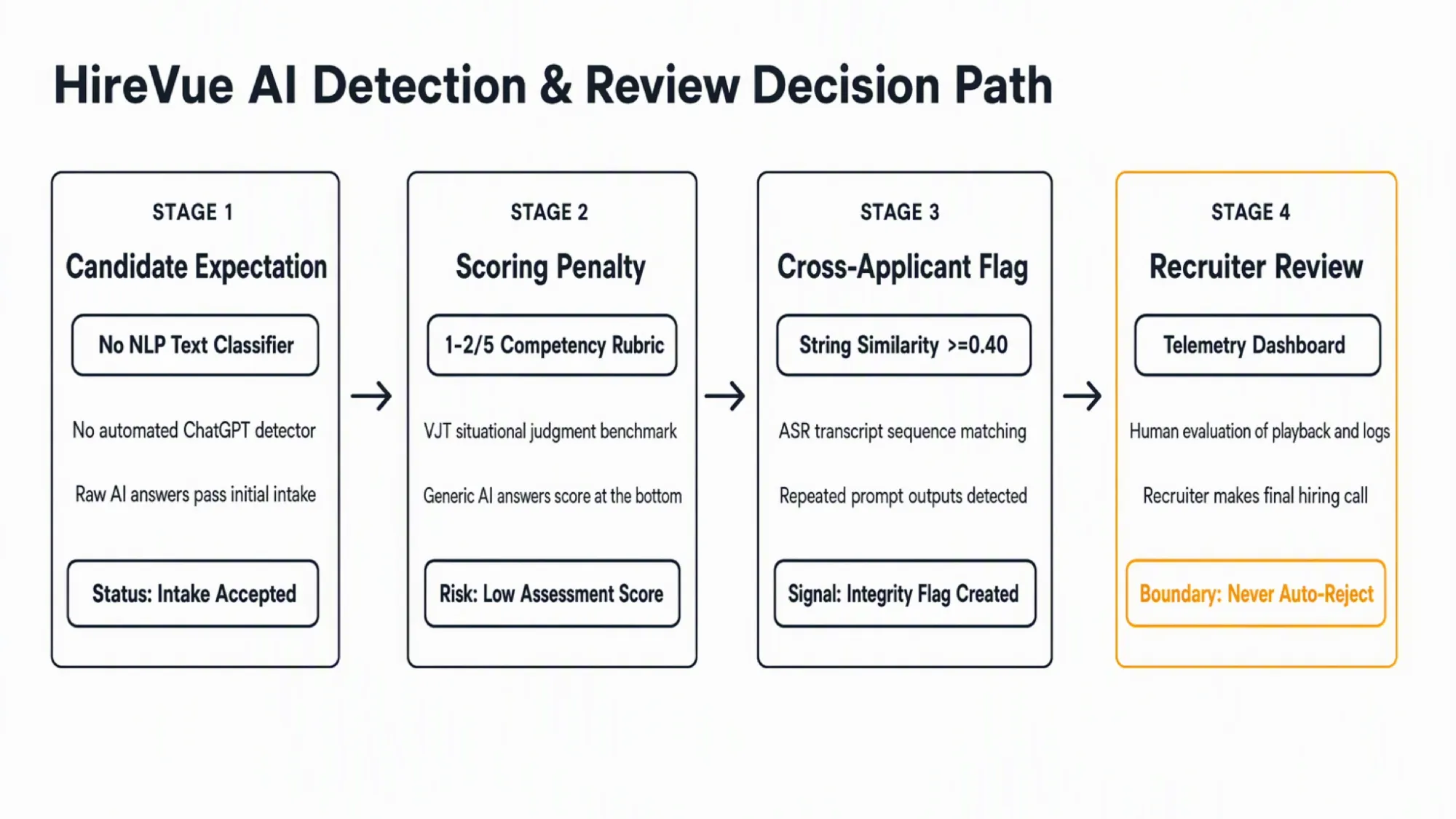
Yes, potentially. HireVue lacks a dedicated ChatGPT detector, but automated skill rubrics, shared text similarity, and recruiter reviews expose AI answers.
The absence of a dedicated AI classifier does not make same-device help safe. Browser focus logs, code paste timestamps, and awkward reading pauses on video alert human recruiters. A safer setup keeps all assistance off the interview machine.
InterviewFox's dual-device mode is undetectable by software running on the monitored interview computer. The assistant displays answers on your phone. Meanwhile, this setup stops on-screen overlays and focus loss. A dual device AI interview helper solves this hardware boundary directly.
Does HireVue have an AI detector for ChatGPT?
HireVue does not run a dedicated AI text classifier. The platform does not scan candidate text or speech for hidden watermarks.
In addition, third-party tools like Turnitin or GPTZero are not built into the system. Instead, candidate responses are graded by scoring rubrics tied to the job.
AI text classifiers versus scoring rubrics
Many candidates worry about automated AI detectors. They fear HireVue flags ChatGPT phrasing. Commercial AI detectors scan text for perplexity and burstiness.
However, perplexity tools create high false flag rates for non-native speakers. Because of these errors, HireVue grades core job skills instead.
These rubrics score story structure and real work experience rather than word choice. Therefore, answers that show relevant job skills score well.
Audio transcription and speech processing
In video interviews, HireVue records your spoken answers through your microphone. Then, speech recognition turns this audio into written text.
Scoring tools and human recruiters review these written transcripts. The speech engine aims for word accuracy. It does not hunt for AI text.
Therefore, spoken answers are judged on substance rather than AI watermarks. Weak answers fail from poor substance, not because code spotted ChatGPT.
Why generic ChatGPT answers fail HireVue scoring rubrics
Generic ChatGPT answers fail HireVue tests. They lack depth and real numbers. HireVue scoring models check how candidates solve real workplace problems.
Unedited AI text sounds polite. But it lacks personal ownership and real examples. As a result, raw language model output scores poorly on structured rubrics.
Virtual Job Tryout benchmark test results
HireVue tested AI model performance across its Virtual Job Tryout tests. In an official whitepaper evaluating generative AI on employment assessments, researchers tested ChatGPT against standard evaluation benchmarks.
ChatGPT-3.5 scored between 1 and 2 out of 5 on work judgment items. Furthermore, the model gave conflicting work-style choices across mock workplace tasks.
Also, finishing the 20-minute test took nearly one hour of prompt work. Basic prompts produced average scores of 3 out of 5 on scored tests.
While advanced prompts raised some scores, the text still felt generic. Meanwhile, HireVue tracked applicant test scores from 2022 to 2026.
Average applicant scores showed zero upward drift after ChatGPT launched. This shows that raw AI output does not beat human prep.
Why generic AI text scores poorly on rubrics
HireVue rubrics reward the STAR method. That means Situation, Task, Action, and Result. Machine scoring looks for hard facts, budget numbers, and clear results.
ChatGPT often writes smooth summaries. But it skips mistakes and lessons learned. When an answer lacks real project details, it gets a low score.
Therefore, candidates succeed by sharing real personal wins. Specific human stories always outscore abstract AI text on skill rubrics.
How HireVue catches shared AI scripts across candidates
HireVue flags shared responses across applicant pools using text overlap checks. When several applicants use the same prompt, ChatGPT generates similar answers.
HireVue compares speech transcripts across all applicants for a role. If two applicants share matching phrasing, the system flags both tests for review.
How the shared word sequence test works
HireVue spots shared scripts by tracking common word sequences. This tool compares transcript pairs. In addition, it skips filler words and small edits.
Normal talks between strangers produce word overlap of 0.25 to 0.26. Because people tell stories in their own way, natural overlap stays low.
In contrast, identical AI prompt outputs easily cross this baseline. The system spots matching phrases even when candidates change opening words.
The similarity threshold for recruiter flags
When word overlap reaches 0.40, HireVue creates an integrity flag. In tests of applicant pairs, under 1 percent of interviews crossed this line.
This low rate confirms that the check targets obvious script sharing. Most applicants who prepare on their own never reach this overlap score.
Also, this check runs only across different applicants in the same pool. Reusing your own notes across different interview rounds does not trigger a flag.
How candidates actually get caught using ChatGPT
Candidates rarely get caught by automated text detectors. Instead, simple mistakes and visible physical cues expose live AI help.
Recruiters spot unnatural pauses, off-screen glances, and code editor jumps. These human reviews carry decisive weight during hiring reviews.
Eye movements and reading cues on video
During video answers, candidates often show clear physical cues while reading text. Eyes moving side to side across a screen look obvious to human reviewers.
Glasses also reflect the bright glow of an open browser window. Recruiters sharing firsthand observations of AI use in video interviews report that reading off-screen is obvious on playback.
Long awkward pauses while waiting for ChatGPT answers also look suspicious. In addition, when people read text aloud, their voice tends to sound flat.
To keep a natural sightline, place any reference tool right by your webcam. Placing your phone next to your webcam stops you from glancing down at your lap.
Clipboard paste tracking and code replay
In CodeVue coding challenges, HireVue tracks actions closely. Employers can turn off copy and paste inside the code box.
When paste stays on, CodeVue logs every paste action and counts the characters. Pasting a full 50-line block of code alerts human reviewers right away.
CodeVue also records a full keystroke playback timeline for the reviewer. Normal typing shows steady edits, while pasted blocks appear in one second.
What happens if HireVue flags your interview
An integrity flag on HireVue does not mean you fail right away. HireVue serves as a review tool. Final hiring choices stay with human teams.
Review flags simply tell recruiters to watch the recorded interview more closely. Real context decides whether a flagged action leads to rejection.
How flags appear on the recruiter dashboard
Recruiter dashboards show test scores right next to integrity flags. Reviewers see tab-switch logs, paste counts, and script overlap scores.
A candidate with a 0.45 match score or multiple paste events gets a review tag. Recruiters then open the video playback or code replay to check what happened.
If the reason looks harmless, the hiring team keeps the candidate in the process. However, if clear cheating is found, the candidate is dropped.
Why flags do not trigger automatic rejection
HireVue guides tell recruiters to assume good intent until they verify the facts. For example, a quick tab switch might come from a pop-up alert or network drop.
Therefore, hiring managers check the full interview before making a final choice. Recruiters often ask candidates to explain their code during a live interview.
Same-device tools create clear logs because their code runs on the test computer. InterviewFox's dual-device mode is undetectable by software running on the monitored interview computer.
The helper shows answers on your phone, leaving zero window on your laptop. Using a dual device AI interview assistant keeps assistance separate from recruiter logs.
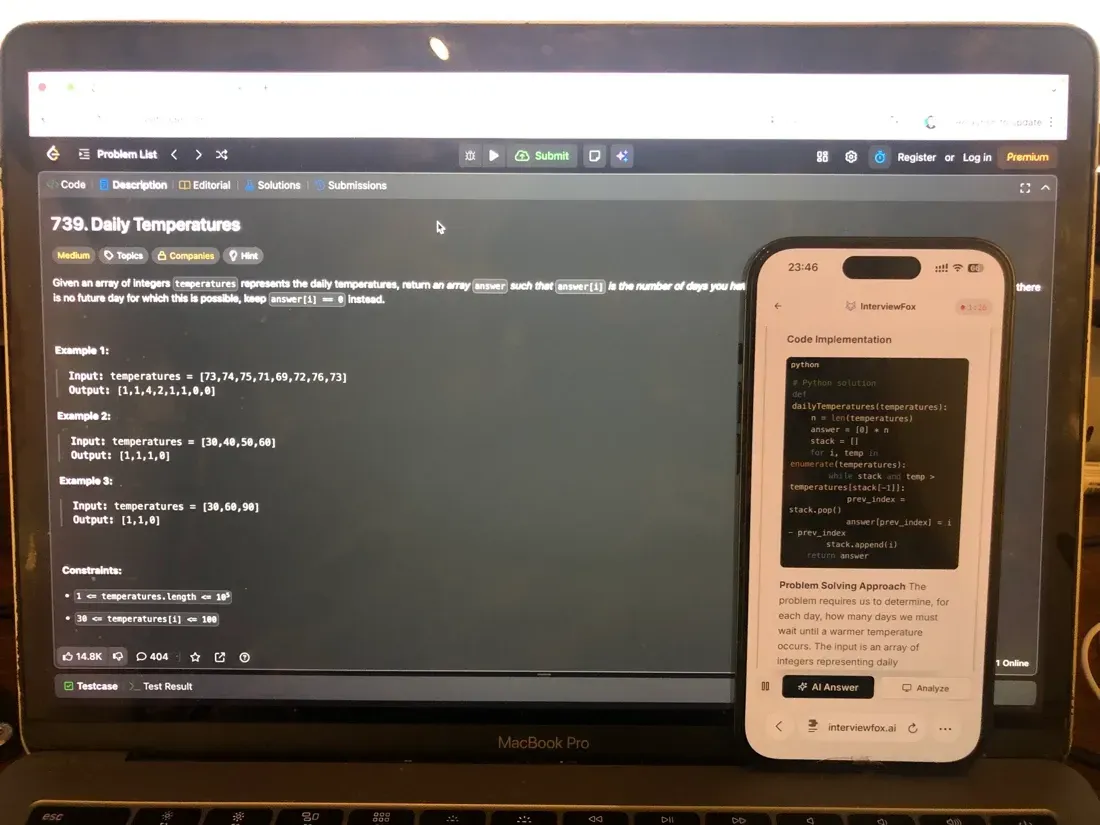

Answers On Your Phone, Not Your Shared Screen
Skip the risky invisible-overlay tricks. Our dual-device mode keeps answers on your phone, never on the screen you're sharing or recording. Nothing for a platform or interviewer to catch, because there's nothing on the shared screen to find.
Get started. It's freeLoved by 100,000+ candidates
Everyday behaviors that do not get you flagged
Candidates often worry that normal habits will trigger cheating flags. Learning the real platform limits helps remove stress before the test.
HireVue works within strict limits on what it can record. Everyday habits remain safe when they do not break clear test rules.
Why HireVue stopped eye tracking AI
HireVue permanently removed facial analysis and eye tracking AI in 2021. Following an outside audit, the vendor dropped all visual AI scoring.
A 2026 court settlement under Illinois privacy laws confirmed this policy. Today, HireVue scores spoken job skills. Instead, it ignores facial twitches or eye shifts.
Looking away for a moment to think will not trigger a system penalty. Natural eye movement remains fully normal during recorded video answers.
What browser tab tracking actually records
Browser Focus Tracking uses browser APIs to log when a window loses focus. This system logs a timestamp when a candidate clicks away from the test tab.
Crucially, browser security walls stop HireVue from seeing other open tabs. HireVue cannot see your external web pages, search queries, or desktop tools.
An accidental click outside the browser logs a focus event. But it never shows what you opened. While repeated tab switches look suspicious, the platform logs zero web history.
Using your own prepared notes during the interview
Reading your own handwritten notes during a video interview is fully fine. HireVue's similarity check explicitly excludes a candidate's own prepared notes from review.
The algorithm checks for shared text across different applicants, not your own outline. Looking at structured notes helps you deliver clear STAR answers.
Candidates can build clear STAR talking points before the test begins. Practicing responses with the unlinked InterviewFox Prep Agent helps turn raw work history into concise interview notes.
You can then reference handwritten notes during your assessment with complete confidence. Structured prep ensures authentic delivery without relying on risky on-screen scripts.
Answers On Your Phone, Not Your Shared Screen
Skip the risky invisible-overlay tricks. Our dual-device mode keeps answers on your phone, never on the screen you're sharing or recording. Nothing for a platform or interviewer to catch, because there's nothing on the shared screen to find.
Get started. It's freeLoved by 100,000+ candidates
What else does HireVue monitor?
Beyond testing text and speech answers, HireVue employs several monitoring tools across its assessment formats:
- Screen recording and session playback: Standard video interviews capture camera and microphone feeds only. To see when full recording requires permission, review desktop screen capture and coding session playback.
- Switching tabs or windows: Leaving the interview window logs a focus loss timestamp for your recruiter. Can reviewers see your open websites? Learn how browser focus tracking logs tab switching without capturing external URLs.
- Clipboard copy and paste: CodeVue coding assessments track paste events, character counts, and editor timelines. If you plan to paste code, check how CodeVue tracks clipboard paste events during technical challenges.
- Webcam identity snapshots: Timed webcam snapshots capture periodic photos throughout the session. These photos verify candidate identity and ensure no outside helper assists you.
- Code submission similarity: Technical coding solutions are evaluated against peer submissions and public codebases. Code checks examine structure to detect identical submissions across applicants.
HireVue aggregates focus events, code timelines, and similarity scores into a single dashboard. For the broader proctoring architecture, explore how HireVue's platform-wide cheating detection combines multiple signals for recruiter review.
FAQ
Can I use ChatGPT to prepare before my HireVue interview? Yes. Using ChatGPT offline to practice interview questions, structure STAR stories, and refine concise bullets is completely safe. Pre-test preparation does not trigger platform flags. The risk arises only when attempting to read live AI text during recorded responses.
Can HireVue detect ChatGPT if I use it on a second monitor or my phone? No, HireVue cannot detect external software running on secondary screens or mobile phones. Browser security sandboxes isolate the interview session. However, repeatedly shifting your gaze off-camera to read another display is clearly visible on recorded video playback.
Does HireVue detect ChatGPT differently in coding tests vs. video interviews? Yes. Video interviews evaluate spoken ASR transcripts for skill depth and shared script similarity. In contrast, CodeVue coding assessments track paste events, record keystroke playback, and scan code for plagiarism.