
I Aced the Okta CodeSignal Interview in 2026: Real Questions

Quick Facts
| Selected reported variant | 1 hands-on Auth0/MCP task; other Okta invitations may differ |
| Custom assessment timing | Administrator-configured; the candidate-facing page shows the timer and count before starting |
| Generic GCA baseline | 4 questions in 70 minutes; platform baseline only |
| Generic ICA baseline | 1 project question, 4 progressive levels, up to 90 minutes |
| CodeSignal Assessment Score | 200–600; use the platform scale with Okta's hiring process |
| Proctored result review | An immediate result may appear; separate verification commonly takes 1–3 business days |
I am an early-career software engineer who took the one-question Okta CodeSignal variant in May 2026. I use that case to answer okta codesignal interview questions. The assessment was a hands-on Auth0/MCP server build with JWT checks, a protected whoami tool, and a local API call. Here is the process and how I prepared.
Missing scope and invalid tokens were easy to confuse. I checked ten concurrent requests against the approximately 200 ms target. I used dual device real time AI interview helper to check the status boundary. It made the 401-versus-403 split clear. I explain that split below.
Before my test, I reviewed Okta CodeSignal posts from the past two years. I read Reddit, LeetCode Discuss, and TeamBlind. Their details matched parts of my experience. The sections below focus on mistakes that can leave coding work unverified or uncertified.
The Real Questions on My Okta CodeSignal Test
I took the one-question Okta CodeSignal variant as a hands-on Auth0/MCP server build. The task moved from authentication setup to a protected local API call, so here is exactly what I got.
Question 1: Auth0/MCP Server with JWT Authentication
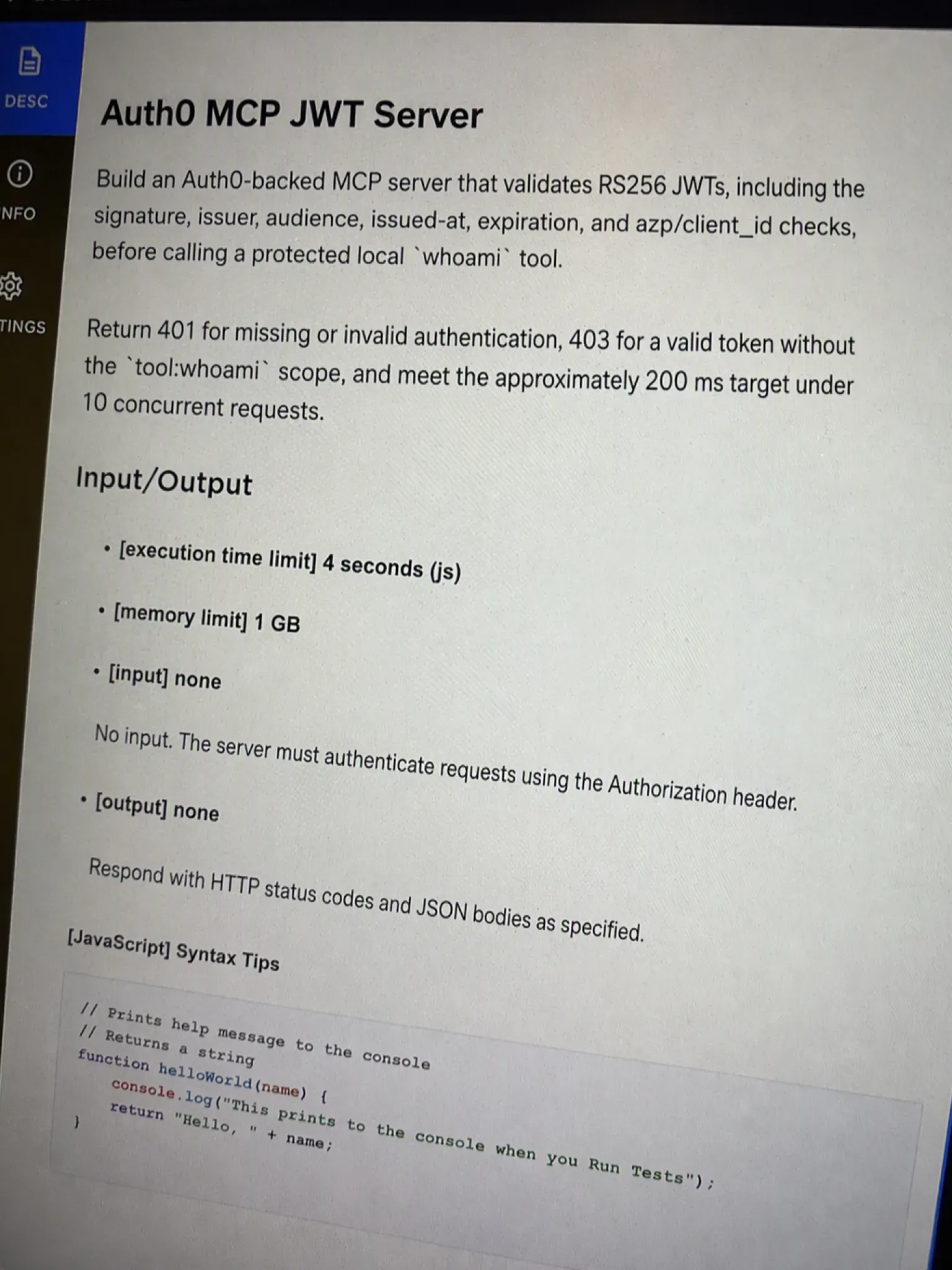
The problem I got: I had to build an Auth0-backed MCP server flow. I created the API credentials, issued a token, called a local API, and protected the whoami tool. The server had to validate an RS256 JWT, including its signature, audience, issuer, issued-at and expiration claims, plus the azp or client_id check. It also had to require the tool:whoami scope. Missing or invalid authentication had to return 401, while a valid token without that scope had to return 403. I checked valid, expired, and missing-scope token cases, along with the approximately 200 ms request target and 10 concurrent requests.
My approach: I kept the authorization boundary separate from the local API call. I first let the JWT library verify the RS256 signature and the standard time and issuer/audience claims. Then I checked the client claim and returned 401 for any failed token check. Only after the token was valid did I inspect scope; a missing tool:whoami scope became 403. The endpoint and credential values stayed in command-line arguments so I did not hard-code any API scaffolding that the task did not specify.
"""Minimal RS256 JWT gate for a protected local whoami call.

Requires: pip install PyJWT cryptography
"""

import argparse
import json
import sys
from urllib.error import HTTPError, URLError
from urllib.request import Request, urlopen

import jwt
from jwt import PyJWKClient


class Unauthorized(Exception):
    pass


class Forbidden(Exception):
    pass


def validate_token(token, jwks_url, issuer, audience, client_id):
    try:
        signing_key = PyJWKClient(jwks_url).get_signing_key_from_jwt(token)
        claims = jwt.decode(
            token,
            signing_key.key,
            algorithms=["RS256"],
            audience=audience,
            issuer=issuer,
            options={"require": ["iss", "aud", "iat", "exp"]},
        )
    except jwt.PyJWTError as exc:
        raise Unauthorized("invalid or expired token") from exc

    azp = claims.get("azp")
    token_client_id = claims.get("client_id")
    if client_id not in {azp, token_client_id}:
        raise Unauthorized("client claim does not match")

    scopes = set(str(claims.get("scope", "")).split())
    if "tool:whoami" not in scopes:
        raise Forbidden("missing tool:whoami scope")

    return claims


def call_whoami(api_url, token):
    request = Request(
        api_url,
        data=json.dumps({"tool": "whoami"}).encode("utf-8"),
        headers={
            "Authorization": f"Bearer {token}",
            "Content-Type": "application/json",
        },
        method="POST",
    )
    with urlopen(request) as response:
        return response.read().decode("utf-8")


def main():
    parser = argparse.ArgumentParser()
    parser.add_argument("--token")
    parser.add_argument("--jwks-url", required=True)
    parser.add_argument("--issuer", required=True)
    parser.add_argument("--audience", required=True)
    parser.add_argument("--client-id", required=True)
    parser.add_argument("--api-url", required=True)
    args = parser.parse_args()

    try:
        if not args.token:
            raise Unauthorized("missing token")
        validate_token(
            args.token,
            args.jwks_url,
            args.issuer,
            args.audience,
            args.client_id,
        )
        print(call_whoami(args.api_url, args.token))
    except Unauthorized as exc:
        print(json.dumps({"status": 401, "error": str(exc)}))
        return 1
    except Forbidden as exc:
        print(json.dumps({"status": 403, "error": str(exc)}))
        return 1
    except HTTPError as exc:
        print(json.dumps({"status": exc.code, "error": "local API request failed"}))
        return 1
    except URLError as exc:
        print(json.dumps({"status": 503, "error": str(exc.reason)}))
        return 1

    return 0


if __name__ == "__main__":
    sys.exit(main())
Time complexity: O(1) for claim and scope checks, excluding JWKS retrieval and the local network request | Space complexity: O(1) for the authorization state, excluding the JWT and JWKS library objects
The hardest part was keeping authentication failure separate from authorization failure. I used the valid, expired, and missing-scope cases to check that the server made that distinction consistently before the protected whoami call.
One candidate I know left a borderless desktop answer window active during a May 2026 assessment. The window placed the answer on the same screen that proctoring monitored. There was no live interruption during the environment check, but the post-test review referenced desktop-assistant activity. The candidate finished with an uncertified score.
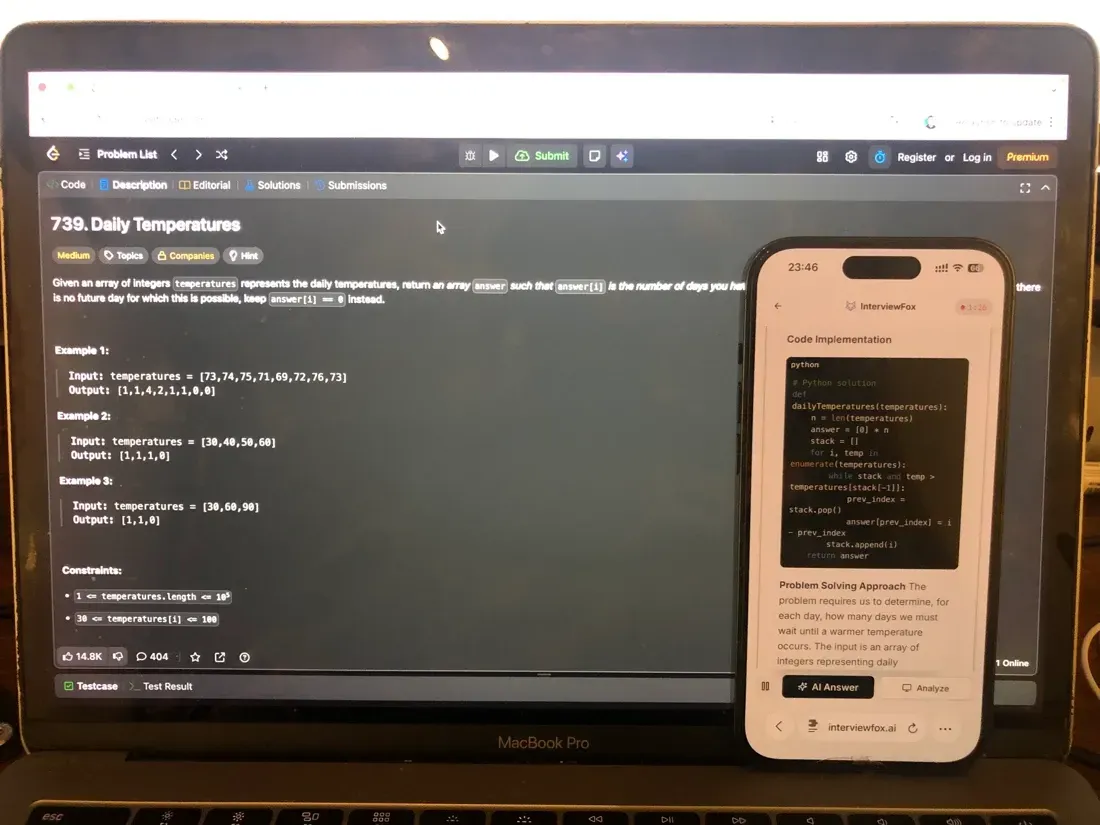
When the 401-versus-403 boundary still felt slippery, I used InterviewFox's keyboard shortcut to capture the problem and send the answer to my phone. The phone was separate from the assessment computer, while my laptop stayed unchanged in the CodeSignal editor. That workflow made the authorization split easier to follow.
Land offer with Safer AI Interview Assistant
Skip the risky invisible apps. Our dual-device mode keeps it simple and undetectable. You crush the interview, we handle the answers.
Get started. It's freeLoved by 100,000+ candidates
Okta's Proctoring Policy for CodeSignal
Proctoring Can Request Camera, Audio, Screen, and ID
The CodeSignal invitation decides whether proctoring applies, and the pre-start screen shows that requirement before the timer begins. A proctored session can request camera, microphone, screen sharing, and government-issued photo ID, with recorded material and identity information reviewed after the evaluation.
I checked the conditional proctoring boundary before treating any device rule as universal. The invitation and displayed CodeSignal rules govern each session, so I use generic platform details only as context.
The timer does not begin until setup is complete, and proctoring is a separate verification check rather than part of the score calculation. That distinction matters because a coding result can exist before the platform finishes checking the session.
The invitation also sets the screen-sharing setup for that assessment. The broader question of what screen sharing can capture belongs in that focused explanation. I use it to frame platform behavior, not to assign one setup to every Okta assessment.
GCA AI Rules Affect Score Certification
The GCA rules prohibit AI assistance and tie displayed-rule compliance to score certification. This is a GCA rule. Each invitation's assessment label and displayed rules decide which tools are allowed.
The selected Auth0/MCP variant explicitly allowed AI tools in its reported instructions. I keep that permission tied to this observed variant and do not carry it into another Okta invitation.
The practical line is simple. I would close any assistant, overlay, outside IDE, or other tool that the invitation does not allow. A running solution still needs a clean, rule-compliant session for certification.
An Integrity Flag Starts Review, Not a Verdict
Suspicion Score signals can include paste events, description copies, language switches, similarity, and possible external assistance including generative AI. A positive Integrity Flagged: Yes result is a review trigger, not definitive proof that cheating occurred; the evidence and replay need to be inspected in context.
The broader review question deserves its own treatment. CodeSignal's cheating-detection process explains that review boundary, while the invitation and displayed rules govern this assessment.
Paste and description-copy events raise a narrower question about how those signals are treated. The platform's copy-event rules explain that narrower boundary without turning one event into automatic proof of a violation.
What Okta's CodeSignal Test Format Actually Looks Like
The Invitation Controls Time and Question Count
The assessment information page displays the duration, question count or style, instructions, and any available practice area before the scored session starts. I record those values first because the invitation takes priority over a generic GCA or ICA default.
Once an assessment starts, I treat it as one sitting with no pause. I can answer in any order and switch between questions when the assigned format allows it, but I submit work before leaving a task because unsaved work does not count as a saved submission.
A dated SRE-intern report records one four-question Okta CodeSignal instance with a 750/1000 result and 3/4 questions correct. It is one observed format. The invitation's timer, label, rules, and the employer process govern each candidate's session and outcome.
The GCA Baseline Is Four Questions in 70 Minutes
The generic CodeSignal GCA baseline is four coding questions in 70 minutes, with varying difficulty. All questions become accessible after the timer starts, and the time can be split across them in any order.
I keep this baseline as a comparison point only. The live assessment may use a different duration or question count. GCA rules also require coding inside the assessment rather than in an outside IDE.
The ICA Uses One Project and Four Levels
The ICA differs from the GCA. It uses one domain-agnostic project question, four progressive levels, and a maximum of 90 minutes. Candidates may not need to complete every level.
That description prevents a format mix-up. The selected report is a single hands-on Auth0/MCP task. Your exact invitation has priority over either generic platform baseline.
How Okta's CodeSignal Scoring Works
The current CodeSignal Assessment Score runs from 200 to 600. Higher scores reflect more successfully completed work across assessment modules, while proficiency labels are separate developmental feedback and are not hiring decisions.
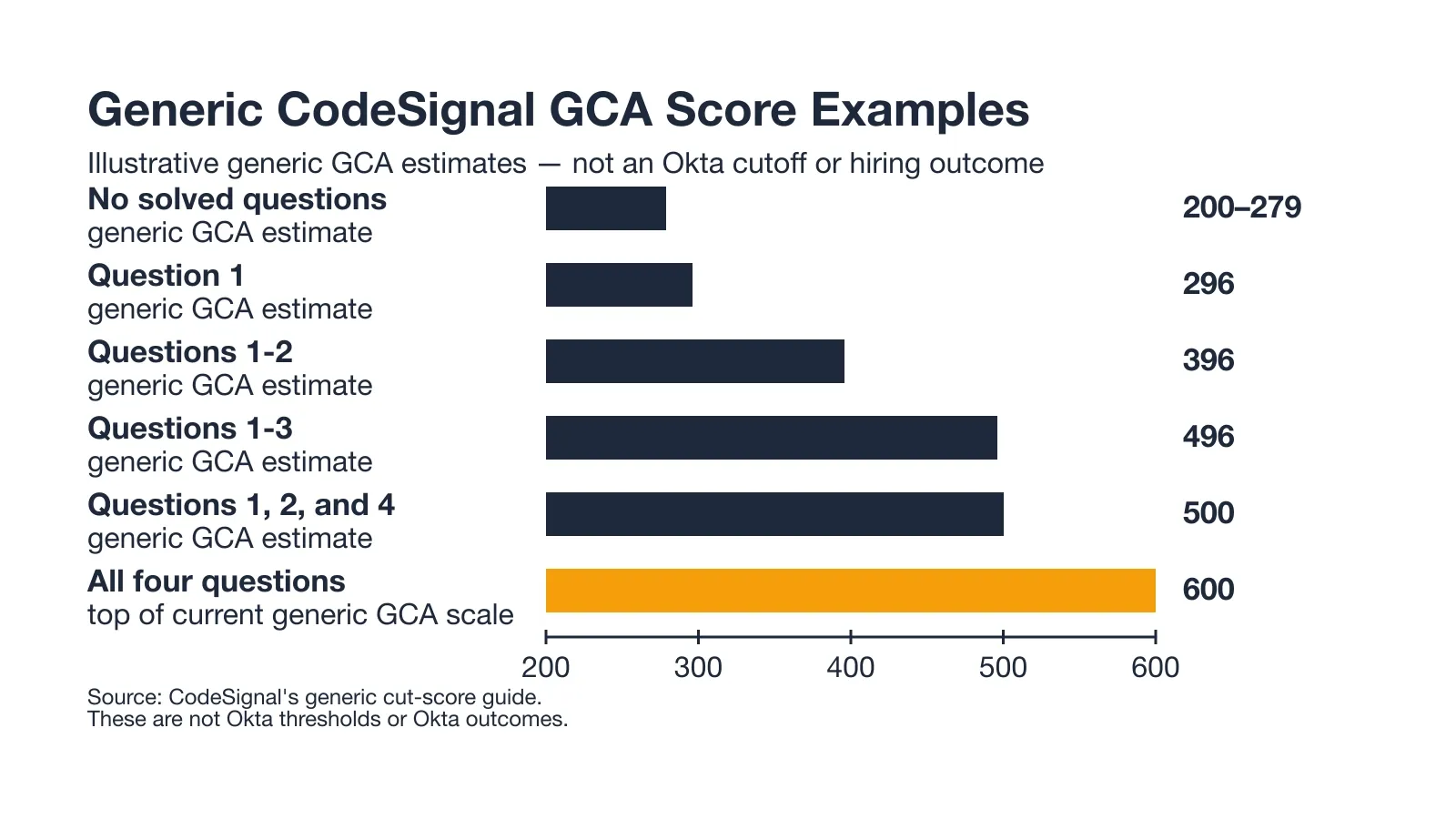
The chart below shows generic GCA score examples. They run from 200–279 for no solved questions through 600 for all four. Use them as platform examples, then follow the employer's process.
Assessment Scores Run from 200 to 600
The 200–600 range is the current platform scale. I keep a score, a proficiency label, and a hiring decision in separate boxes. CodeSignal supplies the scale; Okta's hiring process supplies the employment decision.
Generic GCA Bands Do Not Set an Okta Cutoff
The generic GCA examples map estimated bands to completed-question patterns: 200–279 for no solved questions, 296 for question 1, 396 for questions 1–2, 496 for questions 1–3, 500 for questions 1, 2, and 4, and 600 for all four.
Those values describe a generic GCA scoring guide. Use the role, the assigned assessment, and Okta's hiring process to interpret an application result.
Submission Determines What Gets Scored
For GCA rules, repeated submissions are allowed and the highest-scoring submitted solution is retained for the question. Work must be submitted before leaving the task for it to save.
I carried that submission boundary into the selected one-task case. The Auth0/MCP requirements tell me what to test. The score and the employer process remain separate from that technical checklist.
Why Candidates Fail the Okta CodeSignal Assessment
Outside Devices Can Block Verification
A completed coding result can still fail verification when another person is in the room, the candidate leaves camera view, another device appears, an external IDE is used, or online searching exceeds the displayed rules. I treat these as certification risks, separate from the code result.
The safest boundary is the one shown before the assessment starts. I follow the invitation for camera, microphone, screen sharing, and identity checks instead of assuming a generic platform setup.
AI Assistance Can Leave a Score Uncertified
The GCA rules prohibit AI assistance. The separate verification step can determine whether a result is certified. A candidate I know left a borderless desktop answer window active during a May 2026 assessment.
During the environment check, there was no live interruption. Post-test review referenced desktop-assistant activity. The candidate closed the tool and finished, yet the final score was never certified.
This setup rendered the AI answer on the same computer screen that proctoring monitored, using a basic OS-layer trick. InterviewFox's Dual Device mode sends the answer to a separate phone while the laptop stays in the CodeSignal editor. I use that distinction to keep the test environment aligned with the invitation's rules.
Land offer with Safer AI Interview Assistant
Skip the risky invisible apps. Our dual-device mode keeps it simple and undetectable. You crush the interview, we handle the answers.
Get started. It's freeLoved by 100,000+ candidates
That private case shows why a finished coding task and a certified result are different outcomes. I use it as a safety lesson, not as a universal detector rule.
Integrity Flags Need Contextual Review
An integrity flag can collect signals such as paste activity, copied descriptions, language switches, similarity, or possible generative-AI assistance. I read that flag as the start of contextual review, not as automatic proof of cheating.
The actionable lesson is to follow the invitation's rules and close unapproved tools. The private case and CodeSignal review model support that certification boundary.
How to Prepare for the Okta CodeSignal in 7 Days
Days 1-2: Identify the Variant and Rehearse CodeSignal Setup
I started by reading the invitation and pre-start information page from top to bottom. I recorded the displayed assessment label, question count, timer, rules, allowed tools, browser, language, sample access, and practice area before choosing a study plan.
For the selected one-task case, I wrote down the Auth0/MCP requirements: RS256 validation, the tool:whoami scope, the 401-versus-403 boundary, the approximately 200 ms target, and the 10-concurrent-request check. My completion test was simple: I could repeat the invitation facts and finish one sample in the CodeSignal IDE with every setup step complete.
Before the OA, I used InterviewFox's Prep Agent through WhatsApp. I sent Okta Auth0/MCP patterns and got a drill plan. The Prep Agent kept my role and interview context ready for live answers. Dual Device handled phone display. Full-Screen Mode serves a different need: it starts a sudden interview from the phone without a desktop download or launch.
I skipped the repeated competitor Sneak Path list and a broad Okta interview bank. The LeetCode and TeamBlind material covers the wider interview loop. The available Glassdoor lead names a Node bot-detection exercise, so I left it out of the OA question list.
Days 3-5: Practice the Displayed Format and Submission Control
For three timed CodeSignal-IDE drills, I used the displayed count and timer. I chose the intended language and ran the sample path. Before switching, I submitted each attempted task. I also kept a record of the actual variant instead of replacing it with the four-question GCA baseline.
For the Auth0/MCP shape, I kept the authorization order visible in each drill. I validated the token first and returned 401 for a failed authentication check. I then inspected scope and returned 403 for a valid token without tool:whoami. My completion test was three saved drills inside the displayed time.
Deep system design and identity security did not need a separate block for this OA. The detailed system-design, Java/DSA, and identity material belongs to broader Okta interview rounds. The OA plan stayed tied to the invitation.
Days 6-7: Run a Clean Certification Rehearsal
This rehearsal used only tools allowed by the invitation. I prepared the camera, microphone, screen-sharing setup, and government ID when requested. I closed every unapproved desktop assistant or overlay before entering the test environment.
My completion test was a submitted rehearsal with no environment or rule deviation and no unsaved task. I recorded setup failures and corrected them before the assessment. The May 2026 case showed me that a finished task still needs a certifiable session.
What Happens After You Submit the OA
A Result May Appear Before Verification
I separate the immediate dashboard result from the later verified status. A result may appear after submission. A proctored assessment then needs a separate review of the session and identity information.
An on-screen score is a result, not the final status of a proctored attempt. I wait for the verification state before treating the result as complete.
Proctored Verification Takes 1-3 Business Days
CodeSignal's supplied guidance gives a common 1–3 business-day window for proctored verification. The dashboard can show a verified status or a proctoring-rejected status. Its assessment view displays the reason.
I use that window as the platform boundary only. The next recruiter step follows Okta's process after the platform reports the result and verification state.
Okta's Reply Time Follows the Employer Process
The next step follows Okta's recruiting process after CodeSignal reports the platform result and verification state. I stop there instead of turning a generic follow-up pattern into an Okta promise.
FAQ
Can I use an AI tool or invisible app during the Okta CodeSignal OA?
Desktop overlay tools place an AI answer on the same computer screen as the assessment. A candidate I know left one active in May 2026. The environment check had no live interruption, but the post-test review referenced desktop-assistant activity, and the final score was never certified.
InterviewFox's Dual Device mode sends an answer to a separate phone while the laptop stays in the CodeSignal editor. Full-Screen Mode is different: it starts a sudden interview from the phone without downloading or launching a desktop client. Use either path only when the invitation permits it, and follow the displayed rules.
Land offer with Safer AI Interview Assistant
Skip the risky invisible apps. Our dual-device mode keeps it simple and undetectable. You crush the interview, we handle the answers.
Get started. It's freeLoved by 100,000+ candidates
How many questions and how much time does the Okta CodeSignal take?
Your exact invitation controls the count and timer. Another Okta invitation may use a different format. The generic GCA baseline is four questions in 70 minutes. A generic ICA baseline is one project question with four levels and up to 90 minutes.
What does a CodeSignal score mean for Okta?
The current platform Assessment Score ranges from 200 to 600. Generic GCA examples connect parts of that range to completed-question patterns. Okta's hiring process supplies the role-specific decision.
What if I do not finish every question or pass every test case?
I submit each attempted task before switching because unsaved work does not count as saved work. The selected Auth0/MCP report defines its own checks and status codes. The employer process decides how a partial result affects an application.
What happens after submission?
A result may appear immediately, followed by separate proctored verification that commonly takes 1–3 business days. The dashboard can show verified or proctoring rejected. After that platform step, Okta's recruiting process controls the next action.