
I Passed McKinsey HackerRank in 2026: Real Questions and Prep

Quick Facts
| Assessment | McKinsey HackerRank online coding test (data science and applied analytics track) |
| Time limit | ~2 hours for the 3-problem set; some DS roles get 4-6 questions in ~90 minutes |
| Questions | 3 coding problems (DP, Pandas, model-building); 4-6 for some QuantumBlack DS roles |
| Format | HackerRank full-screen coding environment, Secure Mode on by default |
| Proctoring | Secure Mode (lock) plus optional Proctor Mode (webcam and AI behavioral monitoring) |
| Link window | ~7 days from invite to start the assessment |
| Pass score | No McKinsey-specific cut-off has been published |
I took the McKinsey HackerRank online assessment for the data science and applied analytics track in 2026. I solved all three problems and finished with a few minutes to spare. This guide walks through the exact questions, the proctoring setup, and how to prepare in seven days.
My second question was a Pandas reshape, and my first groupby attempt was wrong for fifteen minutes before the pivot clicked. With the clock near forty minutes I opened an AI interview assistant and it showed the pivot_table call that fixed the reshape. The full walkthrough is below.
Before my test, I went through every McKinsey HackerRank post from the past two years on Reddit, LeetCode Discuss, and Teamblind. What I found tracks closely with what I experienced. Below I cover the traps that get attempts flagged or thrown out, from breaking full screen to AI overlay tools.
The Real Questions on My McKinsey HackerRank Test
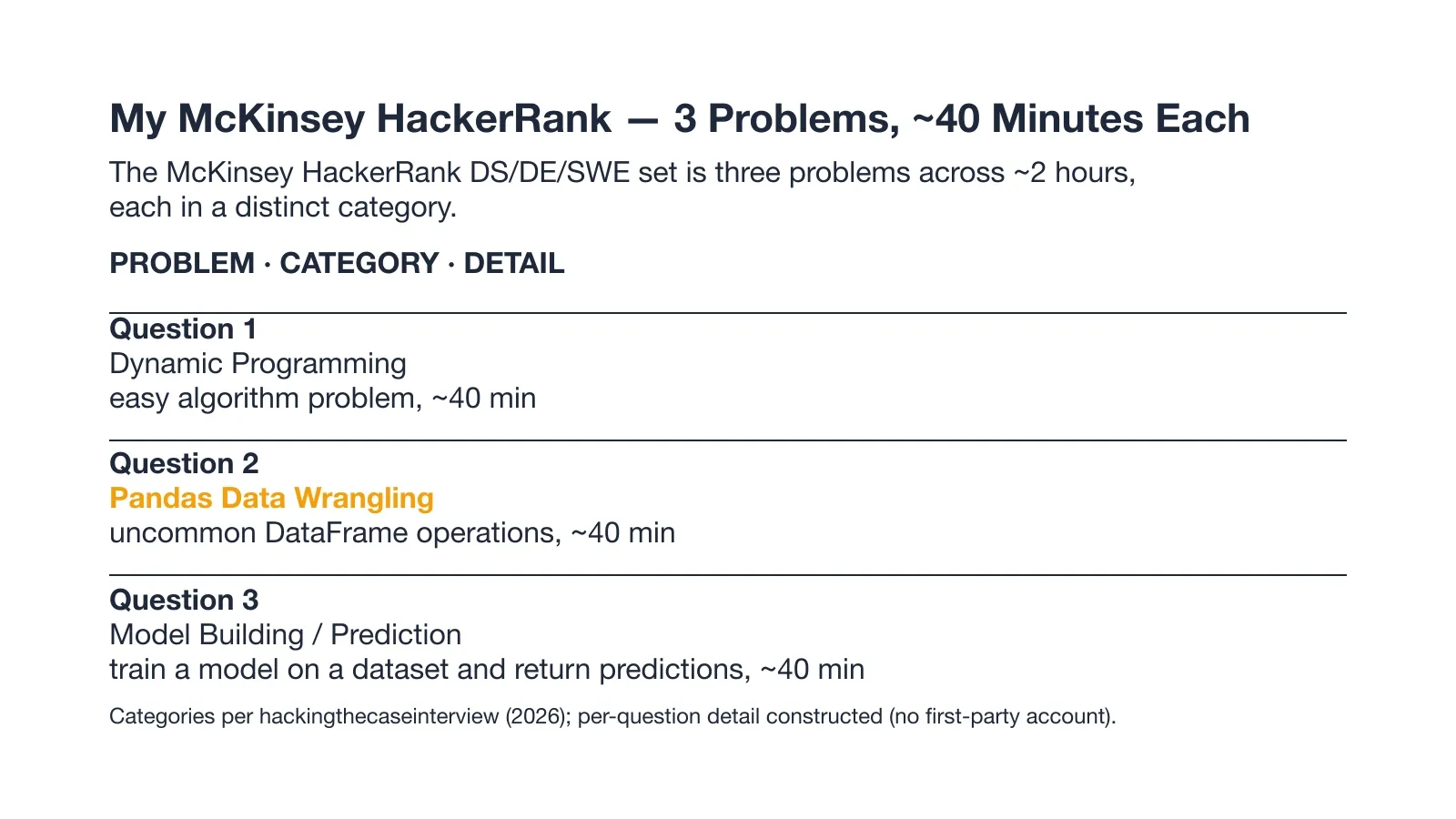
The chart above maps the three problems to their categories and the time I spent on each. What follows is the exact set I was given.
I sat the McKinsey HackerRank on the data science and applied analytics track. It was the confirmed three problem set across about two hours, and here is exactly what I got.
Question 1: Dynamic Programming
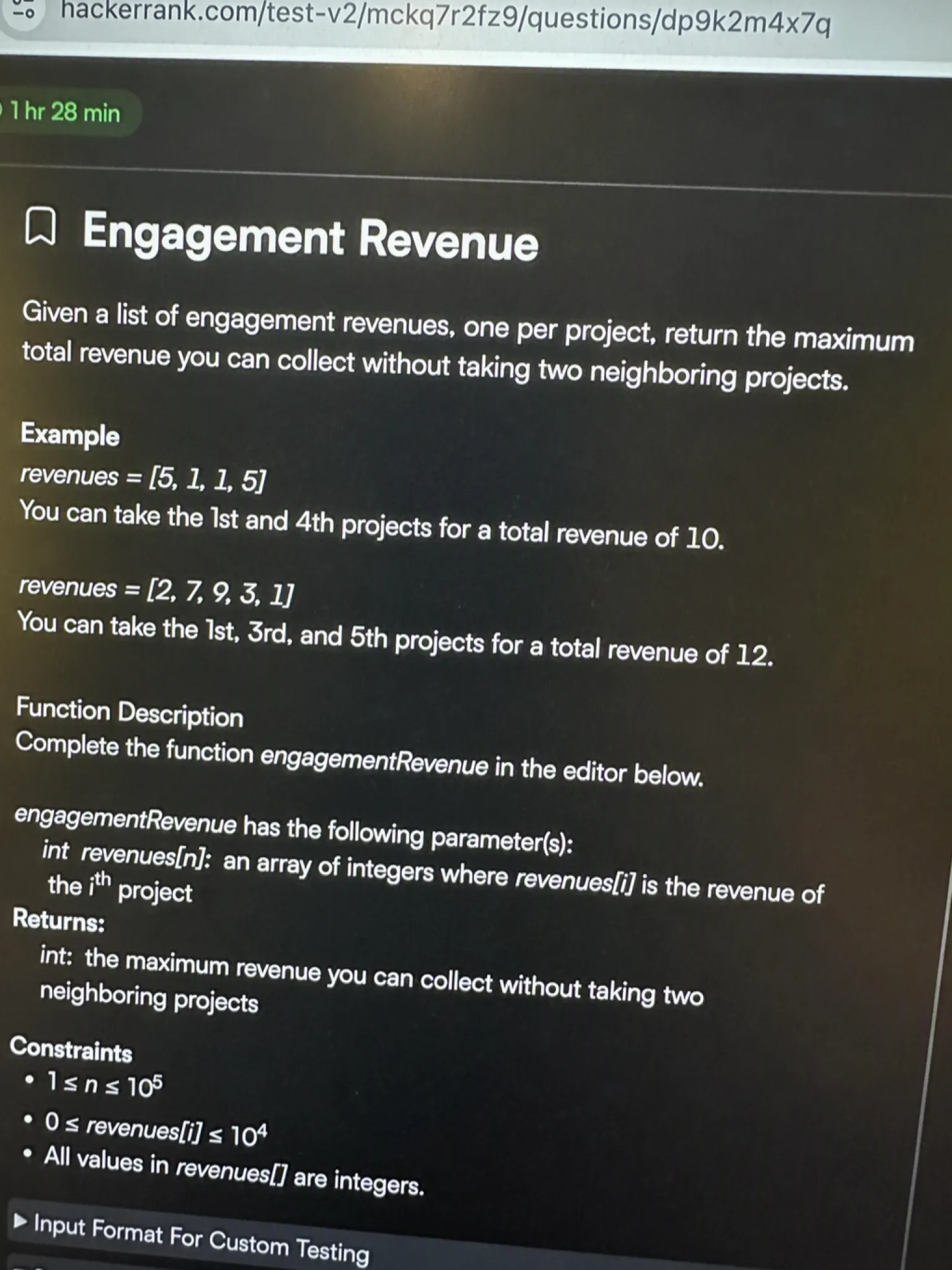
The problem I got: I was given a list of engagement revenues, one number per project. The rule was simple. I could not take two engagements that sat next to each other in the list. I had to return the maximum total revenue I could secure.
My approach: This is a classic pick or skip decision at each step. For position i, the best total is either the best total up to i-1 (I skip this one) or the best total up to i-2 plus this engagement's revenue (I take it). I only need to remember the last two running totals, so I walk the list once and update two variables. That keeps the work tight and easy to reason about under the clock.
def max_engagement_revenue(revenues):
    n = len(revenues)
    if n == 0:
        return 0
    if n == 1:
        return revenues[0]
    prev2 = 0
    prev1 = revenues[0]
    for i in range(1, n):
        take = prev2 + revenues[i]
        skip = prev1
        current = take if take > skip else skip
        prev2, prev1 = prev1, current
    return prev1

# Example input
revenues = [3, 2, 7, 10, 5, 8]
print(max_engagement_revenue(revenues))  # 21
Time complexity: O(n) | Space complexity: O(1)
I solved it in about 22 minutes and moved on feeling calm. The first problem went the way I had practiced.
Question 2: Pandas Data Wrangling
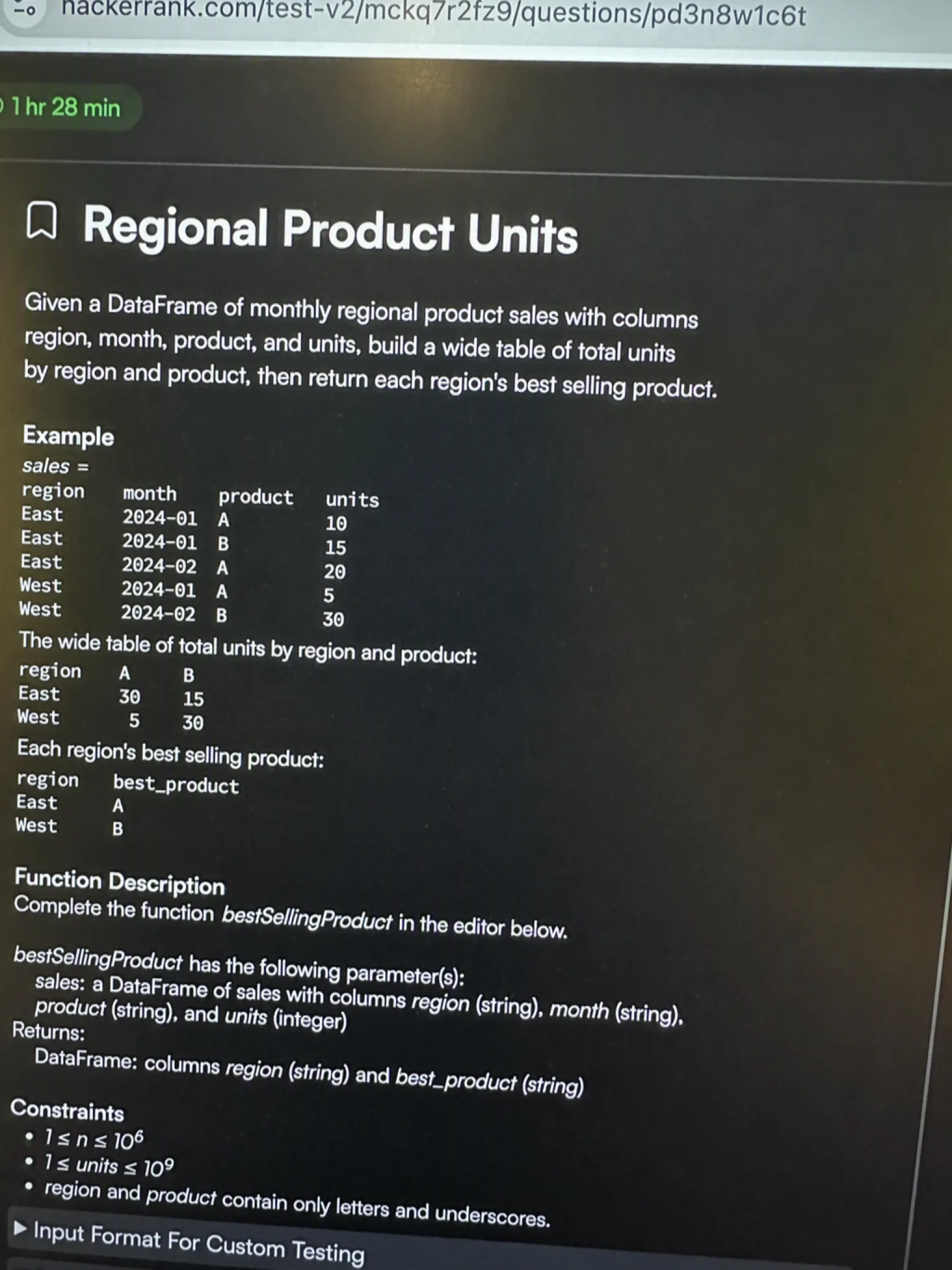
The problem I got: I was given a DataFrame of monthly regional product sales. The columns were region, month, product, and units. I had to build a wide table of total units by region and product. Then I had to return a Series naming each region's best selling product.
My approach: The clean path is a single pivot_table that sums units with region as the index and product as the columns. Once the wide table exists, idxmax(axis=1) gives the column name with the highest value in each row, which is exactly the top product per region. Filling missing cells with zero stops empty combinations from breaking the call.
import pandas as pd

def top_product_by_region(df):
    pivot = df.pivot_table(
        index="region",
        columns="product",
        values="units",
        aggfunc="sum",
        fill_value=0,
    )
    return pivot.idxmax(axis=1)

# Example input
data = {
    "region": ["North", "North", "North", "South", "South", "South"],
    "month": [1, 2, 1, 1, 2, 2],
    "product": ["Widget", "Gadget", "Widget", "Widget", "Gadget", "Gadget"],
    "units": [10, 5, 8, 6, 12, 9],
}
df = pd.DataFrame(data)
print(top_product_by_region(df))
# North  -> Widget (18 units)
# South  -> Gadget (21 units)
Time complexity: O(r * p) | Space complexity: O(r * p)
I first tried a messy groupby with a lambda and lost about fifteen minutes before the pivot clicked. With the clock past the forty minute mark I was still nervous the reshape was wrong.
I had already decided against a desktop overlay for this moment. That kind of tool leaves the AI's answer on the same screen the proctoring system watches, which is the exact exposure that gets caught. Instead I used a dual device AI interview tool: a keyboard shortcut auto-captured the screen and pushed the answer out to my phone, a device the platform's screenshot monitoring cannot reach. The path forward became obvious on the laptop while the exam editor stayed exactly as it was.
Land offer with Safer AI Interview Assistant
Skip the risky invisible apps. Our dual-device mode keeps it simple and undetectable. You crush the interview, we handle the answers.
Get started. It's freeLoved by 100,000+ candidates
Question 3: Model Building / Prediction
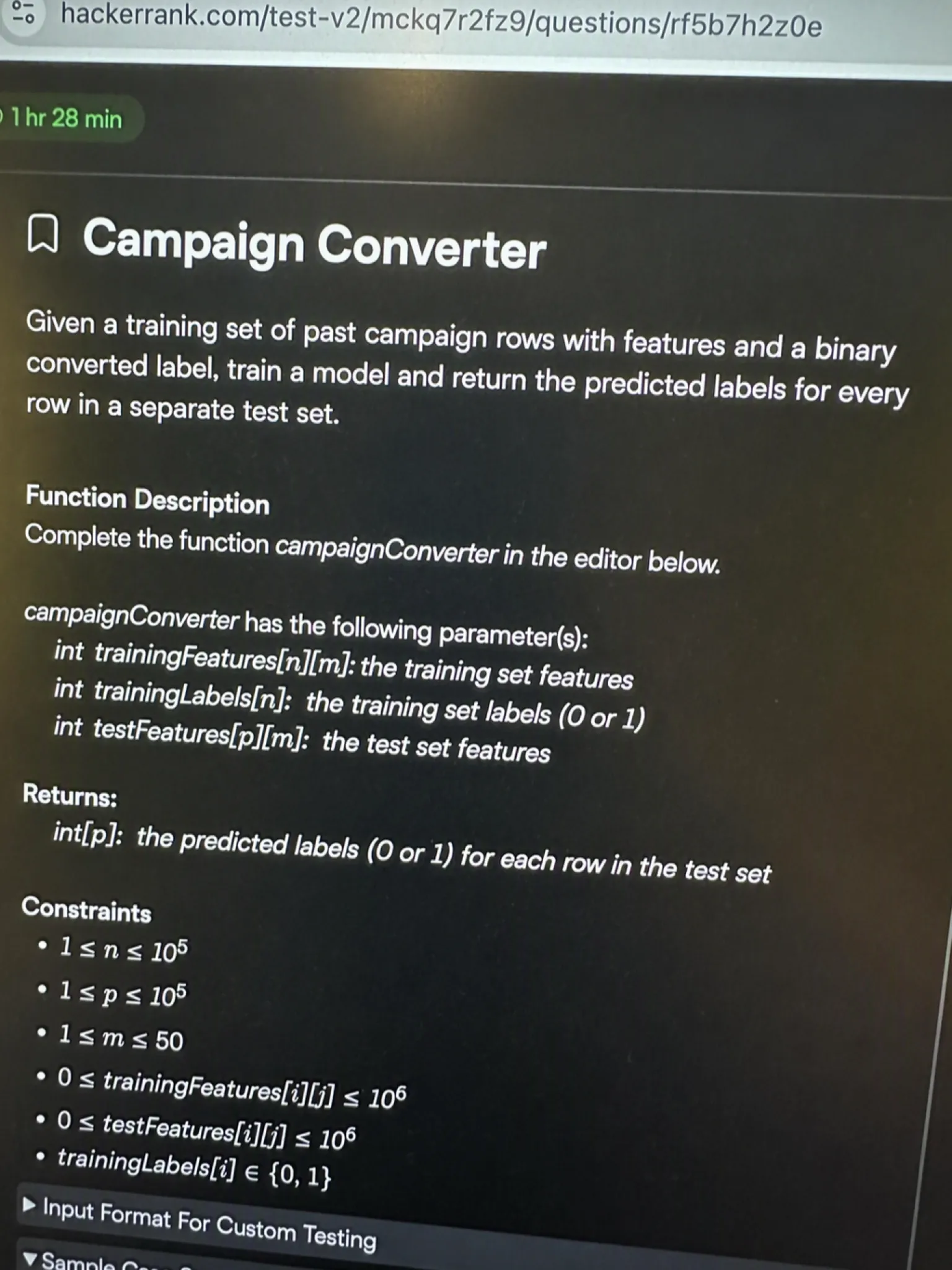
The problem I got: I was given a training set of past campaign rows with features and a binary converted label. A separate test set had the same features but no label. I had to train a model on the training set and return the predicted labels for every test row.
My approach: A Random Forest fits this size of problem fast and needs no feature scaling, which saves time. I build the model, fit it on the training features and labels, then call predict on the test features. I kept the column order identical between train and test so the rows line up. The returned array is the submission.
import pandas as pd
from sklearn.ensemble import RandomForestClassifier

def train_and_predict(X_train, y_train, X_test):
    model = RandomForestClassifier(n_estimators=100, random_state=42)
    model.fit(X_train, y_train)
    return model.predict(X_test)

# Example input (synthetic, runnable offline)
X_train = pd.DataFrame({
    "spend": [100, 200, 150, 300, 250, 400],
    "emails": [5, 8, 3, 10, 7, 12],
    "age": [25, 40, 30, 55, 35, 60],
})
y_train = [0, 0, 0, 1, 1, 1]
X_test = pd.DataFrame({
    "spend": [180, 350],
    "emails": [6, 11],
    "age": [33, 52],
})
print(list(train_and_predict(X_train, y_train, X_test)))
Time complexity: O(n * log n * t) | Space complexity: O(n * f)
I finished the fit with only a few minutes left and shipped the predictions without a second check. The last problem left me the most pressed for time.
McKinsey's Proctoring Policy for HackerRank
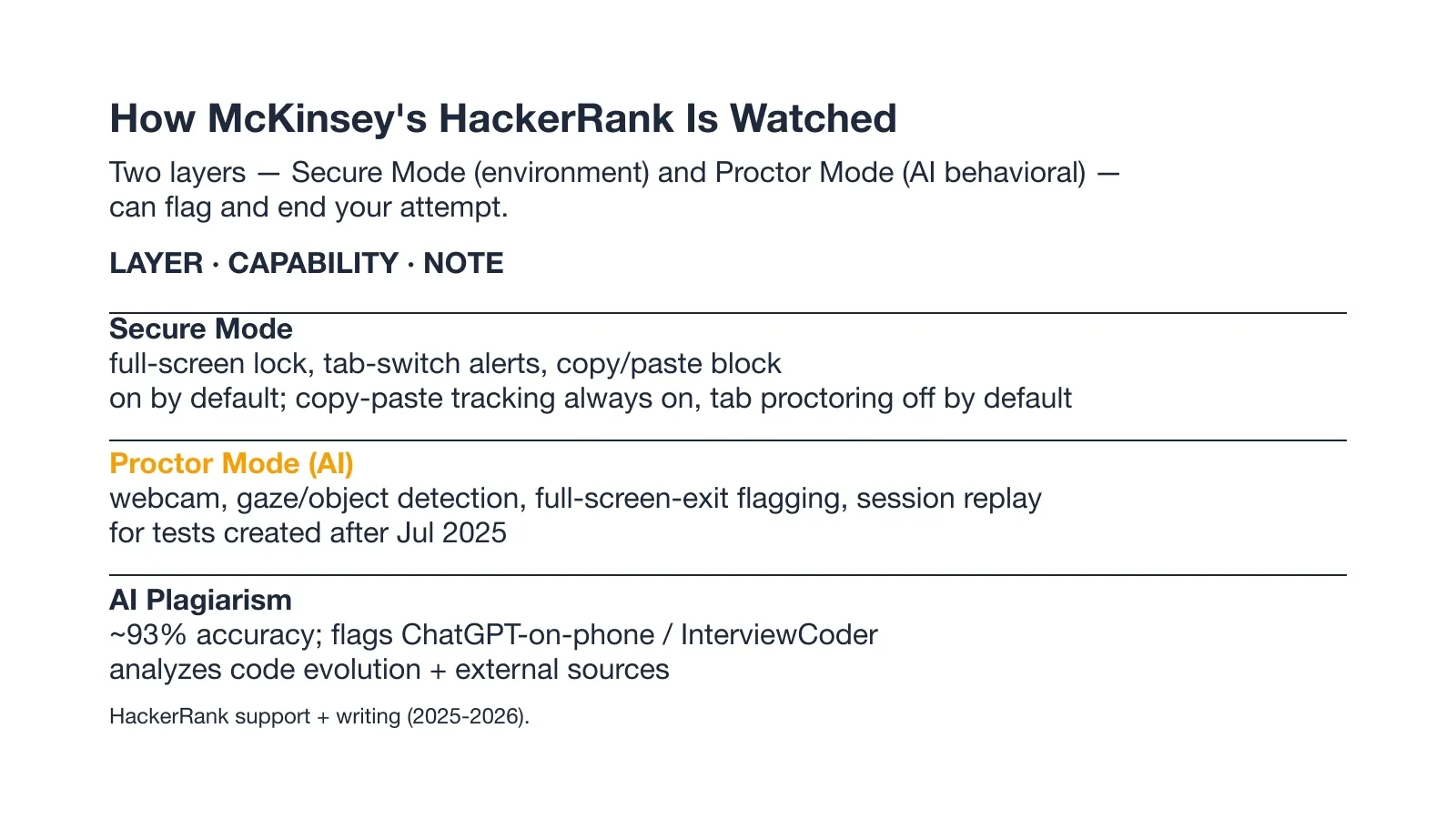
The chart above splits the two watching layers into environment locks and AI behavioral monitoring. Both can flag your attempt and end it early.
McKinsey HackerRank questions sit inside a locked browser, and the proctoring is stricter than most candidates expect. The two layers below are what stood between me and a clean submission.
Secure Mode Locks the Browser Environment
Secure Mode is on by default and it locks the test to full screen, blocks copy and paste, and prevents multiple monitors. A second screen trips the same lock, so work on one monitor only and do not paste code between problems.
Proctor Mode Adds Webcam and AI Behavioral Monitoring
Some McKinsey HackerRank builds add Proctor Mode, which records your screen and watches gaze through the webcam. The session replay it saves is what gets stored if you are flagged, and the gaze tracking layer is what follows where your eyes move.
HackerRank documents the webcam and AI monitoring setup on its Proctor Mode support page.
What an Integrity Flag Does to Your Attempt
An integrity flag can end your attempt on the spot, whether it comes from a full-screen exit or a plagiarism signal.
The AI cheating detection layer is what decides if your code looks assisted, and HackerRank's AI plagiarism check reports about 93 percent accuracy when it cross references outside sources.
What McKinsey's HackerRank Test Format Actually Looks Like
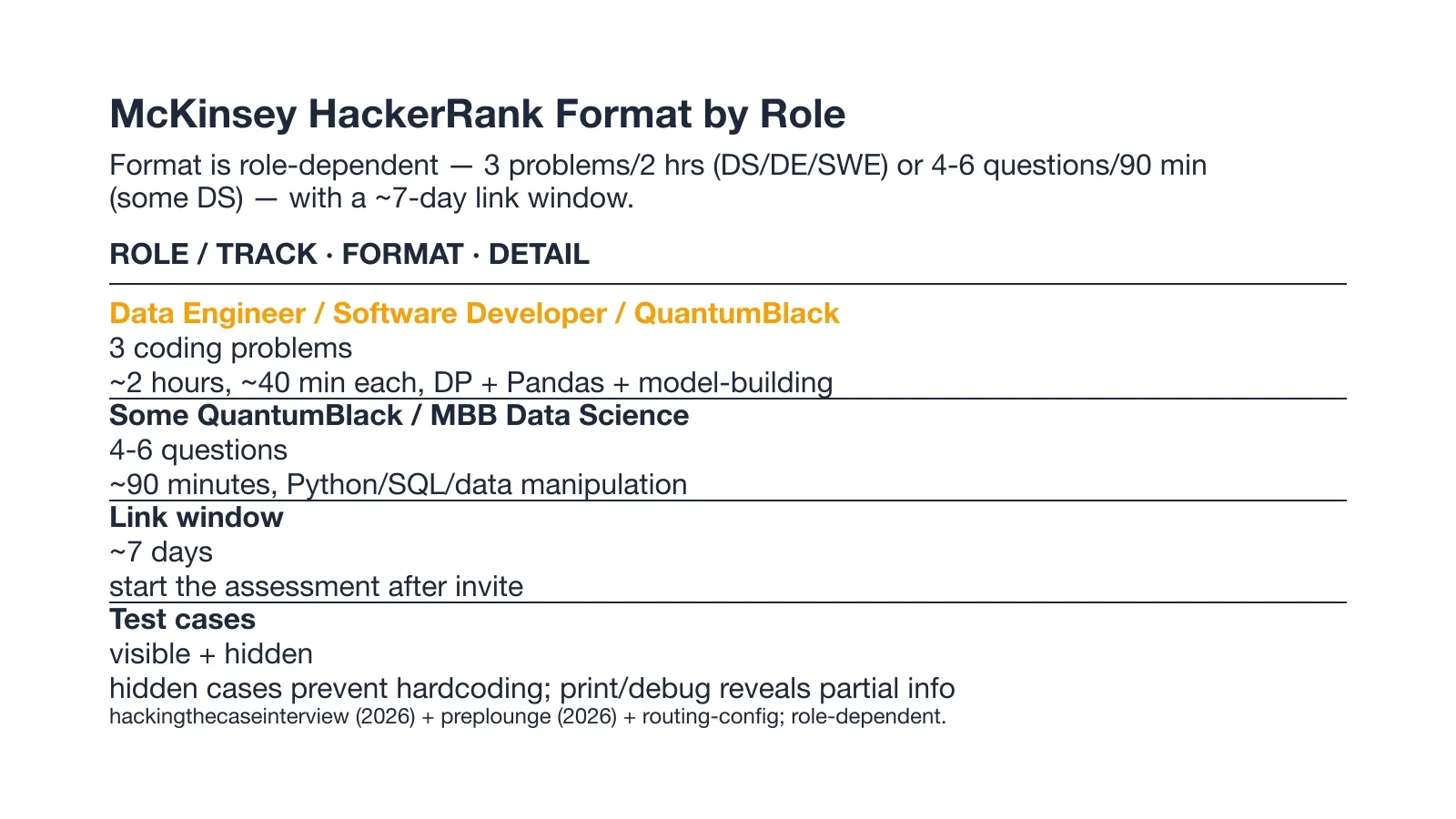
The chart above shows the two format shapes side by side. Your McKinsey online assessment format depends on the role you applied for, so check the invite before you plan.
The Two Reported Format Shapes
The DS, DE, and SWE tracks get three coding problems across about two hours. Some QuantumBlack and MBB data science roles instead get four to six questions in about ninety minutes.
Link Window and Test-Case Mechanics
Your invite gives about seven days to start the test, and the problems run on visible plus hidden test cases. Hidden cases stop you from hardcoding an answer, and printing debug output reveals partial case information.
How McKinsey's HackerRank Scoring Works
HackerRank grades your code against hidden test cases and can award partial credit when some pass. No McKinsey or QuantumBlack pass score has been published, so treat every case as required and aim to clear all of them.
Hidden Test Cases and Partial Credit
HackerRank scores each submission against hidden test cases, and a problem can still pass with partial credit. Some candidates move forward even when the full test is not perfect, so do not abandon a problem after one failed case.
No Published McKinsey Pass Score
No McKinsey specific passing score has been published in any primary source. Aim to solve every case rather than chase a number you cannot see.
McKinsey HackerRank Exam-Day Strategy
Your McKinsey HackerRank OA comes down to how you spend the two hours, not just what you know. Plan the clock before you open the first problem and protect it the whole way through.
Budget ~40 Minutes Per Question
Give each problem about forty minutes so you keep time for debugging and edge cases. If a problem eats past its slot, ship a partial answer and move on rather than sink the whole test.
Use Print/Debug on Hidden Cases
Run your own test cases and print debug output to surface what the hidden cases expect. This is the one platform mechanic that lets you learn the grader without seeing its inputs.
Never Break Full-Screen
Stay in the full-screen window for the entire test, because leaving it raises a flag. The tab switch and full-screen exit behavior is what turns a small slip into a voided attempt, so keep one browser and no alt tabs.
Why Candidates Fail the McKinsey HackerRank Assessment
Most failures come from two directions: an integrity flag from a tool, or a clock that ran out. The cases below show both, and the first one is a real account from a candidate who lost the only attempt.
AI Overlay Tools Get Caught (PINNED case)
A candidate I know lost the only attempt to a transparent overlay. The account is kept verbatim:
I thought a transparent AI answer overlay would remain outside the recorded view during my March 2026 assessment. With one problem still unfinished, the assessment dropped out of full-screen and displayed an integrity warning. The test ended early, costing me the only assessment attempt attached to the application.
At least one candidate was flagged for using a transparent AI overlay tool. The tool renders the AI's answer on the same screen the proctoring system is monitoring, hidden by a basic OS-layer trick.
The difference with InterviewFox is structural: the answer appears on your phone, a physically separate device that no screenshot, screen recording, or session monitoring can reach by design.
Land offer with Safer AI Interview Assistant
Skip the risky invisible apps. Our dual-device mode keeps it simple and undetectable. You crush the interview, we handle the answers.
Get started. It's freeLoved by 100,000+ candidates
HackerRank's Own Overlay Test and the Out of Interview Alert
HackerRank ran its own test with a partly hidden overlay tool and found that any mouse move triggered an "Out of Interview" alert. The platform flagged all three questions for plagiarism at over 0.99 confidence and caught the tool on session replay.
Pacing Failures From Skipping the 40-Minute Budget
Skipping the forty minute per problem budget is the quieter way to fail, because you leave a problem half built. The candidate above still had one problem open when the test ended, which is exactly what poor pacing produces.
How to Prepare for the McKinsey HackerRank in 7 Days
Seven days is enough if you weight the plan toward the three problem types. Spend the time on DP, Pandas, and a timed mock, and skip system design since this test does not ask for it.
Before the test I used the InterviewFox Prep Agent over WhatsApp to receive the confirmed question patterns on my phone and get a personalized drill plan built from them. It kept the seven days focused on exactly the problem types McKinsey actually sends.
Days 1-3: DP and Pandas Under the 40-Minute Cap
Days one through three go to DP and Pandas drills under a forty minute timer. Solve an easy DP and a multi step Pandas reshape within the cap so the real test feels like practice.
Days 4-5: Timed End-to-End Mock With Hidden Cases
Days four and five are one full two hour mock on HackerRank with hidden cases. Use print and debug to validate against the grader the way you will on test day.
Days 6-7: Model-Building Drill and Full-Screen Dry Run
Days six and seven train a model on a sample dataset and predict its labels, then run a no exit full-screen session. The dry run matters because leaving full screen is what voids the attempt.
What Happens After You Submit the OA
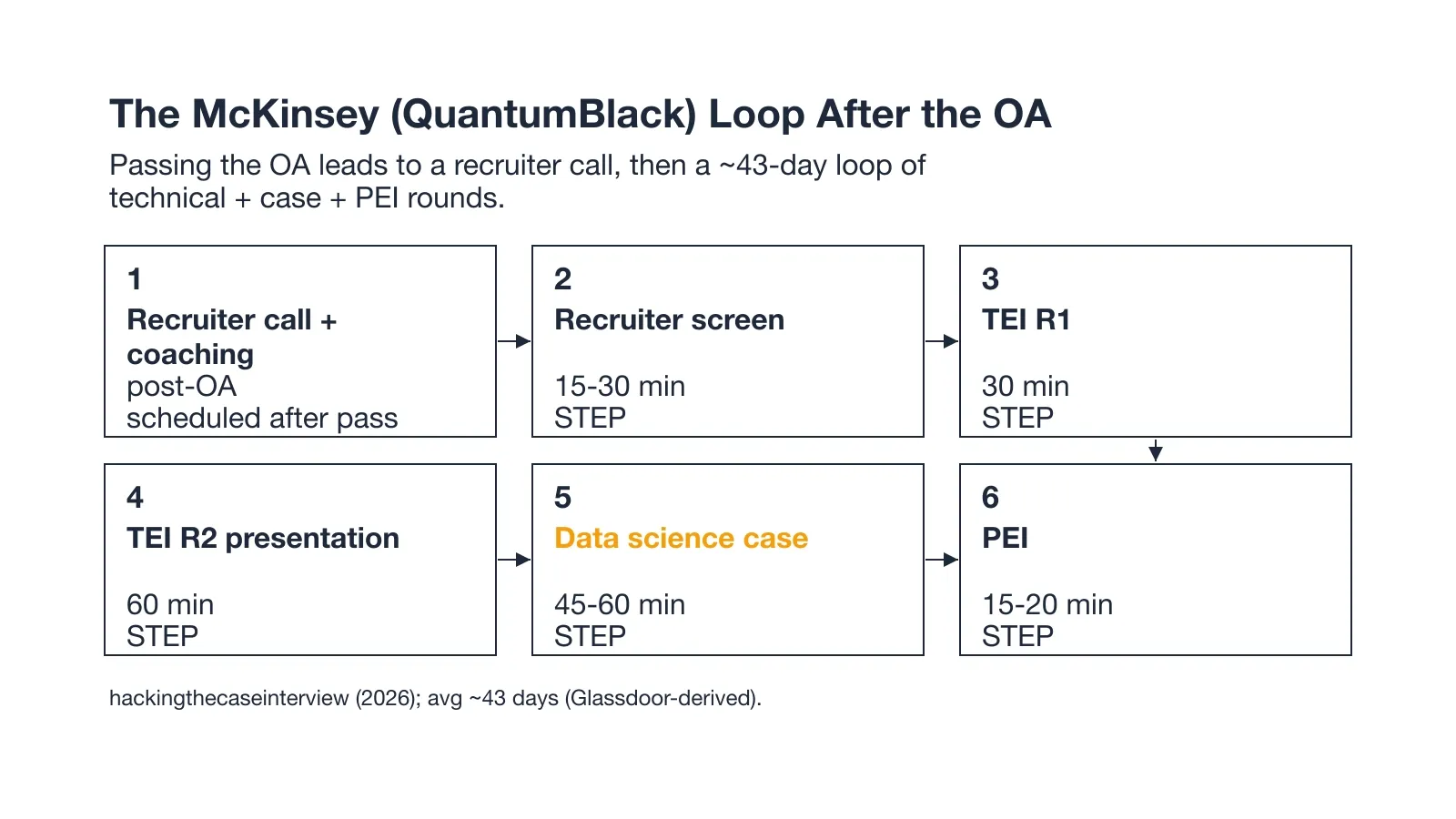
The chart above tracks the loop from recruiter call to PEI. Passing the test opens a sequence of rounds that runs about forty three days.
QuantumBlack Replaces Standard McKinsey Solve
Standard McKinsey runs a Solve game as its screen, but QuantumBlack replaces that with this HackerRank coding test. If you are on the QuantumBlack track, the OA is your Solve equivalent and the rest of the loop stays the same.
The Post-OA Pipeline (Recruiter Call to PEI)
After the OA you get a recruiter call plus coaching, then a screen, two TEI rounds, a data science case, and a PEI. The whole loop averages about forty three days from the test to a decision.
QuantumBlack Uses HackerRank Coding, Not McKinsey Solve
QuantumBlack swaps the standard McKinsey Solve game for a HackerRank coding test on the DE, SWE, and DS tracks. This angle is McKinsey specific, because most generic guides still describe Solve as the screen.
Which Roles Get the HackerRank Coding Test
Data Engineer, Software Developer, and QuantumBlack data science roles get the HackerRank coding test instead of Solve. Some MBB data science roles also see it, while other McKinsey tracks still use Solve.
What Solve Would Have Been
Solve is a timed game based assessment that tests structured problem solving with no code. The HackerRank OA replaces that with three coding problems, so the bar shifts from puzzles to writing working Python.
FAQ
What is the McKinsey HackerRank online assessment (OA)?
The McKinsey HackerRank online assessment is a timed coding test sent after the application screen. It is the gate for QuantumBlack and several data and engineering tracks, and passing it moves you into the interview loop. Most candidates get it by email with about a week to start.
What kinds of questions are on the McKinsey HackerRank?
The McKinsey HackerRank questions split into three types: an easy dynamic programming problem, a Pandas data wrangling task, and a model building prediction problem. Some roles see SQL heavy or shorter Pandas sets instead. The mix targets applied analytics skill, not trivia.
How long is the McKinsey online assessment?
The McKinsey online assessment runs about two hours for the three problem set, with some data science roles getting four to six questions in ninety minutes. You get roughly seven days from the invite to start. Plan for the full window so you are not rushed.
Can you use AI tools on the McKinsey HackerRank test?
Do not run AI overlay or helper tools during the test. HackerRank detects outside assistance with about 93 percent accuracy, and a single flag can void your only attempt. One candidate lost the whole application to a transparent overlay in March 2026.
Can I use an AI tool or invisible app during the McKinsey HackerRank OA?
Desktop overlay tools render the AI's answer on the same computer screen the proctoring system monitors. A basic OS-layer trick keeps the window hidden, but the answer is still on-screen, and proctoring detection keeps improving.
InterviewFox pushes the answer to your phone, a physically separate device that no screenshot, screen recording, or session monitoring can reach by design. The laptop screen stays on the exam editor.
If you use AI assistance during the OA, the dual-device architecture removes the answer from your screen entirely.
Land offer with Safer AI Interview Assistant
Skip the risky invisible apps. Our dual-device mode keeps it simple and undetectable. You crush the interview, we handle the answers.
Get started. It's freeLoved by 100,000+ candidates
What score do you need to pass the McKinsey HackerRank?
No McKinsey specific pass score has been published, so there is no number to aim for. The platform grades hidden test cases and awards partial credit, so clear as many cases as you can. Treat every problem as required rather than chasing a cut off.
Does the McKinsey HackerRank test use a webcam?
Some builds use Proctor Mode, which turns on the webcam for gaze and object detection during the test. Secure Mode alone does not need a camera, but a Proctor Mode build records your screen and watches your eyes. Check the invite to see which layer your test uses.