
I Nailed Zoom CodeSignal in 2026: Real Questions and a Study Plan

Quick Facts
| Company | Zoom |
| Platform | CodeSignal General Coding Assessment |
| Year | 2026 |
| Format | Four coding questions, all unlocked at timer start |
| Time limit | 70 minutes, one sitting, no pause |
| Question count | 4 (platform-confirmed GCA format) |
| Score range | 200 to 600, partial credit per question |
| Proctoring | Camera, microphone, screen, government photo ID, then AI and human review |
| Cooldown | 14 days between CodeSignal assessments |
| Zoom cutoff | Not published |
I took the Zoom CodeSignal online assessment for a 2026 software engineering internship, chose Python, and submitted all four questions with seconds left on the timer. What follows is the complete process and how I prepared for it.
Ten minutes into the Q3 group-chat problem, I had misread the mention rule and the clock was draining toward Q4. I used dual device real time AI interview assistant to recheck the output rule, and it surfaced the per-message counting I had wrong, which I break down below.
Before my test, I went through every Zoom CodeSignal post from the past two years on Reddit, LeetCode Discuss, and Teamblind. What I found tracks closely with what I experienced, and I cover the mistakes that get people flagged, including a silent AI-tool flag that voided a score.
The Real Questions on My Zoom CodeSignal Test
I took the Zoom online assessment on CodeSignal for the 2026 software engineering internship. It was four questions in seventy minutes with all four unlocked from the start. Below is my broad recollection of the topics, followed by related public practice problems and my solutions to those public problems.
Question 1: Running Totals
What I Remember: I remember a warm-up built around tracking a running total while scanning a sequence.
A Similar Public Problem: LeetCode 1480 — Running Sum of 1d Array. I use this public problem to practise the running-total pattern.
My approach: I keep a running total and append it after each value. Each result is the sum of the values seen so far.
def running_sum(nums):
    total = 0
    result = []
    for value in nums:
        total += value
        result.append(total)
    return result
Time complexity: O(n) | Space complexity: O(n) for the returned list
I finished Q1 in about five minutes. That speed was the whole point of the first slot, and it left me a clean hour for the heavy questions.
Question 2: Array Transformations
What I Remember: I remember a sequence-transformation task where understanding how local changes accumulated was the key to keeping the work manageable.
A Similar Public Problem: LeetCode 1526 — Minimum Number of Increments on Subarrays to Form a Target Array. It is a related public array-transformation problem with a different operation.
My approach: I count the starting height once. Moving from left to right, every increase over the previous value requires additional operations; decreases require none because an earlier operation can cover them. Adding those positive increases gives the minimum.
def min_number_operations(target):
    if not target:
        return 0

    operations = target[0]
    for i in range(1, len(target)):
        operations += max(0, target[i] - target[i - 1])
    return operations
Time complexity: O(n) | Space complexity: O(1)
Q2 took me about twelve minutes. The code was easy to write but slow to trust, so I traced the sample by hand before moving on.
Question 3: Counting From Event Records
What I Remember: I remember a task centered on reading event-like input carefully and producing counts. For me, the hard part was understanding the rules before committing to a counting strategy.
A Similar Public Problem: LeetCode 3433 — Count Mentions Per User. This is a related public event-processing problem with its own rules for online status and message types.
My approach: I process events in timestamp order, applying offline events before messages at the same time. A user is available for a HERE message once their offline interval has ended. ALL increments everyone, while explicit user IDs increment the named users directly.
def count_mentions(number_of_users, events):
    counts = [0] * number_of_users
    offline_until = [0] * number_of_users
    ordered = sorted(
        events,
        key=lambda event: (int(event[1]), 0 if event[0] == "OFFLINE" else 1),
    )

    for event_type, timestamp, payload in ordered:
        current_time = int(timestamp)

        if event_type == "OFFLINE":
            user_id = int(payload)
            offline_until[user_id] = current_time + 60
        elif payload == "ALL":
            for user_id in range(number_of_users):
                counts[user_id] += 1
        elif payload == "HERE":
            for user_id in range(number_of_users):
                if offline_until[user_id] <= current_time:
                    counts[user_id] += 1
        else:
            for token in payload.split():
                user_id = int(token[2:])
                counts[user_id] += 1

    return counts
Time complexity: O(E log E + U × E) in the worst case | Space complexity: O(U + E), where E is the number of events and U is the number of users
I lost close to ten minutes to that misread. By the time I fixed the tally I was behind, and the last question was still untouched.
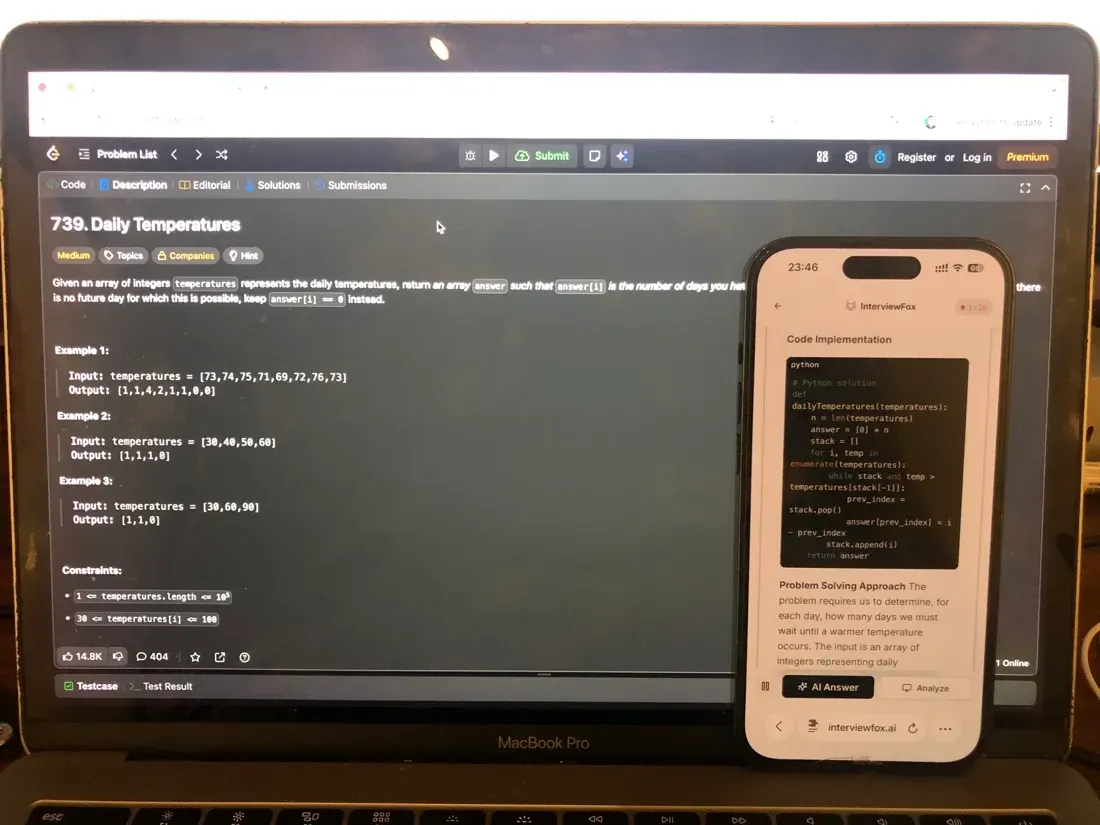
I had already decided against a desktop overlay for this one: the answer would have sat on the same screen the proctoring system was recording, hidden or not, and whether that gets flagged depends on what detection happens to be running, which was uncertainty I did not want running in the background of a timed sitting. So I pressed one keyboard shortcut, and the real time AI interview assistant auto-captured the problem and pushed it to my phone, a separate device outside the platform's screenshot monitoring. The exact mention rule I had misread came back within a minute, the per-message tally finally matched the spec, and my laptop screen stayed on the same CodeSignal editor, unchanged.
Land offer with Safer AI Interview Assistant
Skip the risky invisible apps. Our dual-device mode keeps it simple and undetectable. You crush the interview, we handle the answers.
Get started. It's freeLoved by 100,000+ candidates
Question 4: Maintaining a Changing Sequence
What I Remember: I remember the final task as a sequence of updates where the challenge was keeping track of how the overall state changed without rebuilding it from scratch each time.
A Similar Public Problem: LeetCode 2382 — Maximum Segment Sum After Removals. I use this public problem to practise maintaining connected segments as updates are reversed.
My approach: I process removals backward, adding each value back. A disjoint-set structure joins adjacent active segments and stores each component's sum. After restoring one position, the largest component sum is the answer for the corresponding forward removal.
def maximum_segment_sum(nums, remove_queries):
    n = len(nums)
    parent = list(range(n))
    size = [1] * n
    segment_sum = [0] * n
    active = [False] * n
    answer = [0] * n
    largest = 0

    def find(node):
        while parent[node] != node:
            parent[node] = parent[parent[node]]
            node = parent[node]
        return node

    def union(a, b):
        root_a = find(a)
        root_b = find(b)
        if root_a == root_b:
            return
        if size[root_a] < size[root_b]:
            root_a, root_b = root_b, root_a
        parent[root_b] = root_a
        size[root_a] += size[root_b]
        segment_sum[root_a] += segment_sum[root_b]

    for i in range(n - 1, -1, -1):
        answer[i] = largest
        position = remove_queries[i]
        active[position] = True
        segment_sum[position] = nums[position]

        if position > 0 and active[position - 1]:
            union(position, position - 1)
        if position + 1 < n and active[position + 1]:
            union(position, position + 1)

        largest = max(largest, segment_sum[find(position)])

    return answer
Time complexity: O(n α(n)) | Space complexity: O(n)
Q4 took me about eighteen minutes. I submitted with a few minutes left and never saw the full result breakdown.
Zoom's Proctoring Policy for CodeSignal
Zoom runs its CodeSignal OA on CodeSignal's standard integrity stack. So the recording policy is the platform's, not a Zoom-specific rule. I read the whole policy before I clicked start.
CodeSignal Records Your Camera, Mic, Screen, and ID
Before the first question appears, the setup checks your hardware. It asks for a working camera, a live microphone, full screen share, and a government photo ID. CodeSignal records the video, audio, and the entire computer screen for the session. It then reviews the full recording for suspicious activity.
The capture itself is only part of the picture. Knowing what CodeSignal records from your webcam and how long it stores the footage mattered before I started. It made me tidy the visible room.
The screen capture follows its own rules. How CodeSignal records and reviews your shared screen covers the recorder itself. It also lays out exactly what is captured and who gets to see it.
The Suspicion Score Flags Copy-Paste and AI Patterns
The Suspicion Score weighs solution similarity, telemetry, copy-paste activity, and patterns that may indicate AI-assisted behavior. Each safeguard is a per-company toggle. Whether AI usage is allowed is a Zoom-side setting, not a platform-wide rule (CodeSignal's cheating and fraud policy).
A paste from another window still leaves a trace in an unproctored sitting. What the platform logs when you paste code from another window answers that directly.
Unproctored Sittings Still Carry Typing-Linearity Telemetry
Proctoring is not the only version that watches. Even an unproctored Zoom sitting tracks copy-paste events and timestamps each one. It also exposes how linearly the problem was solved to the recruiter who requested it.
What Zoom's CodeSignal Test Format Actually Looks Like
Zoom's OA runs on the CodeSignal General Coding Assessment, the same four-question format the platform uses across companies. Zoom does not publish a custom shape of its own, so the GCA structure is the one that applies.
Four Questions, 70 Minutes, All Unlocked at Once
The GCA packs four questions into seventy minutes, and no outside IDE or second window is allowed.
Every question is unlocked from the moment the timer starts, and the time can be split freely across the four (the official GCA structure and rules).
How Zoom's CodeSignal Scoring Works
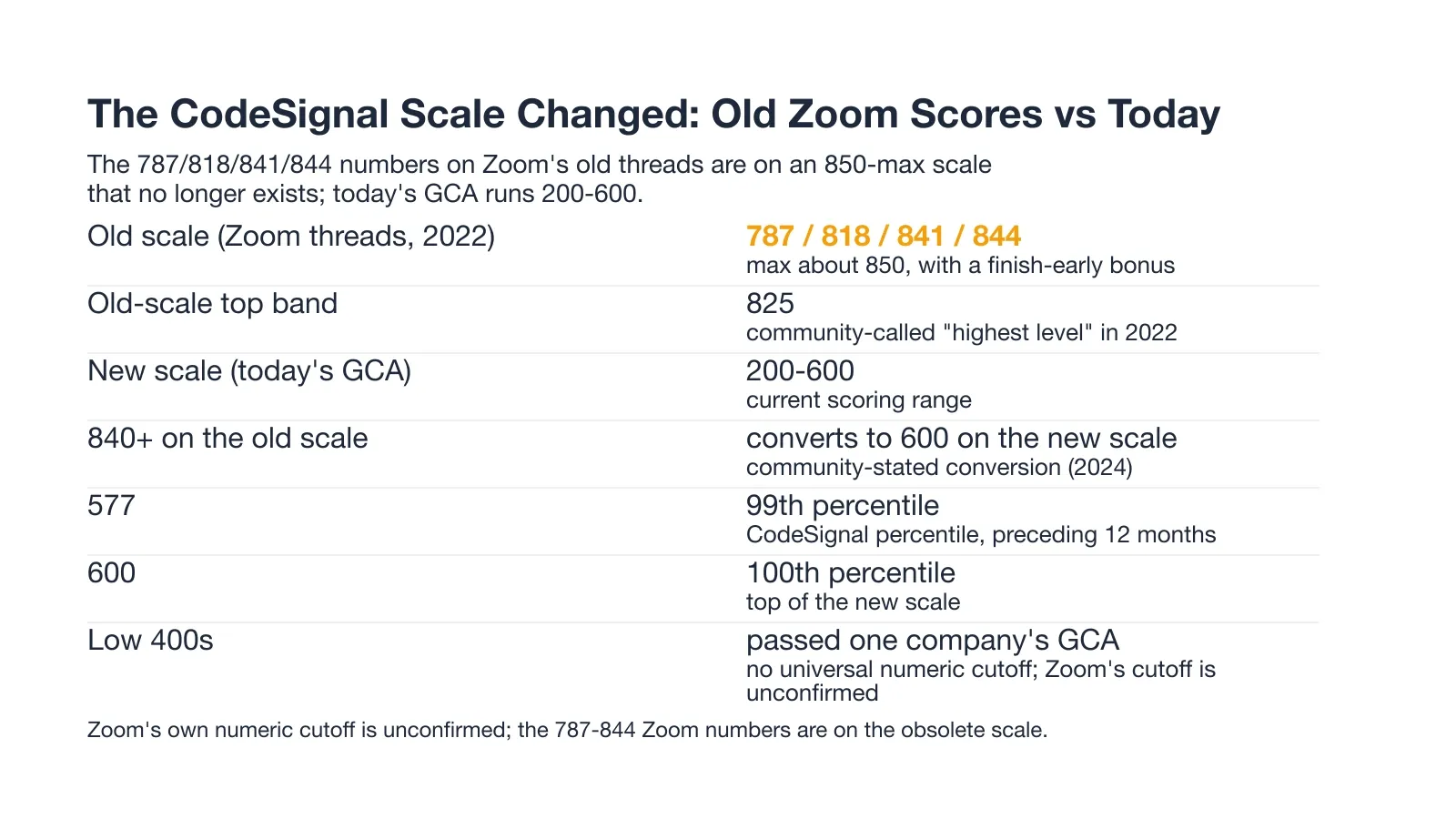
CodeSignal scores the GCA on a 200 to 600 scale, and every question earns partial credit. The chart below shows where the numbers on Zoom's old threads sit against that current scale.
The 200-600 Scale Replaced the Old 850-Max Scale
That 200 to 600 range is the only live scale today. The numbers on Zoom's old threads, 787, 818, 841, and 844, sit on a retired roughly 850-max scale. That old scale added a finish-early bonus. The community conversion puts 840-plus on that old scale at a flat 600 now.
What a Zoom CodeSignal Score Actually Needs to Be
Zoom does not publish a numeric cutoff, and no Zoom-specific pass bar was ever stated. A low-400s score still passed another company's GCA. Also, 577 sat at the 99th percentile of the preceding twelve months. So a clean, complete run matters more than chasing a number.
An Old Zoom Score Raises a New Reusable-Score Question
Back in 2022, candidates debated whether to send an 818 or a 787 to Zoom. On today's scale the same number is not comparable. A re-used score transfers only under the company's own rules and its cooldown window.
Zoom CodeSignal Exam-Day Strategy
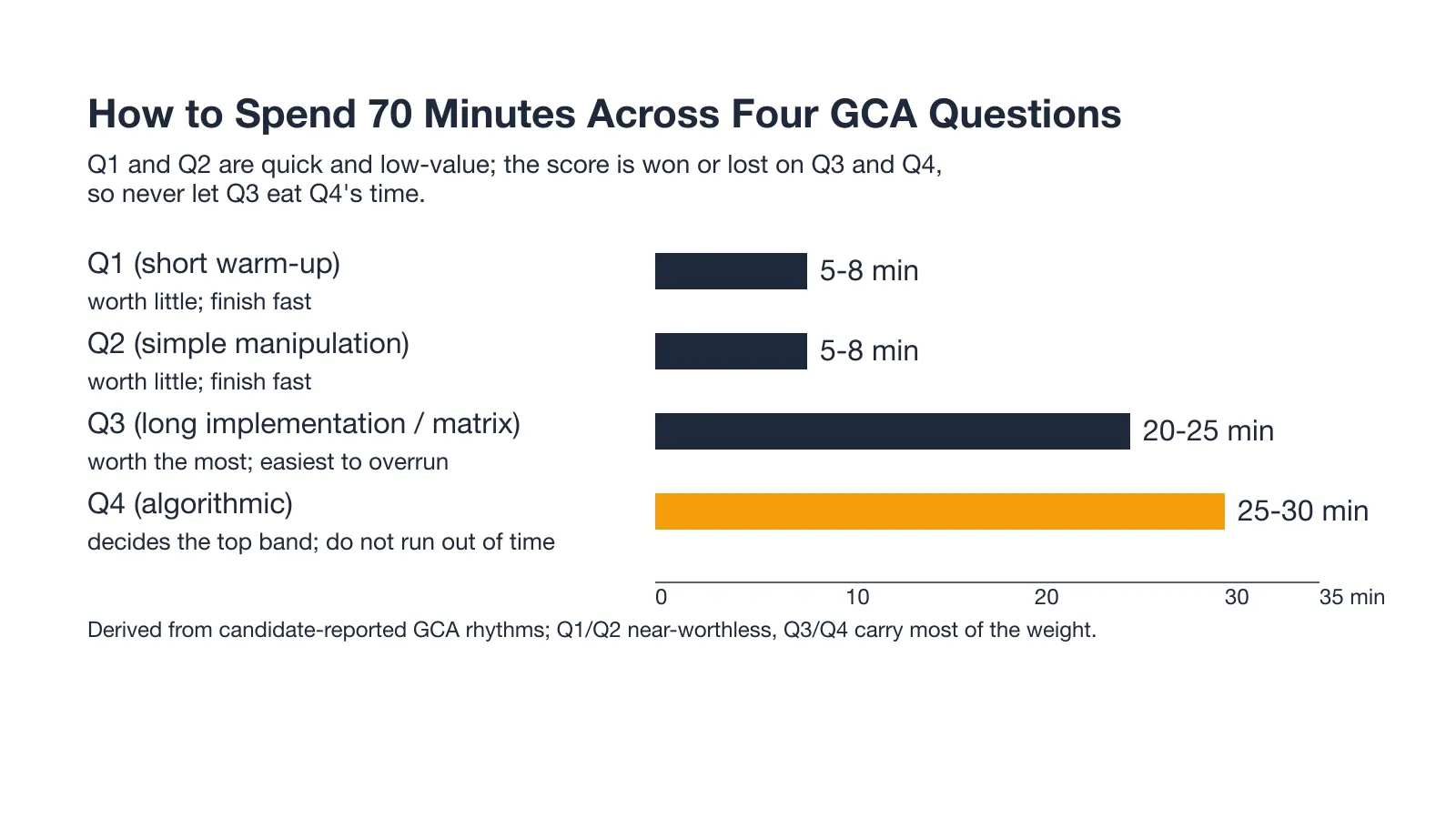
The score is won or lost on the last two questions, and the clock is the real opponent. The chart below shows how I would split the seventy minutes across the four slots.
Bank Q1 and Q2 Fast, Protect Q3 and Q4
Q1 and Q2 are short and worth little. So treating them as a speed round buys time for the questions that carry the score.
When Q3 Eats the Clock (A Misread-and-Recovered Replay)
The Q3 misread I described above is the trap this strategy exists to prevent. Ten minutes lost to a misread rule pushes the final slot right against the timer.
Why Candidates Fail the Zoom CodeSignal Assessment
The failures here split into two kinds. One is a score filtered out by an anti-cheat signal. The other is a deadline that closes before a proctored result is certified. Both end an attempt without any verdict on the code itself.
Rejected for "Unusual Activity" With No Evidence Shown
One candidate had a score rejected for unusual activity during the testing phase and never left the test window. A later candidate strictly followed every rule and still got flagged, and the platform refused to show any evidence.
A Perfect 600/600 Auto-Rejected by the Anti-Cheat Filter
A full 600 out of 600 came back as an automatic rejection a minute after verification. The likely trigger was code that read as too close to a textbook solution. The anti-cheat filter mistook clean code for copied code.
AI-Tool Detection Is Silent and Delayed
A borderless desktop answer window ran in the early August 2026 assessment. It gave no warning at launch and no live interruption during the sitting. The trigger came at the switch from Question 1 to Question 2. The post-test review referenced desktop-assistant activity, and an email two days later said the score had been voided.
What separates a flagged session from a clean one comes down to signals the platform never shows the candidate. Reading How CodeSignal decides a sitting looks like cheating is worth it before the sitting.
The exposure there is structural rather than a matter of luck. A desktop overlay renders the AI's answer on the same computer screen the proctoring system is recording. It keeps that answer out of view with a basic OS-layer trick. So the answer and the monitoring share one surface.
InterviewFox works differently. The dual device AI interview tool puts the answer on my phone. That phone is a physically separate device that no screenshot, screen recording, or session monitoring can reach by design.
Land offer with Safer AI Interview Assistant
Skip the risky invisible apps. Our dual-device mode keeps it simple and undetectable. You crush the interview, we handle the answers.
Get started. It's freeLoved by 100,000+ candidates
Missing the Deadline When a Proctored Score Isn't Certified
A proctored sitting on the deadline stayed Pending, and the company withdrew the application before the score ever certified. The status tabs, Results, Pending, and Declined, make that gap visible. Sitting proctored at least three days before the deadline is the buffer that avoids this.
How to Prepare for the Zoom CodeSignal in 7 Days
Seven days is enough when the plan targets the slots that actually carry points. I weighted the heavy Q3 and Q4 work into the middle days. I left the final two for a proctored mock and the certification buffer.
Before the clock started, I sent the Prep Agent in InterviewFox the question patterns I had confirmed for this company. I sent them over WhatsApp. It came back with a personalized drill plan for the prefix-sum, simulation, and string-parsing families. The plan also included a strategy for where to spend each day.
It was one input among several in the plan below, not a replacement for the timed drills themselves.
Days 1-2: GCA Slot Shapes and Q1/Q2 Speed
I spent the first two days learning the exact slot shapes and drilling short warm-ups under a hard clock. The goal was clearing a short array or string problem in a couple of minutes. That pace lets the first two slots bank time instead of eating it.
I skipped system design and object-oriented design prep entirely, because Zoom's OA is the four-question GCA. It is not CodeSignal's Industry Coding Assessment, where the project-codebase shape belongs. I also skipped deep Big-O and CS-theory drilling, since the GCA scores correctness, speed, and implementation rather than theory recall.
The completion test was clearing two warm-ups inside ten minutes combined. That is the pace the real Q1 and Q2 demand.
Days 3-5: Q3/Q4 Implementation Under the 70-Minute Cap
I gave the middle three days to long implementation and algorithmic problems, because that is where the score concentrates. My own Q3 misread cost me there. I ran timed simulation and string-parsing sets with per-question clocks. I made hidden tests the bar, not the sample cases.
The completion test was a full four-problem set finished inside seventy minutes with Q3 and Q4 both attempted.
Days 6-7: A Full Proctored Mock Before the Certification Window Closes
I ran one full proctored mock on the last two days, with camera, microphone, screen, and ID. By test day the setup felt boring. Since a proctored score is not certified immediately, I left a few buffer days before the deadline. I did not sit on the last day.
The completion test was a submitted mock with days to spare, which removes the Pending-score risk.
What Happens After You Submit the OA
After the CodeSignal submit, Zoom's path runs a recruiter review, an HR round, and a final loop. The chart below lays out the sequence and the rough wait between the steps.
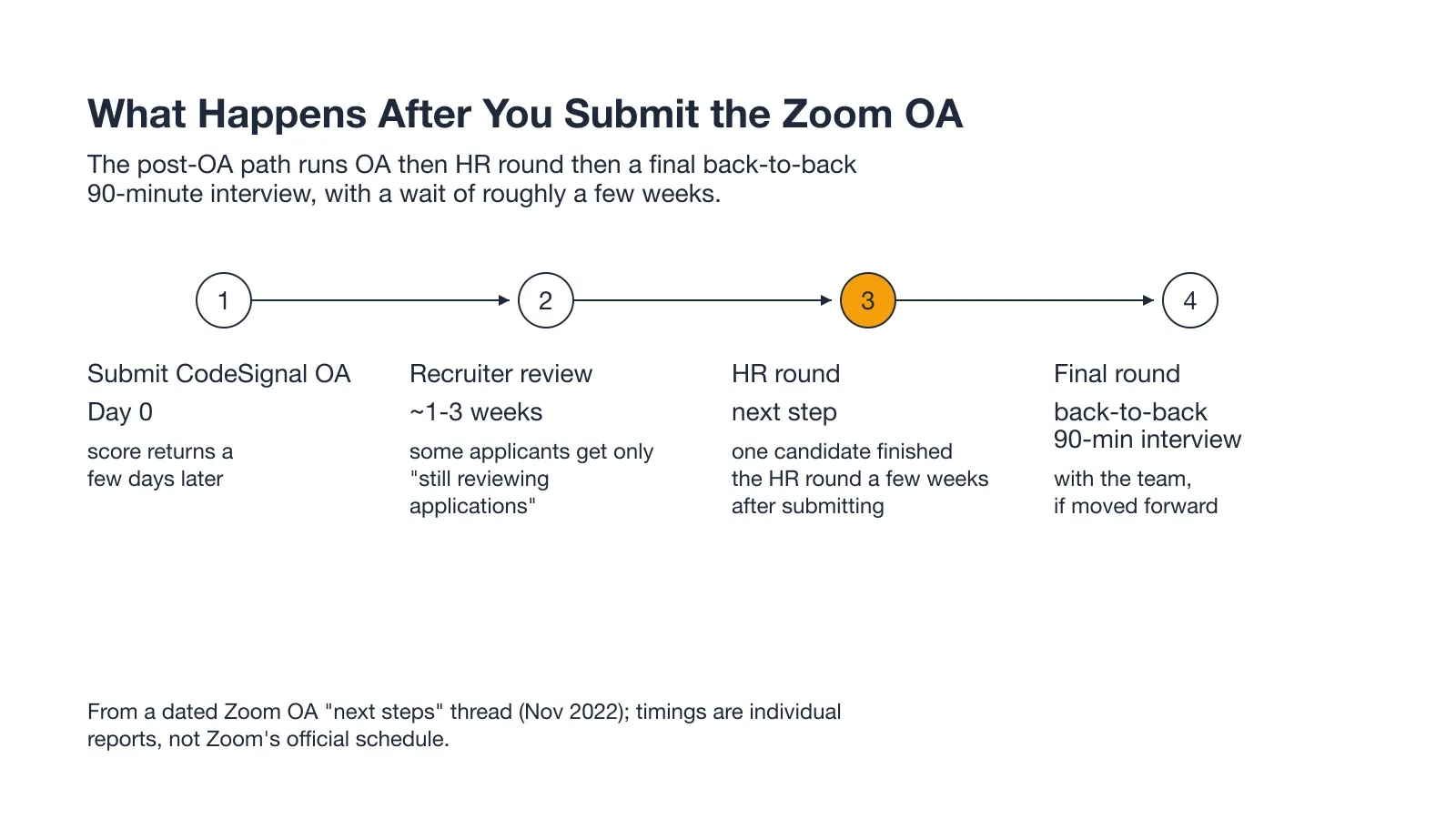
The Zoom Post-OA Sequence and Final 90-Minute Loop
One candidate submitted the OA, waited a few weeks, and finished the HR round before the final step. That final step is a back-to-back ninety-minute interview with the team. It happens if Zoom decides to move the candidate forward.
How Long Zoom Takes to Get Back
The wait from submission to hearing back runs around a few weeks. Some applicants get only a still-reviewing-applications note, and others never get a clear answer at all.
FAQ
What is the Zoom CodeSignal assessment?
Zoom's online assessment is the CodeSignal General Coding Assessment, a four-question coding test. It is the first gate after an application for most software engineering roles.
How many questions are on the Zoom CodeSignal test?
Four questions in seventy minutes, all unlocked from the start. Questions one and two are short warm-ups, and questions three and four carry most of the score.
Can I use an AI tool or invisible app during the Zoom CodeSignal OA?
No. CodeSignal's Suspicion Score watches telemetry, solution similarity, and copy-paste events for AI-assisted patterns. A borderless desktop answer window in an August 2026 sitting voided the score two days after submission.
Desktop overlay tools put the AI's answer on your computer screen. They render it as a hidden layer above the browser using a basic OS-layer trick. The answer is on-screen and the hiding is basic. Proctoring software keeps adding detection capabilities as AI tools become more common, so the risk exposure isn't fixed.
InterviewFox pushes the answer to your phone, a physically separate device. No screenshot, screen recording, or session monitoring can reach that device by design. So the laptop screen stays on the exam editor, unchanged. If you're going to use AI assistance during the OA, the dual-device architecture removes the answer from your screen entirely.
Land offer with Safer AI Interview Assistant
Skip the risky invisible apps. Our dual-device mode keeps it simple and undetectable. You crush the interview, we handle the answers.
Get started. It's freeLoved by 100,000+ candidates
What is a good CodeSignal score for the Zoom OA?
Zoom publishes no numeric cutoff, so there is no official bar. A clean, complete run on all four questions is the goal. Also, 577 was the 99th percentile of the preceding twelve months.
How long does Zoom take to get back after the OA?
The wait from submission to hearing back runs around a few weeks. Some applicants hear only that Zoom is still reviewing applications.
Can I retake the Zoom CodeSignal assessment?
CodeSignal enforces a fourteen-day cooldown between assessments. A retake also depends on Zoom's own cooldown policy, so the first sitting is the one to prepare for.