

You are about to mirror your HackerRank test screen to a phone, TV, or second laptop. You wonder if the platform will notice the duplicated display. The worry is real because the test can feel like it watches everything.
Yes, but only in Desktop App Mode. The native app checks for screen mirroring before and during the test. A browser-based Proctor or Secure mode runs no mirroring scan. A standard test has no display access at all.
That does not mean mirroring is safe everywhere. If your employer picked Desktop App Mode, the check flags any mirrored display and blocks you until you disconnect it. The flag then reaches a human reviewer.
The safest setup keeps answers off the monitored computer entirely. A dual device AI interview assistant shows answers on your phone. Nothing you rely on sits on the screen HackerRank inspects.
How HackerRank detects a mirrored screen
A browser test, however, cannot natively read your display state at the operating-system level. Desktop App Mode is different because it runs as a native app on Windows or macOS. The app asks the OS directly for connected displays and for mirroring state.
The check, moreover, is not a single scan. It runs before the test starts and again continuously. The system therefore catches mirroring you begin during the session, not only the setup you had at launch.
HackerRank's Desktop App Mode help page states the pre-test check requires a single, non-mirrored display. The same page says the live check flags mirroring activity and makes you disconnect it to continue.
Which HackerRank modes detect screen mirroring
Detection depends entirely on the proctoring mode. The browser modes and the native app watch different things.
Proctor Mode relies on the browser Screen API for a monitor count. Its Proctor Mode help page lists only a "Multiple monitor check." It does not, therefore, list a mirroring scan.
Secure Mode behaves the same way. Its help page also lists only a multiple-monitor check. A mirrored display, consequently, appears as one logical screen, so it slips past the count.
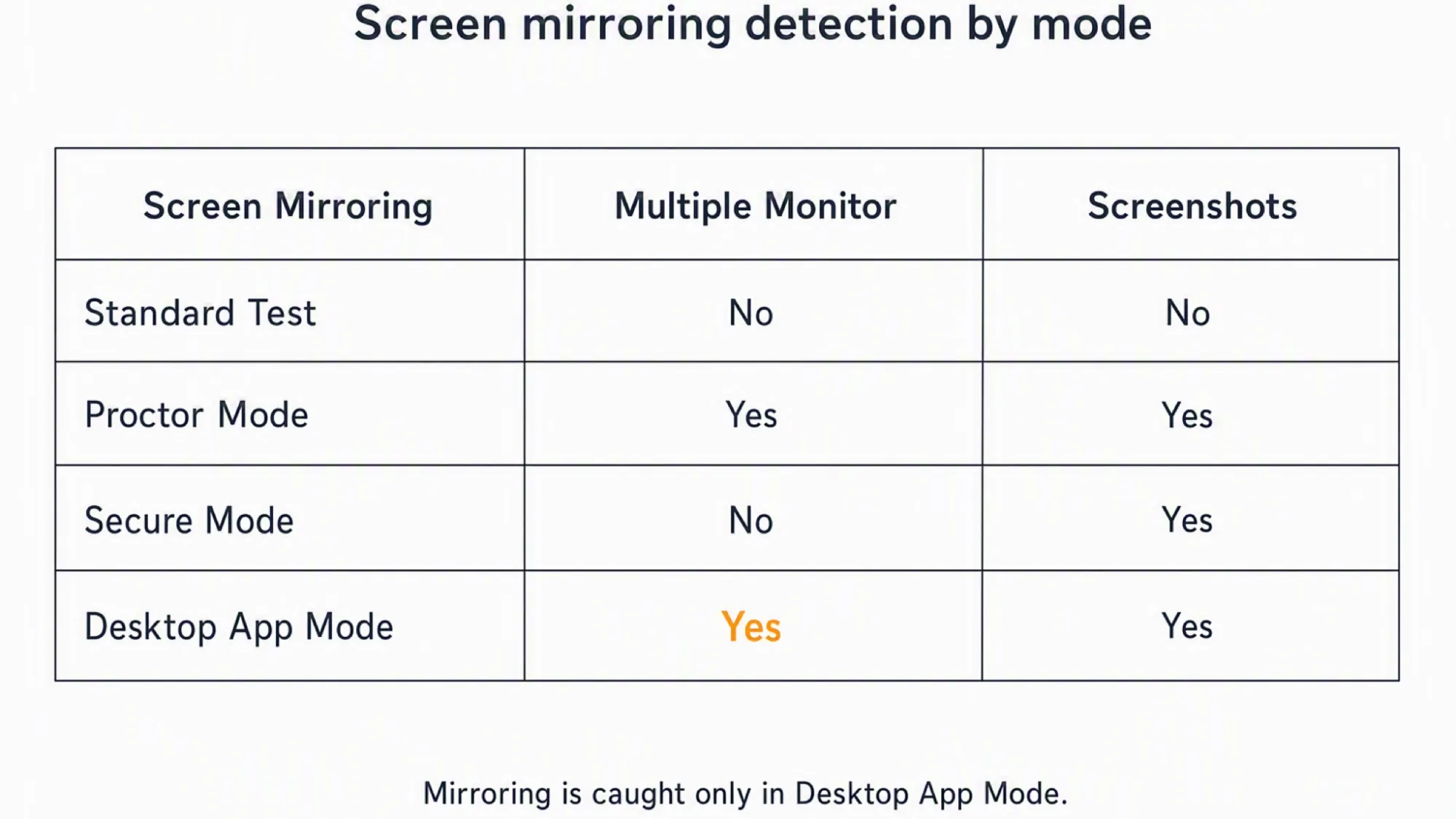
The decisive point is this. Mirroring detection is a Desktop App Mode feature. Browser modes count monitors and inspect screenshots, but they do not read mirroring state.
What counts as screen mirroring
Screen mirroring means showing one logical screen on two devices at once. The second device receives a duplicate of whatever is on the first.
Common examples include wireless cast to a phone. HDMI duplicate to a TV or projector also counts, as do AirPlay and Chromecast to another display. All of these create a mirrored output.
This differs from a second extended monitor. An extended monitor shows different content. A mirrored display, by contrast, shows the same content, which is what Desktop App Mode's mirroring check targets.
What happens if screen mirroring is detected
In Desktop App Mode the system flags the mirrored display right away. The test pauses until you disconnect the mirror. You cannot continue with the duplicate screen active.
The flag then appears in your candidate report. HackerRank's review workflow sends it to a reviewer at the employer. A human opens the report and checks the evidence before deciding anything.
The platform does not auto-fail you. A human, instead, reviews the flag and judges what it means. That review is the real consequence, not an instant rejection.
Webcam proctoring does not read the mirrored display itself. It can flag a phone or tablet visible in the camera frame. Mirroring to a device outside the webcam view, however, is not seen by the camera.
A standard test does not check for mirroring
Most anxiety assumes constant surveillance. A default HackerRank test, however, watches almost nothing. It records no screen and checks no displays.
Proctor, Secure, and Desktop modes are separate opt-in toggles. A plain test has no monitor check, no screenshots, and no webcam. Built-in signals cover only copy-paste and tab switches.
Ask the recruiter which modes your invitation enables. If none are named, you can assume the platform is blind to your display setup.
Screen mirroring vs a second monitor
Mirroring is a duplicate display. A second monitor, by contrast, is an extended one. Desktop App Mode checks both and makes you disconnect either one to continue.
Proctor and Secure modes count monitors but miss mirroring. The count sees one logical screen and treats a mirror as that single screen. This gap is why mirroring can pass those modes.
Display checks are only one slice of what proctoring covers. A wider breakdown of how HackerRank stacks its anti-cheating checks picks up where this display question stops.
The screen HackerRank can see is the real exposure
Mirror detection is only one signal. Detection reviews whatever sits on the screen you share. Anything on that surface is what the system inspects and records.
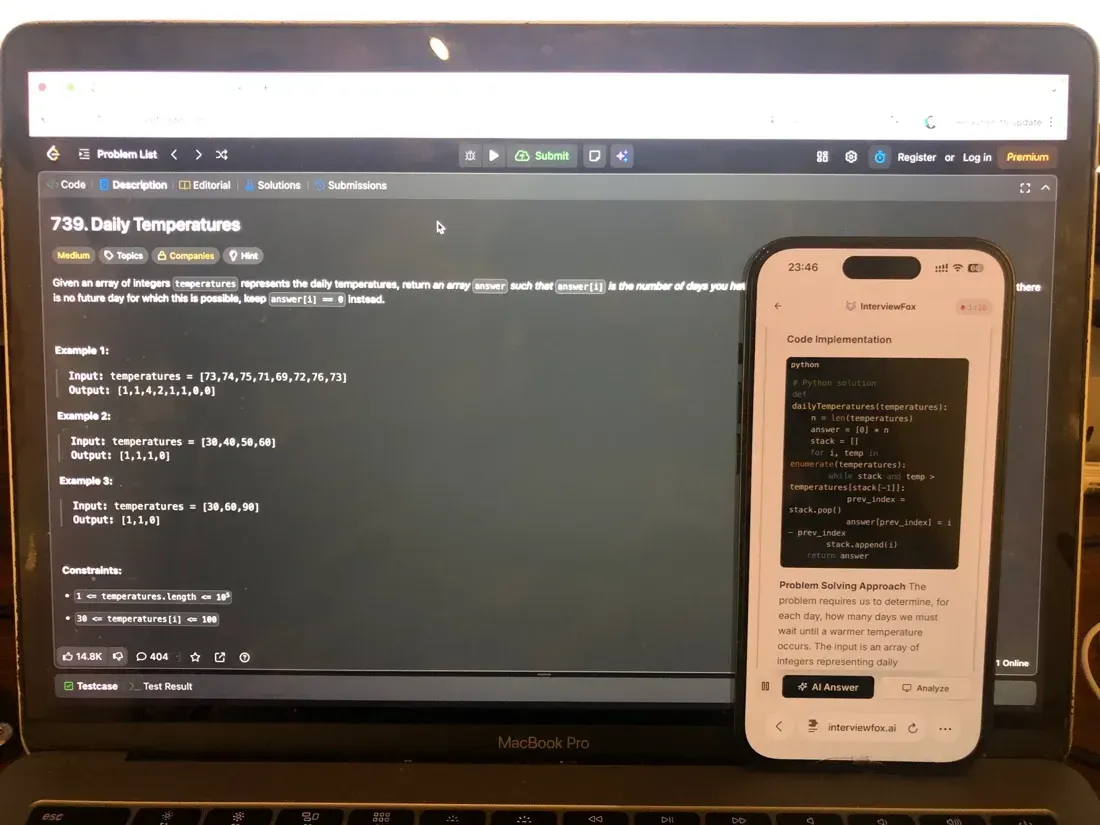
That is why the device boundary matters more than the mirror itself. InterviewFox's dual-device mode is undetectable by software running on the monitored interview computer. The answer appears on your phone, and no InterviewFox window, overlay, or process exists on the interview computer.

Answers On Your Phone, Not Your Shared Screen
Skip the risky invisible-overlay tricks. Our dual-device mode keeps answers on your phone, never on the screen you're sharing or recording. Nothing for a platform or interviewer to catch, because there's nothing on the shared screen to find.
Get started. It's freeLoved by 100,000+ candidates
Because the two devices are independent, you can place the phone near the laptop camera. This avoids the sideways glance a second screen would create. A dual device AI interview tool keeps your help on that separate device.
How to check what your specific test monitors
You do not need to guess which modes are active. The permission prompts name them. A screen-share request, for example, means Proctor Mode or Screenshot Analysis is on.
Webcam access means Image Proctoring is enabled. Installing the desktop app means full OS lockdown is active. Each prompt tells you the access the test will use.
Read the post-test report after finishing. It shows whether a mirroring or monitor flag was recorded. That report is the final source of truth.
What else does HackerRank monitor?
Screen mirroring is one signal among several. HackerRank watches different things depending on the mode. Some checks apply even with no proctoring enabled.
- Tab switching and focus loss. Proctor Mode logs every time your browser loses focus or you switch to another tab. It logs when the switch happened and how long you were away. Then it flags patterns that look like pulling answers from another window.
- Clipboard and copy-paste. Every HackerRank test tracks clipboard activity, even a standard one with no webcam or screen sharing. Paste events are logged with timestamps so the reviewer can tell whether you pasted pre-written code or typed it live. The same clipboard logging shows up in how HackerRank tracks copy-paste across tests.
- Multiple monitor count. Desktop App Mode, Proctor Mode, and Secure Mode each count how many displays are attached. A second extended monitor triggers a flag in Desktop App Mode and shows up in the Proctor screenshot feed. The catch is that a mirrored display registers as one logical screen. That is why mirroring and multiple monitors are detected differently.
- Webcam and gaze behavior. When Image Proctoring is on, the webcam watches for out-of-place objects. A phone laid flat or a second person in frame gets flagged. The same camera feed drives what HackerRank's webcam monitoring catches, and repeated gaze-away patterns are scored by HackerRank's eye-movement tracking as off-screen reading.
- Screen capture and display state. Proctor Mode takes periodic screenshots of your visible desktop. Desktop App Mode reads the OS display list directly. That is how it catches both extra monitors and mirrored outputs at the OS level. The screenshot side is covered in detail by how HackerRank records your screen.
Answers On Your Phone, Not Your Shared Screen
Skip the risky invisible-overlay tricks. Our dual-device mode keeps answers on your phone, never on the screen you're sharing or recording. Nothing for a platform or interviewer to catch, because there's nothing on the shared screen to find.
Get started. It's freeLoved by 100,000+ candidates
Preparation beats workaround. Knowing the format and practicing the question types builds real confidence. That readiness shows regardless of how your screen is set up.
FAQ
Does a standard test flag screen mirroring?
No. Base tests have no display check. Built-in tracking covers only copy-paste and tab switches.
Will a mirroring flag get me auto-rejected?
No. Flags go to the employer for human review. HackerRank states the system does not auto-fail candidates.
Can webcam catch a phone used for mirroring?
It sees a phone in frame, not the mirror. Gaze-away detection may still flag repeated off-screen looks.
Is screen mirroring the same as screen recording?
No. Recording captures the screen to a file. Mirroring duplicates it onto another display in real time.