

Your HackerRank assessment is scheduled. You are deciding whether to run Cluely through it. The tool's behavior is clear to you already. What you still need is the exposure picture. You want to know if HackerRank will catch you using it.
Only in Desktop App Mode, where HackerRank's native app names Cluely and closes it as a running program. Secure Mode and Proctor Mode without that app document no Cluely-specific detection.
That answer should not settle your decision. The desktop app's close has no documented reporting consequence. Code-pattern AI flagging still applies in every mode.
A separate phone removes the risk surface. Software on the monitored computer cannot see that phone. It has no Cluely process, window, or keystroke on it. That separation is what a dual device AI interview assistant keeps intact.
How HackerRank Actually Handles Cluely
HackerRank answers this in two of its own documents, both dated 2026. However, neither applies to every assessment, because the employer chooses the tier. Only Desktop App Mode has this named-tool control.
The Desktop App Mode documentation names Cluely directly. The app blocks other applications during the test. It names Cluely, video conferencing, messaging, and LLM apps. That page is dated July 22, 2026.
The Chakra Desktop App Mode help page covers HackerRank's live AI interviews. It says the app detects and closes other programs candidates open. This includes invisible cheating tools such as Cluely and Ultracode. That page is dated July 30, 2026.
The two documents use two wordings for one control. Only the interview-surface document uses the word detect, and its outcome is closure. HackerRank names Cluely to restrict it. No document records a reporting consequence for that close.
Cluely's own documentation explains why this matters. Cluely says it stays visible in Task Bar and Activity Monitor. Its invisibility claim covers only screen capture and screen sharing. The process layer is exactly where the desktop app looks.
That split explains a confusing contradiction online. Some readers report Cluely as "100% detectable." Others report it as "completely undetectable." Neither claim is evidence. Each describes a different layer without naming it.
The block list is not Cluely-specific. It also names Ultracode and covers video, messaging, and LLM applications. Remote-desktop tools and virtual machines sit on the same list.
What Cluely Does to Stay Hidden and Where It Can't
Cluely hides from screen content. In contrast, HackerRank's Proctor Mode inspects that same layer when screenshot analysis is enabled. Their collision produces the one open conflict in this article.
HackerRank says its screenshot analysis targets external AI coding assistants. It also targets specialized browser extensions or invisible overlay apps. Cluely claims complete invisibility on HackerRank. However, both statements are self-interested, and neither is independently verified. Whether the overlay reaches the captured frame cannot be settled from public evidence.
Will Cluely's hotkeys be logged?
No document read for this article records general keystroke logging. Still, HackerRank tracks copy and paste, and that tracking is on by default. Copy and paste come from the keyboard, so they are the only keyboard signal. A hotkey press alone is not a documented flagged event in any tier document.
That wording is deliberate. "Not documented" is not the same as "cannot happen." No tier document records hotkey presses as a flag.
Does clicking the overlay log a window switch?
For example, the Proctor Mode integrity export includes Window Exit and Fullscreen Exit columns. No document says whether focusing the Cluely overlay produces such a row. No document says whether such a row decides anything. Keep the three states separate: not logged, logged but not deciding, and flagged. This article does not default to the comfortable one.
What Each Assessment Mode Does About Cluely
The answer is tier-conditional because the tiers are employer choices. Secure Mode is the always-on baseline. Proctor Mode is an opt-in layer above it. Desktop App Mode is a native app the employer adds on top of Proctor Mode. Your assessment can run any of the three.
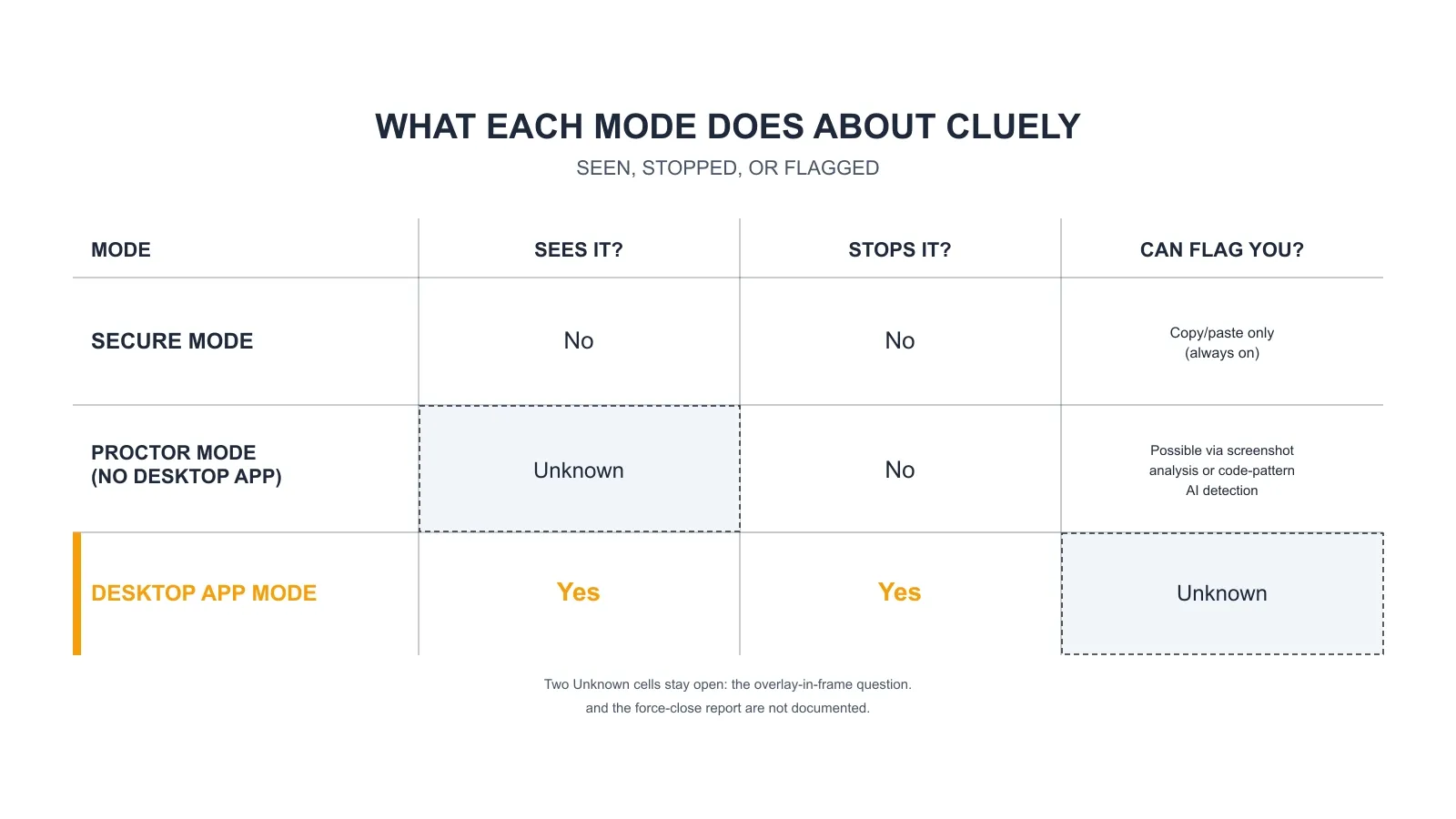
The matrix above answers one question per cell: what each mode does about Cluely.
Two cells are marked Unknown on purpose. Because of this, whether the overlay reaches a Proctor Mode screenshot cannot be resolved from public evidence. Whether a Desktop App Mode force-close writes an integrity flag is not documented. Neither question gets rounded to a comfortable answer.
The reporting channel itself is documented. The Proctor Mode integrity summary names tools identified in screenshots, with ChatGPT and InterviewCoder as the documented examples. Cluely is not among them. Do not read that silence as proof either way.
Desktop App Mode covers both assessment surfaces. The named-tool wording appears for HackerRank Tests and for Chakra AI interviews. There is no separate answer for live interviews.
That tier picture is why the device question exists. A same-device overlay sits inside the layer the platform inspects. A dual device AI interview tool keeps answers on a separate phone.
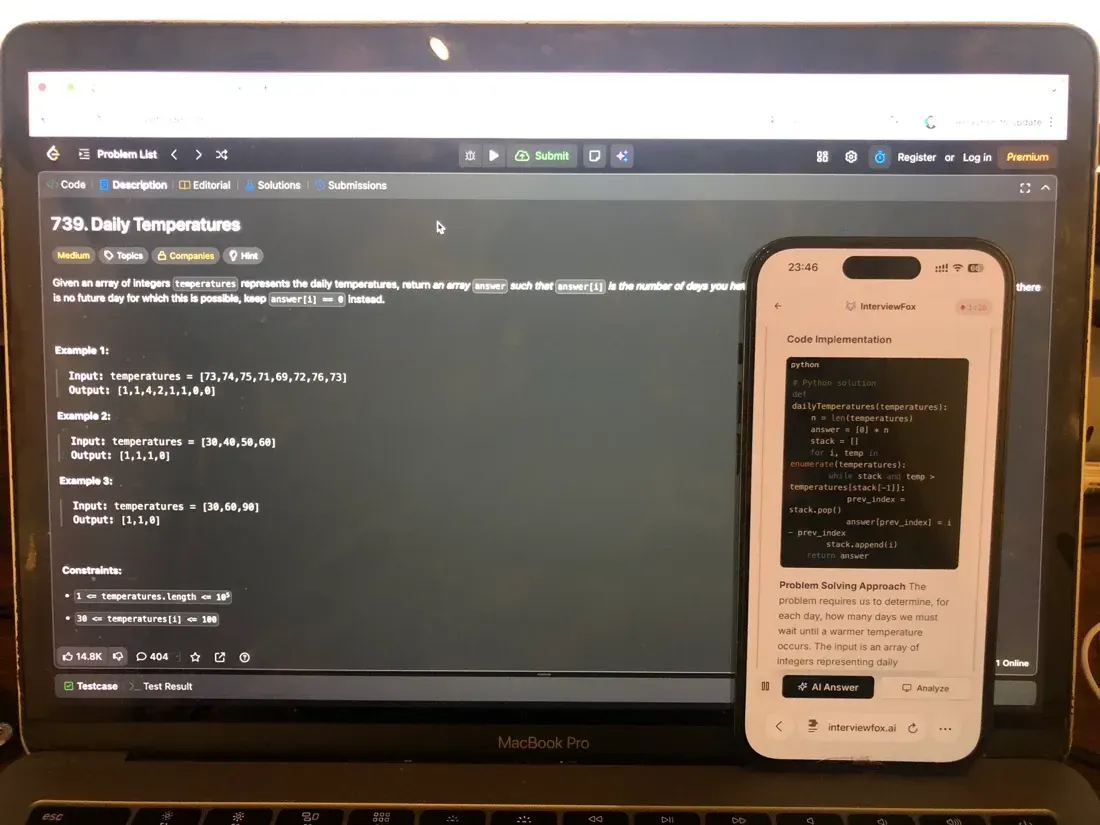
No answer surface, overlay, or InterviewFox process runs on the interview computer. Software on that machine cannot detect the setup. The reason is structural: no process, window, or keystroke from it appears there.

Answers On Your Phone, Not Your Shared Screen
Skip the risky invisible-overlay tricks. Our dual-device mode keeps answers on your phone, never on the screen you're sharing or recording. Nothing for a platform or interviewer to catch, because there's nothing on the shared screen to find.
Get started. It's freeLoved by 100,000+ candidates
How to Know Which Mode Applies Before You Start
You can usually identify the mode before the test begins. To help, each tier asks you to do something observable. No official tier checklist exists. The markers below come from what each mode requires of candidates.
A required native-app download, plus a pre-test "close additional applications" check, means Desktop App Mode. Your antivirus may also flag the app.
A browser prompt to share your entire screen means Proctor Mode. That grant is browser-level, not OS-level.
A plain full-screen browser test, with no download and no screen-share prompt, is the Secure Mode baseline. Copy and paste tracking stays active in all three.
This list is not exhaustive. Employers may configure controls beyond the documented tiers. Use the markers to look, not to conclude.
Getting Flagged From Your Code Alone
One branch of risk survives every invisibility argument. Specifically, HackerRank's AI plagiarism detection analyzes how your code evolves during the session. It applies to coding questions when the employer enables the AI add-on.
The tool does not need to be seen. Instead, this analysis covers how your code evolves and your coding patterns. It also covers copy and paste behavior and tab switching. Your submitted code can be flagged with or without a visible tool.
HackerRank publishes an 85% precision figure for this detection. That is the platform's own number. HackerRank also advertises a 93% accuracy figure on a marketing page. That claim has no published methodology, so this article does not treat it as a verified statistic.
Tier independence is the practical point. Desktop App Mode, Proctor Mode, and Secure Mode all sit under the same code-analysis path. Choosing a device changes the tool-visibility question, not the code question.
What a Flag Actually Means
A flag is not an automatic failure. Rather, HackerRank states that its detection identifies potential cases and that hiring teams decide. The integrity export scores suspicions: Proctor Activity severity uses 10 for High and 5 for Medium.
Flags reach the employer in the integrity report and go to human review. Meanwhile, the candidate is not notified. HackerRank does not share plagiarism check results with candidates. No document describes a candidate-facing appeal.
Both halves matter together. No automatic failure is relief. The missing appeal process is the other half. Neither half alone gives you the full picture.
Does a force-close write a flag?
This is the explicit unknown in the evidence. Nevertheless, HackerRank documents that bypassing full-screen and tab restrictions is flagged and logged. It is silent on what the application-monitoring close writes. The candidate-facing page mentions only lost unsaved data. The honest answer is Unknown, not silent.
Given that picture, preparation is the defensible next step. A flag reaches a human reviewer, and no appeal is documented. You control the code you submit and the practice behind it. A structured plan reduces the risk a flag would decide. The Prep Agent reviews your resume, builds that plan, and runs mock interviews by message.
Prepare Once, Walk In Ready
The durable fix isn't a cleverer hiding trick, it's going in prepared. Our Prep Agent reviews your resume, builds a study plan, and runs mock interviews with you over WhatsApp or SMS, so you rehearse the content before it counts.
Get started. It's freeLoved by 100,000+ candidates
What else does HackerRank monitor?
HackerRank watches more than one behavior during an assessment. For example, the bullets below cover the other signals the platform documents. Each one links to a focused guide.
HackerRank combines every signal into one integrity report. See how the full cheating-detection system fits together.
Copy-paste tracking runs on every test by default. A same-device aid cannot hide this always-on signal.
Proctor Mode captures periodic screenshots, not video. What the screenshot AI actually scans explains the overlay risk.
An optional gaze add-on reads webcam stills. It looks for look-away patterns. Eye tracking shows one glance is not the unit.
A proctored session turns the webcam on and snapshots periodically. Webcam use decides what the lens can expose.
FAQ
Will a phone or second device avoid this?
A second device changes what HackerRank's software can see. However, it does not change what a webcam can see. In webcam tiers, object detection can flag a phone or tablet in the frame. Gaze detection exists but is limited-availability, and it fires only on high-confidence patterns. This is exposure information, not a safer-method tip.
Does my operating system matter?
On the Cluely side, per a dated vendor claim. For instance, in September 2025, Cluely stated that invisibility fails. It fails on Windows 10, Windows 11 Home, and pre-2020 Apple devices. That applied to certain sharing setups. That statement is over ten months old. No document says HackerRank's control varies by operating system.
What can the desktop app see?
The documented scope is a native app with OS screen-recording permission. Specifically, it monitors running programs and asks you to close other applications before the test. The documents read do not detail what the app retains beyond the test. That gap is explicit, not assumed.