
I Took the Workday HackerRank in 2026: Questions and 7-Day Prep Plan

Quick Facts
| Assessment | hackerrank workday online assessment on the HackerRank platform for SWE and campus roles in 2026 |
| Format | 2 DSA + 1 SQL + 7–10 MCQs (campus/SWE); a 60-minute ML-heavy build for MLE |
| Timing | 105 minutes for the campus/SWE build; role and cycle variable |
| Question count | 3 coding problems plus 7–10 Aptitude and core-subject MCQs |
| Score range | No public pass-bar; scores auto-flow into Workday for recruiter review |
| Proctoring | HackerRank Secure Mode or Proctor Mode: full-screen lock, tab-switch alerts, copy/paste tracking |
I sat the hackerrank workday online assessment in 2026. First, I used the Python track and cleared two DSA problems and one SQL problem in 105 minutes. Meanwhile, my work flowed to the recruiter's Workday dashboard. Finally, this article walks through the questions I got, the proctoring rules, and how the format changes by role.
Still, the greedy string question nearly tripped me. However, past the halfway mark I reached for a heap first, then saw the even/odd fill after rewriting. Meanwhile, my AI interview assistant surfaced that pattern when my heap attempt stalled. Also, I finished with a couple of minutes to spare. I work through the full problem and that rewrite in the Real Questions section below.
Before my test, I read every Workday HackerRank post from the past two years. First, I checked Reddit, LeetCode Discuss, and Teamblind. In fact, what I found matched my own experience. Also, the proctoring mistakes get people flagged or rejected before they finish one question.
The Real Questions on My Workday HackerRank Test
In short, the hackerrank workday test I sat breaks down into the three problems below.
First, I took the Workday HackerRank OA on the campus software-engineer track. It had two DSA problems and one SQL problem in 105 minutes. Finally, here's exactly what I got, problem by problem.
The binary search question
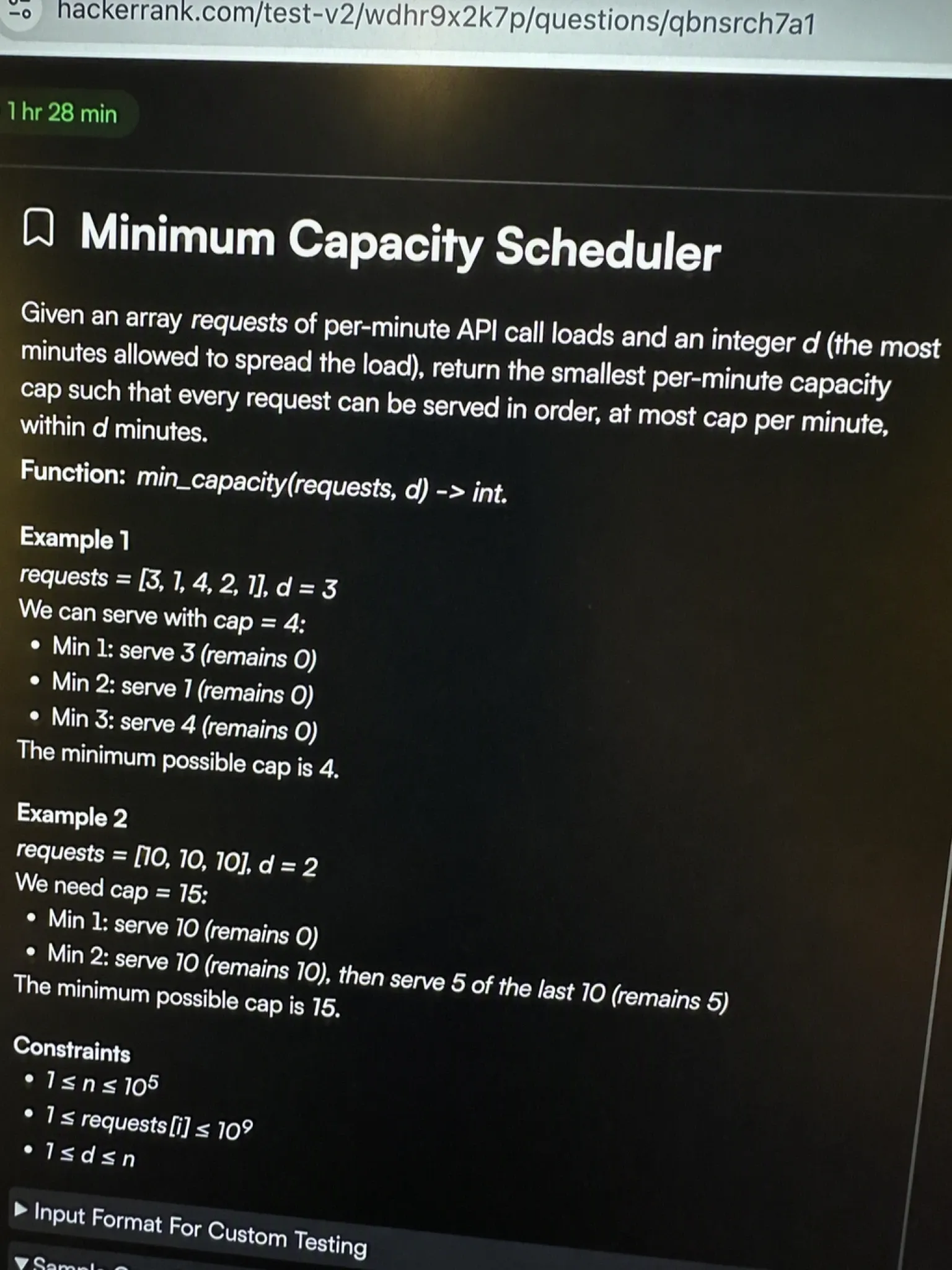
The problem I got: First, I was handed an array requests and an integer d. Also, requests[i] was the API calls a Workday pod handled in minute i. Likewise, d was the max minutes I could spread that load across. I had to return the smallest per-minute capacity cap. Finally, every request had to be served in order, at most cap per minute, within d minutes.
My approach: First, the answer has hard bounds. A single minute can't serve more than its own request, so cap is at least max(requests). At the other extreme, stuffing everything into one minute gives cap = sum(requests). So for any candidate capacity, I simulate the schedule left-to-right. I add requests to the current minute. The moment the next one would exceed cap, I open a new minute. Thus that tells me how many minutes a given cap needs. If that count is ≤ d, the capacity is feasible; otherwise it's too small. So I binary-search between lo and hi. Instead, I shrink hi when a mid is feasible and raise lo otherwise. Finally, the loop ends on the minimum valid capacity.
def min_capacity(requests, d):
    def days_needed(cap):
        days = 1
        cur = 0
        for r in requests:
            if cur + r > cap:
                days += 1
                cur = r
            else:
                cur += r
        return days

    lo, hi = max(requests), sum(requests)
    while lo < hi:
        mid = (lo + hi) // 2
        if days_needed(mid) <= d:
            hi = mid
        else:
            lo = mid + 1
    return lo
Time complexity: O(n · log(sum(requests))) | Space complexity: O(1)
First, I spent roughly 30 minutes here. The binary-search-on-answer shape wasn't obvious at first. Still, I lost time on the search bounds before the pattern clicked. Yet after submitting I still wasn't fully sure the capacity lower bound was airtight.
The greedy string question
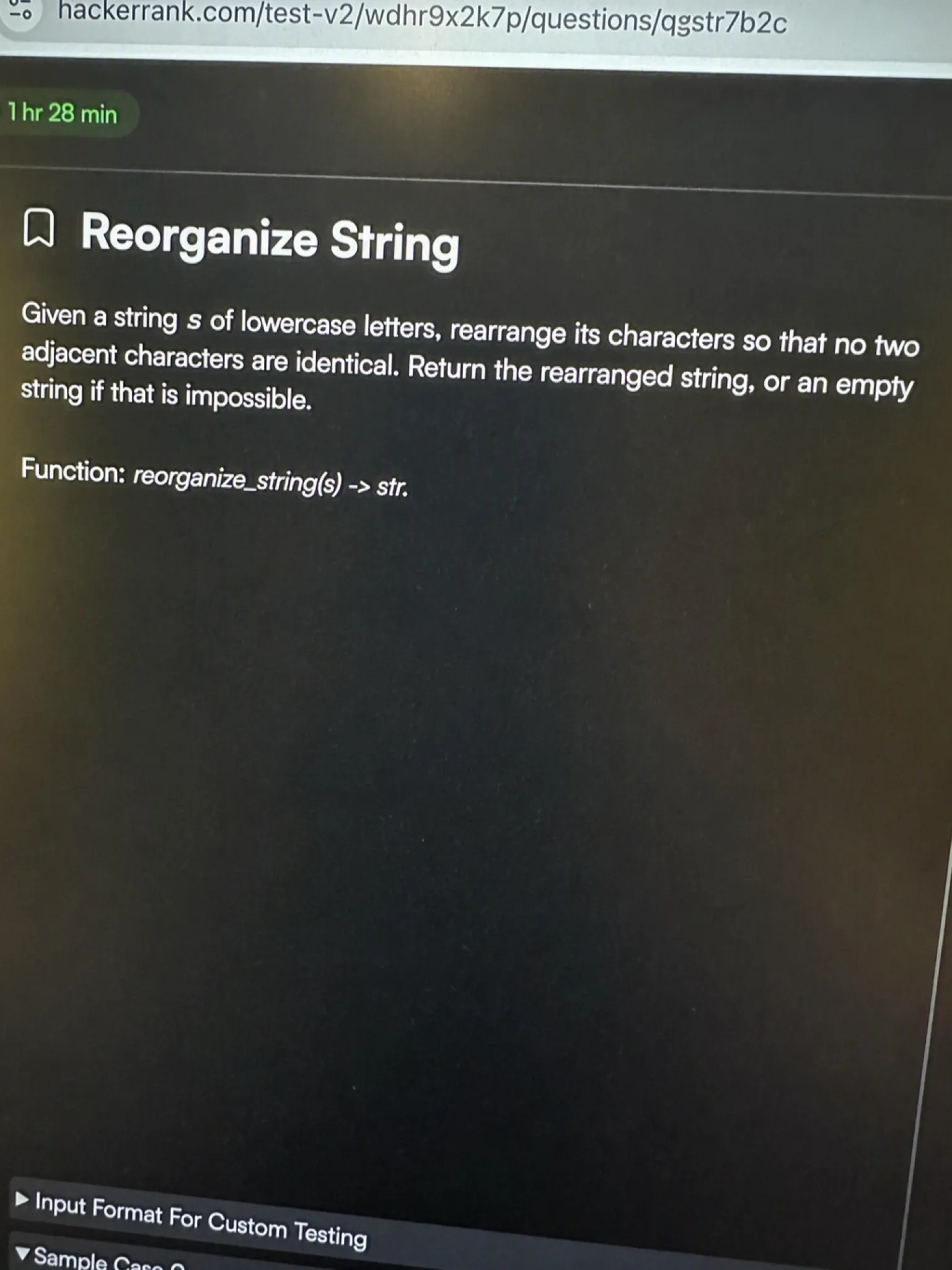
The problem I got: First, I got a string s of lowercase letters. Its characters had to be rearranged so no two neighbors were identical. Also, I had to return the rearranged string, or an empty string if that was impossible.
My approach: First, the impossibility check. If one character shows up more than (n + 1) // 2 times, I return "". Otherwise I fill the even slots (0, 2, 4, …) with the most frequent characters first. Then I wrap the rest into the odd slots (1, 3, 5, …). Moreover, even slots space the heavy characters far apart. That is exactly what stops duplicates from touching. So I count frequencies, order characters by frequency, and place them in that alternating pattern.
import collections

def reorganize_string(s):
    n = len(s)
    freq = collections.Counter(s)
    max_char, max_cnt = freq.most_common(1)[0]
    if max_cnt > (n + 1) // 2:
        return ""

    res = [''] * n
    idx = 0
    for ch, _ in freq.most_common():
        for _ in range(freq[ch]):
            if idx >= n:
                idx = 1
            res[idx] = ch
            idx += 2
    return ''.join(res)
Time complexity: O(n) | Space complexity: O(n)
This one nearly fumbled me under the clock. First, I reached for a heap, then rewrote when the simple even/odd fill worked. Meanwhile, the timer was already past the halfway mark. Still, I finished with only a couple of minutes to spare. Moreover, that left no time to re-check edge cases like a single-character input.
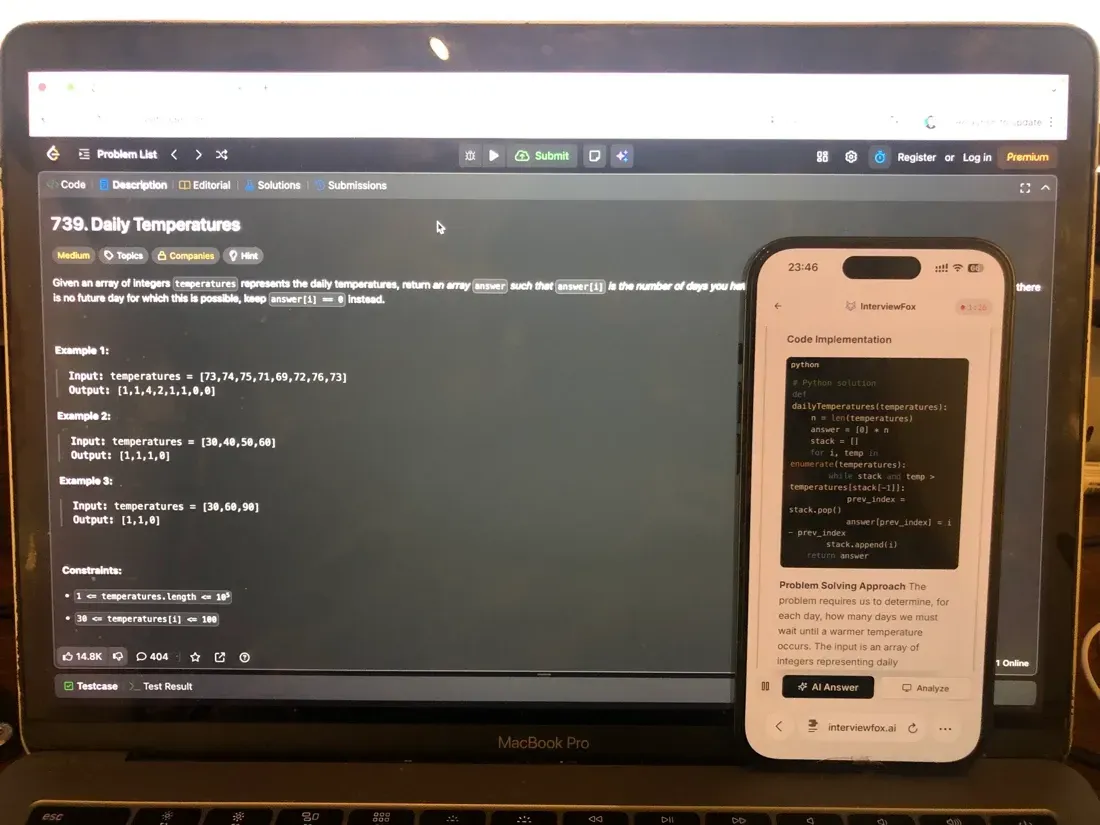
First, I had already ruled out a desktop overlay for a moment like this. A keyboard shortcut captured the problem on screen instead. The answer went to my phone, dual device AI interview assistant, keeping the reasoning off the test window. That is where the even/odd slot fill returned as the rewrite shape. Meanwhile, the approach cleared the sample cases on the next run. Also, my laptop stayed on the exam editor the whole time. So no second window, no focus change, nothing for Secure Mode to log.
Land offer with Safer AI Interview Assistant
Skip the risky invisible apps. Our dual-device mode keeps it simple and undetectable. You crush the interview, we handle the answers.
Get started. It's freeLoved by 100,000+ candidates
The SQL question
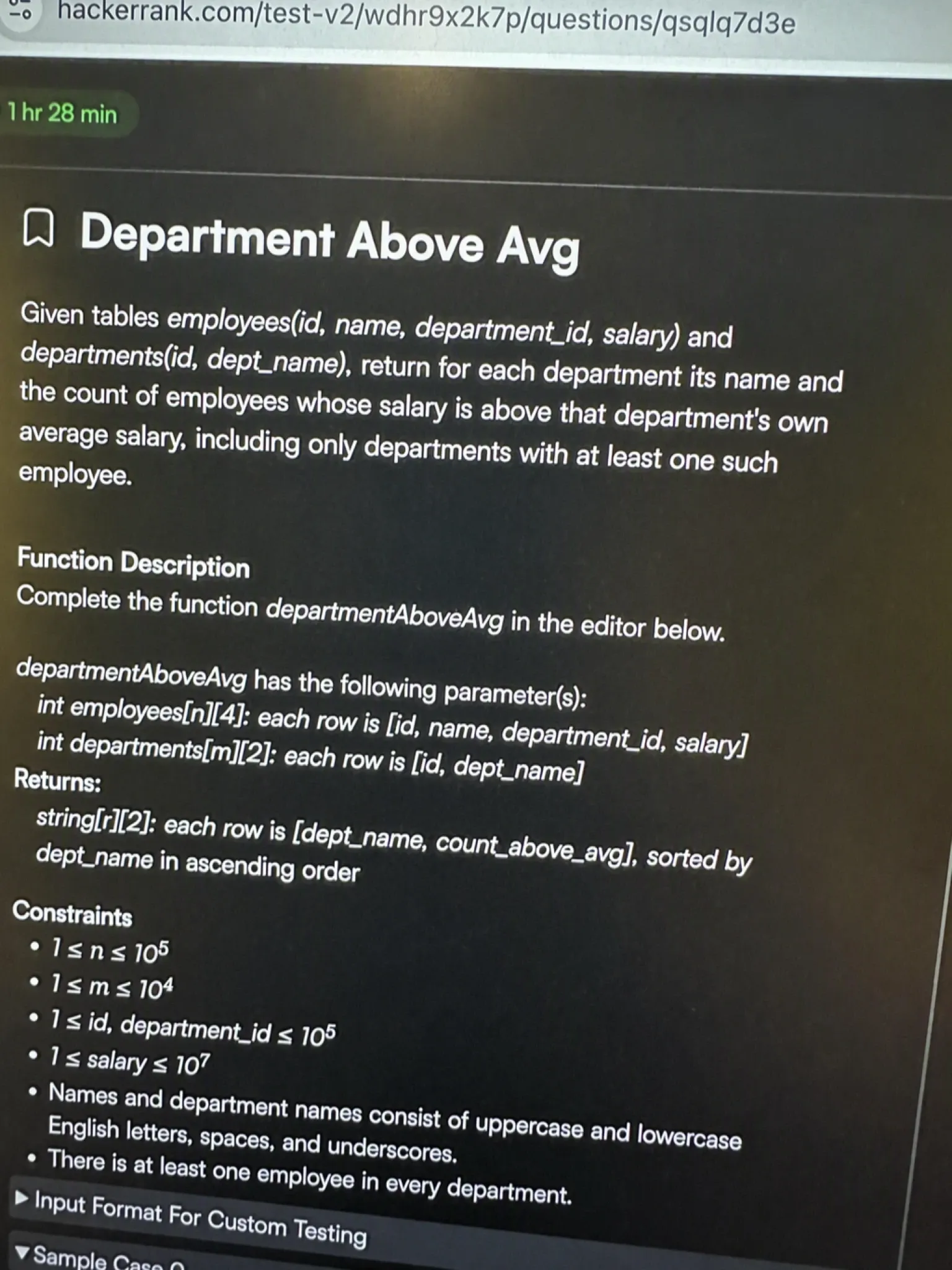
The problem I got: First, I was given two tables: employees(id, name, department_id, salary) and departments(id, dept_name). I had to write a query for each department. It returns the department name and the count of its employees whose salary beat that department's own average. Also, I only included departments with at least one such employee.
My approach: First, I computed each department's average salary once with a GROUP BY. Then I joined that average back onto the employees table. Only rows where the salary beat the department average were kept. So grouping the survivors by department name and counting them gives the per-department tally. The key was matching the average to each employee by department_id. Thus that kept the comparison per-department, not against one global average.
WITH dept_avg AS (
    SELECT department_id, AVG(salary) AS avg_salary
    FROM employees
    GROUP BY department_id
)
SELECT d.dept_name, COUNT(*) AS above_avg_employees
FROM employees e
JOIN dept_avg da ON e.department_id = da.department_id
JOIN departments d ON e.department_id = d.id
WHERE e.salary > da.avg_salary
GROUP BY d.dept_name;
Time complexity: O(n · log n) (join + group by, RDBMS-dependent) | Space complexity: O(n) for the temp table
The SQL piece was the fastest of the three. First, I finished it in about 12 minutes. Still, I had to be careful: the department-average subquery had to match the outer row by department. Otherwise, a naive global average would return wrong counts.
Workday's Proctoring Policy for HackerRank
HackerRank runs two proctoring tiers. The exact Workday build is set by the recruiter config, not published anywhere. Still, the 2026 platform floor is what matters when you sit down to take the test.
Secure Mode vs Proctor Mode
First, Secure Mode and Proctor Mode set the baseline. The HackerRank write-up explains both tiers. Secure Mode locks the test to full screen and fires tab-switch alerts. It also restricts copy/paste with tracking on by default.
Proctor Mode shipped in July 2025. First, it adds real-time AI behavioral monitoring on top of every Secure Mode control. Also, AI plagiarism detection and image analysis are on by default. The exact Workday OA may use either tier, or a lighter toggle set. So I treat these mechanics as the floor I must respect.
However, the copy/paste restriction is the part most people underestimate. How HackerRank tracks pasted code covers pasting from another window.
Secure Mode also blocks multiple monitors. Whether a second monitor ends your test is a real risk for dual-screen setups.
How HackerRank captures screen replays and screenshots covers session-replay and external-tool evidence. Meanwhile, on the webcam side, Proctor Mode can run anomaly detection through the camera. Whether the webcam turns on for anomaly detection explains when that applies.
What Gets Flagged and Captured
The recruiter sees a set of integrity signals. First, they include tab switching, copy/paste events, typing-cadence anomalies, external-tool usage, code similarity, and environment alerts. Also, Proctor Mode grades the session as High or Medium risk. It keeps session replay and screenshots of external-tool use as evidence. Still, one claim puts AI plagiarism detection on 93% of sessions.
What happens when you switch tabs or windows ends the most attempts. So a lost focus event can terminate the test on the spot.
7–10 Other Confirmed Workday HackerRank Questions
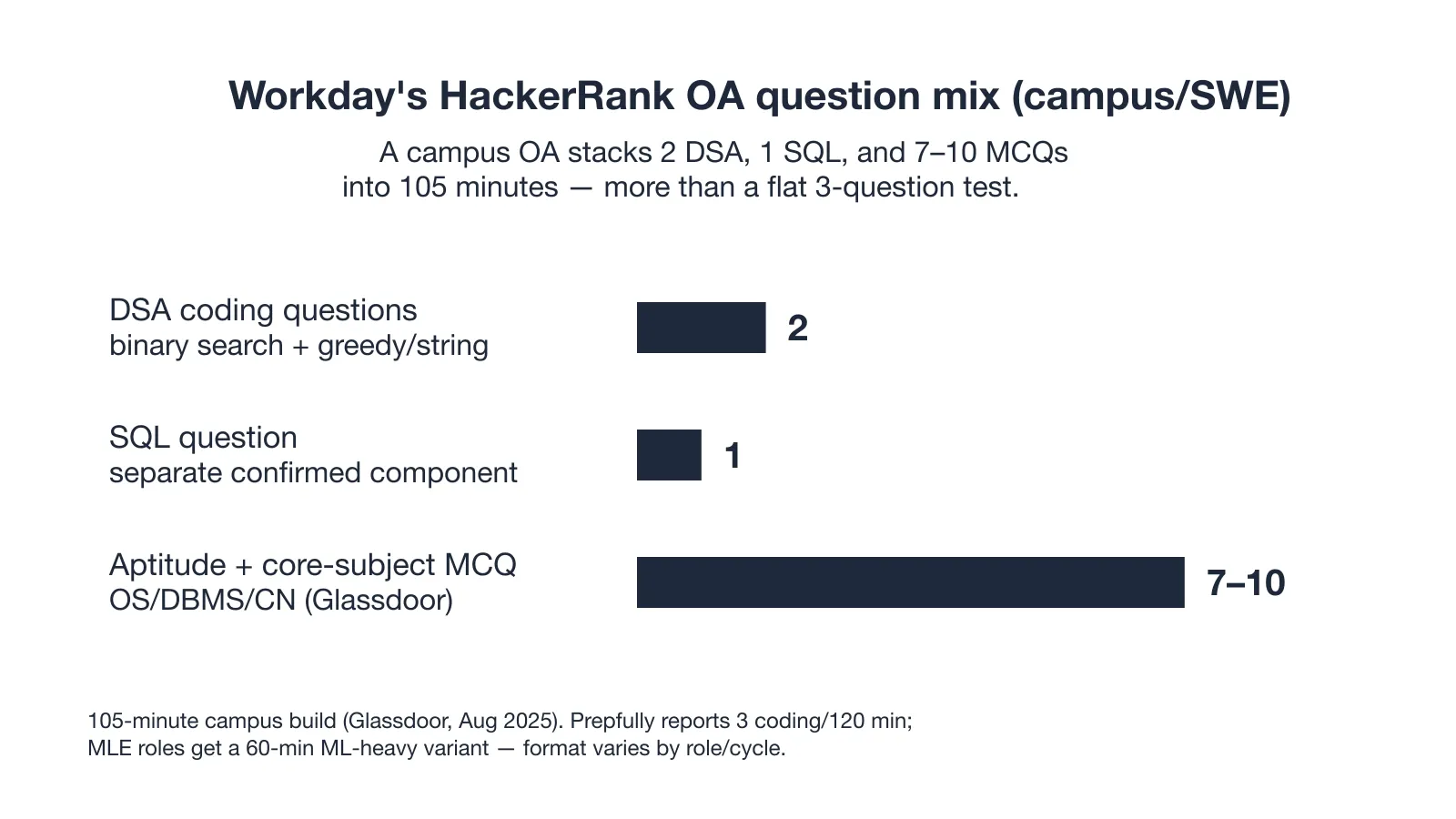
The three coding problems are not the whole test. Also, a Glassdoor campus SWE report from August 2025 confirms extra MCQs on top of the two DSA and one SQL.
The MCQ Band (Aptitude and Core Subjects)
First, a Glassdoor campus report from August 2025 lists 7–10 MCQs. They cover Aptitude plus core subjects like OS, DBMS, and Computer Networks. These are separate from the coding score and easy to overlook. Still, they sit inside the same 105-minute clock and pad the total count past a flat three.
The SQL Component Confirmed Separate
The same Glassdoor campus report lists SQL as its own component next to the two DSA items. Instead, it is not folded into them. Also, Workday leans on SQL across roles. So a standalone SQL question shows up even when the coding count looks small.
What Workday's HackerRank Test Format Actually Looks Like
The campus/SWE build is a stacked block, not a flat three-question test. Meanwhile, the chart below lays out the question mix reported for that track.
The Confirmed SWE/Campus Build
First, a Glassdoor campus SWE report from August 2025 describes the build. It has two DSA, one SQL, Aptitude MCQs, and core-subject MCQs. All sit inside 105 minutes, every item rated difficult. In contrast, Prepfully reports a different shape: three coding problems in 120 minutes. So the campus numbers are one role instance, not a constant.
MLE and Experienced Roles Shift the Mix
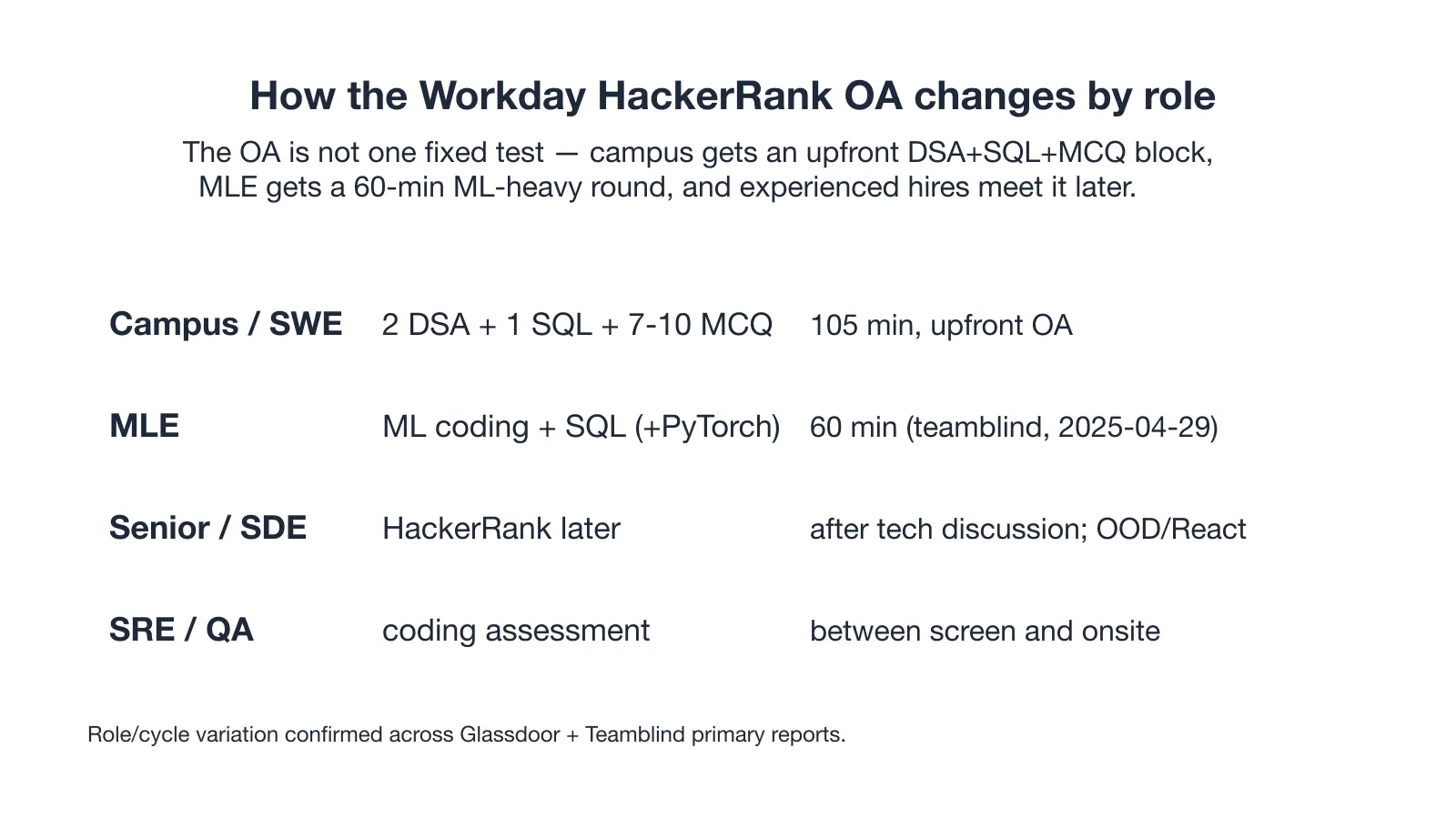
A Teamblind MLE post from 2025-04-29 describes a 60-minute HackerRank round. First, it centers on ML coding in scikit-learn and pandas plus SQL. Also, PyTorch or HuggingFace are possible for genAI roles. Senior and SDE loops push the HackerRank round later, after a technical discussion. So they add OOD or React components the campus OA never touches.
How Workday's HackerRank Scoring Works
No candidate-facing pass score exists for this OA. Still, the platform does not publish a cutoff you can aim at.
No Public Pass-Bar
So HackerRank's Workday integration sends your score and performance data straight into Workday for the recruiter to review. The threshold for advancing is set internally and never shown to candidates. Instead, I prepared around confirmed coverage and failure avoidance, not a number I could not see.
Why Candidates Fail the Workday HackerRank Assessment
The hardest failures on this OA are not wrong answers. Instead, they are proctoring events that end the attempt before the coding even matters.
Desktop Overlay Ends the Attempt Early
First, a private candidate report from the September 2025 campus cycle shows exactly how fast this goes wrong. The verbatim account:
"I thought a click-through desktop overlay would remain outside the recorded view during my September 2025 campus-cycle assessment. While I was opening the first coding prompt, a window-focus warning appeared immediately after the overlay opened. The test ended early, costing me the only assessment attempt attached to the application."
First, focus broke the instant the overlay opened. The window-focus warning fired. Also, the only attempt tied to that application was consumed. Moreover, HackerRank's Secure Mode prevents multiple-monitor and second-window use. So any tool that pulls focus outside the test view carries the same risk.
This is a proctoring and focus event, not a plagiarism flag. However, HackerRank's AI plagiarism check runs after submission. So the early termination here came from losing focus, not code similarity.
At least one candidate was flagged for a click-through desktop overlay. The tool renders the AI's answer on the same monitored screen, hidden by a basic OS-layer trick. However, InterviewFox works differently. So the answer goes to my phone, a separate device no screenshot or recording can reach by design.
Land offer with Safer AI Interview Assistant
Skip the risky invisible apps. Our dual-device mode keeps it simple and undetectable. You crush the interview, we handle the answers.
Get started. It's freeLoved by 100,000+ candidates
Silent window/tab switch auto-rejects the submission
On 2025-11-21 a Workday ML-eng candidate on Teamblind switched windows to check scikit-learn docs. The submission auto-rejected, even without a visible warning. Also, the post and its top comments state plainly that window or tab switching is not allowed. So a lost window focus ending the attempt is an auto-reject.
A Workday ML test where switching windows ended the attempt shows the same focus-loss mechanism from the candidate side.
How to Prepare for the Workday HackerRank in 7 Days
Preparation Blueprint (ranked by score weight from confirmed question types):
- DSA drills (binary search + greedy/string): highest score weight, confirmed in the campus OA.
- SQL: Workday leans on it heavily across roles.
- Aptitude + core-subject MCQ (OS/DBMS/CN): low effort, easy points.
- Simulate the full OA with proctoring ON: the failures above are focus events, not knowledge gaps.
- ML-coding branch (MLE only): scikit-learn, pandas, possibly PyTorch.
No first-person prep testimonial exists for this OA. Instead, the plan below is built from confirmed question types, not a personal walkthrough.
Before my test I sent the confirmed Workday patterns to the Prep Agent from InterviewFox over WhatsApp. Specifically, they were binary search, greedy/string, and a standalone SQL item. It came back with a personalized drill plan and a strategy for ordering the three coding problems inside the 105-minute cap.
The day-by-day split below follows that ordering. So I treated it as one practical tool alongside timed practice, not a replacement.
Days 1–3 Binary Search and Greedy (TIER 2)
First, a Glassdoor campus report confirms two DSA items in a 105-minute OA. One is a binary search, the other a greedy/string problem. So I drilled easy and medium binary search and greedy/string problems, timing two back-to-back in under 70 minutes. Success check: solve two representative DSA items consecutively in under 70 minutes with correct edge cases.
Days 4–5 SQL and Aptitude MCQ Sweep (TIER 2)
Workday leans on SQL across roles. Also, the campus OA adds Aptitude plus OS/DBMS/CN MCQs. So I wrote three SQL queries covering joins, aggregation, and window functions, then ran ten core-subject MCQs. Success check: all three SQL queries correct and at least eight of ten MCQs right.
Days 6–7 Simulate Full OA With Proctoring (TIER 2)
HackerRank guidance recommends practicing with proctoring features enabled. Also, the MLE path adds scikit-learn and pandas drills. So I ran one full 105-minute timed block. It had two DSA, one SQL, and MCQs on a single screen with no second window. Success check: finish the full block without a single focus warning and without opening any external window.
SKIP LIST (campus OA only): system design, OOD, and React-component prep. Those appear only in experienced and SDE loops. So skip generic LeetCode-hard grinding. Instead, the confirmed campus items are easy to medium binary search and greedy problems.
What Happens After You Submit the OA
Submitting is not the end of the loop. Instead, the OA sits early, and what follows depends on role and seniority.
The Round Sequence After the OA
The reported sequence runs recruiter screen, then a hiring-manager chat, then the HackerRank OA. Then come multiple technical and behavioral rounds. Also, Glassdoor places the SWE loop at four to five rounds with three technical. Meanwhile, one Teamblind report describes seven rounds. So senior and SDE loops push the HackerRank round later, after a technical discussion.
Wait Time and Outcome Signals
Reported wait times vary sharply. First, one Teamblind candidate waited 2.5 weeks to get a rejection. Also, a Glassdoor SRE report describes a fast response after the interview. So the OA score feeds the recruiter's decision. Still, the timeline after submission is not something the candidate controls.
The Single-Attempt Rule
Each OA attempt is consumed per application, and HackerRank's Workday integration shows no self-service reinvite. The September 2025 overlay case shows the attempt was lost on early termination. So a retake only happens if the recruiter manually re-invites. Thus treat the attempt as single-use and protect it from any focus event.
Workday HackerRank format varies by role
This OA is not one fixed test. Instead, the build shifts by role and recruiting cycle, and the comparison below shows the main variants.
Campus vs Experienced Roles
The upfront block of two DSA, one SQL, and 7–10 MCQs is a campus and SWE phenomenon. However, senior and SDE loops move the HackerRank round later in the process. So they add OOD or React components the campus OA never includes.
ML and SRE Variants
The MLE track compresses to a 60-minute ML-heavy round. First, it uses scikit-learn, pandas, and SQL, possibly with PyTorch. Also, SRE and QA slots place the coding assessment between the recruiter screen and the onsite. So the same platform serves very different builds by role.
FAQ
What is the hackerrank workday oa like?
The campus/SWE build is two DSA problems and one SQL problem. Also, it adds 7–10 Aptitude and core-subject MCQs inside 105 minutes. In contrast, MLE roles get a 60-minute ML-heavy round instead. So the exact shape depends on the role you applied for.
What workday hackerrank questions should I expect?
Expect a binary search, a greedy or string problem, and a standalone SQL question on the campus track. A Glassdoor campus report also confirms an MCQ band. So it covers Aptitude and core subjects like OS, DBMS, and Computer Networks.
How does the workday online assessment work?
First, you receive a HackerRank link after the recruiter screen. You sit the test under Secure or Proctor Mode. Then your score auto-flows into Workday. So the recruiter reviews it and decides whether to advance you to the technical rounds.
Can the Workday HackerRank test end early without a score?
Yes. Losing window focus, opening a second window, or switching tabs can trigger an immediate warning and early termination. So a private September 2025 case shows the attempt was consumed even though no code was graded.
Can I use an AI tool or invisible app during the Workday HackerRank OA?
First, desktop overlay tools put the AI's answer on your own screen. Also, it is rendered as a hidden layer above the browser using a basic OS trick. Because the answer is on-screen while proctoring keeps adding detection, that risk is not fixed.
However, InterviewFox works the other way around. First, it pushes the answer to your phone. So that is a separate device no screenshot, recording, or monitoring can reach by design. Also, the laptop screen stays on the exam editor unchanged. Thus if you use AI assistance during the OA, the dual-device architecture removes the answer from your screen entirely.
Land offer with Safer AI Interview Assistant
Skip the risky invisible apps. Our dual-device mode keeps it simple and undetectable. You crush the interview, we handle the answers.
Get started. It's freeLoved by 100,000+ candidates
Does Workday's HackerRank OA vary by role?
It does. First, campus and SWE get an upfront DSA plus SQL and MCQ block. In contrast, MLE gets a 60-minute ML-heavy round. So senior or SDE loops meet HackerRank later with OOD or React added.